Display Driver Uninstaller (DDU) causing mouse and keyboard not to work


MK77P

Well-known member
Member
Local time
8:15 AM
Posts
155
OS
Windows 11
When setting Display Driver Uninstaller (DDU) to run in Safe Mode and then restarting the PC as soon as Windows loads the mouse and keyboard turn off (it works fine in BIOS), had to reset Windows for them to work normally again, any idea why is that happening? tried it for a few times and the same exact issue happens.

And is it necessary to use when updating the NVIDIA drivers?
 

My Computer My Computer

At a glance

Windows 11Intel Core i5-14600KFCORSAIR VENGEANCE RGB PRO SL 32GB (2x16GB) DD...GIGABYTE 4080 Gaming OC
OS
Windows 11
Computer type
PC/Desktop
Manufacturer/Model
Custom
CPU
Intel Core i5-14600KF
Motherboard
MSI PRO Z690-A WIFI DDR4
Memory
CORSAIR VENGEANCE RGB PRO SL 32GB (2x16GB) DDR4 3200MHz CL16
Graphics Card(s)
GIGABYTE 4080 Gaming OC
Screen Resolution
1920 x 1080
Hard Drives
Kingston NV3 1TB, Kingston KC600 1TB, SAMSUNG 860 EVO 500GB
PSU
Lian Li Edge EG0850G 850W Gold
Cooling
ARCTIC Liquid Freezer III 360
Keyboard
Logitech G513 Carbon LIGHTSYNC RGB Mechanical
Mouse
Steelseries Prime
Browser
Firefox
Running Safe Mode doesn't load all the drivers that are needed in Normal Mode. Installing updates of device drivers should be done in Normal Mode or the devices may not be recognized.

Forgot about the mouse and keyboard, don't know why they don't work but most BIOSes have support for USB 2 connections and need drivers loaded by the OS for USB 3, maybe newer ones support USB 3.
 
Last edited:

My Computers My Computers

  • At a glance

    Win11 Pro RTM Version 24H2 Build 26100.4202Intel Core i5 11th Gen. 2.40GHz12GB
    OS
    Win11 Pro RTM Version 24H2 Build 26100.4202
    Computer type
    Laptop
    Manufacturer/Model
    Dell Vostro 3400
    CPU
    Intel Core i5 11th Gen. 2.40GHz
    Memory
    12GB
    Hard Drives
    256GB SSD NVMe M.2
  • At a glance

    Win11 Pro RTM Version 24H2 Build 26100.4202Intel Core i5 10th Gen. 2.90GHz16GBOnboard, no VGA, using a DisplayPort-to-VGA a...
    Operating System
    Win11 Pro RTM Version 24H2 Build 26100.4202
    Computer type
    PC/Desktop
    Manufacturer/Model
    Dell Vostro 5890
    CPU
    Intel Core i5 10th Gen. 2.90GHz
    Memory
    16GB
    Graphics card(s)
    Onboard, no VGA, using a DisplayPort-to-VGA adapter
    Monitor(s) Displays
    24" Dell
    Hard Drives
    512GB SSD NVMe, 4TB Seagate HDD
    Browser
    Firefox, Edge
    Antivirus
    Windows Defender/Microsoft Security
Running Safe Mode doesn't load all the drivers that are needed in Normal Mode. Installing updates of device drivers should be done in Normal Mode or the devices may not be recognized.

Forgot about the mouse and keyboard, don't know why they don't work but most BIOSes have support for USB 2 connections and need drivers loaded by the OS for USB 3, maybe newer ones support USB 3.
I've been using DDU for years and this is the first time something like this happens, the M&K work just fine in Safe Mode, it's when I open DDU then go to its settings and check for it to ask if I wanted to run it in Safe Mode, then I would exit DDU and reopen it and it will ask me if I want to restart in Safe Mode, click yes and that's where it all gets messed up, after that exactly the M&K stop working as soon as Windows loads regardless of entering Safe Mode or not.
 
Last edited:

My Computer My Computer

At a glance

Windows 11Intel Core i5-14600KFCORSAIR VENGEANCE RGB PRO SL 32GB (2x16GB) DD...GIGABYTE 4080 Gaming OC
OS
Windows 11
Computer type
PC/Desktop
Manufacturer/Model
Custom
CPU
Intel Core i5-14600KF
Motherboard
MSI PRO Z690-A WIFI DDR4
Memory
CORSAIR VENGEANCE RGB PRO SL 32GB (2x16GB) DDR4 3200MHz CL16
Graphics Card(s)
GIGABYTE 4080 Gaming OC
Screen Resolution
1920 x 1080
Hard Drives
Kingston NV3 1TB, Kingston KC600 1TB, SAMSUNG 860 EVO 500GB
PSU
Lian Li Edge EG0850G 850W Gold
Cooling
ARCTIC Liquid Freezer III 360
Keyboard
Logitech G513 Carbon LIGHTSYNC RGB Mechanical
Mouse
Steelseries Prime
Browser
Firefox
About all I can say is that apparently DDU is what is messing things up. I've never had to use it. Since it's a third-party software it should be taken up with them unless someone else sees the post and can offer a solution.
 

My Computers My Computers

  • At a glance

    Win11 Pro RTM Version 24H2 Build 26100.4202Intel Core i5 11th Gen. 2.40GHz12GB
    OS
    Win11 Pro RTM Version 24H2 Build 26100.4202
    Computer type
    Laptop
    Manufacturer/Model
    Dell Vostro 3400
    CPU
    Intel Core i5 11th Gen. 2.40GHz
    Memory
    12GB
    Hard Drives
    256GB SSD NVMe M.2
  • At a glance

    Win11 Pro RTM Version 24H2 Build 26100.4202Intel Core i5 10th Gen. 2.90GHz16GBOnboard, no VGA, using a DisplayPort-to-VGA a...
    Operating System
    Win11 Pro RTM Version 24H2 Build 26100.4202
    Computer type
    PC/Desktop
    Manufacturer/Model
    Dell Vostro 5890
    CPU
    Intel Core i5 10th Gen. 2.90GHz
    Memory
    16GB
    Graphics card(s)
    Onboard, no VGA, using a DisplayPort-to-VGA adapter
    Monitor(s) Displays
    24" Dell
    Hard Drives
    512GB SSD NVMe, 4TB Seagate HDD
    Browser
    Firefox, Edge
    Antivirus
    Windows Defender/Microsoft Security
I've been using DDU for years and this is the first time something like this happens, the M&K work just fine in Safe Mode, it's when I open DDU then go to its settings and check for it to ask if I wanted to run it in Safe Mode, then I would exit DDU and reopen it and it will ask me if I want to restart in Safe Mode, click yes and that's where it all gets messed up, after that exactly the M$K stop working as soon as Windows loads regardless of entering Safe Mode or not.


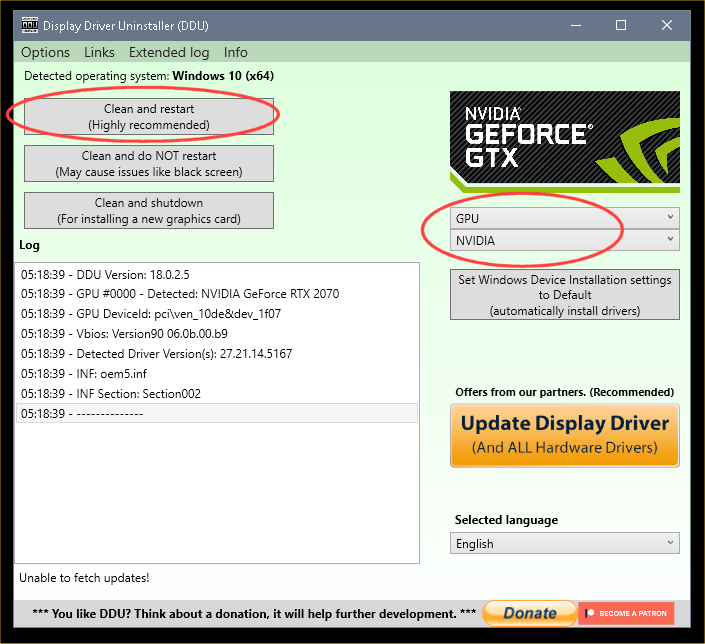
This is how I use DDU... and it's never caused any issues...


DDU Instructions - Nvidia
1. Get this program, here: Display Driver Uninstaller (DDU) | Wagnardsoft ...get the latest version, and save it to your desktop.
2. Get the DCH/Game Ready vid card driver here, use the Manual Search: Advanced Driver Search | NVIDIA ...save this to your desktop.
Unhook the internet completely.
3. Reboot into Safe Mode and run DDU (Display Driver Uninstaller) choose the "Highly Recommend Option", and just do what it tells you.
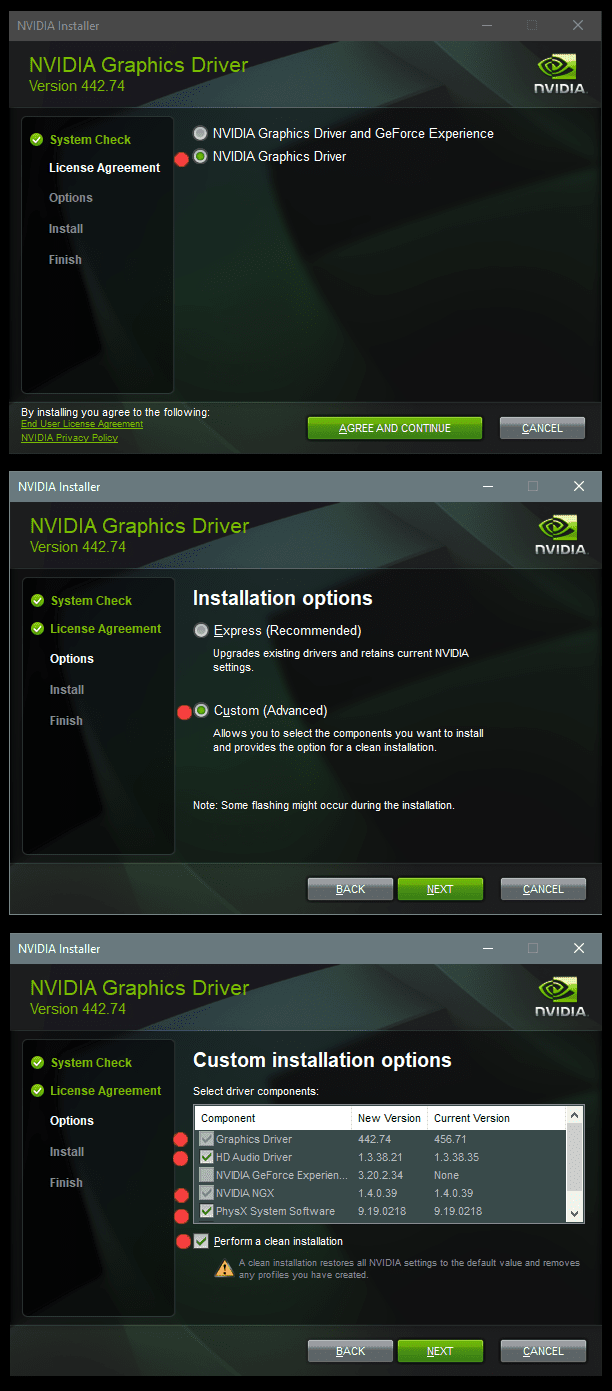
4. After it's done, reboot to normal mode, then just double click the Nvidia driver to install.
[See pics below]. If it want's to reboot, let it.
Rehook the internet.

a2onZnt.png


NjaiKLm.png


To get into Safe Mode, I do that manually.
I use the RUN box and type: msconfig
I don't even "open" DDU in normal mode. Only in Safe Mode.

Then I do ONLY this...

Image3.png


Then, when I'm done running DDU in Safe Mode, I type msconfig in the RUN box, and UN-check Safe Boot and then click Apply.


While in Safe Mode, I don't change any DDU preferences, except those chose in the DDU picture above.

Note: The link for DDU, in step #1 above... is the official author's website.
 

My Computers My Computers

  • At a glance

    Win 11 Home ♦♦♦26200.8875 ♦♦♦♦♦♦♦25H2AMD Ryzen 7 3700XG.Skill (F4-3200C14D-16GTZKW)EVGA RTX 2070 (08G-P4-2171-KR)
    OS
    Win 11 Home ♦♦♦26200.8875 ♦♦♦♦♦♦♦25H2
    Computer type
    PC/Desktop
    Manufacturer/Model
    Built by Ghot® [May 2020]
    CPU
    AMD Ryzen 7 3700X
    Motherboard
    Asus Pro WS X570-ACE (BIOS 5302)
    Memory
    G.Skill (F4-3200C14D-16GTZKW)
    Graphics Card(s)
    EVGA RTX 2070 (08G-P4-2171-KR)
    Sound Card
    Realtek ALC1220P / ALC S1220A
    Monitor(s) Displays
    Dell U3011 30"
    Screen Resolution
    2560 x 1600
    Hard Drives
    2x Samsung 860 EVO 500GB,
    WD 4TB Black FZBX - SATA III,
    WD 8TB Black FZBX - SATA III,
    DRW-24B1ST CD/DVD Burner
    PSU
    PC Power & Cooling 750W Quad EPS12V
    Case
    Cooler Master ATCS 840 Tower
    Cooling
    CM Hyper 212 EVO (push/pull)
    Keyboard
    Ducky DK9008 Shine II Blue LED
    Mouse
    Logitech Optical M-100
    Internet Speed
    300/300
    Browser
    Firefox (latest)
    Antivirus
    Bitdefender Total Security
    Other Info
    Speakers: Klipsch Pro Media 2.1
  • At a glance

    Windows XP Pro 32bit w/SP3AMD Athlon 64 X2 5000+ (OC'd @ 3.2Ghz)TWIN2X2048-6400C4DHX (2 x 1GB, DDR2 800)EVGA 256-P2-N758-TR GeForce 8600GT SSC
    Operating System
    Windows XP Pro 32bit w/SP3
    Computer type
    PC/Desktop
    Manufacturer/Model
    Built by Ghot® (not in use)
    CPU
    AMD Athlon 64 X2 5000+ (OC'd @ 3.2Ghz)
    Motherboard
    ASUS M2N32-SLI Deluxe Wireless Edition
    Memory
    TWIN2X2048-6400C4DHX (2 x 1GB, DDR2 800)
    Graphics card(s)
    EVGA 256-P2-N758-TR GeForce 8600GT SSC
    Sound Card
    Onboard
    Monitor(s) Displays
    ViewSonic G90FB Black 19" Professional (CRT)
    Screen Resolution
    up to 2048 x 1536
    Hard Drives
    WD 36GB 10,000rpm Raptor SATA
    Seagate 80GB 7200rpm SATA
    Lite-On LTR-52246S CD/RW
    Lite-On LH-18A1P CD/DVD Burner
    PSU
    PC Power & Cooling Silencer 750 Quad EPS12V
    Case
    Generic Beige case, 80mm fans
    Cooling
    ZALMAN 9500A 92mm CPU Cooler
    Keyboard
    Logitech Classic Keybooard 200
    Mouse
    Logitech Optical M-BT96a
    Internet Speed
    300/300
    Browser
    Firefox 3.x ??
    Antivirus
    Symantec (Norton)
    Other Info
    Still assembled, still runs. Haven't turned it on for 15 years?
How about asking the author,


My Computer My Computer

At a glance

Windows 11Ryzen 5 5600T-Force Vulcan Z - 32 GB (2x16) @ 3600 MHzSapphire RX 7600
OS
Windows 11
Computer type
PC/Desktop
CPU
Ryzen 5 5600
Motherboard
MSI B550 Tomahawk
Memory
T-Force Vulcan Z - 32 GB (2x16) @ 3600 MHz
Graphics Card(s)
Sapphire RX 7600
Monitor(s) Displays
Sansui ES-G27F2Q
Screen Resolution
2560 x 1440P
Hard Drives
XPG SX8200 240GB M.2 PCIe Gen3x4 NVMe
Samsung 850 EVO 250 GB
Adata SU800 1 TB
WD Black SN750 500GB
PSU
EVGA SuperNOVA 650 G3
Case
Deepcool CK500WH
Cooling
Thermalright Frozen Warframe 240 SE, plus 3 140 MM case fans (2 in front, 1 in rear)
Keyboard
Logitech G213 Prodigy
Mouse
Logitech ERGO M575
I've never used DDU.
Under normal circumstances, there is no need.
If you need to clear the settings for some reason, there is an option in the installer.
"Perfom a clean installation"
 

My Computer My Computer

At a glance

Microsoft Windows 11 HomeIntel Core i5-13490F2 x 16 Patriot Memory (PDP Systems) PSD516G56...GIGABYTE GeForce RTX 4070 WINDFORCE OC 12G (G...
OS
Microsoft Windows 11 Home
Computer type
PC/Desktop
Manufacturer/Model
MSI MS-7D98
CPU
Intel Core i5-13490F
Motherboard
MSI B760 GAMING PLUS WIFI
Memory
2 x 16 Patriot Memory (PDP Systems) PSD516G560081 6400MT (32-37-37-74); 1.35V)
Graphics Card(s)
GIGABYTE GeForce RTX 4070 WINDFORCE OC 12G (GV-N4070WF3OC-12GD)
Sound Card
Bluetooth Аудио
Monitor(s) Displays
INNOCN 15K1F
Screen Resolution
1920 x 1080
Hard Drives
WD_BLACK SN770 250GB
KINGSTON SNV2S1000G (ELFK0S.6)
PSU
Thermaltake Toughpower GF3 1000W
Case
CG560 - DeepCool
Cooling
ID-COOLING SE-224-XTS / 2 x 140Mm Fan - rear and top; 3 x 120Mm - front
Keyboard
Corsair K70 RGB TKL
Mouse
Corsair KATAR PRO XT
Internet Speed
100 Mbps
Browser
Firefox
Antivirus
Microsoft Defender Antivirus
Other Info
https://www.userbenchmark.com/UserRun/66553205
Back
Top Bottom