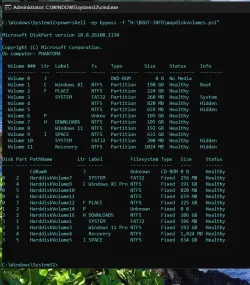
Does anyone care to explain the correlation between Volume and HardDiskVolume numbers ?


suatcini54

Well-known member
Power User
VIP
Local time
2:48 PM
Posts
725
OS
Windows 11 Pro build 26200.8524
When I look at Volume letters obtained from Diskpart -> List Volume command, I get the following. Ex: Drive C: has volume number 1.
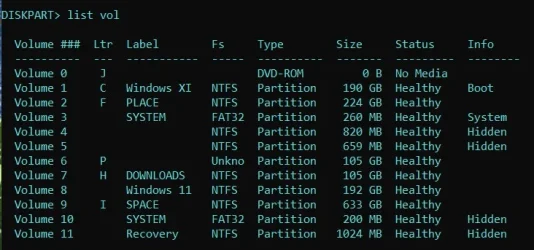
harddiskvolume2.webp

But when I look at HarddiskVolumes, drive C: has HarddiskVolume number 9. It was number 1 in diskpart. HarddiskVolume shows volumes that are not in the list yielded by Diskpart.
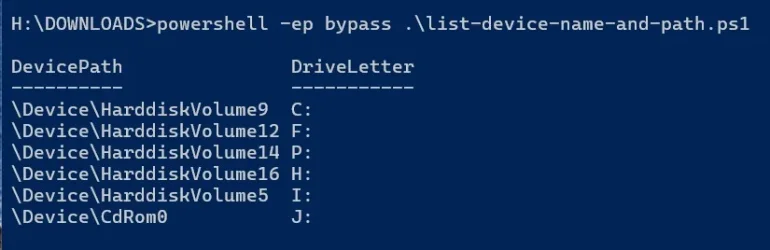
harddiskvolume.webp

I downloaded the list-device-name-and-path.ps1 script over the internet (I think I got the code from superuser.com site).
 

My Computers My Computers

  • At a glance

    Windows 11 Pro build 26200.8524Intel i7-4790Teams DDR3-1600 4x4 GBMSI Nvidia GeForce GTX 1050Ti
    OS
    Windows 11 Pro build 26200.8524
    Computer type
    PC/Desktop
    Manufacturer/Model
    Home Built
    CPU
    Intel i7-4790
    Motherboard
    Asus H97 Pro Gamer with add-on TPM1.2 module
    Memory
    Teams DDR3-1600 4x4 GB
    Graphics Card(s)
    MSI Nvidia GeForce GTX 1050Ti
    Sound Card
    Realtek ALC1150
    Monitor(s) Displays
    Dell P2425D
    Screen Resolution
    2560 by 1440 pixels
    Hard Drives
    Corsair NVMe M.2 Core XT 1000 GB (Windows 11 v.25H2); Samsung SATA Evo 870 500 GB (Windows 11 v.25H2);
    PSU
    Corsair HX850
    Case
    Gigabyte Solo 210
    Cooling
    Zalman CNPS7X Tower
    Keyboard
    Microsoft AIO Wireless (includes touchpad)
    Mouse
    HP S1000 Plus Wireless
    Internet Speed
    500 Mb fiber optic
    Browser
    Chrome; MS Edge
    Antivirus
    Windows Defender
  • At a glance

    MacOS 12 MontereyIntel Core i58 GBIntel integrated
    Operating System
    MacOS 12 Monterey
    Computer type
    Laptop
    Manufacturer/Model
    Apple Macbook Air
    CPU
    Intel Core i5
    Memory
    8 GB
    Graphics card(s)
    Intel integrated
    Screen Resolution
    1440 by 900 pixels
    Hard Drives
    128 GB
    Keyboard
    Built-in
    Mouse
    Microsoft Wireless
    Internet Speed
    802.11 ac
    Browser
    Chrome; Safari
    Antivirus
    N/A
Diskpart enumerates disks differently and just generates a sequential order of volumes. Device paths are objects created by the Windows kernel, so two different systems inventorying the disk volumes for different purposes.
 

My Computer My Computer

At a glance

Linux Mint
OS
Linux Mint
Computer type
Laptop
Manufacturer/Model
System76 Lemur Pro
Drive tools can walk a "device tree" and search for connected drives and their volumes. They don't have to follow the same schema, because they were written by different people and for different purposes.

DevicePath uses a legacy method of numbering volumes. It's still supported for accessing volumes, but not publicly used much (except in bcdedit).

If you're wondering "why?", those reasons are probably lost in time because the original Windows devs had their reasons, and they kept everything unchanged for backwards compatibility.

Code:
> .\MapDiskVolumes.ps1

Microsoft DiskPart version 10.0.26100.1150

Copyright (C) Microsoft Corporation.
On computer: Y50-70

  Volume ###  Ltr  Label        Fs     Type        Size     Status     Info
  ----------  ---  -----------  -----  ----------  -------  ---------  --------
  Volume 0     E   CCCOMA_X64F  UDF    DVD-ROM     8079 MB  Healthy
  Volume 1     F   ESD-ISO      UDF    DVD-ROM     6612 MB  Healthy
  Volume 2     C                NTFS   Partition     78 GB  Healthy    Boot
  Volume 3                      FAT32  Partition    260 MB  Healthy    System
  Volume 4                      NTFS   Partition    700 MB  Healthy    Hidden
  Volume 5                      NTFS   Partition    780 MB  Healthy    Hidden
  Volume 6     D   HASLEOBS     FAT32  Removable     31 GB  Healthy

Disk Part PathName        Ltr Label                   Filesystem Type      Size   Status
---- ---- --------        --- -----                   ---------- ----      ----   ------
          CdRom0            E CCCOMA_X64FRE_EN-US_DV9 Unknown    CD-ROM    8 GB   Healthy
          CdRom1            F ESD-ISO                 Unknown    CD-ROM    6 GB   Healthy
0    1    HarddiskVolume1                             FAT32      Fixed     256 MB Healthy
0    3    HarddiskVolume3                             NTFS       Fixed     700 MB Healthy
0    4    HarddiskVolume4   C                         NTFS       Fixed     78 GB  Healthy
0    5    HarddiskVolume5                             NTFS       Fixed     780 MB Healthy
1    1    HarddiskVolume6   D HASLEOBS                FAT32      Removable 32 GB  Healthy
 

Attachments

My Computer My Computer

At a glance

Windows 7
OS
Windows 7
Thank you all for your informative replies and the script. Apparently, it will be better for me if I should not meddle in Microsoft's complicated way of coding software business.😊
 

My Computers My Computers

  • At a glance

    Windows 11 Pro build 26200.8524Intel i7-4790Teams DDR3-1600 4x4 GBMSI Nvidia GeForce GTX 1050Ti
    OS
    Windows 11 Pro build 26200.8524
    Computer type
    PC/Desktop
    Manufacturer/Model
    Home Built
    CPU
    Intel i7-4790
    Motherboard
    Asus H97 Pro Gamer with add-on TPM1.2 module
    Memory
    Teams DDR3-1600 4x4 GB
    Graphics Card(s)
    MSI Nvidia GeForce GTX 1050Ti
    Sound Card
    Realtek ALC1150
    Monitor(s) Displays
    Dell P2425D
    Screen Resolution
    2560 by 1440 pixels
    Hard Drives
    Corsair NVMe M.2 Core XT 1000 GB (Windows 11 v.25H2); Samsung SATA Evo 870 500 GB (Windows 11 v.25H2);
    PSU
    Corsair HX850
    Case
    Gigabyte Solo 210
    Cooling
    Zalman CNPS7X Tower
    Keyboard
    Microsoft AIO Wireless (includes touchpad)
    Mouse
    HP S1000 Plus Wireless
    Internet Speed
    500 Mb fiber optic
    Browser
    Chrome; MS Edge
    Antivirus
    Windows Defender
  • At a glance

    MacOS 12 MontereyIntel Core i58 GBIntel integrated
    Operating System
    MacOS 12 Monterey
    Computer type
    Laptop
    Manufacturer/Model
    Apple Macbook Air
    CPU
    Intel Core i5
    Memory
    8 GB
    Graphics card(s)
    Intel integrated
    Screen Resolution
    1440 by 900 pixels
    Hard Drives
    128 GB
    Keyboard
    Built-in
    Mouse
    Microsoft Wireless
    Internet Speed
    802.11 ac
    Browser
    Chrome; Safari
    Antivirus
    N/A
Thanks @garlin . This is neat.

Screenshot 2026-07-29 192157.webp

Also, "bcdedit /enum firmware" command always pointed to Device\HarddiskVolume7 for boot manager. I was curious to know why. Your script found that, too.
 

My Computers My Computers

  • At a glance

    Windows 11 Pro build 26200.8524Intel i7-4790Teams DDR3-1600 4x4 GBMSI Nvidia GeForce GTX 1050Ti
    OS
    Windows 11 Pro build 26200.8524
    Computer type
    PC/Desktop
    Manufacturer/Model
    Home Built
    CPU
    Intel i7-4790
    Motherboard
    Asus H97 Pro Gamer with add-on TPM1.2 module
    Memory
    Teams DDR3-1600 4x4 GB
    Graphics Card(s)
    MSI Nvidia GeForce GTX 1050Ti
    Sound Card
    Realtek ALC1150
    Monitor(s) Displays
    Dell P2425D
    Screen Resolution
    2560 by 1440 pixels
    Hard Drives
    Corsair NVMe M.2 Core XT 1000 GB (Windows 11 v.25H2); Samsung SATA Evo 870 500 GB (Windows 11 v.25H2);
    PSU
    Corsair HX850
    Case
    Gigabyte Solo 210
    Cooling
    Zalman CNPS7X Tower
    Keyboard
    Microsoft AIO Wireless (includes touchpad)
    Mouse
    HP S1000 Plus Wireless
    Internet Speed
    500 Mb fiber optic
    Browser
    Chrome; MS Edge
    Antivirus
    Windows Defender
  • At a glance

    MacOS 12 MontereyIntel Core i58 GBIntel integrated
    Operating System
    MacOS 12 Monterey
    Computer type
    Laptop
    Manufacturer/Model
    Apple Macbook Air
    CPU
    Intel Core i5
    Memory
    8 GB
    Graphics card(s)
    Intel integrated
    Screen Resolution
    1440 by 900 pixels
    Hard Drives
    128 GB
    Keyboard
    Built-in
    Mouse
    Microsoft Wireless
    Internet Speed
    802.11 ac
    Browser
    Chrome; Safari
    Antivirus
    N/A
Thank you all for your informative replies and the script. Apparently, it will be better for me if I should not meddle in Microsoft's complicated way of coding software business.😊
It's like Zen. You learn to accept the strange ways some things are done, and not worry about it.
 

My Computer My Computer

At a glance

Windows 7
OS
Windows 7
Back
Top Bottom