Solved Does anyone else have problems with grainy pixelated fonts in explorer in light mode?


glasskuter

aka Mama Glass
Guru
VIP
Local time
6:08 PM
Posts
12,062
Location
The Lone Star State of Texas
OS
Windows 11 Pro 25H2 26200.8875
Windows 11 release 21H2 22000.194 For 4 days I've been messing with this. I upgraded a 6 month old Dell PC to Windows 11 without a hitch, but afterwards the visuals were a real mess. Fonts were fine in applications but not DARK BLACK which they have always been before. They show up as dark gray. In windows explorer they are grainy, dim, and very hard to read. I tried several different themes and nothing changed. The ONLY way I could make the fonts easy to read in explorer was to select dark mode but I despise all that black. Even in dark mode where the fonts are white, they are not clean and crisp like they should be. In control panel the green fonts are so pale I can't read them at all. I've played around with font size and even a different system font until I can at least read items in file explorer but it is still not as legible as it was in Windows 10. I verified I had the latest video drivers, ran SFC, and tried every old solution I could find on the web but nothing helped. Has anyone else had this problem and does anyone know a solution? I hate to have to go back to Windows 10 simply because Windows 11 is so hard on my eyes.
 

My Computers My Computers

  • At a glance

    Windows 11 Pro 25H2 26200.8875i9-10900 10 core 20 threads32 gbnone-Intel UHD Graphics 630
    OS
    Windows 11 Pro 25H2 26200.8875
    Computer type
    PC/Desktop
    Manufacturer/Model
    Dell Optiplex 7080
    CPU
    i9-10900 10 core 20 threads
    Motherboard
    DELL 0J37VM
    Memory
    32 gb
    Graphics Card(s)
    none-Intel UHD Graphics 630
    Sound Card
    Integrated Realtek
    Monitor(s) Displays
    Benq 27
    Screen Resolution
    2560x1440
    Hard Drives
    2x1tb Solidigm m.2 nvme /External drives 512gb Samsung m.2 sata+2tb Kingston m2.nvme
    PSU
    500w
    Case
    MT
    Cooling
    Dell Premium
    Keyboard
    Logitech wired
    Mouse
    Logitech wireless
    Internet Speed
    so slow I'm too embarrassed to tell
    Browser
    #1 Edge #2 Firefox
    Antivirus
    Defender+MWB Premium
  • At a glance

    Windows 11 Pro 24H2 26200.8875AMD Ryzen 7 6800U32 gbintegrated
    Operating System
    Windows 11 Pro 24H2 26200.8875
    Computer type
    PC/Desktop
    Manufacturer/Model
    Beelink Mini PC SER5
    CPU
    AMD Ryzen 7 6800U
    Memory
    32 gb
    Graphics card(s)
    integrated
    Sound Card
    integrated
    Monitor(s) Displays
    Benq 27
    Screen Resolution
    2560x1440
    Hard Drives
    1TB Crucial nvme
    Keyboard
    Logitech wired
    Mouse
    Logitech wireless
    Internet Speed
    still too embarrassed to tell
    Browser
    Firefox
    Antivirus
    Defender
    Other Info
    System 3 is non compliant Dell 9020 i7-4770/24gb ram Win11 PRO 26200.8875
Off the top of my head,l, graphic driver might not be fully compatible. My fonts etc are fine and crisp.
 

My Computer My Computer

At a glance

Windows 11 Home() - 25H2 -26220.8894AMD Ryzen 5 5600GG.SKILL Ripjaws V Series 64GB 4x16Nvidia geforce gtx titan x
OS
Windows 11 Home() - 25H2 -26220.8894
Computer type
PC/Desktop
Manufacturer/Model
Banana Junior 5600-G Series
CPU
AMD Ryzen 5 5600G
Motherboard
Asus ROG Strix B550-F
Memory
G.SKILL Ripjaws V Series 64GB 4x16
Graphics Card(s)
Nvidia geforce gtx titan x
Monitor(s) Displays
28" ASUS VP28U 4k
Screen Resolution
4K
Hard Drives
Primary SAMSUNG 970 EVO Plus
PSU
EVGA BQ 700w 80+ Bronze
Case
Zalman i3 NEO
Cooling
ARCTIC Freezer 7 X
Keyboard
Corsair
Mouse
Amazon Generic with Cord
Internet Speed
Download: 295.11 mbps Upload: 65.35 mbps T-Mobile Internet
Browser
Firefox and Edge
Antivirus
MS - Defender
Other Info
Speakers: Klipsch ProMedia 2.1
Another thought .. does your Windows have ClearType enabled?


My Computers My Computers

  • At a glance

    Windows 11AMD Ryzen 5 560016 GBSapphire Radeon RX 6500XT (8 GB version)
    OS
    Windows 11
    Computer type
    PC/Desktop
    CPU
    AMD Ryzen 5 5600
    Motherboard
    MSI B550-A Pro
    Memory
    16 GB
    Graphics Card(s)
    Sapphire Radeon RX 6500XT (8 GB version)
    Monitor(s) Displays
    BenQ Mobuiz EX2710Q QHD, Iiyama ProLite X23377HDS
    Hard Drives
    MSI Spatium M461 4TB
  • At a glance

    Windows 11Intel Celeron N4020
    Operating System
    Windows 11
    Computer type
    Laptop
    Manufacturer/Model
    Acer A114
    CPU
    Intel Celeron N4020
Hi,
Font quality never noticed anything bad
Theme wise and font settings now that's another thing which is terrible but that is also a 10 trait as well.
Theme wise dark mode makes things easier to not deal with lol
 

My Computer My Computer

At a glance

Win-7-10-11Pro's10900k & 9940x & 5930kTrident-Z Royal 4000c16 2x16gb & Trident-Z 36...Titan Xp & 1080ti FTW3 & evga 980ti gaming
OS
Win-7-10-11Pro's
Computer type
PC/Desktop
Manufacturer/Model
Acer 17" Nitro 7840sn/ 2x16gb 5600c40/ 4060/ stock 1tb-os/ 4tb sn850x
CPU
10900k & 9940x & 5930k
Motherboard
z490-Apex & x299-Apex & x99-Sabertooth
Memory
Trident-Z Royal 4000c16 2x16gb & Trident-Z 3600c16 4x8gb & 3200c14 4x8gb
Graphics Card(s)
Titan Xp & 1080ti FTW3 & evga 980ti gaming
Sound Card
Onboard Realtek x3
Monitor(s) Displays
1-AOC G2460PG 24"G-Sync 144Hz/ 2nd 1-ASUS VG248QE 24"/ 3rd LG 43" series
Screen Resolution
1920-1080 not sure what the t.v is besides 43" class scales from 1920-1080 perfectly
Hard Drives
2-WD-sn850x 4tb/ 970evo+500gb/ 980 pro 2tb.
PSU
1000p2 & 1200p2 & 850p2
Case
D450 x2 & 1 Test bench in cherry Entertainment center
Cooling
Custom water loops x3 with 2x mora 360mm rads only 980ti gaming air cooled
Keyboard
G710+x3
Mouse
Redragon x3
Internet Speed
xfinity gigabyte
Browser
Firefox
Antivirus
mbam pro
No Problem here but dark mode looks sharper
 

My Computers My Computers

  • At a glance

    Windows 11 Pro13th Gen Core i9 13900HX32GB DDR5 @4800MHz 2x16GBGeforce RTX 4090HX 16GB
    OS
    Windows 11 Pro
    Computer type
    Laptop
    Manufacturer/Model
    Alienware M18 R1
    CPU
    13th Gen Core i9 13900HX
    Memory
    32GB DDR5 @4800MHz 2x16GB
    Graphics Card(s)
    Geforce RTX 4090HX 16GB
    Sound Card
    Nvidia HD / Realtek ALC3254
    Monitor(s) Displays
    18" QHD+
    Screen Resolution
    25660 X 1600
    Hard Drives
    C: KIOXIA (Toshiba) 2TB KXG80ZNV2T04 NVMe PCIe M.2 SSD
    D: KIOXIA (Toshiba) 2TB KXG80ZNV2T04 NVMe PCIe M.2 SSD
    Case
    Dark Metallic Moon
    Keyboard
    Alienware M Series per-key AlienFX RGB
    Mouse
    Alienware AW610M
    Browser
    Chrome and Firefox
    Antivirus
    Norton
    Other Info
    Killer E3000 Ethernet Controller
    Killer Killer AX1690 Wi-Fi Network Adaptor Wi-Fi 6E
    Bluetooth 5.2
    Alienware Z01G Graphic Amplifier
  • At a glance

    Windows 11 Pro10th Gen i-9 10900 K32Gb Dual Channel DDR4 @ 8843MHzNvidia RTX 2080 Super
    Operating System
    Windows 11 Pro
    Computer type
    Laptop
    Manufacturer/Model
    Alienware Area 51m R2
    CPU
    10th Gen i-9 10900 K
    Memory
    32Gb Dual Channel DDR4 @ 8843MHz
    Graphics card(s)
    Nvidia RTX 2080 Super
    Sound Card
    Nvidia
    Screen Resolution
    1920 x 1080
    Hard Drives
    Hard Drive C: Samsung 2TB SSD PM981a NVMe
    Hard Drive D:Samsung 2TB SSD 970 EVO Plus
    Mouse
    Alienware 610M
    Browser
    Chrome
    Antivirus
    Norton
What is your graphics board brand or is it on mob
 

My Computer My Computer

At a glance

Windows 11 Pro 64-bitIntel Core i9-14900KF64 GB4083MB NVIDIA GeForce RTX 4090
OS
Windows 11 Pro 64-bit
Computer type
PC/Desktop
Manufacturer/Model
Alienware Aurora R16
CPU
Intel Core i9-14900KF
Motherboard
Alienware 0RF96M (U3E1)
Memory
64 GB
Graphics Card(s)
4083MB NVIDIA GeForce RTX 4090
Monitor(s) Displays
ROG XG43UQ 43 inch monitor
Screen Resolution
(3840x2160@120Hz)
Hard Drives
Samsung SSD 870 EVO 2TB
NVMe Samsung 2048GB
Light mode and dark mode are both sharp on my 4K OLED.
 

My Computers My Computers

  • At a glance

    Windows 11 ProIntel Series 3 Core Ultra X9 388H64GB LPDDR5x 9600 MT/sIntel Arc graphics B390 Panther Lake
    OS
    Windows 11 Pro
    Computer type
    Laptop
    Manufacturer/Model
    Dell XPS 16 DA16260
    CPU
    Intel Series 3 Core Ultra X9 388H
    Memory
    64GB LPDDR5x 9600 MT/s
    Graphics Card(s)
    Intel Arc graphics B390 Panther Lake
    Monitor(s) Displays
    16" 3.2K Tandem OLED Infinity Edge
    Screen Resolution
    3200 x 2000 16:10 236 PPI
    Hard Drives
    1 Terabyte M.2 PCIe NVMe SSD
    Case
    Black Anodized Aluminum
    Cooling
    Vapor Chamber Cooling
    Mouse
    None
    Internet Speed
    942 Mbps Netgear Mesh + 2 Satellites
    Browser
    Microsoft Edge (Chromium)
    Antivirus
    Windows Security (Defender)
    Other Info
    NPU delivering 67 TOPS
    Microsoft 365 subscription
    Microsoft Office 365
    Microsoft OneDrive 1TB Cloud
    Microsoft Visual Studio
    Microsoft Visual Studio Code
    Microsoft Sysinternals Suite
    Microsoft BitLocker
    Microsoft Copilot
    Dell Support Assist
    Dell Command | Update
    Macrium Reflect X subscription
    1Password Password Manager
    Amazon Kindle for PC
    Lightroom/Photoshop subscription
    Interactive Brokers Trader Workstation
  • At a glance

    Windows 11 ProSnapdragon® X Elite (12 Core) with Hexagon NP...32GB LPDDR5x 8448 MT/sIntegrated Adreno GPU
    Operating System
    Windows 11 Pro
    Computer type
    Laptop
    Manufacturer/Model
    Microsoft Surface Laptop 7
    CPU
    Snapdragon® X Elite (12 Core) with Hexagon NPU delivering 45 TOPS
    Memory
    32GB LPDDR5x 8448 MT/s
    Graphics card(s)
    Integrated Adreno GPU
    Sound Card
    Omnisonic speakers with Dolby Atmos spatial sound
    Monitor(s) Displays
    13.8″ PixelSense Flow touchscreen 120 Hz 600 NIT
    Screen Resolution
    2304 × 1536 (201 PPI), 3:2 aspect ratio
    Hard Drives
    1 TB PCIe NVMe Gen 4 SSD
    Case
    Black Anodized Aluminum
    Cooling
    Vapor Chamber Cooling
    Mouse
    None
    Internet Speed
    942 Mbps Netgear Mesh + 2 Satellites
    Browser
    Microsoft Edge (Chromium)
    Antivirus
    Windows Security (Defender)
    Other Info
    Microsoft 365 subscription (Office)
    Microsoft Office 365
    Microsoft OneDrive 1TB Cloud
    Microsoft Visual Studio 2026
    Microsoft Visual Studio Code
    Interactive Brokers Trader Workstation
    Lightroom/Photoshop subscription
    1Password Password Manager
    Microsoft Sysinternals
    Amazon Kindle for PC
    Microsoft BitLocker
    Microsoft Copilot
To answer everyone's questions---Clear type on and calibrated...brand new video driver released from Dell last month (worked great with 10)...graphics is Intel UHD 630 onboard graphics(windows update says I have latest driver)... Let me point out something else. In regedit the folders are very pale yellow. Let's say I expand a folder to find a dword value on the right, the folder on the left is not highlighted so I can know what entry I'm working in. The only way I know is to look in regedit's address bar. It makes working in the registry a tedious thing. I guess I can try resetting Windows 11 but I shouldn't have to. I'll darn sure do a backup first because 11 has me spooked.
 
Last edited:

My Computers My Computers

  • At a glance

    Windows 11 Pro 25H2 26200.8875i9-10900 10 core 20 threads32 gbnone-Intel UHD Graphics 630
    OS
    Windows 11 Pro 25H2 26200.8875
    Computer type
    PC/Desktop
    Manufacturer/Model
    Dell Optiplex 7080
    CPU
    i9-10900 10 core 20 threads
    Motherboard
    DELL 0J37VM
    Memory
    32 gb
    Graphics Card(s)
    none-Intel UHD Graphics 630
    Sound Card
    Integrated Realtek
    Monitor(s) Displays
    Benq 27
    Screen Resolution
    2560x1440
    Hard Drives
    2x1tb Solidigm m.2 nvme /External drives 512gb Samsung m.2 sata+2tb Kingston m2.nvme
    PSU
    500w
    Case
    MT
    Cooling
    Dell Premium
    Keyboard
    Logitech wired
    Mouse
    Logitech wireless
    Internet Speed
    so slow I'm too embarrassed to tell
    Browser
    #1 Edge #2 Firefox
    Antivirus
    Defender+MWB Premium
  • At a glance

    Windows 11 Pro 24H2 26200.8875AMD Ryzen 7 6800U32 gbintegrated
    Operating System
    Windows 11 Pro 24H2 26200.8875
    Computer type
    PC/Desktop
    Manufacturer/Model
    Beelink Mini PC SER5
    CPU
    AMD Ryzen 7 6800U
    Memory
    32 gb
    Graphics card(s)
    integrated
    Sound Card
    integrated
    Monitor(s) Displays
    Benq 27
    Screen Resolution
    2560x1440
    Hard Drives
    1TB Crucial nvme
    Keyboard
    Logitech wired
    Mouse
    Logitech wireless
    Internet Speed
    still too embarrassed to tell
    Browser
    Firefox
    Antivirus
    Defender
    Other Info
    System 3 is non compliant Dell 9020 i7-4770/24gb ram Win11 PRO 26200.8875
You could try checking the Resolution, Colour depth and Refresh Rate of your Intel device.
A lower refresh rate can appear blurry, but you say it is okay on a dark mode setting. So, check the color depth is set correctly as well.


My Computers My Computers

  • At a glance

    Windows 11AMD Ryzen 5 560016 GBSapphire Radeon RX 6500XT (8 GB version)
    OS
    Windows 11
    Computer type
    PC/Desktop
    CPU
    AMD Ryzen 5 5600
    Motherboard
    MSI B550-A Pro
    Memory
    16 GB
    Graphics Card(s)
    Sapphire Radeon RX 6500XT (8 GB version)
    Monitor(s) Displays
    BenQ Mobuiz EX2710Q QHD, Iiyama ProLite X23377HDS
    Hard Drives
    MSI Spatium M461 4TB
  • At a glance

    Windows 11Intel Celeron N4020
    Operating System
    Windows 11
    Computer type
    Laptop
    Manufacturer/Model
    Acer A114
    CPU
    Intel Celeron N4020
Try turning HDR off and back on. What you describe seems to be an effect I get every once in an while and this will fix it for me.
 

My Computer My Computer

At a glance

Windows 11
OS
Windows 11
@glasskuter


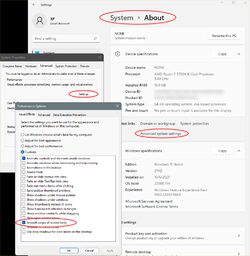
If you haven't already done this... it helps a lot.

Image1.png
 

My Computers My Computers

  • At a glance

    Win 11 Home ♦♦♦26200.8875 ♦♦♦♦♦♦♦25H2AMD Ryzen 7 3700XG.Skill (F4-3200C14D-16GTZKW)EVGA RTX 2070 (08G-P4-2171-KR)
    OS
    Win 11 Home ♦♦♦26200.8875 ♦♦♦♦♦♦♦25H2
    Computer type
    PC/Desktop
    Manufacturer/Model
    Built by Ghot® [May 2020]
    CPU
    AMD Ryzen 7 3700X
    Motherboard
    Asus Pro WS X570-ACE (BIOS 5302)
    Memory
    G.Skill (F4-3200C14D-16GTZKW)
    Graphics Card(s)
    EVGA RTX 2070 (08G-P4-2171-KR)
    Sound Card
    Realtek ALC1220P / ALC S1220A
    Monitor(s) Displays
    Dell U3011 30"
    Screen Resolution
    2560 x 1600
    Hard Drives
    2x Samsung 860 EVO 500GB,
    WD 4TB Black FZBX - SATA III,
    WD 8TB Black FZBX - SATA III,
    DRW-24B1ST CD/DVD Burner
    PSU
    PC Power & Cooling 750W Quad EPS12V
    Case
    Cooler Master ATCS 840 Tower
    Cooling
    CM Hyper 212 EVO (push/pull)
    Keyboard
    Ducky DK9008 Shine II Blue LED
    Mouse
    Logitech Optical M-100
    Internet Speed
    300/300
    Browser
    Firefox (latest)
    Antivirus
    Bitdefender Total Security
    Other Info
    Speakers: Klipsch Pro Media 2.1
  • At a glance

    Windows XP Pro 32bit w/SP3AMD Athlon 64 X2 5000+ (OC'd @ 3.2Ghz)TWIN2X2048-6400C4DHX (2 x 1GB, DDR2 800)EVGA 256-P2-N758-TR GeForce 8600GT SSC
    Operating System
    Windows XP Pro 32bit w/SP3
    Computer type
    PC/Desktop
    Manufacturer/Model
    Built by Ghot® (not in use)
    CPU
    AMD Athlon 64 X2 5000+ (OC'd @ 3.2Ghz)
    Motherboard
    ASUS M2N32-SLI Deluxe Wireless Edition
    Memory
    TWIN2X2048-6400C4DHX (2 x 1GB, DDR2 800)
    Graphics card(s)
    EVGA 256-P2-N758-TR GeForce 8600GT SSC
    Sound Card
    Onboard
    Monitor(s) Displays
    ViewSonic G90FB Black 19" Professional (CRT)
    Screen Resolution
    up to 2048 x 1536
    Hard Drives
    WD 36GB 10,000rpm Raptor SATA
    Seagate 80GB 7200rpm SATA
    Lite-On LTR-52246S CD/RW
    Lite-On LH-18A1P CD/DVD Burner
    PSU
    PC Power & Cooling Silencer 750 Quad EPS12V
    Case
    Generic Beige case, 80mm fans
    Cooling
    ZALMAN 9500A 92mm CPU Cooler
    Keyboard
    Logitech Classic Keybooard 200
    Mouse
    Logitech Optical M-BT96a
    Internet Speed
    300/300
    Browser
    Firefox 3.x ??
    Antivirus
    Symantec (Norton)
    Other Info
    Still assembled, still runs. Haven't turned it on for 15 years?
To anyone who runs across this thread, here's what solved this problem for me. I have to say I feel like a real idiot that I didn't try it this sooner. I went to "Adjust Appearance and performance of Windows" and found it to be set as 'Adjust for best appearance'. I changed it to 'Let Windows decide' and rebooted, but the pixelation was still there so I changed it back to 'Adjust for best appearance.' When I rebooted again, the pixelation was gone. Go figure. The funny thing was that when it was pixelated, it was only in explorer...not in Word or any browsers or apps. Thanks to all of your input. After all the effort I spent on this, it's time for Quervo.
 

My Computers My Computers

  • At a glance

    Windows 11 Pro 25H2 26200.8875i9-10900 10 core 20 threads32 gbnone-Intel UHD Graphics 630
    OS
    Windows 11 Pro 25H2 26200.8875
    Computer type
    PC/Desktop
    Manufacturer/Model
    Dell Optiplex 7080
    CPU
    i9-10900 10 core 20 threads
    Motherboard
    DELL 0J37VM
    Memory
    32 gb
    Graphics Card(s)
    none-Intel UHD Graphics 630
    Sound Card
    Integrated Realtek
    Monitor(s) Displays
    Benq 27
    Screen Resolution
    2560x1440
    Hard Drives
    2x1tb Solidigm m.2 nvme /External drives 512gb Samsung m.2 sata+2tb Kingston m2.nvme
    PSU
    500w
    Case
    MT
    Cooling
    Dell Premium
    Keyboard
    Logitech wired
    Mouse
    Logitech wireless
    Internet Speed
    so slow I'm too embarrassed to tell
    Browser
    #1 Edge #2 Firefox
    Antivirus
    Defender+MWB Premium
  • At a glance

    Windows 11 Pro 24H2 26200.8875AMD Ryzen 7 6800U32 gbintegrated
    Operating System
    Windows 11 Pro 24H2 26200.8875
    Computer type
    PC/Desktop
    Manufacturer/Model
    Beelink Mini PC SER5
    CPU
    AMD Ryzen 7 6800U
    Memory
    32 gb
    Graphics card(s)
    integrated
    Sound Card
    integrated
    Monitor(s) Displays
    Benq 27
    Screen Resolution
    2560x1440
    Hard Drives
    1TB Crucial nvme
    Keyboard
    Logitech wired
    Mouse
    Logitech wireless
    Internet Speed
    still too embarrassed to tell
    Browser
    Firefox
    Antivirus
    Defender
    Other Info
    System 3 is non compliant Dell 9020 i7-4770/24gb ram Win11 PRO 26200.8875
Back
Top Bottom