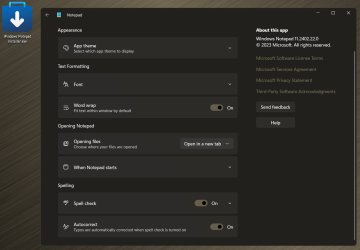
I was doing some testing this evening that included performing a 100% clean install of Windows 23H2 on a laptop. After installation I was surprised to discover that Notepad had the spell check option. I knew that this was already available in insider builds but had assumed that this was coming to released versions of Windows only in the 24H2 version, so this caught me pleasantly by surprise.
I don't have that option on any of my other systems.
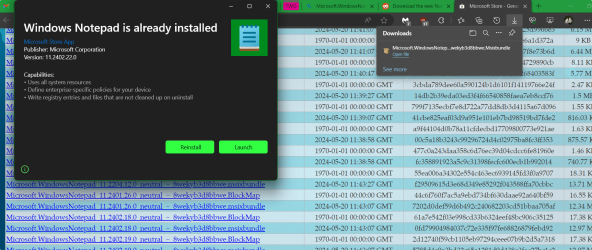
Is anyone aware of a way to force this update? I went into the Microsoft Store and checked for updates on several machines, but there were no Notepad updates.
I use notepad exceedingly heavily so this has actually been one of the main things I was looking forward to in 24H2, but if I can get it now, I want it!
I have already tried to turn on the option "Get the latest updates as soon as they're available" but that made no difference.
My Installation Details
The version of Windows that I installed fresh was 23H2 with the May 2024 Patch Tuesday updates already slipstreamed into my installation media (22631.3593).
It is a 100% clean install with the only software added being the system drivers, the "My Asus" utility, and literally nothing else.
NO NOTEPAD++!
I suspect that Notepad++ has this capability already as well as other similar programs so there is no need to point out to me that I can accomplish this with another program. I'm merely curious to know how I might obtain this Notepad update for now.
Thanks for any suggestions.
I don't have that option on any of my other systems.
Is anyone aware of a way to force this update? I went into the Microsoft Store and checked for updates on several machines, but there were no Notepad updates.
I use notepad exceedingly heavily so this has actually been one of the main things I was looking forward to in 24H2, but if I can get it now, I want it!
I have already tried to turn on the option "Get the latest updates as soon as they're available" but that made no difference.
My Installation Details
The version of Windows that I installed fresh was 23H2 with the May 2024 Patch Tuesday updates already slipstreamed into my installation media (22631.3593).
It is a 100% clean install with the only software added being the system drivers, the "My Asus" utility, and literally nothing else.
NO NOTEPAD++!
I suspect that Notepad++ has this capability already as well as other similar programs so there is no need to point out to me that I can accomplish this with another program. I'm merely curious to know how I might obtain this Notepad update for now.
Thanks for any suggestions.
My Computers
-
At a glance
Win11 Pro 26H2 (Release Preview)Intel i7-14650HX32 GBNo GPU - Built-in Intel Graphics- OS
- Win11 Pro 26H2 (Release Preview)
- Computer type
- PC/Desktop
- Manufacturer/Model
- Acemagic Matrix M5
- CPU
- Intel i7-14650HX
- Memory
- 32 GB
- Graphics Card(s)
- No GPU - Built-in Intel Graphics
- Sound Card
- Integrated
- Monitor(s) Displays
- Varies as machine will often be moved to locations with different monitors
- Screen Resolution
- Varies
- Hard Drives
- 1 x 1TB Gen 4 NVMe SSD
- PSU
- 120W Power Brick
- Keyboard
- Corsair K70 Max RGB Magnetic Keyboard
- Mouse
- Logitech MX Master 3
- Internet Speed
- 1Gb Up / 1 Gb Down
- Browser
- Edge
- Antivirus
- Windows Defender
-
At a glance
Win11 Pro 26H2 (Release Preview)Intel i7-1255U16 GBIntel Iris Xe Graphics- Operating System
- Win11 Pro 26H2 (Release Preview)
- Computer type
- Laptop
- Manufacturer/Model
- Lenovo ThinkBook 13x Gen 2
- CPU
- Intel i7-1255U
- Memory
- 16 GB
- Graphics card(s)
- Intel Iris Xe Graphics
- Sound Card
- Realtek® ALC3306-CG codec
- Monitor(s) Displays
- 13.3-inch IPS Display
- Screen Resolution
- WQXGA (2560 x 1600)
- Hard Drives
- 4 TB 4 x 4 NVMe SSD
- PSU
- USB-C / Thunderbolt 4 Power / Charging Using an Anker 160W Charger
- Keyboard
- Backlit, spill resistant keyboard
- Mouse
- Buttonless Glass Precision Touchpad
- Internet Speed
- 1Gb Up / 1Gb Down
- Browser
- Edge
- Antivirus
- Windows Defender
- Other Info
- WiFi 6e / Bluetooth 5.1 / Facial Recognition / Fingerprint Sensor / ToF (Time of Flight) Human Presence Sensor