Installation and Upgrade Download Official Windows 11 ISO file from Microsoft

  • Thread starter Thread starter Brink
  • Start date Published: Start date Updated Updated:
  • Featured
  • Tags Tags
    iso

ISO_banner.png

This tutorial will show you how to download an official Windows Server or Windows 11 64-bit or ARM64 ISO file from Microsoft.

Microsoft provides ISO files for Windows Server and Windows 11 to download. You can use these ISO files to clean install or in-place upgrade Windows 11.


The Flight Hub can also help you keep updated on which Windows 11 builds have an ISO available.


Contents

  • Option One: Download Latest Windows 11 64-bit ISO using Media Creation Tool (MCT)
  • Option Two: Download Windows 11 64-bit or ARM64 ISO from Microsoft
  • Option Three: Download Windows 11 Insider 64-bit ISO from Microsoft
  • Option Four: Download Windows Server Insider ISO from Microsoft
  • Option Five: Download Windows 11 64-bit or ARM64 ISO or Windows Server ISO from UUP Dump


See also:


Option One

Download Latest Windows 11 64-bit ISO using Media Creation Tool (MCT)


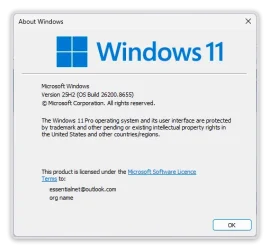
This will be for a Windows 11 Version 25H2 build 26200.8653 ISO file with install.esd.


1 Click/tap on the Download button below, and click/tap on the Download Now button at Microsoft's site for Create Windows 11 Installation Media. (see screenshot below)


Windows_11_MCT-1.png

2 Save the mediacreationtool.exe file version 10.0.26100.7019 to your desktop, and run it.

Windows_11_MCT-2.webp

3 If prompted by UAC, click/tap on Yes.

4 Click/tap on Accept for the license terms. (see screenshot below)

Windows_11_MCT-3.png

5 Uncheck the Use the recommended options for this PC box. (see screenshot below)

Leaving the Use the recommended options for this PC box checked will have the Media Creation Tool download an ISO that's the same language, edition, and architecture as the current PC.


Windows_11_MCT-4.png

6 Select the Language and Edition you want for the ISO file, and click/tap on Next. (see screenshot below)

The Windows 11 option includes both the Home and Pro editions. The product key you enter during installation (Windows Setup) is what determines which edition gets installed.

Your digital license or product key determines if Home or Pro gets installed during Windows Setup.

If you skip entering a product key during Windows Setup, then you will be prompted to select to install the Home or Pro edition.


Windows_11_MCT_x.png

7 Select (dot) ISO file, and click/tap on Next. (see screenshot below)

Windows_11_MCT-5.png

8 Select where you would like to save the ISO file to, type in a name you want for the ISO file, and click/tap on Save. (see screenshot below)

Windows_11_MCT-6.png

9 The Windows 11 ISO file will now begin to download. (see screenshot below)

Windows_11_MCT-7.png

10 When the download has finished, click/tap on the link where you selected to save the ISO file at to open that location, and click/tap on Finish. (see screenshot below)

Windows_11_MCT-8.png


Option Two

Download Windows 11 64-bit or ARM64 ISO from Microsoft


This will be for a Windows 11 Version 25H2 build 26200.8037 ISO file with install.wim.


1 Click/tap on the Download button below for the 64-bit or ARM64 ISO you want to download.

64-bit ISO

OR​

ARM64 ISO

2 Perform the appropriate action below for 64-bit or ARM64: (see screenshots below)
  • Select Windows 11 (multi-edition ISO for x64 devices) in the Download Windows 11 Disk Image (ISO) for x64 devices drop menu, and click/tap on Confirm
  • Select Windows 11 (multi-edition ISO for Arm64) in the drop menu, and click/tap on Download Now.
Download_W11_ISO-1.png
Windows11_ARM_ISO.png

3 Select the language (ex: "English") you want, and click/tap on Confirm. (see screenshot below)

Download_W11_ISO-2.png

4 Click/tap on the 64-bit Download or Download Now (ARM64) button. (see screenshots below)

Download_W11_ISO-3.png
Windows11_ARM_ISO-download_now.png

5 Navigate to and select where (ex: "Desktop") you want to save the ISO file, and click/tap on Save. (see screenshot below)

Download_W11_ISO-4.png


Option Three

Download Windows 11 Insider 64-bit ISO from Microsoft


1 Click/tap on the Download button below to go to the Windows Insider Preview Downloads site by Microsoft below,


2 Scroll down to the Select edtion section, and select the Windows 11 Insider Preview Canary, Dev, Beta, or Release Preview Channel ISO for the build number you want, and click/tap on Confirm. (see screenshots below)

ISO_download.webp
confirm.png

3 Select the language (ex: "English") you want, and click/tap on Confirm. (see screenshot below)

language.png

4 Click/tap on the 64-bit Download button. (see screenshot below)

Download.png

5 Navigate to and select where (ex: "Desktop") you want to save the ISO file, and click/tap on Save. (see screenshot below)

Save.png


Option Four

Download Windows Server Insider ISO from Microsoft


1 Click/tap on the Download button below to go to the Windows Insider Preview Downloads site by Microsoft below,


2 Select the Windows Server VNext Preview ISO for the build number you want, and click/tap on Confirm. (see screenshots below)

W11_Server_Insider-1.webp
W11_Server_Insider-2.png

3 Select the language (ex: "English") you want, and click/tap on Confirm. (see screenshot below)

W11_Server_Insider-3.png

4 Click/tap on the Download Now button. (see screenshot below)

W11_Server_Insider-4.png

5 Navigate to and select where (ex: "Desktop") you want to save the ISO file, and click/tap on Save. (see screenshot below)

W11_Server_Insider-5.png


Option Five

Download Windows 11 64-bit or ARM64 ISO or Windows Server ISO from UUP Dump


You can download an ISO for public and Insider builds using this option.


1 Using the tutorial below, search for and select the Windows version and build ISO you want to download.



That's it,
Shawn Brink


Last edited:
I'd wait another 12 hours, and see if MCT drops a new ISO.
 

My Computer My Computer

At a glance

Windows 7
OS
Windows 7
I'd wait another 12 hours, and see if MCT drops a new ISO.
26200.8653 is new dated 06/06/2026, last one was 26200.8457 dated 05/07/2036 and that had a bug.
We'll see if they fixed the bug on this one. 🤞 🤷‍♂️
 

My Computer My Computer

At a glance

Windows 11 Pro 25H2Intel I9-9900K64GBNVIDIA RTX 2060
OS
Windows 11 Pro 25H2
Computer type
PC/Desktop
Manufacturer/Model
Dell XPS 8930
CPU
Intel I9-9900K
Memory
64GB
Graphics Card(s)
NVIDIA RTX 2060
Sound Card
NVIDIA High Definition Audio
Monitor(s) Displays
4k Samsung
Screen Resolution
3840 x 2160
Hard Drives
512GB NVMe, ADATA SU 800, 2TB HDD
I'd wait another 12 hours, and see if MCT drops a new ISO.
Unfortunately, MCT build 26200 8653 has the same problem as 26200.8457, when I hit "Repair my PC" it reboots to the main OS instead of showing the recovery menus.
What a waste of time! 😵‍💫🤬🤷‍♂️
They have the same bug also on all recent insider ISO files.


1781233243783.webp


To work around this big, I created the ISO 26200.8655 from uup-dump and that still works because it does not have yet the changes that Microsoft made to boot.wim which added this problem.
Looks like Microsoft is not paying attention to the FBH reports about this bug that they created.
 
Last edited:

My Computer My Computer

At a glance

Windows 11 Pro 25H2Intel I9-9900K64GBNVIDIA RTX 2060
OS
Windows 11 Pro 25H2
Computer type
PC/Desktop
Manufacturer/Model
Dell XPS 8930
CPU
Intel I9-9900K
Memory
64GB
Graphics Card(s)
NVIDIA RTX 2060
Sound Card
NVIDIA High Definition Audio
Monitor(s) Displays
4k Samsung
Screen Resolution
3840 x 2160
Hard Drives
512GB NVMe, ADATA SU 800, 2TB HDD

Attachments

  • Win-2047.webp
    Win-2047.webp
    21.5 KB · Views: 2

My Computers My Computers

  • At a glance

    Windows 11 Pro 25H2 Build 26200.8655Intel(R) Core(TM) i7-4770K CPU @ 3.50GHz32.0 GB of I forget and the box is in storage.Gigabyte nVidia GeForce GTX 1660 Super OC 6GB
    OS
    Windows 11 Pro 25H2 Build 26200.8655
    Computer type
    PC/Desktop
    Manufacturer/Model
    Sin-built 2013
    CPU
    Intel(R) Core(TM) i7-4770K CPU @ 3.50GHz
    Motherboard
    ASUS ROG Maximus VI Formula
    Memory
    32.0 GB of I forget and the box is in storage.
    Graphics Card(s)
    Gigabyte nVidia GeForce GTX 1660 Super OC 6GB
    Sound Card
    ROG SupremeFX Formula 8-Channel High Definition Audio
    Monitor(s) Displays
    5 x LG 25MS500-B - 1 x 24MK430H-B - 1 x Wacom Pro 22" Touch Screen Tablet
    Screen Resolution
    All over the place
    Hard Drives
    Too many to list. OS on Samsung 1TB 870 QVO SATA
    PSU
    Silverstone 1500
    Case
    NZXT Phantom 820 Full-Tower Case
    Cooling
    Noctua NH-D15 Elite Class Dual Tower CPU Cooler / 6 x EziDIY 120mm / 2 x Corsair 140mm somethings / 1 x 140mm Thermaltake something / 2 x 200mm Corsair.
    Keyboard
    Corsair K95 / Logitech diNovo Edge Wireless
    Mouse
    Logitech: G402 / G502 / Mx Masters / Mx Air Cordless
    Internet Speed
    2000/500Mbps
    Browser
    All sorts
    Antivirus
    Kaspersky Premium
    Other Info
    ㅤㅤㅤㅤㅤㅤㅤㅤㅤㅤㅤㅤㅤㅤㅤㅤㅤㅤㅤㅤㅤㅤㅤㅤㅤㅤㅤㅤㅤㅤㅤㅤㅤㅤㅤㅤㅤㅤㅤㅤ⠀⠀⠀⠀⠀⠀⠀⠀⠀⠀
    TP-Link BE9300 WiFi 7 Bluetooth 5.4 (Archer TBE550E)
    TP-Link TX201 V1 2.5GB Lan

    Grandstream HT812 - VoIP
    ASUS DSL-AX82U - Mesh
    ASUS RT-AC68U - Mesh
    ASUS RT-BE88U Router

    Brother MFC-L2880DW Printer

    I’m on a horse.
  • At a glance

    Windows 11 Pro 25H2 Build 26200.8655 (Wifes)13th Generation Intel® Core™ i5-1340P Process...16GB LPDDR5-52001x Intel® Iris® Xe Graphics
    Operating System
    Windows 11 Pro 25H2 Build 26200.8655 (Wifes)
    Computer type
    Laptop
    Manufacturer/Model
    LENOVO Yoga 7 14IRL8 - Type 82YL
    CPU
    13th Generation Intel® Core™ i5-1340P Processor(Core™ i5-1340P)
    Memory
    16GB LPDDR5-5200
    Graphics card(s)
    1x Intel® Iris® Xe Graphics
    Sound Card
    Optimized with Dolby Atmos®
    Screen Resolution
    QHD 2880 x 1800 OLED
    Hard Drives
    M.2 512 GB SSD PCIe
    Mouse
    Logiteck MX Master 3S
    Internet Speed
    2000/500
    Antivirus
    Defender / Malwarebytes
    Other Info
    …still on a horse.


    Wireless Network: Wi-Fi 6E 2x2 AX; Bluetooth® 5.1 or above
    Ports: 1x 1 Novo button; 2 in 1 Audio Combo jack; Micro SD Card Reader; HDMI 1.4b; 2 x USB Type-C (TBT4)
    USB 3.2 Gen 2 DP 1.4a
    PD 3.0); 1 x USB 3.2 Gen1 Type A
    Camera
    1x 1080P FHD IR/RGB Hybrid with Privacy Shutter and Dual Array Microphone
    Graphics
    1x Intel® Iris® Xe Graphics
    Monitor
    14" WUXGA
    Form Factor
    Convertible Notebook
  • Windows 11 Pro 25H2 Build 26200.8655 (Wifes)

    Yoga 7 2-in-1 14IML9 - Type 83DJ

    Processor: Intel® Core™ Ultra 7 155H Processor(Core™ Ultra 7 155H)

    Memory: 32GB LPD5X-7467

    Hard Drive: 1 TB SSD PCIe

    Wireless Network: 1x Wi-Fi 6E 2x2 AX; Bluetooth® 5.1 or above

    Ports: 1 x HDMI 2.1 TMDS; 1 x Novo Button; 1 x Combo Audio Jack
    2 x USB-C (USB 4.0)
    1 x USB-A 3.2 Gen 1

    Camera: 1080P FHD IR Hybrid with Dual Microphone

    Graphics: Intel® Arc™ Graphics

    Monitor: 14" 2.8K

    ...Where's my horse?
The next stable version will come out in July. 8728 is an optional out of band update.
 

My Computers My Computers

  • At a glance

    Windows 11 Education For 25H2Intel® Core i7 5500u8 GBIntel HD Family Graphics 5500 AMD Firepro 4150M
    OS
    Windows 11 Education For 25H2
    Computer type
    Laptop
    Manufacturer/Model
    HP ZBook G2
    CPU
    Intel® Core i7 5500u
    Motherboard
    HP
    Memory
    8 GB
    Graphics Card(s)
    Intel HD Family Graphics 5500 AMD Firepro 4150M
    Sound Card
    Realtek High Audio
    Hard Drives
    1 TB SSD
    Mouse
    HP USB Mouse
    Antivirus
    Windows Defender
  • At a glance

    Windows 11 Pro For Workstations 25H2Xeon 1535m v632 GBAMD Quadro Pro 4100
    Operating System
    Windows 11 Pro For Workstations 25H2
    Computer type
    Laptop
    Manufacturer/Model
    HP Zbook G4
    CPU
    Xeon 1535m v6
    Motherboard
    HP
    Memory
    32 GB
    Graphics card(s)
    AMD Quadro Pro 4100
    Sound Card
    Bang and Olufson Audio
    Hard Drives
    1TB SSD
    Mouse
    HP USB Mouse
    Antivirus
    Windows Defender
New Insider ISOs :alien:

ISO_download.webp
 

My Computers My Computers

  • At a glance

    Windows 11 Pro for WorkstationsIntel i7-8700K 5 GHz64 GB (4x16GB) G.SKILL TridentZ RGB DDR4 3600...ASUS ROG-STRIX-GTX1080TI-O11G-GAMING (11GB GD...
    OS
    Windows 11 Pro for Workstations
    Computer type
    PC/Desktop
    Manufacturer/Model
    Custom self build
    CPU
    Intel i7-8700K 5 GHz
    Motherboard
    ASUS ROG Maximus XI Formula Z390
    Memory
    64 GB (4x16GB) G.SKILL TridentZ RGB DDR4 3600 MHz (F4-3600C18D-32GTZR)
    Graphics Card(s)
    ASUS ROG-STRIX-GTX1080TI-O11G-GAMING (11GB GDDR5X)
    Sound Card
    Integrated Digital Audio (S/PDIF)
    Monitor(s) Displays
    2 x Samsung Odyssey G75 27"
    Screen Resolution
    2560x1440
    Hard Drives
    1TB Samsung 990 PRO M.2,
    4TB Samsung 990 PRO M.2,
    TerraMaster F8 SSD Plus NAS
    PSU
    Seasonic Prime Titanium 850W
    Case
    Thermaltake Core P3 wall mounted
    Cooling
    Corsair Hydro H115i
    Keyboard
    Amazon Basics Wired Full Keyboard MD005
    Mouse
    Logitech MX Master 4
    Internet Speed
    2 Gbps Download and 100 Mbps Upload
    Browser
    Chrome and Edge
    Antivirus
    Microsoft Defender
    Other Info
    Logitech Z625 speaker system,
    Logitech BRIO 4K Pro webcam,
    HP Color LaserJet Pro MFP M477fdn,
    CyberPower CP1500PFCLCD
    Galaxy S23 Plus phone
  • At a glance

    Windows 11 ProSnapdragon X Elite (12 core) 3.42 GHz16 GB LPDDR5x-7467 MHz
    Operating System
    Windows 11 Pro
    Computer type
    Laptop
    Manufacturer/Model
    Surface Laptop 7 Copilot+ PC
    CPU
    Snapdragon X Elite (12 core) 3.42 GHz
    Memory
    16 GB LPDDR5x-7467 MHz
    Monitor(s) Displays
    15" HDR
    Screen Resolution
    2496 x 1664
    Hard Drives
    1 TB SSD
    Internet Speed
    Wi-Fi 7 and Bluetooth 5.4
    Browser
    Chrome and Edge
    Antivirus
    Microsoft Defender
  • Like
Reactions: OAT

My Computer My Computer

At a glance

Windows 11 Pro 25H2Intel I9-9900K64GBNVIDIA RTX 2060
OS
Windows 11 Pro 25H2
Computer type
PC/Desktop
Manufacturer/Model
Dell XPS 8930
CPU
Intel I9-9900K
Memory
64GB
Graphics Card(s)
NVIDIA RTX 2060
Sound Card
NVIDIA High Definition Audio
Monitor(s) Displays
4k Samsung
Screen Resolution
3840 x 2160
Hard Drives
512GB NVMe, ADATA SU 800, 2TB HDD
New Insider ISOs :alien:
@Brink.
Looks like with 29610.1000 we are now facing two different bugs.
1) With the official Microsoft ISO which reboots to the main OS when selecting "Repair my PC"
2) With uup-dump ISO which now skips the "Select Setup option" and goes directly to the "Choose your Keyboard layout" and then the recovery menus without allowing the option to install.
So, both ISO files are now broken in a different way.
To work around both issues, I have to use the previous uup-dump ISO 29599.1000 that still works correctly.
 

My Computer My Computer

At a glance

Windows 11 Pro 25H2Intel I9-9900K64GBNVIDIA RTX 2060
OS
Windows 11 Pro 25H2
Computer type
PC/Desktop
Manufacturer/Model
Dell XPS 8930
CPU
Intel I9-9900K
Memory
64GB
Graphics Card(s)
NVIDIA RTX 2060
Sound Card
NVIDIA High Definition Audio
Monitor(s) Displays
4k Samsung
Screen Resolution
3840 x 2160
Hard Drives
512GB NVMe, ADATA SU 800, 2TB HDD
New Insider ISOs :alien:
@Brink,
One good thing with Build 29613.1000 from uup-dump. 👍
I just made 29613.1000 ISO from UUP-Dump and this seems to work fine, it does not have the problem that was skipping the "Select Setup Option" like 29610.1000. Now I can again choose "Install Windows 11" or "Repair my PC"
This one works like it did with uup-dump 29599.1000, it still shows all the menus like it used to, including "Select language settings", "Select Keyboard settings" and "Select setup option". 🤞
The uup-dump 29610.1000 was going directly to the recovery menus skipping the setup option. 😵‍💫🤷‍♂️
 

My Computer My Computer

At a glance

Windows 11 Pro 25H2Intel I9-9900K64GBNVIDIA RTX 2060
OS
Windows 11 Pro 25H2
Computer type
PC/Desktop
Manufacturer/Model
Dell XPS 8930
CPU
Intel I9-9900K
Memory
64GB
Graphics Card(s)
NVIDIA RTX 2060
Sound Card
NVIDIA High Definition Audio
Monitor(s) Displays
4k Samsung
Screen Resolution
3840 x 2160
Hard Drives
512GB NVMe, ADATA SU 800, 2TB HDD
New Insider ISOs :alien:

ISO_download.webp
 

My Computers My Computers

  • At a glance

    Windows 11 Pro for WorkstationsIntel i7-8700K 5 GHz64 GB (4x16GB) G.SKILL TridentZ RGB DDR4 3600...ASUS ROG-STRIX-GTX1080TI-O11G-GAMING (11GB GD...
    OS
    Windows 11 Pro for Workstations
    Computer type
    PC/Desktop
    Manufacturer/Model
    Custom self build
    CPU
    Intel i7-8700K 5 GHz
    Motherboard
    ASUS ROG Maximus XI Formula Z390
    Memory
    64 GB (4x16GB) G.SKILL TridentZ RGB DDR4 3600 MHz (F4-3600C18D-32GTZR)
    Graphics Card(s)
    ASUS ROG-STRIX-GTX1080TI-O11G-GAMING (11GB GDDR5X)
    Sound Card
    Integrated Digital Audio (S/PDIF)
    Monitor(s) Displays
    2 x Samsung Odyssey G75 27"
    Screen Resolution
    2560x1440
    Hard Drives
    1TB Samsung 990 PRO M.2,
    4TB Samsung 990 PRO M.2,
    TerraMaster F8 SSD Plus NAS
    PSU
    Seasonic Prime Titanium 850W
    Case
    Thermaltake Core P3 wall mounted
    Cooling
    Corsair Hydro H115i
    Keyboard
    Amazon Basics Wired Full Keyboard MD005
    Mouse
    Logitech MX Master 4
    Internet Speed
    2 Gbps Download and 100 Mbps Upload
    Browser
    Chrome and Edge
    Antivirus
    Microsoft Defender
    Other Info
    Logitech Z625 speaker system,
    Logitech BRIO 4K Pro webcam,
    HP Color LaserJet Pro MFP M477fdn,
    CyberPower CP1500PFCLCD
    Galaxy S23 Plus phone
  • At a glance

    Windows 11 ProSnapdragon X Elite (12 core) 3.42 GHz16 GB LPDDR5x-7467 MHz
    Operating System
    Windows 11 Pro
    Computer type
    Laptop
    Manufacturer/Model
    Surface Laptop 7 Copilot+ PC
    CPU
    Snapdragon X Elite (12 core) 3.42 GHz
    Memory
    16 GB LPDDR5x-7467 MHz
    Monitor(s) Displays
    15" HDR
    Screen Resolution
    2496 x 1664
    Hard Drives
    1 TB SSD
    Internet Speed
    Wi-Fi 7 and Bluetooth 5.4
    Browser
    Chrome and Edge
    Antivirus
    Microsoft Defender
  • Like
Reactions: OAT
I just checked the 29613.1000 and it has CA 2011 banned, no CA 2023 added.
Had to convert with ADK to add CA 2023.
I tried a USB installation media, and it has the same bug as previous Microsoft 29610.1000, when I press "Repair my PC" it reboots to the main OS instead of loading the recovery menus.
They did not fix the bug; I still have to use the 29613.1000 created from uup-dump to get a working installation media. 🤬🤷‍♂️

 
Last edited:

My Computer My Computer

At a glance

Windows 11 Pro 25H2Intel I9-9900K64GBNVIDIA RTX 2060
OS
Windows 11 Pro 25H2
Computer type
PC/Desktop
Manufacturer/Model
Dell XPS 8930
CPU
Intel I9-9900K
Memory
64GB
Graphics Card(s)
NVIDIA RTX 2060
Sound Card
NVIDIA High Definition Audio
Monitor(s) Displays
4k Samsung
Screen Resolution
3840 x 2160
Hard Drives
512GB NVMe, ADATA SU 800, 2TB HDD
From the chatter on MDL, it appears the different releases' boot.wim might be missing a required DLL, which the UUP dump folks have forced back into the image (after noticing the problem).
 

My Computer My Computer

At a glance

Windows 7
OS
Windows 7
From the chatter on MDL, it appears the different releases' boot.wim might be missing a required DLL, which the UUP dump folks have forced back into the image (after noticing the problem).
I think Microsoft change that skips the "Choose your keyboard layout" menu, introduced the bug.
 

My Computer My Computer

At a glance

Windows 11 Pro 25H2Intel I9-9900K64GBNVIDIA RTX 2060
OS
Windows 11 Pro 25H2
Computer type
PC/Desktop
Manufacturer/Model
Dell XPS 8930
CPU
Intel I9-9900K
Memory
64GB
Graphics Card(s)
NVIDIA RTX 2060
Sound Card
NVIDIA High Definition Audio
Monitor(s) Displays
4k Samsung
Screen Resolution
3840 x 2160
Hard Drives
512GB NVMe, ADATA SU 800, 2TB HDD
I got a newer version by not using MCT.
 

My Computers My Computers

  • At a glance

    Windows 11 Pro 25H2 26200.8655AMD Ryzen 7 5825U with Radeon Graphics16GB
    OS
    Windows 11 Pro 25H2 26200.8655
    Computer type
    Laptop
    Manufacturer/Model
    Acemagic LX15PRO
    CPU
    AMD Ryzen 7 5825U with Radeon Graphics
    Motherboard
    BIOS CT_BI_AMI_LX15PRO_AB8139_A-004
    Memory
    16GB
    Screen Resolution
    1920 x 1080
    Hard Drives
    SSD 2TB
    Internet Speed
    30 Mbps
    Browser
    Brave
    Antivirus
    Defender/Windows Security
    Other Info
    System 3

    Acer Swift SF114-34 laptop
    OS Windows 11 Pro 26200.8655
    CPU Pentium Silver N6000
    RAM 4GB
    BIOS v1.17
    SSD Samsung 970 EVO Plus SSD 2TB (an upgrade)
  • At a glance

    Windows 11 Pro 23H2 22631.2506Atom N450 1.66GHz2GB
    Operating System
    Windows 11 Pro 23H2 22631.2506
    Computer type
    Laptop
    Manufacturer/Model
    HP Mini 210-1090NR PC (bought in late 2009!)
    CPU
    Atom N450 1.66GHz
    Memory
    2GB
    Browser
    Brave
    Antivirus
    Webroot
Back
Top Bottom