Dreambuild First Boot Problems and Monitor Incompatibility. Can't Load Drivers or anything. I'm Running Blind


MrMultiMax

New member
Local time
3:17 PM
Posts
2
OS
Pre-instal KDE Linux Plasma x64 & Windows 10 Ent
Lol. PLEASE HELP


After finally finishing rough set up of my master build of:


MSI X870E GODLIKE


Ryzen 9 9950X3D


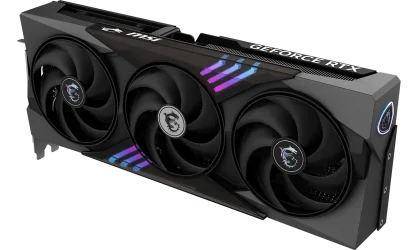
GFORCE RTX 5080 Gaming Trio


G.SKILL Trident Z5 Neo RGB Series DDR5 RAM (AMD Expo & Intel XMP 3.0) 128GB (2x64GB) 6000MT/s


NO M2 NVMe SSD (IS THAT A PTOBLEM?)


ASUS ROG HYPERION GR701


Pre-installation KDE Linux Plasma x64 &
Windows 10 IoT Enterprise ltsc 2021 x64
Dual/Multi-boot
***
UGH. I HAVE MULTIPLE ISSUES


Looks like I need to return my monitor. Only supports older CPU & GPU


AOC CQ27G4H 27" Curved Gaming Monitor, QHD 2K 2560x1440


I was not pleased to discover my monitor appears to be incompatible. If these darn companies stated the product incompatibility list when advertised on Amazon, such frustrating issues would not occur. I will upload a picture of their compatability suggestions.


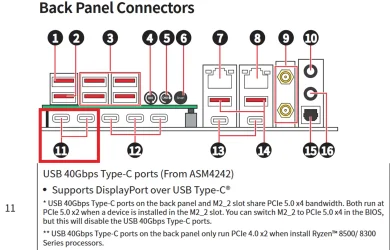
And, what is the deal with the MSI X870E GODLIKE Driver install USB? How are you supposed to plug in a female connector? I think I figured out to connect it with a C to USB adapter, but will the drivers even load without any commands or interaction? I can't see anything to click on!!!


So I am running blind.


First Boot Boot Problems


But I can't do anything without seeing the menu and running processes.


Can't load drivers.


Can't run a USB Linux Live or Hirens Boot CD PE


Can't do a Remote Install without an OS or Network Connection


I am really stuck in a hard place.


Having to wait to return and get a new monitor totally sucks.


IS THERE ANY WAY TO WORK AROUND NOT HAVING A VISUAL INTERFACE?


I can't even install from a USB because I can't see "Boot from USB," Hit any key, or even enter BIOS set up.


I can't even think of how any external app, Android or Remote could possibly be used without pairing it in the OS (Which of course is not yet installed.


I have put together close to 100 PC's.


But this build has been as hard as all of them put together. Instead of 1 or 2 days, it is closer to 2 weeks.


ANY HELP US MUCH APPRECIATED


THANKS
 

My Computer

System One

  • OS
    Pre-instal KDE Linux Plasma x64 & Windows 10 Ent
    Computer type
    PC/Desktop
    Manufacturer/Model
    MSI X870E GODLIKE, Ryzen 9 9950X3D, MSI GFORCE RTX 5080 Gaming Trio, ASUS ROG HYPERION GR701
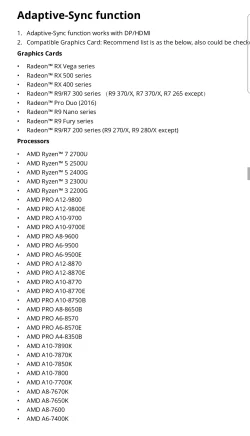
Opps. Here are the photos of compatible CPU - GPU for the monitor and the adapter of the MSI Motherboard Driver USB
 

Attachments

  • 20260211_191846.webp
    20260211_191846.webp
    100.6 KB · Views: 1

My Computer

System One

  • OS
    Pre-instal KDE Linux Plasma x64 & Windows 10 Ent
    Computer type
    PC/Desktop
    Manufacturer/Model
    MSI X870E GODLIKE, Ryzen 9 9950X3D, MSI GFORCE RTX 5080 Gaming Trio, ASUS ROG HYPERION GR701
The monitor supports AMD Freesync. That's an option, mainly used for gaming, not a requirement for operation. The list in post 2 is for AMD devices (GPUs or CPUs with integrated graphics) that support Freesysnc.

nVidia offers G-Sync, their own version. But I believe that their drivers have supported Freesync as well for a while.

It's hard to troubleshoot with no display working.

Do you have access to another PC that you can use to test the monitor?

You don't say what storage you're using for the OS, if you're not using an M2 device. But it shouldn't matter. You should be able to get into the BIOS settings with no drive installed. (I believe. I don't think I've ever done it.)

If you've built 100 PCs, it's hard for me to imagine that you need to be told any of this.
 

My Computers

System One System Two

  • OS
    Windows 11 26200.8116
    Computer type
    PC/Desktop
    Manufacturer/Model
    homebuilt
    CPU
    Amd Threadripper 7970X
    Motherboard
    Gigabyte TRX50 Aero D Rev. 1.0
    Memory
    128GB (4 X 32) G.Skill DDR5 6400 (RDIMM)
    Graphics Card(s)
    Gigabyte RTX 4090 OC
    Sound Card
    none (USB to speakers), Realtek
    Monitor(s) Displays
    Innocn 32" OLED
    Screen Resolution
    3840 X 2160 @ 60Hz
    Hard Drives
    Crucial T700 2TB M.2 NVME SSD
    WD 4TB Blue SATA SSD
    Seagate 18TB IronWolf Pro
    PSU
    BeQuiet! Straight Power 12 1500W
    Case
    Lian Li 011 Dynamic Evo XL
    Cooling
    SilverStone Technology XE360-TR5, with 3 Phanteks T30 fans
    Keyboard
    Cherry KC 500 MX LP (mechanical)
    Mouse
    Logitech M500s (wired)
    Internet Speed
    2000/250 Mbps (down/up)
    Other Info
    xFinity gateway
  • Operating System
    windows 11 26200.8116
    Computer type
    PC/Desktop
    Manufacturer/Model
    homebuilt
    CPU
    Intel I9-13900K
    Motherboard
    Asus RoG Strix Z690-E
    Memory
    64GB G.Skill DDR5-6000
    Graphics card(s)
    Gigabyte RTX 3090 ti
    Sound Card
    built in Realtek
    Monitor(s) Displays
    Philips 27E1N8900 27" OLED
    Screen Resolution
    3840 X 2160 @60Hz
    Hard Drives
    WDC SN850 1TB
    8TB Seagate Ironwolf
    4TB Seagate Ironwolf
    PSU
    eVGA SuperNOVA 1300 GT
    Case
    Lian Li 011 Dynamic Evo
    Cooling
    Corsair iCUE H150i ELITE CAPELLIX Liquid CPU Cooler
    Keyboard
    Cherry Streaming (wired)
    Mouse
    Logitech M500s (wired)
  • Like
Reactions: OAT
Have you already tried using the on-chip graphics with the monitor?
 

My Computers

System One System Two

  • OS
    Windows 11 Pro x64
    Computer type
    PC/Desktop
    Manufacturer/Model
    📷🔈🎧 🪛 DIY Photoshop/Audio/Game/tinker
    CPU
    i9 14900K P/E 5.8/4.5 GHz, cache 5.0 GHz
    Motherboard
    Asus ROG Maximus Z790 Dark Hero
    Memory
    🐏 96GB (2x48) G.skill Ripjaws 6800 MT/s
    Graphics Card(s)
    Asus ROG Strix 4070 Ti OC
    Sound Card
    🔊Bowers & Wilkins 606 S3 speakers; Audiolabs 7000a integrated amp; RSL 10S Mk2 sub; Creative Pebble Pro Minimilist
    Monitor(s) Displays
    🖥️🖥️ Eizo CG2730 ColorEdge, ViewSonic VP2768
    Screen Resolution
    🖥️🖥️ 2560 x 1440p x 2
    Hard Drives
    💾 WDC SN850X 4TB nvme, SN850 1TB nvme, SK-Hynix 2 TB P41 nvme,. Sabrent USB-C DS-SC5B 5-bay docking station: 6TB WDC Black, 6TB Ironwolf Pro; 2x 2TB WDC Black HDD
    PSU
    ⚡️ 850W Seasonic Vertex PX-850 ATX 3.0/PCI-E 5.0
    Case
    Fractal Design North XL Mesh, Black Walnut
    Cooling
    ❄️ EK Nucleus black 360 AIO w/Phanteks T30-120 fans, 2 Noctua NF-A14 Chromax case fan, 1 T30-120 fan cooling memory
    Keyboard
    ⌨️ Keychron Q3 Max TKL with custom GMK Redsuns Red Samuri keycaps, TX Stabs
    Mouse
    🖱️ Logitech G305 wireless gaming
    Internet Speed
    ⬇️ 500 Mb/s ⬆️ 12 Mb/s
    Browser
    🔥🦊 Firefox
    Antivirus
    🦺 Defender, Macrium Reflect X 🏆
    Other Info
    Phangkey Amaterasu V2 Desk Mat
  • Computer type
    Laptop
    Manufacturer/Model
    💻 Apple 13" Macbook Pro 2020 (m1)
    CPU
    Apple M1
    Screen Resolution
    2560x1600
    Browser
    Firefox
Have you already tried using the on-chip graphics with the monitor?
It appears that the X870E Godlike lacks video ports. (I had no idea that any such MBs exist.)

I guess you're not supposed to use the iGPU with an $1k motherboard.
 

My Computers

System One System Two

  • OS
    Windows 11 26200.8116
    Computer type
    PC/Desktop
    Manufacturer/Model
    homebuilt
    CPU
    Amd Threadripper 7970X
    Motherboard
    Gigabyte TRX50 Aero D Rev. 1.0
    Memory
    128GB (4 X 32) G.Skill DDR5 6400 (RDIMM)
    Graphics Card(s)
    Gigabyte RTX 4090 OC
    Sound Card
    none (USB to speakers), Realtek
    Monitor(s) Displays
    Innocn 32" OLED
    Screen Resolution
    3840 X 2160 @ 60Hz
    Hard Drives
    Crucial T700 2TB M.2 NVME SSD
    WD 4TB Blue SATA SSD
    Seagate 18TB IronWolf Pro
    PSU
    BeQuiet! Straight Power 12 1500W
    Case
    Lian Li 011 Dynamic Evo XL
    Cooling
    SilverStone Technology XE360-TR5, with 3 Phanteks T30 fans
    Keyboard
    Cherry KC 500 MX LP (mechanical)
    Mouse
    Logitech M500s (wired)
    Internet Speed
    2000/250 Mbps (down/up)
    Other Info
    xFinity gateway
  • Operating System
    windows 11 26200.8116
    Computer type
    PC/Desktop
    Manufacturer/Model
    homebuilt
    CPU
    Intel I9-13900K
    Motherboard
    Asus RoG Strix Z690-E
    Memory
    64GB G.Skill DDR5-6000
    Graphics card(s)
    Gigabyte RTX 3090 ti
    Sound Card
    built in Realtek
    Monitor(s) Displays
    Philips 27E1N8900 27" OLED
    Screen Resolution
    3840 X 2160 @60Hz
    Hard Drives
    WDC SN850 1TB
    8TB Seagate Ironwolf
    4TB Seagate Ironwolf
    PSU
    eVGA SuperNOVA 1300 GT
    Case
    Lian Li 011 Dynamic Evo
    Cooling
    Corsair iCUE H150i ELITE CAPELLIX Liquid CPU Cooler
    Keyboard
    Cherry Streaming (wired)
    Mouse
    Logitech M500s (wired)

My Computers

System One System Two

  • OS
    Windows 11 Pro x64
    Computer type
    PC/Desktop
    Manufacturer/Model
    📷🔈🎧 🪛 DIY Photoshop/Audio/Game/tinker
    CPU
    i9 14900K P/E 5.8/4.5 GHz, cache 5.0 GHz
    Motherboard
    Asus ROG Maximus Z790 Dark Hero
    Memory
    🐏 96GB (2x48) G.skill Ripjaws 6800 MT/s
    Graphics Card(s)
    Asus ROG Strix 4070 Ti OC
    Sound Card
    🔊Bowers & Wilkins 606 S3 speakers; Audiolabs 7000a integrated amp; RSL 10S Mk2 sub; Creative Pebble Pro Minimilist
    Monitor(s) Displays
    🖥️🖥️ Eizo CG2730 ColorEdge, ViewSonic VP2768
    Screen Resolution
    🖥️🖥️ 2560 x 1440p x 2
    Hard Drives
    💾 WDC SN850X 4TB nvme, SN850 1TB nvme, SK-Hynix 2 TB P41 nvme,. Sabrent USB-C DS-SC5B 5-bay docking station: 6TB WDC Black, 6TB Ironwolf Pro; 2x 2TB WDC Black HDD
    PSU
    ⚡️ 850W Seasonic Vertex PX-850 ATX 3.0/PCI-E 5.0
    Case
    Fractal Design North XL Mesh, Black Walnut
    Cooling
    ❄️ EK Nucleus black 360 AIO w/Phanteks T30-120 fans, 2 Noctua NF-A14 Chromax case fan, 1 T30-120 fan cooling memory
    Keyboard
    ⌨️ Keychron Q3 Max TKL with custom GMK Redsuns Red Samuri keycaps, TX Stabs
    Mouse
    🖱️ Logitech G305 wireless gaming
    Internet Speed
    ⬇️ 500 Mb/s ⬆️ 12 Mb/s
    Browser
    🔥🦊 Firefox
    Antivirus
    🦺 Defender, Macrium Reflect X 🏆
    Other Info
    Phangkey Amaterasu V2 Desk Mat
  • Computer type
    Laptop
    Manufacturer/Model
    💻 Apple 13" Macbook Pro 2020 (m1)
    CPU
    Apple M1
    Screen Resolution
    2560x1600
    Browser
    Firefox
According to the spec sheet:
True. I missed that because I was looking for ports that support the OP's CQ27G4H monitor, which only has two HDMI 2.0 and one DP 1.4 ports.

There are USB4 to HDMI adapters, so it's not moot.

If the X870E Godlike has diagnostic LEDs that show the status of the board during POST, I didn't spot them in the manual.
 

My Computers

System One System Two

  • OS
    Windows 11 26200.8116
    Computer type
    PC/Desktop
    Manufacturer/Model
    homebuilt
    CPU
    Amd Threadripper 7970X
    Motherboard
    Gigabyte TRX50 Aero D Rev. 1.0
    Memory
    128GB (4 X 32) G.Skill DDR5 6400 (RDIMM)
    Graphics Card(s)
    Gigabyte RTX 4090 OC
    Sound Card
    none (USB to speakers), Realtek
    Monitor(s) Displays
    Innocn 32" OLED
    Screen Resolution
    3840 X 2160 @ 60Hz
    Hard Drives
    Crucial T700 2TB M.2 NVME SSD
    WD 4TB Blue SATA SSD
    Seagate 18TB IronWolf Pro
    PSU
    BeQuiet! Straight Power 12 1500W
    Case
    Lian Li 011 Dynamic Evo XL
    Cooling
    SilverStone Technology XE360-TR5, with 3 Phanteks T30 fans
    Keyboard
    Cherry KC 500 MX LP (mechanical)
    Mouse
    Logitech M500s (wired)
    Internet Speed
    2000/250 Mbps (down/up)
    Other Info
    xFinity gateway
  • Operating System
    windows 11 26200.8116
    Computer type
    PC/Desktop
    Manufacturer/Model
    homebuilt
    CPU
    Intel I9-13900K
    Motherboard
    Asus RoG Strix Z690-E
    Memory
    64GB G.Skill DDR5-6000
    Graphics card(s)
    Gigabyte RTX 3090 ti
    Sound Card
    built in Realtek
    Monitor(s) Displays
    Philips 27E1N8900 27" OLED
    Screen Resolution
    3840 X 2160 @60Hz
    Hard Drives
    WDC SN850 1TB
    8TB Seagate Ironwolf
    4TB Seagate Ironwolf
    PSU
    eVGA SuperNOVA 1300 GT
    Case
    Lian Li 011 Dynamic Evo
    Cooling
    Corsair iCUE H150i ELITE CAPELLIX Liquid CPU Cooler
    Keyboard
    Cherry Streaming (wired)
    Mouse
    Logitech M500s (wired)
I would think the OP should have studied the owner's guide. If you've built 100 PC's, you know it's always important to have a fallback console display in case your discrete GPU fails or doesn't work with the mobo.
 

My Computer

System One

  • OS
    Windows 7
I would think the OP should have studied the owner's guide. If you've built 100 PC's, you know it's always important to have a fallback console display in case your discrete GPU fails or doesn't work with the mobo.
Yeah. But it's not always possible. My primary PC is an AMD Threadripper. No iGPU.

But I miss the old days when nVidia cards had their own BIOS displays at startup. Independent of the motherboard.
 

My Computers

System One System Two

  • OS
    Windows 11 26200.8116
    Computer type
    PC/Desktop
    Manufacturer/Model
    homebuilt
    CPU
    Amd Threadripper 7970X
    Motherboard
    Gigabyte TRX50 Aero D Rev. 1.0
    Memory
    128GB (4 X 32) G.Skill DDR5 6400 (RDIMM)
    Graphics Card(s)
    Gigabyte RTX 4090 OC
    Sound Card
    none (USB to speakers), Realtek
    Monitor(s) Displays
    Innocn 32" OLED
    Screen Resolution
    3840 X 2160 @ 60Hz
    Hard Drives
    Crucial T700 2TB M.2 NVME SSD
    WD 4TB Blue SATA SSD
    Seagate 18TB IronWolf Pro
    PSU
    BeQuiet! Straight Power 12 1500W
    Case
    Lian Li 011 Dynamic Evo XL
    Cooling
    SilverStone Technology XE360-TR5, with 3 Phanteks T30 fans
    Keyboard
    Cherry KC 500 MX LP (mechanical)
    Mouse
    Logitech M500s (wired)
    Internet Speed
    2000/250 Mbps (down/up)
    Other Info
    xFinity gateway
  • Operating System
    windows 11 26200.8116
    Computer type
    PC/Desktop
    Manufacturer/Model
    homebuilt
    CPU
    Intel I9-13900K
    Motherboard
    Asus RoG Strix Z690-E
    Memory
    64GB G.Skill DDR5-6000
    Graphics card(s)
    Gigabyte RTX 3090 ti
    Sound Card
    built in Realtek
    Monitor(s) Displays
    Philips 27E1N8900 27" OLED
    Screen Resolution
    3840 X 2160 @60Hz
    Hard Drives
    WDC SN850 1TB
    8TB Seagate Ironwolf
    4TB Seagate Ironwolf
    PSU
    eVGA SuperNOVA 1300 GT
    Case
    Lian Li 011 Dynamic Evo
    Cooling
    Corsair iCUE H150i ELITE CAPELLIX Liquid CPU Cooler
    Keyboard
    Cherry Streaming (wired)
    Mouse
    Logitech M500s (wired)
So I was wondering if you have to have a special USB C cable that will run HDMI, the monitor might have HDMI input or it might have a USB- C So a TYPE C USB TO HDMI CABLE and then find out what USB C port is on the motherboard will output HDMI or maybe they all do I do not know. If this has Linux and windows lt it seams you wont need to install drivers if they already installed the dual boot OS. ?
 

My Computers

System One System Two

  • OS
    Windows 11 pro
    Computer type
    Laptop
    Manufacturer/Model
    Precision 7780
    CPU
    Processor 13th Gen Intel(R) Core(TM) i9-13950HX, 2200 M
    Motherboard
    Dell calls it the “system board” in the service manual.
    Memory
    64GIG
    Graphics Card(s)
    NVIDIA RTX 5000 Ada Generation Laptop GPU
    Sound Card
    NVIDIA HIGH DEFINITION AUDIO
    Monitor(s) Displays
    Samsung and a HP Monitor
    Screen Resolution
    Resolution 3840 x 2160 x 60 hertz
    Hard Drives
    3 1T NVME and 1 223 Gb
    PSU
    External
    Case
    Laptop
    Cooling
    Dual fans
    Keyboard
    LOGI REMOTE KEYBOARD
    Mouse
    LOGI REMOTE MOUSE
    Internet Speed
    538 Mbps 163 Mbps upload
    Browser
    Duck, Chrome, Edge, Opra
    Antivirus
    Norton Antivirus
  • Operating System
    WIN 11 PRO
    Computer type
    Laptop
    Manufacturer/Model
    HP
    CPU
    RTX ADA 5000
    Memory
    32
    Monitor(s) Displays
    MY BIG SCREEN TV
    Screen Resolution
    3840 X 2016
    Hard Drives
    2 NVME
    Keyboard
    REMOTE USB
    Mouse
    REMOTE USB LOGI
    Internet Speed
    FIBER TO MY DOOR
    Browser
    DUCK FIREFOX CHROME OPRA
    Antivirus
    NORTON
So I was wondering if you have to have a special USB C cable that will run HDMI, the monitor might have HDMI input or it might have a USB- C So a TYPE C USB TO HDMI CABLE and then find out what USB C port is on the motherboard will output HDMI or maybe they all do I do not know. If this has Linux and windows lt it seams you wont need to install drivers if they already installed the dual boot OS. ?
I believe that the CQ27G4H only has HDMI and DP inputs.
 

My Computers

System One System Two

  • OS
    Windows 11 26200.8116
    Computer type
    PC/Desktop
    Manufacturer/Model
    homebuilt
    CPU
    Amd Threadripper 7970X
    Motherboard
    Gigabyte TRX50 Aero D Rev. 1.0
    Memory
    128GB (4 X 32) G.Skill DDR5 6400 (RDIMM)
    Graphics Card(s)
    Gigabyte RTX 4090 OC
    Sound Card
    none (USB to speakers), Realtek
    Monitor(s) Displays
    Innocn 32" OLED
    Screen Resolution
    3840 X 2160 @ 60Hz
    Hard Drives
    Crucial T700 2TB M.2 NVME SSD
    WD 4TB Blue SATA SSD
    Seagate 18TB IronWolf Pro
    PSU
    BeQuiet! Straight Power 12 1500W
    Case
    Lian Li 011 Dynamic Evo XL
    Cooling
    SilverStone Technology XE360-TR5, with 3 Phanteks T30 fans
    Keyboard
    Cherry KC 500 MX LP (mechanical)
    Mouse
    Logitech M500s (wired)
    Internet Speed
    2000/250 Mbps (down/up)
    Other Info
    xFinity gateway
  • Operating System
    windows 11 26200.8116
    Computer type
    PC/Desktop
    Manufacturer/Model
    homebuilt
    CPU
    Intel I9-13900K
    Motherboard
    Asus RoG Strix Z690-E
    Memory
    64GB G.Skill DDR5-6000
    Graphics card(s)
    Gigabyte RTX 3090 ti
    Sound Card
    built in Realtek
    Monitor(s) Displays
    Philips 27E1N8900 27" OLED
    Screen Resolution
    3840 X 2160 @60Hz
    Hard Drives
    WDC SN850 1TB
    8TB Seagate Ironwolf
    4TB Seagate Ironwolf
    PSU
    eVGA SuperNOVA 1300 GT
    Case
    Lian Li 011 Dynamic Evo
    Cooling
    Corsair iCUE H150i ELITE CAPELLIX Liquid CPU Cooler
    Keyboard
    Cherry Streaming (wired)
    Mouse
    Logitech M500s (wired)

My Computers

System One System Two

  • OS
    Win 11 Pro 25H2 26200.8524
    Computer type
    PC/Desktop
    Manufacturer/Model
    Self Built
    CPU
    Intel® Core™ i7-14700K
    Motherboard
    ASUS TUF Z690-PLUS WIFI BIOS 4505 11/29/25
    Memory
    G.SKILL Ripjaws S5 Series 64GB (2 x 32GB) DDR5
    Graphics Card(s)
    ASUS GeForce RTX 4070 Super 12GB
    Sound Card
    Sound Blaster AE-5 Plus
    Monitor(s) Displays
    ASUS TUF Gaming 27" 2K HDR Gaming
    Screen Resolution
    2560 x 1440
    Hard Drives
    Samsung 990 Pro 1TB NVMe (Win 11 25H2)
    SK hynix P41 500GB NVMe 25H2 DEV/Games
    SK hynix P41 2TB NVMe (x3)
    Crucial P3 Plus 4TB
    PSU
    Corsair RM850x Shift
    Case
    Antec Dark Phantom DP502 FLUX
    Cooling
    Corsair Nautilus 360 RS AIO
    Keyboard
    Logitech MK 320
    Mouse
    Razer Basilisk V3
    Internet Speed
    350Mbs
    Browser
    Firefox
    Antivirus
    Winows Security
    Other Info
    MR 8.1 Home

    System 3 Specs
    Win 11 Pro 25H2 26200.8524
    ASUS PRIME Z370-P II BIOS 3004 7/12/21
    Intel Core i7-8700 CPU @ 3.20GHz
    32GB DDR4 RAM (4x8)
    iGPU Intel UHD Graphics 630
  • Operating System
    Win 11 Pro 25H2 26200.8524
    Computer type
    PC/Desktop
    Manufacturer/Model
    Self Built
    CPU
    Intel Core i7-11700F
    Motherboard
    Asus TUF Gaming Z590 Plus WiFi (BIOS 2803)
    Memory
    64 GB DDR4
    Graphics card(s)
    MSI GeForce RTX 3060 Ventus 2X 12GB
    Sound Card
    SoundBlaster Audigy Fx V2
    Monitor(s) Displays
    Samsung F27T350
    Screen Resolution
    1920x1080
    Hard Drives
    Samsung 980 Pro 1TB
    Samsung 970 EVO Plus 2TB
    Samsung 870 EVO 500GB SSD
    PSU
    Corsair HX750
    Case
    Cougar MX330-G Window
    Cooling
    Thermalright Frozen Edge 240 Black AIO
    Internet Speed
    350Mbps
    Browser
    Firefox
    Antivirus
    Windows Security

My Computers

System One System Two

  • OS
    Win 11 Pro 25H2 26200.8524
    Computer type
    PC/Desktop
    Manufacturer/Model
    Self Built
    CPU
    Intel® Core™ i7-14700K
    Motherboard
    ASUS TUF Z690-PLUS WIFI BIOS 4505 11/29/25
    Memory
    G.SKILL Ripjaws S5 Series 64GB (2 x 32GB) DDR5
    Graphics Card(s)
    ASUS GeForce RTX 4070 Super 12GB
    Sound Card
    Sound Blaster AE-5 Plus
    Monitor(s) Displays
    ASUS TUF Gaming 27" 2K HDR Gaming
    Screen Resolution
    2560 x 1440
    Hard Drives
    Samsung 990 Pro 1TB NVMe (Win 11 25H2)
    SK hynix P41 500GB NVMe 25H2 DEV/Games
    SK hynix P41 2TB NVMe (x3)
    Crucial P3 Plus 4TB
    PSU
    Corsair RM850x Shift
    Case
    Antec Dark Phantom DP502 FLUX
    Cooling
    Corsair Nautilus 360 RS AIO
    Keyboard
    Logitech MK 320
    Mouse
    Razer Basilisk V3
    Internet Speed
    350Mbs
    Browser
    Firefox
    Antivirus
    Winows Security
    Other Info
    MR 8.1 Home

    System 3 Specs
    Win 11 Pro 25H2 26200.8524
    ASUS PRIME Z370-P II BIOS 3004 7/12/21
    Intel Core i7-8700 CPU @ 3.20GHz
    32GB DDR4 RAM (4x8)
    iGPU Intel UHD Graphics 630
  • Operating System
    Win 11 Pro 25H2 26200.8524
    Computer type
    PC/Desktop
    Manufacturer/Model
    Self Built
    CPU
    Intel Core i7-11700F
    Motherboard
    Asus TUF Gaming Z590 Plus WiFi (BIOS 2803)
    Memory
    64 GB DDR4
    Graphics card(s)
    MSI GeForce RTX 3060 Ventus 2X 12GB
    Sound Card
    SoundBlaster Audigy Fx V2
    Monitor(s) Displays
    Samsung F27T350
    Screen Resolution
    1920x1080
    Hard Drives
    Samsung 980 Pro 1TB
    Samsung 970 EVO Plus 2TB
    Samsung 870 EVO 500GB SSD
    PSU
    Corsair HX750
    Case
    Cougar MX330-G Window
    Cooling
    Thermalright Frozen Edge 240 Black AIO
    Internet Speed
    350Mbps
    Browser
    Firefox
    Antivirus
    Windows Security
GFORCE RTX 5080 Gaming Trio Is this a large Graphics card with the fans on it ? YOu were saying it came with dual boot it has IOT and Linux dual boot ? ?
At first I thought this Gaming Trio was onboard but when I looked it up it said that Gaming Trio is not on any motherboard ? Also Ryzen 9 9950X3D processor I assume it would allow the USB C ports to run since they are ABOVE the 8500/8300 ? So many things on a motherboard are difficult to pin down what is what. They state thunderbolt but then you don't get it UNLESS Like my Gigabyte GA-Z170X-Ultra Gaming motherboard has a USB C thunderbolt but then it wont work unless I buy a Thunderbolt addon chip.
 

My Computers

System One System Two

  • OS
    Windows 11 pro
    Computer type
    Laptop
    Manufacturer/Model
    Precision 7780
    CPU
    Processor 13th Gen Intel(R) Core(TM) i9-13950HX, 2200 M
    Motherboard
    Dell calls it the “system board” in the service manual.
    Memory
    64GIG
    Graphics Card(s)
    NVIDIA RTX 5000 Ada Generation Laptop GPU
    Sound Card
    NVIDIA HIGH DEFINITION AUDIO
    Monitor(s) Displays
    Samsung and a HP Monitor
    Screen Resolution
    Resolution 3840 x 2160 x 60 hertz
    Hard Drives
    3 1T NVME and 1 223 Gb
    PSU
    External
    Case
    Laptop
    Cooling
    Dual fans
    Keyboard
    LOGI REMOTE KEYBOARD
    Mouse
    LOGI REMOTE MOUSE
    Internet Speed
    538 Mbps 163 Mbps upload
    Browser
    Duck, Chrome, Edge, Opra
    Antivirus
    Norton Antivirus
  • Operating System
    WIN 11 PRO
    Computer type
    Laptop
    Manufacturer/Model
    HP
    CPU
    RTX ADA 5000
    Memory
    32
    Monitor(s) Displays
    MY BIG SCREEN TV
    Screen Resolution
    3840 X 2016
    Hard Drives
    2 NVME
    Keyboard
    REMOTE USB
    Mouse
    REMOTE USB LOGI
    Internet Speed
    FIBER TO MY DOOR
    Browser
    DUCK FIREFOX CHROME OPRA
    Antivirus
    NORTON
GFORCE RTX 5080 Gaming Trio
GFORCE RTX 5080 Gaming Trio Is this a large Graphics card with the fans on it ? Also you were saying it came with dual boot it has Win IOT and Linux dual boot ? ? So it came setup in a case with a power supply? right ?
At first I thought this Gaming Trio was onboard but when I looked it up it said that Gaming Trio is not on any motherboard ? Also Ryzen 9 9950X3D processor I assume it would allow the USB C ports to run since they are ABOVE the 8500/8300 ? So many things on a motherboard are difficult to pin down what is what. They state thunderbolt but then you don't get it UNLESS Like my Gigabyte GA-Z170X-Ultra Gaming motherboard has a USB C thunderbolt but then it wont work unless I buy a Thunderbolt addon chip.
 

My Computers

System One System Two

  • OS
    Windows 11 pro
    Computer type
    Laptop
    Manufacturer/Model
    Precision 7780
    CPU
    Processor 13th Gen Intel(R) Core(TM) i9-13950HX, 2200 M
    Motherboard
    Dell calls it the “system board” in the service manual.
    Memory
    64GIG
    Graphics Card(s)
    NVIDIA RTX 5000 Ada Generation Laptop GPU
    Sound Card
    NVIDIA HIGH DEFINITION AUDIO
    Monitor(s) Displays
    Samsung and a HP Monitor
    Screen Resolution
    Resolution 3840 x 2160 x 60 hertz
    Hard Drives
    3 1T NVME and 1 223 Gb
    PSU
    External
    Case
    Laptop
    Cooling
    Dual fans
    Keyboard
    LOGI REMOTE KEYBOARD
    Mouse
    LOGI REMOTE MOUSE
    Internet Speed
    538 Mbps 163 Mbps upload
    Browser
    Duck, Chrome, Edge, Opra
    Antivirus
    Norton Antivirus
  • Operating System
    WIN 11 PRO
    Computer type
    Laptop
    Manufacturer/Model
    HP
    CPU
    RTX ADA 5000
    Memory
    32
    Monitor(s) Displays
    MY BIG SCREEN TV
    Screen Resolution
    3840 X 2016
    Hard Drives
    2 NVME
    Keyboard
    REMOTE USB
    Mouse
    REMOTE USB LOGI
    Internet Speed
    FIBER TO MY DOOR
    Browser
    DUCK FIREFOX CHROME OPRA
    Antivirus
    NORTON

My Computers

System One System Two

  • OS
    Win 11 Pro 25H2 26200.8524
    Computer type
    PC/Desktop
    Manufacturer/Model
    Self Built
    CPU
    Intel® Core™ i7-14700K
    Motherboard
    ASUS TUF Z690-PLUS WIFI BIOS 4505 11/29/25
    Memory
    G.SKILL Ripjaws S5 Series 64GB (2 x 32GB) DDR5
    Graphics Card(s)
    ASUS GeForce RTX 4070 Super 12GB
    Sound Card
    Sound Blaster AE-5 Plus
    Monitor(s) Displays
    ASUS TUF Gaming 27" 2K HDR Gaming
    Screen Resolution
    2560 x 1440
    Hard Drives
    Samsung 990 Pro 1TB NVMe (Win 11 25H2)
    SK hynix P41 500GB NVMe 25H2 DEV/Games
    SK hynix P41 2TB NVMe (x3)
    Crucial P3 Plus 4TB
    PSU
    Corsair RM850x Shift
    Case
    Antec Dark Phantom DP502 FLUX
    Cooling
    Corsair Nautilus 360 RS AIO
    Keyboard
    Logitech MK 320
    Mouse
    Razer Basilisk V3
    Internet Speed
    350Mbs
    Browser
    Firefox
    Antivirus
    Winows Security
    Other Info
    MR 8.1 Home

    System 3 Specs
    Win 11 Pro 25H2 26200.8524
    ASUS PRIME Z370-P II BIOS 3004 7/12/21
    Intel Core i7-8700 CPU @ 3.20GHz
    32GB DDR4 RAM (4x8)
    iGPU Intel UHD Graphics 630
  • Operating System
    Win 11 Pro 25H2 26200.8524
    Computer type
    PC/Desktop
    Manufacturer/Model
    Self Built
    CPU
    Intel Core i7-11700F
    Motherboard
    Asus TUF Gaming Z590 Plus WiFi (BIOS 2803)
    Memory
    64 GB DDR4
    Graphics card(s)
    MSI GeForce RTX 3060 Ventus 2X 12GB
    Sound Card
    SoundBlaster Audigy Fx V2
    Monitor(s) Displays
    Samsung F27T350
    Screen Resolution
    1920x1080
    Hard Drives
    Samsung 980 Pro 1TB
    Samsung 970 EVO Plus 2TB
    Samsung 870 EVO 500GB SSD
    PSU
    Corsair HX750
    Case
    Cougar MX330-G Window
    Cooling
    Thermalright Frozen Edge 240 Black AIO
    Internet Speed
    350Mbps
    Browser
    Firefox
    Antivirus
    Windows Security
Back
Top Bottom