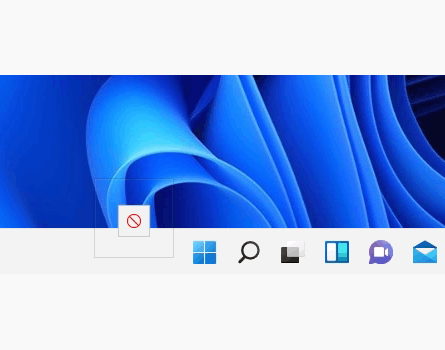
Dropping files on to a running app on taskbar is not working


robgr

Well-known member
Local time
6:06 PM
Posts
104
OS
Windows 11
It's not possible to drop files on to a running app on taskbar
An example is dragging & dropping selected jpg files on to ACDSEE image basket
Another is dragging & dropping selected mkv files on to MKVToolNix Header editor
When the file is dragged and the mouse hovers over the running app on the taskbar you get a 'No entry' type icon so it is not possible to drop the files
It can be done by snapping File Explorer and the app and then dragging & dropping (not via the taskbar)
Any ideas?
 

My Computer My Computer

At a glance

Windows 11Intel(R) Core(TM) i7-107032 GBytes DDR4-2667 (1333 MHz)NVIDIA GeForce GT 1030
OS
Windows 11
Computer type
PC/Desktop
Manufacturer/Model
PCSpecialist
CPU
Intel(R) Core(TM) i7-1070
Motherboard
TUF GAMING B460-PLUS
Memory
32 GBytes DDR4-2667 (1333 MHz)
Graphics Card(s)
NVIDIA GeForce GT 1030
Sound Card
ONBOARD 6 CHANNEL (5.1) HIGH DEF AUDIO (AS STANDARD)
Monitor(s) Displays
Samsung U32J590UQU
Screen Resolution
4k
Hard Drives
SYSTEM Win 10 237.22GB SSD Disk 0 238.47GB M2 (mobo)
DATA Data 931.41GB HD 2.5" Disk 1 931.51GB SATA3
BACKUPS Backups 2TB HD 3.5" Disk 2 2TB SATA3
PSU
CORSAIR 550W CV SERIES™ CV-550 POWER SUPPLY
Case
PCS 3601 CASE
Cooling
CoolerMaster Hyper 212 (120mm) Fan CPU Cooler Black Edition
Internet Speed
57/18 Mbps
Browser
Vivaldi
Antivirus
Kaspersky Total Security

Same for me in a post I made earlier on dropping photo on top of open Edge icon so it then pops up to let you add to this forum, worked in Win10
 

My Computer My Computer

At a glance

Windows 10Intel i7-4790k @ 5GHZ32GB Corsair Dominator Platinum 2400Mhz @ 10-...Nvidia RTX 3090FE @ Core 2200 MHZ / Memory 21...
OS
Windows 10
Computer type
PC/Desktop
Manufacturer/Model
Self Built
CPU
Intel i7-4790k @ 5GHZ
Motherboard
Asus Maximus VI Extreme
Memory
32GB Corsair Dominator Platinum 2400Mhz @ 10-12-11-27-1T
Graphics Card(s)
Nvidia RTX 3090FE @ Core 2200 MHZ / Memory 21 GHZ
Sound Card
Creative SoundBlaster ZxR
Monitor(s) Displays
LG 32GN600 (G-Sync Comp)
Screen Resolution
1440p
Hard Drives
C: Primary SSD > Samsung 860 PRO 512GB
G: Gaming SSD > Samsung 860 PRO 1TB
S: Storage SSD > Samsung 860 EVO 4TB x2 (Windows Storage Spaces = 8TB)
X: Ext Backup > IcyBox+WD Red 4TB x4 (Raid 10)
PSU
Corsair AX1600i
Case
NZXT Phantom 630 (Black)
Cooling
Noctua NH-D15S Chromax Black
Keyboard
Logitech G613
Mouse
Logitech G903 LS (Hero)+PowerPlay Wireless Charge Pad
Internet Speed
VM 1Gb/s
Browser
Edge
Antivirus
Eset
Last edited:

My Computer My Computer

At a glance

Windows 11Intel(R) Core(TM) i7-107032 GBytes DDR4-2667 (1333 MHz)NVIDIA GeForce GT 1030
OS
Windows 11
Computer type
PC/Desktop
Manufacturer/Model
PCSpecialist
CPU
Intel(R) Core(TM) i7-1070
Motherboard
TUF GAMING B460-PLUS
Memory
32 GBytes DDR4-2667 (1333 MHz)
Graphics Card(s)
NVIDIA GeForce GT 1030
Sound Card
ONBOARD 6 CHANNEL (5.1) HIGH DEF AUDIO (AS STANDARD)
Monitor(s) Displays
Samsung U32J590UQU
Screen Resolution
4k
Hard Drives
SYSTEM Win 10 237.22GB SSD Disk 0 238.47GB M2 (mobo)
DATA Data 931.41GB HD 2.5" Disk 1 931.51GB SATA3
BACKUPS Backups 2TB HD 3.5" Disk 2 2TB SATA3
PSU
CORSAIR 550W CV SERIES™ CV-550 POWER SUPPLY
Case
PCS 3601 CASE
Cooling
CoolerMaster Hyper 212 (120mm) Fan CPU Cooler Black Edition
Internet Speed
57/18 Mbps
Browser
Vivaldi
Antivirus
Kaspersky Total Security
yes they dont work.

follow this if you want a temporary solution:


My Computer My Computer

At a glance

Windows 11 x64 v23H2 Build 22631.3958
OS
Windows 11 x64 v23H2 Build 22631.3958
Computer type
PC/Desktop
Manufacturer/Model
Acer

My Computer My Computer

At a glance

Windows 10Intel i7-4790k @ 5GHZ32GB Corsair Dominator Platinum 2400Mhz @ 10-...Nvidia RTX 3090FE @ Core 2200 MHZ / Memory 21...
OS
Windows 10
Computer type
PC/Desktop
Manufacturer/Model
Self Built
CPU
Intel i7-4790k @ 5GHZ
Motherboard
Asus Maximus VI Extreme
Memory
32GB Corsair Dominator Platinum 2400Mhz @ 10-12-11-27-1T
Graphics Card(s)
Nvidia RTX 3090FE @ Core 2200 MHZ / Memory 21 GHZ
Sound Card
Creative SoundBlaster ZxR
Monitor(s) Displays
LG 32GN600 (G-Sync Comp)
Screen Resolution
1440p
Hard Drives
C: Primary SSD > Samsung 860 PRO 512GB
G: Gaming SSD > Samsung 860 PRO 1TB
S: Storage SSD > Samsung 860 EVO 4TB x2 (Windows Storage Spaces = 8TB)
X: Ext Backup > IcyBox+WD Red 4TB x4 (Raid 10)
PSU
Corsair AX1600i
Case
NZXT Phantom 630 (Black)
Cooling
Noctua NH-D15S Chromax Black
Keyboard
Logitech G613
Mouse
Logitech G903 LS (Hero)+PowerPlay Wireless Charge Pad
Internet Speed
VM 1Gb/s
Browser
Edge
Antivirus
Eset

My Computer My Computer

At a glance

Windows 11 x64 v23H2 Build 22631.3958
OS
Windows 11 x64 v23H2 Build 22631.3958
Computer type
PC/Desktop
Manufacturer/Model
Acer
The Taskbar is no longer coupled to the Explorer process.

It was spotted recently that the Taskbar will run under it's own process...

000742.jpg
 

My Computers My Computers

  • At a glance

    Windows 11 Pro
    OS
    Windows 11 Pro
    Computer type
    PC/Desktop
    Manufacturer/Model
    ASUS ROG Strix
  • At a glance

    Windows 11 Pro
    Operating System
    Windows 11 Pro
    Computer type
    Laptop
    Manufacturer/Model
    ASUS VivoBook
  • ASUS VivoBook 'Lite' ~ Windows 11 Home
Intentional:
For now, at least.

IMHO dropping a much used feature that has been available (and used by many) from XP up to W10 is a major mistake.

The quote in your link was that... 'On Feedback Hub, a Microsoft representative said Windows 11 currently does not support drag and drop, but the company "appreciates users feedback."'. That suggests to me that there is (perhaps) a chance that it will be added back in before RTM. I certainly hope so, I use it a lot.
 

My Computers My Computers

  • At a glance

    Windows 11 HomeAMD Athlon Silver 3050U8GBRadeon Graphics
    OS
    Windows 11 Home
    Computer type
    Laptop
    Manufacturer/Model
    Acer Aspire 3 A315-23-R9VY
    CPU
    AMD Athlon Silver 3050U
    Memory
    8GB
    Graphics Card(s)
    Radeon Graphics
    Monitor(s) Displays
    laptop screen
    Screen Resolution
    1366x768 native resolution, up to 2560x1440 with Radeon Virtual Super Resolution
    Hard Drives
    1TB Samsung EVO 870 SSD (from April 2026: 250GB EVO 850)
    Internet Speed
    150 Mbps
    Browser
    Edge, Firefox
    Antivirus
    Defender
    Other Info
    UPDATE - 11 April 2026: due to lid hinges starting to break up this laptop has been retired from active duty. The OS with all software and files has been migrated to my System Seven in 'Other systems' to carry on as my general purpose 'main machine'.

    I've now clean installed 25H2 and used Garlin's scripts to update Secure Boot to CA 2023 and revoke the PCA 2011 certificates. It's new role is to test secure boot issues.

    Info for 2021-2026:
    fully 'Windows 11 ready' laptop. Windows 10 C: partition migrated from my old unsupported 'main machine' then upgraded to 11. A test migration ran Insider builds for 2 months. When 11 was released on 5th October 2021 it was re-imaged back to 10 and was offered the upgrade in Windows Update on 20th October. Windows Update offered the 22H2 Feature Update on 20th September 2022. It got the 23H2 Feature Update on 4th November 2023 through Windows Update, 24H2 on 3rd October 2024 through Windows Update by setting the Target Release Version for 24H2, and 25H2 on 30th September 2025 through Windows Update by setting the Target Release Version for 25H2.
  • At a glance

    Windows 11 ProIntel® Core™ i5-520M8GB(integrated graphics) Intel HD Graphics
    Operating System
    Windows 11 Pro
    Computer type
    Laptop
    Manufacturer/Model
    Dell Latitude E4310
    CPU
    Intel® Core™ i5-520M
    Motherboard
    0T6M8G
    Memory
    8GB
    Graphics card(s)
    (integrated graphics) Intel HD Graphics
    Screen Resolution
    1366x768
    Hard Drives
    500GB Crucial MX500 SSD
    Browser
    Firefox, Edge
    Antivirus
    Defender
    Other Info
    unsupported machine: Legacy bios, MBR, TPM 1.2, upgraded from W10 to W11 using W10/W11 hybrid install media workaround.

    In-place upgrade to 22H2 using ISO and a workaround.
    Feature Update to 23H2 by manually installing the Enablement Package.
    In-place upgrade to 24H2 using hybrid 23H2/24H2 install media.
    Upgraded to 25H2 by Enablement Package.

    Also running Insider Experimental 263xx and 29xxx builds and Windows 10 as native boot .vhdx.
  • My SYSTEM THREE is a Dell Latitude 5410, i7-10610U, 32GB RAM, 512GB NVMe ssd, supported device running Windows 11 Pro.

    My SYSTEM FOUR was a 2-in-1 convertible Lenovo Yoga 11e (1st gen) type 20DA, Celeron N2930, 8GB RAM, 256GB ssd. Unsupported device. This has now been sold. It has been replaced by my System Eight.

    My SYSTEM FIVE is a Dell Latitude 3190 2-in-1, Pentium Silver N5030, 8GB RAM, 1TB NVMe ssd, supported device running Windows 11 Pro, plus Insider Beta, Experimental 263xx and 29xxx builds (and a few others) as a native boot .vhdx.

    My SYSTEM SIX is a Dell Latitude 5550, Core Ultra 7 165H, 64GB RAM, 1TB NVMe SSD, supported device, Windows 11 Pro, Hyper-V host machine. Updated to 25H2 on 30th September 2025.

    My SYSTEM SEVEN is a Lenovo Thinkpad T580, 1920x1080 touchscreen, Intel Core i7-8650U, 16GB RAM, 512GB NVMe SSD + 2nd 512GB NVMe SSD, a supported device for Windows 11. This is my current general purpose 'main machine'. The installed Windows 11 Home from my System One has been migrated to this machine. As its new home has an existing digital licence for Pro I've been able to upgrade the migrated OS from Home to Pro.

    My SYSTEM EIGHT is a 2-in-1 convertible Lenovo Yoga 11e (5th gen) type 20LN, Celeron N4120, 8GB RAM, 512GB NVMe ssd, a supported device for Windows 11. Currently running Windows 11 Pro, plus Insider Beta, Experimental 263xx and 29xxx builds as native boot vhdx.
The Taskbar is no longer coupled to the Explorer process.

It was spotted recently that the Taskbar will run under it's own process...

View attachment 4090

yup.

Code:
https://rammichael.com/7-taskbar-tweaker-and-a-first-look-at-windows-11
 

My Computer My Computer

At a glance

Windows 11 x64 v23H2 Build 22631.3958
OS
Windows 11 x64 v23H2 Build 22631.3958
Computer type
PC/Desktop
Manufacturer/Model
Acer
For now, at least.

IMHO dropping a much used feature that has been available (and used by many) from XP up to W10 is a major mistake.

The quote in your link was that... 'On Feedback Hub, a Microsoft representative said Windows 11 currently does not support drag and drop, but the company "appreciates users feedback."'. That suggests to me that there is (perhaps) a chance that it will be added back in before RTM. I certainly hope so, I use it a lot.
I think MS is stuck between a rock and hard place right now..., they were eager to dish out this offering, but it met with more negative reception than they anticipated!
They've gotta make a few wise moves, and do it quickly!
 

My Computers My Computers

  • At a glance

    Windows 11 Pro
    OS
    Windows 11 Pro
    Computer type
    PC/Desktop
    Manufacturer/Model
    ASUS ROG Strix
  • At a glance

    Windows 11 Pro
    Operating System
    Windows 11 Pro
    Computer type
    Laptop
    Manufacturer/Model
    ASUS VivoBook
  • ASUS VivoBook 'Lite' ~ Windows 11 Home
I think MS is stuck between a rock and hard place right now..., they were eager to dish out this offering, but it met with more negative reception than they anticipated!
They've gotta make a few wise moves, and do it quickly!
Either that or, they don't give a sh*t and are just gonna plow forth!!! :cool:
 

My Computers My Computers

  • At a glance

    Windows 11 Pro
    OS
    Windows 11 Pro
    Computer type
    PC/Desktop
    Manufacturer/Model
    ASUS ROG Strix
  • At a glance

    Windows 11 Pro
    Operating System
    Windows 11 Pro
    Computer type
    Laptop
    Manufacturer/Model
    ASUS VivoBook
  • ASUS VivoBook 'Lite' ~ Windows 11 Home

My Computers My Computers

  • At a glance

    Windows 11 HomeAMD Athlon Silver 3050U8GBRadeon Graphics
    OS
    Windows 11 Home
    Computer type
    Laptop
    Manufacturer/Model
    Acer Aspire 3 A315-23-R9VY
    CPU
    AMD Athlon Silver 3050U
    Memory
    8GB
    Graphics Card(s)
    Radeon Graphics
    Monitor(s) Displays
    laptop screen
    Screen Resolution
    1366x768 native resolution, up to 2560x1440 with Radeon Virtual Super Resolution
    Hard Drives
    1TB Samsung EVO 870 SSD (from April 2026: 250GB EVO 850)
    Internet Speed
    150 Mbps
    Browser
    Edge, Firefox
    Antivirus
    Defender
    Other Info
    UPDATE - 11 April 2026: due to lid hinges starting to break up this laptop has been retired from active duty. The OS with all software and files has been migrated to my System Seven in 'Other systems' to carry on as my general purpose 'main machine'.

    I've now clean installed 25H2 and used Garlin's scripts to update Secure Boot to CA 2023 and revoke the PCA 2011 certificates. It's new role is to test secure boot issues.

    Info for 2021-2026:
    fully 'Windows 11 ready' laptop. Windows 10 C: partition migrated from my old unsupported 'main machine' then upgraded to 11. A test migration ran Insider builds for 2 months. When 11 was released on 5th October 2021 it was re-imaged back to 10 and was offered the upgrade in Windows Update on 20th October. Windows Update offered the 22H2 Feature Update on 20th September 2022. It got the 23H2 Feature Update on 4th November 2023 through Windows Update, 24H2 on 3rd October 2024 through Windows Update by setting the Target Release Version for 24H2, and 25H2 on 30th September 2025 through Windows Update by setting the Target Release Version for 25H2.
  • At a glance

    Windows 11 ProIntel® Core™ i5-520M8GB(integrated graphics) Intel HD Graphics
    Operating System
    Windows 11 Pro
    Computer type
    Laptop
    Manufacturer/Model
    Dell Latitude E4310
    CPU
    Intel® Core™ i5-520M
    Motherboard
    0T6M8G
    Memory
    8GB
    Graphics card(s)
    (integrated graphics) Intel HD Graphics
    Screen Resolution
    1366x768
    Hard Drives
    500GB Crucial MX500 SSD
    Browser
    Firefox, Edge
    Antivirus
    Defender
    Other Info
    unsupported machine: Legacy bios, MBR, TPM 1.2, upgraded from W10 to W11 using W10/W11 hybrid install media workaround.

    In-place upgrade to 22H2 using ISO and a workaround.
    Feature Update to 23H2 by manually installing the Enablement Package.
    In-place upgrade to 24H2 using hybrid 23H2/24H2 install media.
    Upgraded to 25H2 by Enablement Package.

    Also running Insider Experimental 263xx and 29xxx builds and Windows 10 as native boot .vhdx.
  • My SYSTEM THREE is a Dell Latitude 5410, i7-10610U, 32GB RAM, 512GB NVMe ssd, supported device running Windows 11 Pro.

    My SYSTEM FOUR was a 2-in-1 convertible Lenovo Yoga 11e (1st gen) type 20DA, Celeron N2930, 8GB RAM, 256GB ssd. Unsupported device. This has now been sold. It has been replaced by my System Eight.

    My SYSTEM FIVE is a Dell Latitude 3190 2-in-1, Pentium Silver N5030, 8GB RAM, 1TB NVMe ssd, supported device running Windows 11 Pro, plus Insider Beta, Experimental 263xx and 29xxx builds (and a few others) as a native boot .vhdx.

    My SYSTEM SIX is a Dell Latitude 5550, Core Ultra 7 165H, 64GB RAM, 1TB NVMe SSD, supported device, Windows 11 Pro, Hyper-V host machine. Updated to 25H2 on 30th September 2025.

    My SYSTEM SEVEN is a Lenovo Thinkpad T580, 1920x1080 touchscreen, Intel Core i7-8650U, 16GB RAM, 512GB NVMe SSD + 2nd 512GB NVMe SSD, a supported device for Windows 11. This is my current general purpose 'main machine'. The installed Windows 11 Home from my System One has been migrated to this machine. As its new home has an existing digital licence for Pro I've been able to upgrade the migrated OS from Home to Pro.

    My SYSTEM EIGHT is a 2-in-1 convertible Lenovo Yoga 11e (5th gen) type 20LN, Celeron N4120, 8GB RAM, 512GB NVMe ssd, a supported device for Windows 11. Currently running Windows 11 Pro, plus Insider Beta, Experimental 263xx and 29xxx builds as native boot vhdx.
Time will tell...

Anyway..., 4am start for me tomorrow! Gotta hit the sack...,
besides, you've all listened to enough of my vomit spewing for one day! :cool:

Night folks! See ya on the flip side! :sleep:
 

My Computers My Computers

  • At a glance

    Windows 11 Pro
    OS
    Windows 11 Pro
    Computer type
    PC/Desktop
    Manufacturer/Model
    ASUS ROG Strix
  • At a glance

    Windows 11 Pro
    Operating System
    Windows 11 Pro
    Computer type
    Laptop
    Manufacturer/Model
    ASUS VivoBook
  • ASUS VivoBook 'Lite' ~ Windows 11 Home

Latest Support Threads

Back
Top Bottom