Duplicate File Problem


TeeJay

Active member
Local time
6:15 AM
Posts
21
Location
Toronto, Ontario Canada
OS
Windows 11
Hello everyone;

First things first Microsoft Windows Version 23H2 (OS Build 22631.4602).

So here is the problem, I had 14.5 GB (1668 MP3 Files) on my PC as well as the same amount backed up in the OneDrive.

I have been using Hibernation on my PC for about 6 months now with no problems, yesterday January 9th I woke my PC and turned on my Media player and to my horror ALL of my MP3's were gone from my PC's "C" drive.

I immediately went to OneDrive and found them there, waiting as a backup.

I cut the Music folder from the OneDrive in my File Explorer and pasted it back to my PC "C" drive where it had originally been, after it had done it's thing I opened the folder and to my HORROR everyone of my MP3's in it is now duplicated it self, so I now had 3,336 MP3's the original from my PC and the ones that were already there in OneDrive. (See attached Picture for clarity, duplicates are marked with a yellow star.)

When I looked at the OneDrive icon on my PC's taskbar EVERYTHING had uploaded there, even though it was already there.
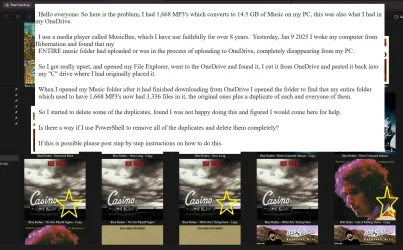
Duplicates.webp

So there is one more thing, I have a program that tells me how much space I have used on my PC since building it myself and on Wed Jan 8th it read 978 GB of my 2 TB C drive had been used.

That same program now reads 1,353 GB of space used, rough math tells me that there are 375 GB of unwanted duplicates (less the 14.5 GB of music) of something on my PC.

I have not bothered to go looking for what has been duplicated, I am so pissed off right now.

Words can not describe what I feel about Microsoft and their HORROR story of the new Windows 11 OS.

Since installing it last year 2023 in June I have had to reinstall Windows 11 5 times because of their incompetence in their programing.

This MAJOR screw up is the straw that broke the camel's back. I am done with OneDrive and the crap it has caused me.

What I would like to know is how can I use PowerShell to remove ALL of the duplicates that are now on my PC or do I have to go through another re - installation of this untested OS?

And by duplicates I mean files that have "Copy" beside the originals

If there is a way of removing ALL duplicate files of every kind from my PC in one sweep with PowerShell.

Step by step instruction with copy/paste commands would be greatly appreciated.

Thanks in advance for all the help that I may get.
 

My Computer My Computer

At a glance

Windows 11
OS
Windows 11
Can you post a screenshot of the names of the duplicated files?
 

My Computer My Computer

At a glance

Windows 11AMD Ryzen 7 5700GMicron Technology DDR4-3200 16GBNVIDIA GeForce RTX 3060
OS
Windows 11
Computer type
PC/Desktop
Manufacturer/Model
HP Pavilion
CPU
AMD Ryzen 7 5700G
Motherboard
Erica6
Memory
Micron Technology DDR4-3200 16GB
Graphics Card(s)
NVIDIA GeForce RTX 3060
Sound Card
Realtek ALC671
Monitor(s) Displays
Samsung SyncMaster U28E590
Screen Resolution
3840 x 2160
Hard Drives
SAMSUNG MZVLQ1T0HALB-000H1
 

My Computer My Computer

At a glance

Windows 11AMD Ryzen 7 5700GMicron Technology DDR4-3200 16GBNVIDIA GeForce RTX 3060
OS
Windows 11
Computer type
PC/Desktop
Manufacturer/Model
HP Pavilion
CPU
AMD Ryzen 7 5700G
Motherboard
Erica6
Memory
Micron Technology DDR4-3200 16GB
Graphics Card(s)
NVIDIA GeForce RTX 3060
Sound Card
Realtek ALC671
Monitor(s) Displays
Samsung SyncMaster U28E590
Screen Resolution
3840 x 2160
Hard Drives
SAMSUNG MZVLQ1T0HALB-000H1
See if this helps (from a similar thread: Easy Way to Delete Duplicate Tracks Just alter the instructions there to delete files that have 'copy' as part of their file name.

You did a wise thing deleting OneDrive!
 

My Computers My Computers

  • At a glance

    Win 11 Pro. 25H2Intel Core i7-14700 (Raptor Lake)32GB Corsair Vengeance LPX (DDR4)Intel UHD 770 — onboard standard as supplied ...
    OS
    Win 11 Pro. 25H2
    Computer type
    PC/Desktop
    Manufacturer/Model
    Customised "Chillblast Apex Intel Core i7 Office PC"
    CPU
    Intel Core i7-14700 (Raptor Lake)
    Motherboard
    ASUS Prime B760M-A WiFi D4
    Memory
    32GB Corsair Vengeance LPX (DDR4)
    Graphics Card(s)
    Intel UHD 770 — onboard standard as supplied by Intel/Asus
    Monitor(s) Displays
    Dell P2421 24 inch WUXGA (1920x1200) 16:10 Monitor
    Screen Resolution
    1920x1200
    Hard Drives
    First (Boot Drive Only): 2TB Samsung SSD 990 Pro.
    Second (Data Drive) 2TB Samsung SSD 990 Pro.
    PSU
    850W Corsair RM850x 80 Plus Gold
    Cooling
    Just standard fans for both the case and CPU.
    Keyboard
    Unicomp Model M (IBM Style keyboard)
    Mouse
    Wired Mouse
    Internet Speed
    1.6 MB/s
    Browser
    Firefox
    Antivirus
    Microsoft's Defender
  • At a glance

    Win 11 Pro. 25H214th Generation Intel® Core™ i9-14900HX32 GB DDR5-5600MHzNVIDIA® GeForce RTX™ 4080 Laptop GPU 12GB GDDR6
    Operating System
    Win 11 Pro. 25H2
    Computer type
    Laptop
    Manufacturer/Model
    Lenovo Legion Pro 7i Gen 9 (16" Intel)
    CPU
    14th Generation Intel® Core™ i9-14900HX
    Memory
    32 GB DDR5-5600MHz
    Graphics card(s)
    NVIDIA® GeForce RTX™ 4080 Laptop GPU 12GB GDDR6
    Monitor(s) Displays
    16" WQXGA (2560 x 1600), IPS, Anti-Glare, Non-Touch, HDR 40
    Screen Resolution
    2560 x 1600
    Hard Drives
    First (Boot): 1 TB SSD M.2 2280 PCIe Gen4 TLC
    Second (Data): 1 TB SSD M.2 2280 PCIe Gen4 TLC
    Keyboard
    Per-Key RGB-Coloured Backlit - English (UK)
    Mouse
    Wired Mouse
    Internet Speed
    1.6 MB/s
    Browser
    Firefox
    Antivirus
    Microsoft's Defender
Windows 11 is not untested. You seek to blame MS for your own mistakes.
 

My Computers My Computers

  • At a glance

    Windows 11 Pro 25H2 26200.8894AMD Ryzen 7 5825U with Radeon Graphics16GB
    OS
    Windows 11 Pro 25H2 26200.8894
    Computer type
    Laptop
    Manufacturer/Model
    Acemagic LX15PRO
    CPU
    AMD Ryzen 7 5825U with Radeon Graphics
    Motherboard
    BIOS CT_BI_AMI_LX15PRO_AB8139_A-004
    Memory
    16GB
    Screen Resolution
    1920 x 1080
    Hard Drives
    SSD 2TB
    Internet Speed
    30 Mbps
    Browser
    Brave
    Antivirus
    Webroot SecureAnywhere Complete beta
  • At a glance

    Windows 11 Pro 23H2 22631.2506Atom N450 1.66GHz2GB
    Operating System
    Windows 11 Pro 23H2 22631.2506
    Computer type
    Laptop
    Manufacturer/Model
    HP Mini 210-1090NR PC (bought in late 2009!)
    CPU
    Atom N450 1.66GHz
    Memory
    2GB
    Browser
    Brave
    Antivirus
    Webroot
  • Acer Swift SF114-34 laptop
    OS Windows 11 Pro 26200.8894
    CPU Pentium Silver N6000
    RAM 4GB
    BIOS v1.17
    SSD Samsung 970 EVO Plus SSD 2TB (an upgrade)
Your problem is a lack of understanding of how OneDrive works. The default for OneDrive is "Files On Demand". This means that all files in your OneDrive folder will be in cloud OneDrive and only downloaded to your PC "ON DEMAND" when you ask to use them. What you were seeing was perfectly normal OneDrive behavior.

I've used OneDrive for over 15 years and I turn "Files On Demand" OFF. The result is that all files in my local OneDrive folder are mirrored in cloud OneDrive in real-time, which is exactly the OneDrive behavior I want. Files are always in both places and always in total sync.

To have all of your files physically both locally and in cloud OneDrive, all you needed to do was simply turn "Files On Demand" OFF in OneDrive settings.
 

My Computers My Computers

  • At a glance

    Windows 11 ProIntel Series 3 Core Ultra X9 388H64GB LPDDR5x 9600 MT/sIntel Arc graphics B390 Panther Lake
    OS
    Windows 11 Pro
    Computer type
    Laptop
    Manufacturer/Model
    Dell XPS 16 DA16260
    CPU
    Intel Series 3 Core Ultra X9 388H
    Memory
    64GB LPDDR5x 9600 MT/s
    Graphics Card(s)
    Intel Arc graphics B390 Panther Lake
    Monitor(s) Displays
    16" 3.2K Tandem OLED Infinity Edge
    Screen Resolution
    3200 x 2000 16:10 236 PPI
    Hard Drives
    1 Terabyte M.2 PCIe NVMe SSD
    Case
    Black Anodized Aluminum
    Cooling
    Vapor Chamber Cooling
    Mouse
    None
    Internet Speed
    942 Mbps Netgear Mesh + 2 Satellites
    Browser
    Microsoft Edge (Chromium)
    Antivirus
    Windows Security (Defender)
    Other Info
    NPU delivering 67 TOPS
    Microsoft 365 subscription
    Microsoft Office 365
    Microsoft OneDrive 1TB Cloud
    Microsoft Visual Studio
    Microsoft Visual Studio Code
    Microsoft Sysinternals Suite
    Microsoft BitLocker
    Microsoft Copilot
    Dell Support Assist
    Dell Command | Update
    Macrium Reflect X subscription
    1Password Password Manager
    Amazon Kindle for PC
    Lightroom/Photoshop subscription
    Interactive Brokers Trader Workstation
  • At a glance

    Windows 11 ProSnapdragon® X Elite (12 Core) with Hexagon NP...32GB LPDDR5x 8448 MT/sIntegrated Adreno GPU
    Operating System
    Windows 11 Pro
    Computer type
    Laptop
    Manufacturer/Model
    Microsoft Surface Laptop 7
    CPU
    Snapdragon® X Elite (12 Core) with Hexagon NPU delivering 45 TOPS
    Memory
    32GB LPDDR5x 8448 MT/s
    Graphics card(s)
    Integrated Adreno GPU
    Sound Card
    Omnisonic speakers with Dolby Atmos spatial sound
    Monitor(s) Displays
    13.8″ PixelSense Flow touchscreen 120 Hz 600 NIT
    Screen Resolution
    2304 × 1536 (201 PPI), 3:2 aspect ratio
    Hard Drives
    1 TB PCIe NVMe Gen 4 SSD
    Case
    Black Anodized Aluminum
    Cooling
    Vapor Chamber Cooling
    Mouse
    None
    Internet Speed
    942 Mbps Netgear Mesh + 2 Satellites
    Browser
    Microsoft Edge (Chromium)
    Antivirus
    Windows Security (Defender)
    Other Info
    Microsoft 365 subscription (Office)
    Microsoft Office 365
    Microsoft OneDrive 1TB Cloud
    Microsoft Visual Studio 2026
    Microsoft Visual Studio Code
    Interactive Brokers Trader Workstation
    Lightroom/Photoshop subscription
    1Password Password Manager
    Microsoft Sysinternals
    Amazon Kindle for PC
    Microsoft BitLocker
    Microsoft Copilot
Can you post a screenshot of the names of the duplicated files?
As requested here is the screen shot:

Duplicates A.webp

This is obviously not my entire MP# collection I had to use Extra Large Icons in the view to show the "Copy".
 

My Computer My Computer

At a glance

Windows 11
OS
Windows 11
I cut the Music folder from the OneDrive
What caused the duplication is..... You don't "cut" a user folder from onedrive.

As far as the duplicate files Here are multiple ways of finding them. Find and Delete Duplicate Files on Windows PC: Step-By-Step Guide
Or use a 3rd party duplicate file finder like this one Duplicate File Finder

No matter what you do I advise you make a full system image first.
-----------------------------------------------------------------

The proper way to have handled it so you did not get into this mess was to first disable backup folder syncing for the Music folder
https://www.elevenforum.com/t/turn-on-or-off-onedrive-folder-backup-syncing-across-windows-11-devices.4321/

NOTE: ONLY IF FOLDER DOES NOT MOVE TO DEFAULT LOCATION DO THIS
If the Music folder location does not move to C:\users\yourusernamet, you could try option three in the tutorial below to restore the default folder location and move your files manually from Onedrive into the folder..


My Computers My Computers

  • At a glance

    Windows 11 Pro 25H2 26200.8875i9-10900 10 core 20 threads32 gbnone-Intel UHD Graphics 630
    OS
    Windows 11 Pro 25H2 26200.8875
    Computer type
    PC/Desktop
    Manufacturer/Model
    Dell Optiplex 7080
    CPU
    i9-10900 10 core 20 threads
    Motherboard
    DELL 0J37VM
    Memory
    32 gb
    Graphics Card(s)
    none-Intel UHD Graphics 630
    Sound Card
    Integrated Realtek
    Monitor(s) Displays
    Benq 27
    Screen Resolution
    2560x1440
    Hard Drives
    2x1tb Solidigm m.2 nvme /External drives 512gb Samsung m.2 sata+2tb Kingston m2.nvme
    PSU
    500w
    Case
    MT
    Cooling
    Dell Premium
    Keyboard
    Logitech wired
    Mouse
    Logitech wireless
    Internet Speed
    so slow I'm too embarrassed to tell
    Browser
    #1 Edge #2 Firefox
    Antivirus
    Defender+MWB Premium
  • At a glance

    Windows 11 Pro 24H2 26200.8875AMD Ryzen 7 6800U32 gbintegrated
    Operating System
    Windows 11 Pro 24H2 26200.8875
    Computer type
    PC/Desktop
    Manufacturer/Model
    Beelink Mini PC SER5
    CPU
    AMD Ryzen 7 6800U
    Memory
    32 gb
    Graphics card(s)
    integrated
    Sound Card
    integrated
    Monitor(s) Displays
    Benq 27
    Screen Resolution
    2560x1440
    Hard Drives
    1TB Crucial nvme
    Keyboard
    Logitech wired
    Mouse
    Logitech wireless
    Internet Speed
    still too embarrassed to tell
    Browser
    Firefox
    Antivirus
    Defender
    Other Info
    System 3 is non compliant Dell 9020 i7-4770/24gb ram Win11 PRO 26200.8875
Your problem is a lack of understanding of how OneDrive works. The default for OneDrive is "Files On Demand". This means that all files in your OneDrive folder will be in cloud OneDrive and only downloaded to your PC "ON DEMAND" when you ask to use them. What you were seeing was perfectly normal OneDrive behavior.

I've used OneDrive for over 15 years and I turn "Files On Demand" OFF. The result is that all files in my local OneDrive folder are mirrored in cloud OneDrive in real-time, which is exactly the OneDrive behavior I want. Files are always in both places and always in total sync.

To have all of your files physically both locally and in cloud OneDrive, all you needed to do was simply turn "Files On Demand" OFF in OneDrive settings.
No Gary you seem to have missed the entire point, they were already in the OneDrive or Cloud and they took all of them off my PC and now I have duplicates.

I have used Microsoft since Windows 95 and know how the system works.

This was caused by MS OS not me thanks for not responding anymore.

As I originally stated MS OS did this by itself, I did nothing but Hibernate my PC, also how do explain my PC going from 978 GB of used space to over 1383 GB of used space in less then a 12 hour period.

It is IMPOSSIBLE to use up that much space by me, my PC is not that fast, nor am I. That would mean I would need hundreds of connections for my one PC to be able to do that.

Have a nice day.
 

My Computer My Computer

At a glance

Windows 11
OS
Windows 11
Here's a little PowerShell to delete files from the Music folder where the name contains - Copy. As it stands, it will not actually delete anything, only showing you what would happen if you ran it. If you want to actually delete, take the -WhatIf off the end.

Powershell:
Get-ChildItem -Path ([Environment]::GetFolderPath([Environment+SpecialFolder]::MyMusic)) -Recurse -Force -File | Where-Object { $_.Name -like '*- Copy*' } | Remove-Item -WhatIf
 

My Computer My Computer

At a glance

Windows 11 Enterprise 25H2 [rev. 8893]
OS
Windows 11 Enterprise 25H2 [rev. 8893]
The files in your Music folder were duplicated because you copied them from OneDrive. I don't know why Media Player did not see them. Did you check with File Explorer? That's why the duplicates have 'copy' in the name because the files were ALREADY there.

I suggest you go to the folder in Command Prompt and then enter DEL *copy.*
 

My Computers My Computers

  • At a glance

    Windows 11 Pro 25H2 26200.8894AMD Ryzen 7 5825U with Radeon Graphics16GB
    OS
    Windows 11 Pro 25H2 26200.8894
    Computer type
    Laptop
    Manufacturer/Model
    Acemagic LX15PRO
    CPU
    AMD Ryzen 7 5825U with Radeon Graphics
    Motherboard
    BIOS CT_BI_AMI_LX15PRO_AB8139_A-004
    Memory
    16GB
    Screen Resolution
    1920 x 1080
    Hard Drives
    SSD 2TB
    Internet Speed
    30 Mbps
    Browser
    Brave
    Antivirus
    Webroot SecureAnywhere Complete beta
  • At a glance

    Windows 11 Pro 23H2 22631.2506Atom N450 1.66GHz2GB
    Operating System
    Windows 11 Pro 23H2 22631.2506
    Computer type
    Laptop
    Manufacturer/Model
    HP Mini 210-1090NR PC (bought in late 2009!)
    CPU
    Atom N450 1.66GHz
    Memory
    2GB
    Browser
    Brave
    Antivirus
    Webroot
  • Acer Swift SF114-34 laptop
    OS Windows 11 Pro 26200.8894
    CPU Pentium Silver N6000
    RAM 4GB
    BIOS v1.17
    SSD Samsung 970 EVO Plus SSD 2TB (an upgrade)
Just go to the topmost folder and search file explorer for
Code:
“- copy”
and delete them all.
Make sure you search that exact phrase (including quotation marks) in case you just happen to have any album or song titles with the word copy in them.

Or use pseymour script above
 

My Computers My Computers

  • At a glance

    Windows 11 Pro 25H2 Build 26200.8894Intel(R) Core(TM) i7-4770K CPU @ 3.50GHz32.0 GB of I forget and the box is in storage.Gigabyte nVidia GeForce GTX 1660 Super OC 6GB
    OS
    Windows 11 Pro 25H2 Build 26200.8894
    Computer type
    PC/Desktop
    Manufacturer/Model
    Sin-built 2013
    CPU
    Intel(R) Core(TM) i7-4770K CPU @ 3.50GHz
    Motherboard
    ASUS ROG Maximus VI Formula
    Memory
    32.0 GB of I forget and the box is in storage.
    Graphics Card(s)
    Gigabyte nVidia GeForce GTX 1660 Super OC 6GB
    Sound Card
    ROG SupremeFX Formula 8-Channel High Definition Audio
    Monitor(s) Displays
    5 x LG 25MS500-B - 1 x 24MK430H-B - 1 x Wacom Pro 22" Touch Screen Tablet
    Screen Resolution
    All over the place
    Hard Drives
    Too many to list. OS on Samsung 1TB 870 QVO SATA
    PSU
    Silverstone 1500
    Case
    NZXT Phantom 820 Full-Tower Case
    Cooling
    Noctua NH-D15 Elite Class Dual Tower CPU Cooler / 6 x EziDIY 120mm / 2 x Corsair 140mm somethings / 1 x 140mm Thermaltake something / 2 x 200mm Corsair.
    Keyboard
    Corsair K95 / Logitech diNovo Edge Wireless
    Mouse
    Logitech: G402 / G502 / Mx Masters / Mx Air Cordless
    Internet Speed
    2000/500Mbps
    Browser
    All sorts
    Antivirus
    Kaspersky Premium
    Other Info
    ㅤㅤㅤㅤㅤㅤㅤㅤㅤㅤㅤㅤㅤㅤㅤㅤㅤㅤㅤㅤㅤㅤㅤㅤㅤㅤㅤㅤㅤㅤㅤㅤㅤㅤㅤㅤㅤㅤㅤㅤ⠀⠀⠀⠀⠀⠀⠀⠀⠀⠀
    TP-Link BE9300 WiFi 7 Bluetooth 5.4 (Archer TBE550E)
    TP-Link TX201 V1 2.5GB Lan

    Grandstream HT812 - VoIP
    ASUS DSL-AX82U - Mesh
    ASUS RT-AC68U - Mesh
    ASUS RT-BE88U Router

    Brother MFC-L2880DW Printer

    I’m on a horse.
  • At a glance

    Windows 11 Pro 25H2 Build 26200.8894 (Wifes)13th Generation Intel® Core™ i5-1340P Process...16GB LPDDR5-52001x Intel® Iris® Xe Graphics
    Operating System
    Windows 11 Pro 25H2 Build 26200.8894 (Wifes)
    Computer type
    Laptop
    Manufacturer/Model
    LENOVO Yoga 7 14IRL8 - Type 82YL
    CPU
    13th Generation Intel® Core™ i5-1340P Processor(Core™ i5-1340P)
    Memory
    16GB LPDDR5-5200
    Graphics card(s)
    1x Intel® Iris® Xe Graphics
    Sound Card
    Optimized with Dolby Atmos®
    Screen Resolution
    QHD 2880 x 1800 OLED
    Hard Drives
    M.2 512 GB SSD PCIe
    Mouse
    Logiteck MX Master 3S
    Internet Speed
    2000/500
    Antivirus
    Defender / Malwarebytes
    Other Info
    …still on a horse.


    Wireless Network: Wi-Fi 6E 2x2 AX; Bluetooth® 5.1 or above
    Ports: 1x 1 Novo button; 2 in 1 Audio Combo jack; Micro SD Card Reader; HDMI 1.4b; 2 x USB Type-C (TBT4)
    USB 3.2 Gen 2 DP 1.4a
    PD 3.0); 1 x USB 3.2 Gen1 Type A
    Camera
    1x 1080P FHD IR/RGB Hybrid with Privacy Shutter and Dual Array Microphone
    Graphics
    1x Intel® Iris® Xe Graphics
    Monitor
    14" WUXGA
    Form Factor
    Convertible Notebook
  • Windows 11 Pro 25H2 Build 26200.8894 (Wifes)

    Yoga 7 2-in-1 14IML9 - Type 83DJ

    Processor: Intel® Core™ Ultra 7 155H Processor(Core™ Ultra 7 155H)

    Memory: 32GB LPD5X-7467

    Hard Drive: 1 TB SSD PCIe

    Wireless Network: 1x Wi-Fi 6E 2x2 AX; Bluetooth® 5.1 or above

    Ports: 1 x HDMI 2.1 TMDS; 1 x Novo Button; 1 x Combo Audio Jack
    2 x USB-C (USB 4.0)
    1 x USB-A 3.2 Gen 1

    Camera: 1080P FHD IR Hybrid with Dual Microphone

    Graphics: Intel® Arc™ Graphics

    Monitor: 14" 2.8K

    ...Where's my horse?
Too late, so long to reply. Waiting since January, had my PC given a full examination for failed components and check Windows OS.

Components were good to go.

Windows OS totally corrupted beyond fixing, completely erased and formatted, and re-installed.

Problem cured.

Thank you for the response, sorry it took you 5 months to respond.

Enjoy the heat wave.
 

My Computer My Computer

At a glance

Windows 11
OS
Windows 11
Back
Top Bottom