
On my Fritzbox 7490 router, it has a feature where you can plug in a USB drive and it will be available to all users of the network in a NAS-like way.
For the last couple of months (but never before that) I'm seeing duplicate files and folders, Sometimes two instances of each folder or file, and sometimes three instances. I permanently have an explorer instance open to that drive because I use it so often. Ignore the fact that other machines have potential access to it, because my laptop is the only one that does ever use it (and is 99.9% of the time the only computer switched on).
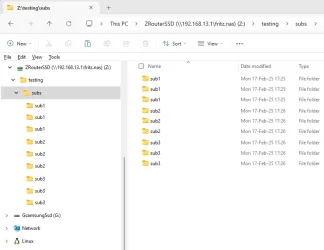
I've made a screenshot below of what it looks like. It is of course impossible to have multiple files or folders of the same name, but Explorer is happy to present the folder hierarchy as if that is what's happening. You'd think it would catch itself and realize that can't be right, but it doesn't. If I hit F5 to refresh, they'll usually go away and I'll see single entries as normal, but quite often they don't.
One important and perhaps relevant thing to note is that I have a batch file that is constantly running/re-running and when it detects files of a certain type, it will copy them from my local drives to that network drive. So my machine will have two parallel (and different) connections to the drive. But .... and it's a big but (I cannot lie) I've been using this machine and that batch file since I bought the laptop 3 years ago without this duplicate entries ever happening. I suspect a windows update change to Explorer (or some service) that happened in the last 6 months.
Is it just me?
Using Windows 11 Home 24H2 26100.3194
For the last couple of months (but never before that) I'm seeing duplicate files and folders, Sometimes two instances of each folder or file, and sometimes three instances. I permanently have an explorer instance open to that drive because I use it so often. Ignore the fact that other machines have potential access to it, because my laptop is the only one that does ever use it (and is 99.9% of the time the only computer switched on).
I've made a screenshot below of what it looks like. It is of course impossible to have multiple files or folders of the same name, but Explorer is happy to present the folder hierarchy as if that is what's happening. You'd think it would catch itself and realize that can't be right, but it doesn't. If I hit F5 to refresh, they'll usually go away and I'll see single entries as normal, but quite often they don't.
One important and perhaps relevant thing to note is that I have a batch file that is constantly running/re-running and when it detects files of a certain type, it will copy them from my local drives to that network drive. So my machine will have two parallel (and different) connections to the drive. But .... and it's a big but (I cannot lie) I've been using this machine and that batch file since I bought the laptop 3 years ago without this duplicate entries ever happening. I suspect a windows update change to Explorer (or some service) that happened in the last 6 months.
Is it just me?
Using Windows 11 Home 24H2 26100.3194
- Windows Build/Version
- 26100.3194
My Computer
At a glance
Win11 Pro 25H2Intel Core Ultra 9 275HX32GBNVIDIA® GeForce RTX™ 5060 Laptop GPU
- OS
- Win11 Pro 25H2
- Computer type
- Laptop
- Manufacturer/Model
- Lenovo ThinkBook 16p G6 IAX
- CPU
- Intel Core Ultra 9 275HX
- Memory
- 32GB
- Graphics Card(s)
- NVIDIA® GeForce RTX™ 5060 Laptop GPU
- Monitor(s) Displays
- 3 external monitors, Samsung 43" super widescreen (providing 2x 1080p via separate inputs), 1x LG 27" 1080p
- Screen Resolution
- 2560x1600 and 3x 1920x1080
- Hard Drives
- 1TB SSD internal, 2x4TB SSD external
- Keyboard
- Logitech illuminated and silent thing
- Mouse
- Traditional MS Intellimouse
- Internet Speed
- 256Mb down/50Mb up
- Browser
- Chrome mostly, Edge for PDF's, Brave for YouTube
- Antivirus
- MalwareBytes/Defender
- Other Info
- Also an m4 Mac Mini for work dev stuff that I operate remotely via HelpWire.






