

I’ve installed eM Client from the MS Store because I find it convenient for keeping programs easily up-to-date… The only two issues I’ve encountered are:
- Pop-up and notifications in general show “eMClient.20054CA46072C_rq410mg92b554…” label (the UWP app real name) instead of expected “eM Client”, f.e.:
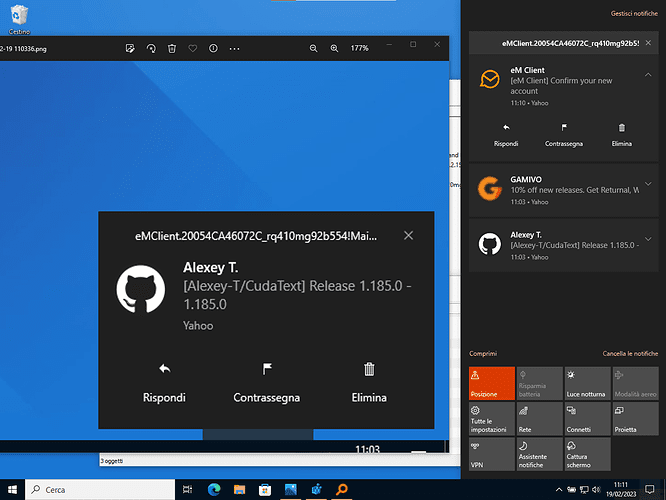
image1280×960 153 KB
Is there something I can edit in the registry to make notifications show a comprehensible “eM Client” instead?

- Windows Build/Version
- Windows 11 22H2
My Computer
At a glance
Windows 11 HomeIntel i9-13980HX32GB DDR5 5600MHzNVidia GTX 4090 Laptop 256bit 16GB 175W
- OS
- Windows 11 Home
- Computer type
- Laptop
- Manufacturer/Model
- ASUS ROG SCAR 18
- CPU
- Intel i9-13980HX
- Memory
- 32GB DDR5 5600MHz
- Graphics Card(s)
- NVidia GTX 4090 Laptop 256bit 16GB 175W
- Sound Card
- Realtek ALC285 + Dolby Atmos
- Monitor(s) Displays
- G-Sync NE180QDM-NZ2 18" 16:10, FreeSync Premium XiaoMi Mi 34" 21:9
- Screen Resolution
- 2560x1600@240Hz (internal), 3440x1440@144Hz (external)
- Hard Drives
- NVMe Lexar NM790 1TB 6GB/s, NVMe Lexar NM790 4TB 6GB/s
- PSU
- 330W (laptop PSU)
- Mouse
- ROG Strix Carry Wireless-BT mouse
- Other Info
- 4K UHD USB Archgon Star Blu-Ray 4K UHD,
8BitDo Arcade Stick,
Vader 4 Pro controller






