Enable Insider Updates for Incompatible Laptops


nwtech

Well-known member
Local time
10:37 PM
Posts
14
OS
Windows 11 | 24H2
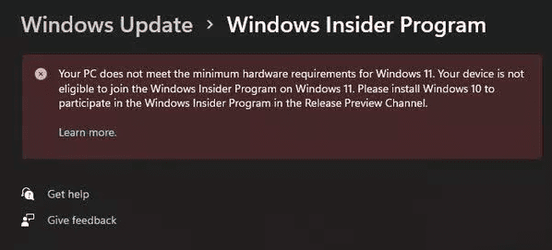
Hi, I've been Insider for a long time, however after Windows 11 I can't use Insider as my laptop is incompatible. Is it possible to work around this issue, and release the updates?
 
Windows Build/Version
Windows 11, 21H2

Attachments

  • 1638636178535.png
    1638636178535.png
    28.7 KB · Views: 3

My Computer My Computer

At a glance

Windows 11 | 24H2Intel® Core™ i7-12700H (24 MB, 4.70 GHz)DDR5 24GB '4800 MHzGeForce RTX™ 3060 6GB
OS
Windows 11 | 24H2
Computer type
Laptop
Manufacturer/Model
N.A.V.E ESTELAR | GM5AG0O
CPU
Intel® Core™ i7-12700H (24 MB, 4.70 GHz)
Motherboard
FCBGA1744
Memory
DDR5 24GB '4800 MHz
Graphics Card(s)
GeForce RTX™ 3060 6GB
Monitor(s) Displays
Acer Predator 27" XB273 Gx 240Hz
Screen Resolution
Full HD 144Hz / Adaptive Sync
Hard Drives
NVME 1 TB PCIe 4.0
NVME 512 GB PCIe 4.0
PSU
200W
Mouse
Logitech G305
Internet Speed
700MB
Browser
Brave
Antivirus
Kaspersky Total Security
Hi and welcome to the forum
I just did a Google search and I found this.. It has the instruction on how to install/update to the insider program,, there may be other instruction in the tutorial section of this forum


My Computer My Computer

At a glance

Windows 11 Home- RP - 26H2 -26300.9550AMD Ryzen 5 5600GG.SKILL Ripjaws V Series 64GB 4x16Nvidia geforce gtx titan x
OS
Windows 11 Home- RP - 26H2 -26300.9550
Computer type
PC/Desktop
Manufacturer/Model
Banana Junior 5600-G Series
CPU
AMD Ryzen 5 5600G
Motherboard
Asus ROG Strix B550-F
Memory
G.SKILL Ripjaws V Series 64GB 4x16
Graphics Card(s)
Nvidia geforce gtx titan x
Monitor(s) Displays
28" ASUS VP28U 4k
Screen Resolution
4K
Hard Drives
Primary SAMSUNG 970 EVO Plus
PSU
EVGA BQ 700w 80+ Bronze
Case
Zalman i3 NEO
Cooling
ARCTIC Freezer 7 X
Keyboard
Corsair
Mouse
Amazon Generic with Cord
Internet Speed
Download: 295.11 mbps Upload: 65.35 mbps T-Mobile Internet
Browser
Firefox and Edge
Antivirus
MS - Defender
Other Info
Speakers: Klipsch ProMedia 2.1
By means of hacks, it should definitely be possible to use the latest version of Windows 11 (even the insider editions) on an unsupported PC, if it could run Windows 10.
This is because Windows 11 is not actually very much relying on TPM 2.0 or the other "requirements" (such as CPU being 8th gen Intel, it would work perfectly fine on 6th gen too...)

Keep in mind, this is the case as of December, 2021. It might change later. If Microsoft actually starts to rely on features not supported by older hardware, then you might experience crashes or maybe it won't start anymore. This is especially the case with Insider editions which are the first versions to bring new changes. So I would recommend against installing them. But still, if you really wanted, it is possible to do it.

Remember that the Rufus hack is not *magic* it is actually just a simple modification to the installer, to let you bypass the checks DURING install. It, however, does not touch core Windows files inside the wim/esd image therefore it cannot "trick" Windows Update, let alone MCT (Media creation tool, a tool that isn't even on the filesystem by default, you download it after installing...) to believe that your PC is compatible. You would need to manually patch these tools or spoof your hardware config to them.


Or, since some insider version are also released as ISOs you could mod the installer manually and then do in-place upgrades with the modded installer.

I cannot stress enough: it will work for a while, then it will break. It definitely will break down one day, as these rather strict requirements must be there for a good reason. You should upgrade your hardware or just stay on Windows 10. It is still supported for 4 more years at least

 

My Computers My Computers

Hi, I tried all the suggested alternatives, unfortunately the only way to install it is offline via ISO
 

My Computer My Computer

At a glance

Windows 11 | 24H2Intel® Core™ i7-12700H (24 MB, 4.70 GHz)DDR5 24GB '4800 MHzGeForce RTX™ 3060 6GB
OS
Windows 11 | 24H2
Computer type
Laptop
Manufacturer/Model
N.A.V.E ESTELAR | GM5AG0O
CPU
Intel® Core™ i7-12700H (24 MB, 4.70 GHz)
Motherboard
FCBGA1744
Memory
DDR5 24GB '4800 MHz
Graphics Card(s)
GeForce RTX™ 3060 6GB
Monitor(s) Displays
Acer Predator 27" XB273 Gx 240Hz
Screen Resolution
Full HD 144Hz / Adaptive Sync
Hard Drives
NVME 1 TB PCIe 4.0
NVME 512 GB PCIe 4.0
PSU
200W
Mouse
Logitech G305
Internet Speed
700MB
Browser
Brave
Antivirus
Kaspersky Total Security
You can actually install it online via ISO but it requires modification to the installer, and you still need to download the full ISO of course.

(Be careful: by online I do not mean internet, I mean dism-like online interpretation, so running on a real/live system, not booted from some installer disk)

But still, this is so much of a mess and compatibility hell (especially in the future when they will probably deploy the features for which these restrictions were added)

Windows 10 is still supported for 4 more years at least, with an extension possible even after it.
ANd Windows 11 does not offer so much more , especially not on incompatible hardware. I cannot see why you want to do this beyond experimentation, for which a virtual machine could be better.
 

My Computers My Computers

Hi. There are many versions of the moded windows 11 as iso files available in different forums. You can safely install any of them on your Non-TPM compliant machine without any issue. Many of them are even updatable. I am using such a version on my 12 years old HP laptop smoothly. It may or may not cause any issue in the future. But at present, it is running as if it has been installed on a newer machine. I am new here and don't know whether it is allowed to post links to other forums here.
 

My Computer My Computer

At a glance

windows 11
OS
windows 11
Computer type
Laptop
Manufacturer/Model
hp dv6 3085t

Latest Support Threads

Back
Top Bottom