Phone Enable or Disable Allow PC to Access your Mobile Devices in Windows 11

  • Thread starter Thread starter Brink
  • Start date Published: Start date Updated Updated:
  • Tags Tags
    android

Cross_Device_banner.png

This tutorial will show you how to turn on or off "Allow this PC to access content and capabilities from your mobile devices" for your Microsoft account in Windows 11.

Now you can link and manage your mobile devices directly from your PC. This link between your Android device and PC provides instant access to your mobile device with just a few simple steps.

The following are required for this to work:
  • A PC running Windows 11.
  • An Android devices running Android 8.0 or later.
  • Your Phone and your PC both need to be connected to Wi-Fi network (directly or via router).
Starting with Windows 11 build 26100.7309 (24H2) and build 26200.7309 (25H2), you can now directly add and manage your mobile devices from Settings on your Windows PC by navigating to “Mobile Devices” under the Bluetooth & Devices section.

Reference:

If you disabled Phone-PC linking on this device using group policy, it will also disable Mobile Devices.


Contents

  • Option One: Turn On or Off "Allow this PC to access content and capabilities from your mobile devices" in Settings
  • Option Two: Turn On or Off "Allow this PC to access content and capabilities from your mobile devices" using REG file


Option One

Turn On or Off "Allow this PC to access content and capabilities from your mobile devices" in Settings


1 Open Settings (Win+I).

2 Click/tap on Bluetooth & devices on the left side, and click/tap on Mobile devices on the right side. (see screenshot below)

Starting with Windows 11 build 22631.3235, the Phone Link settings page has been renamed to Mobile devices.


Mobile_Devices_Settings-1.webp

3 Do step 4 (on) or step 5 (off) below for what you want.

4 Turn On "Allow this PC to access your mobile devices"

A) Turn On Allow this PC to access content and capabilities from your mobile devices. (see screenshot below)​

Mobile_Devices_Settings-2.webp

B) If this is the first time turning on this setting, the Cross Device Experience Host feature will now download and install for this feature. (see screenshot below)​

Mobile_Devices_Settings-3.webp

C) Go to step 6 below.​

5 Turn Off "Allow this PC to access your mobile devices"

This is the default setting.


A) Turn Off Allow this PC to access content and capabilities from your mobile devices. (see screenshot below)​

B) Go to step 6 below.​

Mobile_Devices_Settings-4.webp

6 You can now close Settings if you like.


Option Two

Turn On or Off "Allow this PC to access content and capabilities from your mobile devices" using REG file


1 Do step 2 (on) or step 3 (off) below for what you want.

2 Turn On "Allow this PC to access your mobile devices"

This will not install the required Cross Device Experience Host feature if it hasn't already been installed.


A) Click/tap on the Download button below to download the REG file below, and go to step 4 below.​

Turn_ON_Allow_this_PC_to_access_your_mobile_devices.reg


(Contents of REG file for reference)
Code:
Windows Registry Editor Version 5.00

[HKEY_CURRENT_USER\Software\Microsoft\Windows\CurrentVersion\Mobility]
"CrossDeviceEnabled"=dword:00000001

3 Turn Off "Allow this PC to access your mobile devices"

This is the default setting.


A) Click/tap on the Download button below to download the REG file below, and go to step 4 below.​

Turn_OFF_Allow_this_PC_to_access_your_mobile_devices.reg


(Contents of REG file for reference)
Code:
Windows Registry Editor Version 5.00

[HKEY_CURRENT_USER\Software\Microsoft\Windows\CurrentVersion\Mobility]
"CrossDeviceEnabled"=dword:00000000

4 Save the .reg file to your desktop.

5 Double click/tap on the downloaded .reg file to merge it.

6 When prompted, click/tap on Run, Yes (UAC), Yes, and OK to approve the merge.

7 You can now delete the downloaded .reg file if you like.


That's it,
Shawn Brink


Attachments

Last edited:

Hi there,

I run a debloated script sometime last year that disabled some unnecessary stuff and rendered some sections with "Some of these settings are managed by your organization".

I was able to toggle the "Allow this PC to access your mobile devices" with the regeditor change you mentioned, but the buttons are still grayed out and do nothing.

I am able to run the Phone Link app and do basically everything between my PC and my android device, EXCEPT for the new feature that allows the use of the phone camara as a windows webcam, since to turn on this ability we have to toggle it inside the "Manage Devices" that I can't open.

1709289158887.png

1709289220448.png


Anyway I can restore this by regedit?

Thanks
 

My Computer My Computer

At a glance

Windows 11 ProAMD Ryzen 9 5950X64GB G.Skill F4-3600CL16NVIDIA GeForce RTX 4080
OS
Windows 11 Pro
Computer type
PC/Desktop
CPU
AMD Ryzen 9 5950X
Motherboard
ASUS ROG STRIX X570-F GAMING
Memory
64GB G.Skill F4-3600CL16
Graphics Card(s)
NVIDIA GeForce RTX 4080
Screen Resolution
4K
You might have some luck by looking for relevant policies and remove them after performing a backup:
The keys to look for are:

HKEY_LOCAL_MACHINE\SOFTWARE\Policies
HKEY_CURRENT_USER\Software\Microsoft\Windows\CurrentVersion\Policies

There could be others.
 

My Computers My Computers

  • At a glance

    All Branches but StableAMD Ryzen 7 7735HS 3200-4500 Mhz 8 cores x 232 GB DDR5Radeon Graphic / NVIDIA GeForce RTX 4060 8 GB...
    OS
    All Branches but Stable
    Computer type
    Laptop
    Manufacturer/Model
    Acer Nitro ANV15-51
    CPU
    AMD Ryzen 7 7735HS 3200-4500 Mhz 8 cores x 2
    Motherboard
    Sportage_RBH
    Memory
    32 GB DDR5
    Graphics Card(s)
    Radeon Graphic / NVIDIA GeForce RTX 4060 8 GB GDDR6
    Sound Card
    AMD/Realtek(R) Audio
    Monitor(s) Displays
    Integrated Monitor (15.3"vis)
    Screen Resolution
    FHD 1920X1080 16:9 144Hz
    Hard Drives
    KINGSTON OM8SEP4512Q-AA 1TB
    Western Digital 256GB
    PSU
    19V DC 6.32 A 120 W
    Cooling
    Dual Fans
    Mouse
    MS Bluetooth
    Internet Speed
    Fiber 1GB Cox -us & 1GB Orange-fr
    Browser
    Edge Canary- Firefox Nightly-Chrome Dev-Chrome Dev
    Antivirus
    Windows Defender
  • At a glance

    Windows 11 BetaAMD A9-94208 GB of DDR4AMD Radeon R5
    Operating System
    Windows 11 Beta
    Computer type
    Laptop
    Manufacturer/Model
    Asus X751BP
    CPU
    AMD A9-9420
    Memory
    8 GB of DDR4
    Graphics card(s)
    AMD Radeon R5
    Screen Resolution
    1600x900
    Hard Drives
    Seagate 1 TB
@OAT yes I checked those as well as Group Policy's Administrative Templates, it seems that a recent change in "Data collection and preview builds" was the culprit here, optional data was turned off witch prevented some features to work correctly since I'm on the beta channel.

After some tweaks and restarts all is available again :wink:

Thanks
 

My Computer My Computer

At a glance

Windows 11 ProAMD Ryzen 9 5950X64GB G.Skill F4-3600CL16NVIDIA GeForce RTX 4080
OS
Windows 11 Pro
Computer type
PC/Desktop
CPU
AMD Ryzen 9 5950X
Motherboard
ASUS ROG STRIX X570-F GAMING
Memory
64GB G.Skill F4-3600CL16
Graphics Card(s)
NVIDIA GeForce RTX 4080
Screen Resolution
4K
  • Like
Reactions: OAT
For that specific setting, the key below is the culprit:

HKEY_LOCAL_MACHINE\SOFTWARE\Policies\Microsoft\Windows\CloudContent
DisableWindowsConsumerFeatures=RegDWord=0
 

My Computers My Computers

  • At a glance

    All Branches but StableAMD Ryzen 7 7735HS 3200-4500 Mhz 8 cores x 232 GB DDR5Radeon Graphic / NVIDIA GeForce RTX 4060 8 GB...
    OS
    All Branches but Stable
    Computer type
    Laptop
    Manufacturer/Model
    Acer Nitro ANV15-51
    CPU
    AMD Ryzen 7 7735HS 3200-4500 Mhz 8 cores x 2
    Motherboard
    Sportage_RBH
    Memory
    32 GB DDR5
    Graphics Card(s)
    Radeon Graphic / NVIDIA GeForce RTX 4060 8 GB GDDR6
    Sound Card
    AMD/Realtek(R) Audio
    Monitor(s) Displays
    Integrated Monitor (15.3"vis)
    Screen Resolution
    FHD 1920X1080 16:9 144Hz
    Hard Drives
    KINGSTON OM8SEP4512Q-AA 1TB
    Western Digital 256GB
    PSU
    19V DC 6.32 A 120 W
    Cooling
    Dual Fans
    Mouse
    MS Bluetooth
    Internet Speed
    Fiber 1GB Cox -us & 1GB Orange-fr
    Browser
    Edge Canary- Firefox Nightly-Chrome Dev-Chrome Dev
    Antivirus
    Windows Defender
  • At a glance

    Windows 11 BetaAMD A9-94208 GB of DDR4AMD Radeon R5
    Operating System
    Windows 11 Beta
    Computer type
    Laptop
    Manufacturer/Model
    Asus X751BP
    CPU
    AMD A9-9420
    Memory
    8 GB of DDR4
    Graphics card(s)
    AMD Radeon R5
    Screen Resolution
    1600x900
    Hard Drives
    Seagate 1 TB
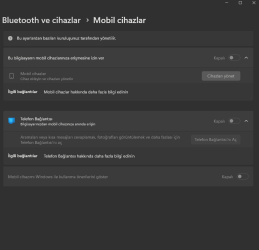
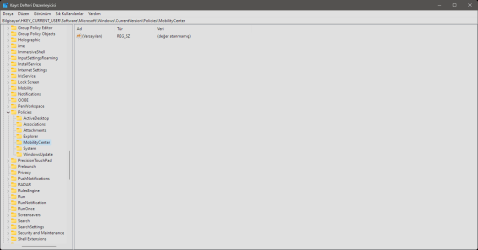
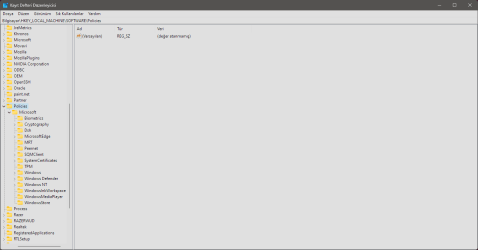
Same here how get rid this warning and can use this features ''Some of these settings are managed by your organization'' help please.Ekran görüntüsü 2024-05-31 124053.pngEkran görüntüsü 2024-05-31 124119.pngEkran görüntüsü 2024-05-31 124527.png

Win 11 Home 22631.3593
 

My Computer My Computer

At a glance

Windows 11 HomeRyzen 5700XCrucial 16GB (2X8) 3600MhzMSİ GTX 1660Ti 6GB
OS
Windows 11 Home
Computer type
PC/Desktop
Manufacturer/Model
Custom
CPU
Ryzen 5700X
Motherboard
MSİ B550 A-Pro
Memory
Crucial 16GB (2X8) 3600Mhz
Graphics Card(s)
MSİ GTX 1660Ti 6GB
Sound Card
Realtek® ALC892 Codec
Monitor(s) Displays
Samsung Odyssey G4 240Hz IPS
Screen Resolution
1920X1080
Hard Drives
Samsung 970 EVO Plus 500GB M.2 Toshiba 2TB 7200Rpm
PSU
ASUS Rog Strix 850W 80+ Gold
Case
MSİ Gungnir 110M
Cooling
Cooler Master Hyper 212 Black Edition
Keyboard
Microsoft Wired 400
Mouse
Razer Deathadder V2 Mini
Internet Speed
Vodafone 5.0Mb
Browser
Chrome
Antivirus
None

My Computer My Computer

At a glance

Windows 11 Pro 25H2AMD Ryzen 7 5700GKingston FURY Beast 2x16GB DIMM DDR4 2666 CL16MSI GeForce GT 730 2GB LP V1
OS
Windows 11 Pro 25H2
Computer type
PC/Desktop
Manufacturer/Model
Build by vendor to my specs
CPU
AMD Ryzen 7 5700G
Motherboard
MSI PRO B550M-P Gen3
Memory
Kingston FURY Beast 2x16GB DIMM DDR4 2666 CL16
Graphics Card(s)
MSI GeForce GT 730 2GB LP V1
Sound Card
Creative Sound Blaster Audigy FX
Monitor(s) Displays
Samsung S24E450F 24"
Screen Resolution
1920 x 1080
Hard Drives
1. SSD Crucial P5 Plus 500GB PCIe M.2
2. SSD-SATA Crucial MX500-2TB
PSU
Corsair CV650W
Case
Cooler Master Silencio S400
Cooling
Cooler Master Hyper H412R with Be Quiet Pure Wings 2 PWM BL038 fan
Keyboard
Cherry Stream (wired, scissor keys)
Mouse
Asus WT465 (wireless)
Internet Speed
70 Mbps down / 80 Mbps up
Browser
Firefox 130.0
Antivirus
F-Secure (Internetprovider version)
Other Info
Router: FRITZBox 7490
Oracle VirtualBox 7 for testing software on Win 10 or 11
For that specific setting, the key below is the culprit:

HKEY_LOCAL_MACHINE\SOFTWARE\Policies\Microsoft\Windows\CloudContent
DisableWindowsConsumerFeatures=RegDWord=0
I fix this way;

HKEY_LOCAL_MACHINE\SOFTWARE\Policies\Microsoft\Windows\CloudContent then;

DisableWindowsConsumerFeatures value to 0

Here fix same message i didn't understand first time.
 

My Computer My Computer

At a glance

Windows 11 HomeRyzen 5700XCrucial 16GB (2X8) 3600MhzMSİ GTX 1660Ti 6GB
OS
Windows 11 Home
Computer type
PC/Desktop
Manufacturer/Model
Custom
CPU
Ryzen 5700X
Motherboard
MSİ B550 A-Pro
Memory
Crucial 16GB (2X8) 3600Mhz
Graphics Card(s)
MSİ GTX 1660Ti 6GB
Sound Card
Realtek® ALC892 Codec
Monitor(s) Displays
Samsung Odyssey G4 240Hz IPS
Screen Resolution
1920X1080
Hard Drives
Samsung 970 EVO Plus 500GB M.2 Toshiba 2TB 7200Rpm
PSU
ASUS Rog Strix 850W 80+ Gold
Case
MSİ Gungnir 110M
Cooling
Cooler Master Hyper 212 Black Edition
Keyboard
Microsoft Wired 400
Mouse
Razer Deathadder V2 Mini
Internet Speed
Vodafone 5.0Mb
Browser
Chrome
Antivirus
None

Latest Support Threads

Back
Top Bottom