Devices Enable or Disable Disk Write Caching for Internal Storage Devices in Windows 11

  • Thread starter Thread starter Brink
  • Start date Published: Start date Updated Updated:
  • Tags Tags
    drive

Disk_Management_banner.png

This tutorial will show you how to enable or disable disk write caching for internal storage devices in Windows 10 and Windows 11.

Disk Write Caching for internal storage devices is enabled by default.

Write caching improves system performance by allowing Windows to cache disk write operations in system memory until it is written to the disk. This allows the system and apps to run faster by allowing them to continue without waiting on data write requests to be written to the disk.

However, a power outage or equipment failure might result in data loss or corruption if not written to the disk from the cache yet.

While it's recommended to leave write caching enabled for drives, you can disable write caching for devices if wanted or needed.

For external storage devices, see:

Reference:

You must be signed in as an administrator to enable or disable disk write caching for internal storage devices.


Contents

  • Option One: Enable or Disable Disk Write Caching for Internal Storage Device in Disk Management
  • Option Two: Enable or Disable Disk Write Caching for Internal Storage Device in Device Manager


Option One

Enable or Disable Disk Write Caching for Internal Storage Device in Disk Management


1 Open Disk Management (diskmgmt.msc).

2 In the bottom pane, right click on a disk label on the left side of the internal drive you want, and click/tap on Properties. (see screenshot below)

disk_write_caching_Disk_Management.png

3 Click/tap on the Policies tab, check (default) or uncheck Enable write caching on the device for what you want, and click/tap on OK. (see screenshots below)

disk_write_caching_properties-1.png
disk_write_caching_properties-2.png

4 You can now close Disk Management if you like.


Option Two

Enable or Disable Disk Write Caching for Internal Storage Device in Device Manager


1 Open Device Manager (devmgmt.msc).

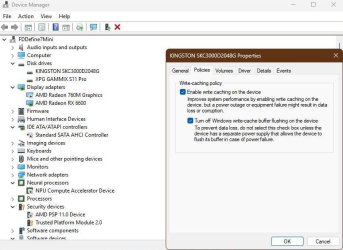
2 Expand open Disk drives, and double click/tap on the internal drive you want. (see screenshot below)

disk_write_caching_Device_Manager.png

3 Click/tap on the Policies tab, check (default) or uncheck Enable write caching on the device for what you want, and click/tap on OK. (see screenshots below)

disk_write_caching_properties-1.png
disk_write_caching_properties-2.png

4 You can now close Device Manager if you like.


That's it,
Shawn Brink


Last edited:
I even disable buffer flushing, unless one has problems with a power, it should not be an issue.

capture_09182024_175018.jpg
 

My Computer My Computer

At a glance

Home26H2CanAMD Ryzen 5 8600G (07/24)2x32GB Kingston FURY DDR5 5600 MHz CL36 @5200...ASROCK Radeon RX 6600 Challenger D 8G @48FPS ...
OS
Home26H2Can
Computer type
PC/Desktop
CPU
AMD Ryzen 5 8600G (07/24)
Motherboard
ASROCK B650M-HDV/M.2 (07/24) BIOS 4.21 AGESA ComboAM5 1.3.0.1 (04/26)
Memory
2x32GB Kingston FURY DDR5 5600 MHz CL36 @5200 CL36 (07/24)
Graphics Card(s)
ASROCK Radeon RX 6600 Challenger D 8G @48FPS (08/24)
Sound Card
Creative Sound BlasterX AE-5 Plus (05/24)
Monitor(s) Displays
24" Philips 24M1N3200ZS/00 (05/24)
Screen Resolution
1920×1080@165Hz via DP1.4
Hard Drives
Kingston KC3000 NVMe 2TB (05/24)
ADATA XPG GAMMIX S11 Pro 512GB (07/19)
PSU
Seasonic Core GM 550 Gold (04/24)
Case
Fractal Design Define 7 Mini with 3x Noctua NF-P14s/12@555rpm (04/24)
Cooling
Noctua NH-U12S with Noctua NF-P12 (04/24)
Keyboard
HP Pavilion Wired Keyboard 300 (07/24) + Rabalux 76017 Parker (01/24)
Mouse
Logitech M330 Silent Plus (01/26)
Internet Speed
500/100 Mbps via RouterOS (05/21) & TCP Optimizer
Browser
Edge, Brave for YouTube, LibreWolf for FB
Antivirus
NextDNS blocking 1/3 Traffic
Other Info
Phone: Motorola Moto G86 (02/26)
Backup: Hasleo Backup Suite (PreOS)
Headphones: Sennheiser RS170 (09/10)
Chair: Huzaro Force 4.4 Grey Mesh (05/24)
Notifier: Xiaomi Mi Band 9 Milanese (10/24)
FlexCore USB-C 3.2 Gen 1 (M) to LAN (F) (08/25)
Is it possible to make this a .reg? What if there are two drivers? I have a similar setup to what is in the SS. I have a 1TB and a 4TB that I like to check both boxes on.
 

My Computer My Computer

At a glance

WindowsIntel 8086kEVGA 3080 Ti FTW3 Ultra
OS
Windows
CPU
Intel 8086k
Motherboard
Asus z370-F
Graphics Card(s)
EVGA 3080 Ti FTW3 Ultra
Sound Card
ADI-2 DAC fs
Is it possible to make this a .reg? What if there are two drivers? I have a similar setup to what is in the SS. I have a 1TB and a 4TB that I like to check both boxes on.

Hello, :alien:

Unfortunately not since this is device specific with each their own unique hardware ID.
 

My Computers My Computers

  • At a glance

    Windows 11 Pro for WorkstationsIntel i7-8700K 5 GHz64 GB (4x16GB) G.SKILL TridentZ RGB DDR4 3600...ASUS ROG-STRIX-GTX1080TI-O11G-GAMING (11GB GD...
    OS
    Windows 11 Pro for Workstations
    Computer type
    PC/Desktop
    Manufacturer/Model
    Custom self build
    CPU
    Intel i7-8700K 5 GHz
    Motherboard
    ASUS ROG Maximus XI Formula Z390
    Memory
    64 GB (4x16GB) G.SKILL TridentZ RGB DDR4 3600 MHz (F4-3600C18D-32GTZR)
    Graphics Card(s)
    ASUS ROG-STRIX-GTX1080TI-O11G-GAMING (11GB GDDR5X)
    Sound Card
    Integrated Digital Audio (S/PDIF)
    Monitor(s) Displays
    2 x Samsung Odyssey G75 27"
    Screen Resolution
    2560x1440
    Hard Drives
    1TB Samsung 990 PRO M.2,
    4TB Samsung 990 PRO M.2,
    TerraMaster F8 SSD Plus NAS
    PSU
    Seasonic Prime Titanium 850W
    Case
    Thermaltake Core P3 wall mounted
    Cooling
    Corsair Hydro H115i
    Keyboard
    Amazon Basics Wired Full Keyboard MD005
    Mouse
    Logitech MX Master 4
    Internet Speed
    2 Gbps Download and 100 Mbps Upload
    Browser
    Chrome and Edge
    Antivirus
    Microsoft Defender
    Other Info
    Logitech Z625 speaker system,
    Logitech BRIO 4K Pro webcam,
    HP Color LaserJet Pro MFP M477fdn,
    CyberPower CP1500PFCLCD
    Galaxy S23 Plus phone
  • At a glance

    Windows 11 ProSnapdragon X Elite (12 core) 3.42 GHz16 GB LPDDR5x-7467 MHz
    Operating System
    Windows 11 Pro
    Computer type
    Laptop
    Manufacturer/Model
    Surface Laptop 7 Copilot+ PC
    CPU
    Snapdragon X Elite (12 core) 3.42 GHz
    Memory
    16 GB LPDDR5x-7467 MHz
    Monitor(s) Displays
    15" HDR
    Screen Resolution
    2496 x 1664
    Hard Drives
    1 TB SSD
    Internet Speed
    Wi-Fi 7 and Bluetooth 5.4
    Browser
    Chrome and Edge
    Antivirus
    Microsoft Defender

Latest Support Threads

Back
Top Bottom