Personalization Enable or Disable Dynamic Lighting on RGB Devices in Windows 11

  • Thread starter Thread starter Brink
  • Start date Published: Start date Updated Updated:

Dynamic_Lighting_banner.webp

This tutorial will show you how to turn on or off using Dynamic Lighting on RGB devices for your account in Windows 11.

Lighted accessories have been on the rise and can add energy and emotion to your PC experience. Today, many of these accessories rely on third-party apps and integrations that are highly fragmented. With Dynamic Lighting, Windows users will be able to effortlessly set up and customize their devices with RGB lights directly from Windows Settings. It has never been easier to help all your RGB accessories seamlessly work together for Windows apps.

If you have Dynamic Lighting-compatible devices (such as LED-lit keyboards, mice, case lighting, or other devices), you can control them both individually or as a group through Windows Settings.

When connected, compatible devices will show up as cards along the top of the page. Select these cards to change individual device settings. Below these cards you can find global Dynamic Lighting settings, where changes affect all connected devices.
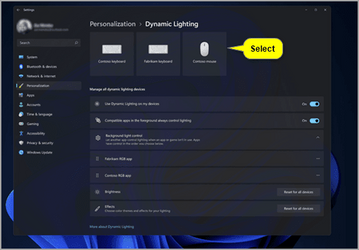
cards.png

Dynamic Lighting provides Windows users and developers with native control of Lighting Devices implementing the open HID LampArray standard. By adopting an open standard, and by working with our OEM and ODM partners, Microsoft seeks to improve the RGB device and software ecosystem for users by increasing interoperability of devices and apps. Included are APIs for Windows apps to control devices from the background and foreground, as well as a page in Windows Settings for users to customize how their devices behave.

When Dynamic Lighting is off, devices should function with their default non-Dynamic Lighting behavior. Dynamic Lighting includes a built-in set of basic effects.

Several device manufacturers including Acer, ASUS, HP, HyperX, Logitech, Razer, and Twinkly have partnered with Microsoft on Dynamic Lighting.

As of Windows 11 build 23475 (Dev) and build 22631.2050 (Beta), a list of current, in-market compatible devices is below. Review the Dynamic Lighting Hardware MS Learn page for a more current list of compatible in-market devices. The latest firmware should be used with these devices. We are aware of several issues with wireless device connections so please use a wired connection with a compatible device to a PC, if possible, for the time being. And check out the known issues below in this post for other issues that may impact this experience.

Starting with Windows 11 build 23486 (Dev), Microsoft added new Wave, Wheel, and Gradient effects for Dynamic Lighting.

Starting with Windows 11 version 22H2 KB5030310 Build 22621.2361, you can now instantly sync your Windows accent color with the devices around you with the “Match my Windows accent color” toggle under “Effects” for Dynamic Lighting via Settings > Personalization > Dynamic Lighting. Microsoft also added the ability to choose a custom color to light up your devices with.

Starting with Windows 11 build 22631.4541 (23H2) and build 22631.4534 (24H2), when no compatible devices are attached, the Dynamic Lighting settings page will now show a placeholder message and Brightness and Effects controls are disabled. On the Dynamic Lighting settings page, Microsoft has added Forward, Backward, Outward and Inward direction options to the Wave effect, and added the Forward direction option to the Gradient effect.

References:


Contents

  • Option One: Turn On or Off Dynamic Lighting on RGB Devices in Settings
  • Option Two: Turn On or Off Dynamic Lighting on RGB Devices using REG file


Option One

Turn On or Off Dynamic Lighting on RGB Devices in Settings


1 Open Settings (WIn+I).

2 Click/tap on Personalization on the left side, and click/tap on Dynamic Lighting on the right side. (see screenshot below)


Dynamic_Lighting-1.png

3 Turn On (default) or Off Use Dynamic Lighting on my devices for what you want. (see screenshots below)

Dynamic_Lighting-2.png
Dynamic_Lighting-3.png

4 You can now close Settings if you like.


Option Two

Turn On or Off Dynamic Lighting on RGB Devices using REG file


1 Do step 2 (on) or step 3 (off) below for what you would like to do.

2 Turn On Dynamic Lighting on RGB Devices

This is the default setting


A) Click/tap on the Download button below to download the file below, and go to step 4 below.​

Turn_ON_Dynamic_Lighting.reg


(Contents of REG file for reference)
Code:
Windows Registry Editor Version 5.00

[HKEY_CURRENT_USER\Software\Microsoft\Lighting]
"AmbientLightingEnabled"=dword:00000001

3 Turn Off Dynamic Lighting on RGB Devices

A) Click/tap on the Download button below to download the file below, and go to step 4 below.​

Turn_OFF_Dynamic_Lighting.reg


(Contents of REG file for reference)
Code:
Windows Registry Editor Version 5.00

[HKEY_CURRENT_USER\Software\Microsoft\Lighting]
"AmbientLightingEnabled"=dword:00000000

4 Save the REG file to your desktop.

5 If you have Smart App Control turned on, you will need to unblock the downloaded REG file.

6 Double click/tap on the downloaded REG file to merge it.

7 When prompted, click/tap on Run, Yes (UAC), Yes, and OK to approve the merge.

8 You can now delete the downloaded REG file if you like.


That's it,
Shawn Brink


Attachments

Last edited:
You will need to install the drivers from developers and hardware partners ?
What if the mouse, keyboard, fans, ram are from different manufacturers?
 

My Computer My Computer

At a glance

Microsoft Windows 11 HomeIntel Core i5-13490F2 x 16 Patriot Memory (PDP Systems) PSD516G56...GIGABYTE GeForce RTX 4070 WINDFORCE OC 12G (G...
OS
Microsoft Windows 11 Home
Computer type
PC/Desktop
Manufacturer/Model
MSI MS-7D98
CPU
Intel Core i5-13490F
Motherboard
MSI B760 GAMING PLUS WIFI
Memory
2 x 16 Patriot Memory (PDP Systems) PSD516G560081 6400MT (32-37-37-74); 1.35V)
Graphics Card(s)
GIGABYTE GeForce RTX 4070 WINDFORCE OC 12G (GV-N4070WF3OC-12GD)
Sound Card
Bluetooth Аудио
Monitor(s) Displays
INNOCN 15K1F
Screen Resolution
1920 x 1080
Hard Drives
WD_BLACK SN770 250GB
KINGSTON SNV2S1000G (ELFK0S.6)
PSU
Thermaltake Toughpower GF3 1000W
Case
CG560 - DeepCool
Cooling
ID-COOLING SE-224-XTS / 2 x 140Mm Fan - rear and top; 3 x 120Mm - front
Keyboard
Corsair K70 RGB TKL
Mouse
Corsair KATAR PRO XT
Internet Speed
100 Mbps
Browser
Firefox
Antivirus
Microsoft Defender Antivirus
Other Info
https://www.userbenchmark.com/UserRun/66553205
Microsoft would be better off working with "developers and hardware partners" to make it possible to see the temperature and fan speed for laptops in the task manager. But backlighting is of course more important.
 

My Computer My Computer

At a glance

Microsoft Windows 11 HomeIntel Core i5-13490F2 x 16 Patriot Memory (PDP Systems) PSD516G56...GIGABYTE GeForce RTX 4070 WINDFORCE OC 12G (G...
OS
Microsoft Windows 11 Home
Computer type
PC/Desktop
Manufacturer/Model
MSI MS-7D98
CPU
Intel Core i5-13490F
Motherboard
MSI B760 GAMING PLUS WIFI
Memory
2 x 16 Patriot Memory (PDP Systems) PSD516G560081 6400MT (32-37-37-74); 1.35V)
Graphics Card(s)
GIGABYTE GeForce RTX 4070 WINDFORCE OC 12G (GV-N4070WF3OC-12GD)
Sound Card
Bluetooth Аудио
Monitor(s) Displays
INNOCN 15K1F
Screen Resolution
1920 x 1080
Hard Drives
WD_BLACK SN770 250GB
KINGSTON SNV2S1000G (ELFK0S.6)
PSU
Thermaltake Toughpower GF3 1000W
Case
CG560 - DeepCool
Cooling
ID-COOLING SE-224-XTS / 2 x 140Mm Fan - rear and top; 3 x 120Mm - front
Keyboard
Corsair K70 RGB TKL
Mouse
Corsair KATAR PRO XT
Internet Speed
100 Mbps
Browser
Firefox
Antivirus
Microsoft Defender Antivirus
Other Info
https://www.userbenchmark.com/UserRun/66553205
iCue by Corsair Software I can control all my RGB devices by different manufacturers.
 

My Computer My Computer

At a glance

Windows 11 ProIntel S1700 Core i7 12700 12 Core CPU 2.1GHz32GB Corsair (2x16) DDR4 3200Mhz VengeanceASUS RTX3060 12GB V2 TUF Gaming PCIe Video Card
OS
Windows 11 Pro
Computer type
PC/Desktop
CPU
Intel S1700 Core i7 12700 12 Core CPU 2.1GHz
Motherboard
ASUS TUF GAMING B660-PLUS WIFI D4
Memory
32GB Corsair (2x16) DDR4 3200Mhz Vengeance
Graphics Card(s)
ASUS RTX3060 12GB V2 TUF Gaming PCIe Video Card
Sound Card
Realtek 7.1 Surround Sound High Definition Audio
Monitor(s) Displays
32" Philips 3237E
Screen Resolution
1920 x 1080, 60Hz
Hard Drives
Crucial P3 Plus 1TB PCIe 4.0 NVMe M.2 2280 SSD
500GB Samsung 2.5" 860 EVO SATA 6Gb/s SSD
PSU
650 Watt Thermaltake Litepower RGB
Case
Thermaltake ATX Versa C21 RGB
Cooling
Noctua NH-D15 CPU Heatsink and Fan
Keyboard
Corsair STRAFE RGB MK.2
Mouse
Corsair Dark Core Pro SE
Internet Speed
286.1 Mbps
Browser
Google
Antivirus
Windows Security
Other Info
Corsair Lighting Node Pro

My Computer My Computer

At a glance

Windows 11i7-9750H16GBGTX 1650
OS
Windows 11
Computer type
Laptop
Manufacturer/Model
Dell/XPS 7590
CPU
i7-9750H
Memory
16GB
Graphics Card(s)
GTX 1650
by working with our OEM and ODM partners,

Really now?
No, I mean really?!
We all know that OEMs WANT to install their bloatware crap(specially ASUS) on our systems, eating up resources, .
I'm sticking to OpenRGB :cool:
 

My Computers My Computers

  • At a glance

    Win10 Pro, Win10 Pro N, Win10 Home, Windows 8...Intel Core i9 9900K32 GB Quad Kit, G.Skill Trident Z RGB Series ...ASUS GeForce RTX 3090 ROG Strix O24G, 24576 M...
    OS
    Win10 Pro, Win10 Pro N, Win10 Home, Windows 8.1 Pro, Ubuntu
    Computer type
    PC/Desktop
    Manufacturer/Model
    ۞ΞЖ†ԘΜΞ۞
    CPU
    Intel Core i9 9900K
    Motherboard
    ASUS ROG Maximus X Hero
    Memory
    32 GB Quad Kit, G.Skill Trident Z RGB Series schwarz, DDR4-3866, 18-19-19-39-2T
    Graphics Card(s)
    ASUS GeForce RTX 3090 ROG Strix O24G, 24576 MB GDDR6X
    Sound Card
    (1) HD Webcam C270 (2) NVIDIA High Definition Audio (3) Realtek High Definition Audio
    Monitor(s) Displays
    BenQ BL2711U(4K) and a hp 27vx(1080p)
    Hard Drives
    C: Samsung 960 EVO NVMe M.2 SSD
    E: & O: Libraries & OneDrive-> Samsung 850 EVO 1TB
    D: Hyper-V VM's -> Samsung PM951 Client M.2 512Gb SSD
    G: System Images -> Samsung 860 Pro 2TB
    PSU
    Corsair HX1000i High Performance ATX Power Supply 80+ Platinum
    Case
    Phanteks Enthoo Pro TG
    Cooling
    Thermaltake Floe Riing RGB TT Premium-Edition 360mm and 2x120 Phantek& Halo front, and 1x140 Phanteks
    Keyboard
    Trust GTX THURA
    Mouse
    Trust GTX 148
    Internet Speed
    25+/5+ (+usually faster)
    Browser
    Edge; Chrome;
    Antivirus
    Windows Defender of course & Malwarebytes Anti-Exploit as an added layer between browser & OS
    Other Info
    Router: FRITZ!Box 7590 AX V2
    Sound system: SHARP HT-SBW460 Dolby Atmos Soundbar
    Webcam: Logitech BRIO ULTRA HD PRO WEBCAM 4K webcam with HDR
  • At a glance

    Windoes 10 HomeIntel Ii 6700K32GB DDR4 Corsair Vengeance Blue 3000MHzZOTAC GAMING GeForce RTX 1080 Ti AMP Extreme ...
    Operating System
    Windoes 10 Home
    Computer type
    PC/Desktop
    Manufacturer/Model
    Hyrican
    CPU
    Intel Ii 6700K
    Motherboard
    MSI Z170A PC MATE
    Memory
    32GB DDR4 Corsair Vengeance Blue 3000MHz
    Graphics card(s)
    ZOTAC GAMING GeForce RTX 1080 Ti AMP Extreme Core
    Sound Card
    Connected via HDMI from graics card to home theater system
    Monitor(s) Displays
    Samsung 50" Crystal UHD 4K TU7179 (2020)
    Screen Resolution
    4K
    Hard Drives
    two 256GB San Disk SSD Plus
    PSU
    Corsair 650W CX650M (80+ Bronze)
    Case
    Inwin 303
    Cooling
    Arctic Freezer i11 for CPU and 3 Corsair fans on top ans 3 on the bottom
    Keyboard
    Old generic from Lenovo
    Mouse
    Old generic from Lenovo
    Internet Speed
    25/5
    Browser
    Edge, Chrome
    Antivirus
    Windows Security(Defender)
I got OpenRGB to work on everything except my EVGA Z12 keyboard :(
 

My Computers My Computers

  • At a glance

    Windows 11 25H2Intel i7 11700KCrucial 32GB DDR4 3200mhzEVGA RTX 3070 FTW3 Ultra
    OS
    Windows 11 25H2
    Computer type
    PC/Desktop
    Manufacturer/Model
    Intel
    CPU
    Intel i7 11700K
    Motherboard
    Asus Prime Z590-A
    Memory
    Crucial 32GB DDR4 3200mhz
    Graphics Card(s)
    EVGA RTX 3070 FTW3 Ultra
    Sound Card
    Realtek S1220A 7.1 DTS:X Ultra
    Monitor(s) Displays
    Dell 32in 4K Asus 27in 1K
    Screen Resolution
    3840x2160 144Hz 1920x1080 60Hz
    Hard Drives
    10TB 3 Nvme's & 2 SSD's
    PSU
    EVGA 220G3750
    Case
    Antec 1200 w/8 fans
    Cooling
    Noctua NH-U12A
    Keyboard
    EVGA Z12
    Mouse
    Razer Deathadder v2
    Internet Speed
    GFiber 2GIG
    Browser
    MS Edge
    Antivirus
    Windows Security
    Other Info
    SONY WH-XB910N,
    7 Altec Lansing speakers
  • At a glance

    Windows 10 Pro V20H2Intel i7-3540M 3.0GHz 3001Mhz4GB DDR3-1600Nvidia NVS 5200M / Intel HD Graphics 4000
    Operating System
    Windows 10 Pro V20H2
    Computer type
    Laptop
    Manufacturer/Model
    Dell Latitude E6530
    CPU
    Intel i7-3540M 3.0GHz 3001Mhz
    Memory
    4GB DDR3-1600
    Graphics card(s)
    Nvidia NVS 5200M / Intel HD Graphics 4000
    Monitor(s) Displays
    ASUS PA248 / Dell
    Screen Resolution
    1920 x 1200 / 1600 x 900
    Hard Drives
    128GB Samsung SSD SM841
Does Win 11 Dynamic Lighting work on any RGB RAM sticks? Info says only some mice and keyboards, but wondered if any RAM also worked?
I have G.Skill Trident Z and refuse to install G.Skill bloatware.
I currently use OpenRGB which does everything except my RAM, in fact it is known to permanently break RGB lighting on some RAM, including G.Skill.
Appreciate any response.
 

My Computer My Computer

At a glance

Win 11 23H2 EnterpriseRyzen 9800X3DG.Skill Trident Z RGB 6200MT CL30MSI RTX 5090 Suprim SoC
OS
Win 11 23H2 Enterprise
Computer type
PC/Desktop
Manufacturer/Model
Self-Built
CPU
Ryzen 9800X3D
Motherboard
MSI MAG X870 Tomahawk WiFi
Memory
G.Skill Trident Z RGB 6200MT CL30
Graphics Card(s)
MSI RTX 5090 Suprim SoC
Sound Card
Sound Blaster G8
Monitor(s) Displays
LG C2 42 Main Desktop, 3x Gigabyte FI32Q in a triple array for gaming simulations
Screen Resolution
3840x2160, 2560x1440 (3)
Hard Drives
WD SN850X 2TB M.2 NVME (OS Drive), WD SN850X 2TB M.2 NVME, 2x Crucial 2TB SSD, Crucial 1TB SSD, Seagate Barracuda 2TB HDD
PSU
NZXT C1200 Gold ATX 3.1-Fully Modular/Low-Noise-1200 Watts-12V-2x6 Connector-Zero Fan Mode-100% Japanese Capacitors
Case
NZXT H7
Cooling
EK AIO Elite 360mm Elite
Keyboard
Razer Huntsman V3 Pro
Mouse
Logitech G502X
Internet Speed
1GB
Browser
Edge Chromium
Antivirus
Windows Defender
Hello

Does it work with the latest CU 22621.2283 (not 22631) ?
I haven't installed the CU yet

Thanks
 

My Computers My Computers

  • At a glance

    Windows 11 Pro 25h2Intel 10980XEG.Skill TridentZ RoyaleEVGA RTX 2080Ti Hydro Copper
    OS
    Windows 11 Pro 25h2
    Computer type
    PC/Desktop
    CPU
    Intel 10980XE
    Motherboard
    Asus Rampage VI Extreme Encore
    Memory
    G.Skill TridentZ Royale
    Graphics Card(s)
    EVGA RTX 2080Ti Hydro Copper
    Sound Card
    Asus
    Monitor(s) Displays
    Dell 27"
    Hard Drives
    Intel Optane P5801X
    Samsung 9100 Pro
    PSU
    Seasonic Prime TX 1000W
    Case
    Lian Li A77F
    Cooling
    Watercooling
    Keyboard
    Logitech MX keys
    Mouse
    Logitech MX Master 3S
    Browser
    Edge Canary
    Antivirus
    Kaspersky
  • At a glance

    Windows 11 Pro 24h2
    Operating System
    Windows 11 Pro 24h2
    Computer type
    Laptop
    Manufacturer/Model
    Asus Pro
Hello

Does it work with the latest CU 22621.2283 (not 22631) ?
I haven't installed the CU yet

Thanks
Hello, :alien:

Sorry, but no. It's only available in the 22631 build instead.

Build 22631.2262 = New features rolling out.
Build 22621.2262 = New features off by default.
 

My Computers My Computers

  • At a glance

    Windows 11 Pro for WorkstationsIntel i7-8700K 5 GHz64 GB (4x16GB) G.SKILL TridentZ RGB DDR4 3600...ASUS ROG-STRIX-GTX1080TI-O11G-GAMING (11GB GD...
    OS
    Windows 11 Pro for Workstations
    Computer type
    PC/Desktop
    Manufacturer/Model
    Custom self build
    CPU
    Intel i7-8700K 5 GHz
    Motherboard
    ASUS ROG Maximus XI Formula Z390
    Memory
    64 GB (4x16GB) G.SKILL TridentZ RGB DDR4 3600 MHz (F4-3600C18D-32GTZR)
    Graphics Card(s)
    ASUS ROG-STRIX-GTX1080TI-O11G-GAMING (11GB GDDR5X)
    Sound Card
    Integrated Digital Audio (S/PDIF)
    Monitor(s) Displays
    2 x Samsung Odyssey G75 27"
    Screen Resolution
    2560x1440
    Hard Drives
    1TB Samsung 990 PRO M.2,
    4TB Samsung 990 PRO M.2,
    TerraMaster F8 SSD Plus NAS
    PSU
    Seasonic Prime Titanium 850W
    Case
    Thermaltake Core P3 wall mounted
    Cooling
    Corsair Hydro H115i
    Keyboard
    Amazon Basics Wired Full Keyboard MD005
    Mouse
    Logitech MX Master 4
    Internet Speed
    2 Gbps Download and 100 Mbps Upload
    Browser
    Chrome and Edge
    Antivirus
    Microsoft Defender
    Other Info
    Logitech Z625 speaker system,
    Logitech BRIO 4K Pro webcam,
    HP Color LaserJet Pro MFP M477fdn,
    CyberPower CP1500PFCLCD
    Galaxy S23 Plus phone
  • At a glance

    Windows 11 ProSnapdragon X Elite (12 core) 3.42 GHz16 GB LPDDR5x-7467 MHz
    Operating System
    Windows 11 Pro
    Computer type
    Laptop
    Manufacturer/Model
    Surface Laptop 7 Copilot+ PC
    CPU
    Snapdragon X Elite (12 core) 3.42 GHz
    Memory
    16 GB LPDDR5x-7467 MHz
    Monitor(s) Displays
    15" HDR
    Screen Resolution
    2496 x 1664
    Hard Drives
    1 TB SSD
    Internet Speed
    Wi-Fi 7 and Bluetooth 5.4
    Browser
    Chrome and Edge
    Antivirus
    Microsoft Defender
OK thanks,
I believed it is possible to activate certain functions with Vivetool and the 22621.xxxx
So it doesn't work for that
 

My Computers My Computers

  • At a glance

    Windows 11 Pro 25h2Intel 10980XEG.Skill TridentZ RoyaleEVGA RTX 2080Ti Hydro Copper
    OS
    Windows 11 Pro 25h2
    Computer type
    PC/Desktop
    CPU
    Intel 10980XE
    Motherboard
    Asus Rampage VI Extreme Encore
    Memory
    G.Skill TridentZ Royale
    Graphics Card(s)
    EVGA RTX 2080Ti Hydro Copper
    Sound Card
    Asus
    Monitor(s) Displays
    Dell 27"
    Hard Drives
    Intel Optane P5801X
    Samsung 9100 Pro
    PSU
    Seasonic Prime TX 1000W
    Case
    Lian Li A77F
    Cooling
    Watercooling
    Keyboard
    Logitech MX keys
    Mouse
    Logitech MX Master 3S
    Browser
    Edge Canary
    Antivirus
    Kaspersky
  • At a glance

    Windows 11 Pro 24h2
    Operating System
    Windows 11 Pro 24h2
    Computer type
    Laptop
    Manufacturer/Model
    Asus Pro
OK thanks,
I believed it is possible to activate certain functions with Vivetool and the 22621.xxxx
So it doesn't work for that
I haven't tested enabling this feature with vivetool, but it should work.
 

My Computers My Computers

  • At a glance

    Windows 11 Pro for WorkstationsIntel i7-8700K 5 GHz64 GB (4x16GB) G.SKILL TridentZ RGB DDR4 3600...ASUS ROG-STRIX-GTX1080TI-O11G-GAMING (11GB GD...
    OS
    Windows 11 Pro for Workstations
    Computer type
    PC/Desktop
    Manufacturer/Model
    Custom self build
    CPU
    Intel i7-8700K 5 GHz
    Motherboard
    ASUS ROG Maximus XI Formula Z390
    Memory
    64 GB (4x16GB) G.SKILL TridentZ RGB DDR4 3600 MHz (F4-3600C18D-32GTZR)
    Graphics Card(s)
    ASUS ROG-STRIX-GTX1080TI-O11G-GAMING (11GB GDDR5X)
    Sound Card
    Integrated Digital Audio (S/PDIF)
    Monitor(s) Displays
    2 x Samsung Odyssey G75 27"
    Screen Resolution
    2560x1440
    Hard Drives
    1TB Samsung 990 PRO M.2,
    4TB Samsung 990 PRO M.2,
    TerraMaster F8 SSD Plus NAS
    PSU
    Seasonic Prime Titanium 850W
    Case
    Thermaltake Core P3 wall mounted
    Cooling
    Corsair Hydro H115i
    Keyboard
    Amazon Basics Wired Full Keyboard MD005
    Mouse
    Logitech MX Master 4
    Internet Speed
    2 Gbps Download and 100 Mbps Upload
    Browser
    Chrome and Edge
    Antivirus
    Microsoft Defender
    Other Info
    Logitech Z625 speaker system,
    Logitech BRIO 4K Pro webcam,
    HP Color LaserJet Pro MFP M477fdn,
    CyberPower CP1500PFCLCD
    Galaxy S23 Plus phone
  • At a glance

    Windows 11 ProSnapdragon X Elite (12 core) 3.42 GHz16 GB LPDDR5x-7467 MHz
    Operating System
    Windows 11 Pro
    Computer type
    Laptop
    Manufacturer/Model
    Surface Laptop 7 Copilot+ PC
    CPU
    Snapdragon X Elite (12 core) 3.42 GHz
    Memory
    16 GB LPDDR5x-7467 MHz
    Monitor(s) Displays
    15" HDR
    Screen Resolution
    2496 x 1664
    Hard Drives
    1 TB SSD
    Internet Speed
    Wi-Fi 7 and Bluetooth 5.4
    Browser
    Chrome and Edge
    Antivirus
    Microsoft Defender
Microsoft needs to keep their hands OFF!
 

My Computer My Computer

At a glance

Windows 11 25h2i7 -12700k64 Gig GSkill RipJaws s5 6000MSI GeForce RTX 3060
OS
Windows 11 25h2
Computer type
PC/Desktop
Manufacturer/Model
Home-built
CPU
i7 -12700k
Motherboard
MSI Pro z790-A Max Wifi
Memory
64 Gig GSkill RipJaws s5 6000
Graphics Card(s)
MSI GeForce RTX 3060
Monitor(s) Displays
BenQ GL2760H
Screen Resolution
1920 x 1080
Hard Drives
[OS: Samsung-990.Pro-1T M.2 PCIe 4.0]
PSU
Seasonic-Vertex GX-1000 80+ Gold
Case
Fractal Design R5
Cooling
[CPU: Thermalright Phantom Spirit 120 SE] [Case: Fractal Design GP-14 x 3]
Keyboard
Razer Blackwidow V4 Pro + Razer Orbweaver Chroma
Mouse
Razer Deathadder V2
Browser
Chrome
Antivirus
MS Defender
Hello, :alien:

Sorry, but no. It's only available in the 22631 build instead.

Build 22631.2262 = New features rolling out.
Build 22621.2262 = New features off by default.
I've had that settings pane for weeks, i'm on 26200.7171 right now.
 

My Computers My Computers

  • At a glance

    Windows 11 Enterprise 25H2 26200 7462Intel XEON E5-2699 v364GB Teamgroup UD4-3600NVIDIA GeForce GTX 1080 Ti
    OS
    Windows 11 Enterprise 25H2 26200 7462
    Computer type
    PC/Desktop
    Manufacturer/Model
    Custom Build
    CPU
    Intel XEON E5-2699 v3
    Motherboard
    ASUS X99-A
    Memory
    64GB Teamgroup UD4-3600
    Graphics Card(s)
    NVIDIA GeForce GTX 1080 Ti
    Sound Card
    Integrated
    Monitor(s) Displays
    ACER X34 Predator
    Screen Resolution
    3440 x 1440
    Hard Drives
    Crucial CT1000P 3P SSD8 1TB
    Crucial CT1000 BX500 SSD 1TB
    PSU
    GameMax Pro
    Case
    Fractal Design
    Cooling
    Corsair H110iGT + 6 140mm Fans
    Keyboard
    Corsair K4
    Mouse
    G-Skill G502
    Internet Speed
    300MBs
    Browser
    Chrome
    Antivirus
    OEM
    Other Info
    ASUS RT-AC87U Router
  • At a glance

    25H2 26200.50748GB
    Operating System
    25H2 26200.5074
    Computer type
    Laptop
    Manufacturer/Model
    ASUS X555LA
    Memory
    8GB
    Browser
    Chrome
    Antivirus
    OEM
The topic is two years old, yes, that option has been available for a long time.
 

My Computers My Computers

  • At a glance

    Windows 11 Pro 25h2Intel 10980XEG.Skill TridentZ RoyaleEVGA RTX 2080Ti Hydro Copper
    OS
    Windows 11 Pro 25h2
    Computer type
    PC/Desktop
    CPU
    Intel 10980XE
    Motherboard
    Asus Rampage VI Extreme Encore
    Memory
    G.Skill TridentZ Royale
    Graphics Card(s)
    EVGA RTX 2080Ti Hydro Copper
    Sound Card
    Asus
    Monitor(s) Displays
    Dell 27"
    Hard Drives
    Intel Optane P5801X
    Samsung 9100 Pro
    PSU
    Seasonic Prime TX 1000W
    Case
    Lian Li A77F
    Cooling
    Watercooling
    Keyboard
    Logitech MX keys
    Mouse
    Logitech MX Master 3S
    Browser
    Edge Canary
    Antivirus
    Kaspersky
  • At a glance

    Windows 11 Pro 24h2
    Operating System
    Windows 11 Pro 24h2
    Computer type
    Laptop
    Manufacturer/Model
    Asus Pro

My Computers My Computers

  • At a glance

    Windows 11 Enterprise 25H2 26200 7462Intel XEON E5-2699 v364GB Teamgroup UD4-3600NVIDIA GeForce GTX 1080 Ti
    OS
    Windows 11 Enterprise 25H2 26200 7462
    Computer type
    PC/Desktop
    Manufacturer/Model
    Custom Build
    CPU
    Intel XEON E5-2699 v3
    Motherboard
    ASUS X99-A
    Memory
    64GB Teamgroup UD4-3600
    Graphics Card(s)
    NVIDIA GeForce GTX 1080 Ti
    Sound Card
    Integrated
    Monitor(s) Displays
    ACER X34 Predator
    Screen Resolution
    3440 x 1440
    Hard Drives
    Crucial CT1000P 3P SSD8 1TB
    Crucial CT1000 BX500 SSD 1TB
    PSU
    GameMax Pro
    Case
    Fractal Design
    Cooling
    Corsair H110iGT + 6 140mm Fans
    Keyboard
    Corsair K4
    Mouse
    G-Skill G502
    Internet Speed
    300MBs
    Browser
    Chrome
    Antivirus
    OEM
    Other Info
    ASUS RT-AC87U Router
  • At a glance

    25H2 26200.50748GB
    Operating System
    25H2 26200.5074
    Computer type
    Laptop
    Manufacturer/Model
    ASUS X555LA
    Memory
    8GB
    Browser
    Chrome
    Antivirus
    OEM
Back
Top Bottom