Accounts Enable or Disable Passwordless Sign-in for Microsoft Accounts in Windows 11

  • Thread starter Thread starter Brink
  • Start date Published: Start date Updated Updated:
  • Tags Tags

Password_banner.png

This tutorial will show you how to turn on or off only allow Windows Hello sign-in for Microsoft accounts for passwordless sign-in on your Windows 11 device.

You can keep your device even more secure by removing passwords when signing in to Windows 11 with Microsoft accounts on your device. All the places on your device where you use your Microsoft account and password (even your apps and browsers) will automatically switch to modern multifactor authentication with Windows Hello Face, Fingerprint, or PIN.

References:


You must be signed as an administrator to enable or disable passwordless sign-in for all Microsoft accounts on the computer.


If you turn on For improved security, only allow Windows Hello sign-in for Microsoft accounts on this device, the Users must enter a user name and password to use this computer check box in netplwiz will be removed for both local accounts and Microsoft accounts.

If you turn on For improved security, only allow Windows Hello sign-in for Microsoft accounts on this device, the Remove button to remove a PIN from Microsoft accounts will be disabled.

If you turn on For improved security, only allow Windows Hello sign-in for Microsoft accounts on this device, Microsoft accounts on the computer will not have the Password or Picture password sign-in options available.


Contents

  • Option One: Enable or Disable Passwordless Sign-in for Microsoft Accounts in Settings
  • Option Two: Enable or Disable Passwordless Sign-in for Microsoft Accounts using REG file


Option One

Enable or Disable Passwordless Sign-in for Microsoft Accounts in Settings


If you are not currently signed in to Windows with a Microsoft account, then you will need to use Option Two instead.


1 Open Settings (Win+I).

2 Click/tap on Accounts on the left side, and click/tap on Sign-in options on the right side. (see screenshot below)


Passwordless_sign-in-1.png

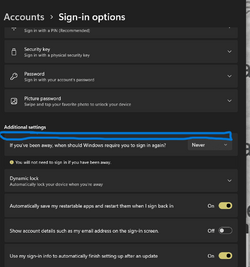
3 Turn On (default) or Off For improved security, only allow Windows Hello sign-in for Microsoft accounts on this device for what you want on the right side. (see screenshots below)

The For improved security, only allow Windows Hello sign-in for Microsoft accounts on this device setting will be grayed out if you do not have a Windows Hello (ex: PIN, facial recognition, or fingerprint) sign-in option available.


Passwordless_sign-in-2.png
Passwordless_sign-in-3.png

4 You can now close Settings if you like.


Option Two

Enable or Disable Passwordless Sign-in for Microsoft Accounts using REG file


1 Do step 2 (enable) or step 3 (disable) below for what you would like to do.

2 To Enable Passwordless Sign-in for Microsoft Accounts

This is the default setting.


A) Click/tap on the Download button below to download the REG file below, and go to step 4 below.​

Turn_ON_PasswordLess_sign-in_for_Microsoft_accounts.reg


(Contents of REG file for reference)
Code:
Windows Registry Editor Version 5.00

[HKEY_LOCAL_MACHINE\SOFTWARE\Microsoft\Windows NT\CurrentVersion\PasswordLess\Device]
"DevicePasswordLessBuildVersion"=dword:00000002
"DevicePasswordLessUpdateType"=dword:00000001

3 To Disable Passwordless Sign-in for Microsoft Accounts

A) Click/tap on the Download button below to download the file below, and go to step 4 below.​

Turn_OFF_PasswordLess_sign-in_for_Microsoft_accounts.reg


(Contents of REG file for reference)
Code:
Windows Registry Editor Version 5.00

[HKEY_LOCAL_MACHINE\SOFTWARE\Microsoft\Windows NT\CurrentVersion\PasswordLess\Device]
"DevicePasswordLessBuildVersion"=dword:00000000
"DevicePasswordLessUpdateType"=dword:00000001

4 Save the .reg file to your desktop.

5 If you have Smart App Control turned on, you will need to unblock the downloaded REG file.

6 Double click/tap on the downloaded .reg file to merge it.

7 When prompted, click/tap on Run, Yes (UAC), Yes, and OK to approve the merge.

8 You can now delete the downloaded .reg file if you like.


That's it,
Shawn Brink


Attachments

Last edited:
Brand new 22H2, I don't have that option.
1663930039542.png
 

My Computer My Computer

At a glance

W11 Pro and Insider DevAMD Ryzen 9 7900x2x16GB Kingston 6000MHz, Cl 32 @ 6200MHz Cl30Gigabyte Rx 6600XT Gaming OC 8G Pro
OS
W11 Pro and Insider Dev
Computer type
PC/Desktop
Manufacturer/Model
Home brewed
CPU
AMD Ryzen 9 7900x
Motherboard
ASROCK b650 PRO RS
Memory
2x16GB Kingston 6000MHz, Cl 32 @ 6200MHz Cl30
Graphics Card(s)
Gigabyte Rx 6600XT Gaming OC 8G Pro
Sound Card
MB, Realtek Ac1220p
Monitor(s) Displays
3 x 27"
Screen Resolution
1080p
Hard Drives
Kingston KC3000. 1TBSamsung 970 evo Plus 500GB, Crucial P1 NVMe 1TB, Lexar NVMe 2 TB, Silicon Power M.2 SATA 500GB
PSU
Seasonic 750W
Case
Custom Raidmax
Cooling
Arctic Liquid Freezer III 360mm
Internet Speed
20/19 mbps
Brand new 22H2, I don't have that option.

Hello Mike, :-)

This would be normal if you are not signed in to Windows 11 with a Microsoft account.

 

My Computers My Computers

  • At a glance

    Windows 11 Pro for WorkstationsIntel i7-8700K 5 GHz64 GB (4x16GB) G.SKILL TridentZ RGB DDR4 3600...ASUS ROG-STRIX-GTX1080TI-O11G-GAMING (11GB GD...

    OS
    Windows 11 Pro for Workstations

    Computer type
    PC/Desktop
    Manufacturer/Model
    Custom self build
    CPU
    Intel i7-8700K 5 GHz
    Motherboard
    ASUS ROG Maximus XI Formula Z390
    Memory
    64 GB (4x16GB) G.SKILL TridentZ RGB DDR4 3600 MHz (F4-3600C18D-32GTZR)
    Graphics Card(s)
    ASUS ROG-STRIX-GTX1080TI-O11G-GAMING (11GB GDDR5X)
    Sound Card
    Integrated Digital Audio (S/PDIF)
    Monitor(s) Displays
    2 x Samsung Odyssey G75 27"
    Screen Resolution
    2560x1440
    Hard Drives
    1TB Samsung 990 PRO M.2,
    4TB Samsung 990 PRO M.2,
    TerraMaster F8 SSD Plus NAS
    PSU
    Seasonic Prime Titanium 850W
    Case
    Thermaltake Core P3 wall mounted
    Cooling
    Corsair Hydro H115i
    Keyboard
    Amazon Basics Wired Full Keyboard MD005
    Mouse
    Logitech MX Master 4
    Internet Speed
    2 Gbps Download and 100 Mbps Upload
    Browser
    Chrome and Edge
    Antivirus
    Microsoft Defender
    Other Info
    Logitech Z625 speaker system,
    Logitech BRIO 4K Pro webcam,
    HP Color LaserJet Pro MFP M477fdn,
    CyberPower CP1500PFCLCD
    Galaxy S23 Plus phone
  • At a glance

    Windows 11 ProSnapdragon X Elite (12 core) 3.42 GHz16 GB LPDDR5x-7467 MHz
    Operating System
    Windows 11 Pro
    Computer type
    Laptop
    Manufacturer/Model
    Surface Laptop 7 Copilot+ PC
    CPU
    Snapdragon X Elite (12 core) 3.42 GHz
    Memory
    16 GB LPDDR5x-7467 MHz
    Monitor(s) Displays
    15" HDR
    Screen Resolution
    2496 x 1664
    Hard Drives
    1 TB SSD
    Internet Speed
    Wi-Fi 7 and Bluetooth 5.4
    Browser
    Chrome and Edge
    Antivirus
    Microsoft Defender
Hello Mike, :-)

This would be normal if you are not signed in to Windows 11 with a Microsoft account.
I get it now but still have problems with MS account. Somehow I managed to install with local account although I used Hotmail account that works fine and even managed to change password for it. I always thought that Hotmail and MS account is one and same. did something change ? Now when I try to change Local to MS account it doesn't take my Hotmail password. .
Now I tried to retrieve/change MS account password but because I tried once too many times can't do nothing until tomorrow.
All together, I think that my MS account must be alive because when I did clean install of 22H2 many things were synced with old installation which was just update from 21H2.
My other windows which are Insider dev are properly linked to MS and Hotmail account and were always with same credentials.
What's going on here ???
 

My Computer My Computer

At a glance

W11 Pro and Insider DevAMD Ryzen 9 7900x2x16GB Kingston 6000MHz, Cl 32 @ 6200MHz Cl30Gigabyte Rx 6600XT Gaming OC 8G Pro
OS
W11 Pro and Insider Dev
Computer type
PC/Desktop
Manufacturer/Model
Home brewed
CPU
AMD Ryzen 9 7900x
Motherboard
ASROCK b650 PRO RS
Memory
2x16GB Kingston 6000MHz, Cl 32 @ 6200MHz Cl30
Graphics Card(s)
Gigabyte Rx 6600XT Gaming OC 8G Pro
Sound Card
MB, Realtek Ac1220p
Monitor(s) Displays
3 x 27"
Screen Resolution
1080p
Hard Drives
Kingston KC3000. 1TBSamsung 970 evo Plus 500GB, Crucial P1 NVMe 1TB, Lexar NVMe 2 TB, Silicon Power M.2 SATA 500GB
PSU
Seasonic 750W
Case
Custom Raidmax
Cooling
Arctic Liquid Freezer III 360mm
Internet Speed
20/19 mbps
I get it now but still have problems with MS account. Somehow I managed to install with local account although I used Hotmail account that works fine and even managed to change password for it. I always thought that Hotmail and MS account is one and same. did something change ? Now when I try to change Local to MS account it doesn't take my Hotmail password. .
Now I tried to retrieve/change MS account password but because I tried once too many times can't do nothing until tomorrow.
All together, I think that my MS account must be alive because when I did clean install of 22H2 many things were synced with old installation which was just update from 21H2.
My other windows which are Insider dev are properly linked to MS and Hotmail account and were always with same credentials.
What's going on here ???

I'm not sure if this below is still valid, but you used to be able to upgrade the old Hotmail address to Outlook.


My Computers My Computers

  • At a glance

    Windows 11 Pro for WorkstationsIntel i7-8700K 5 GHz64 GB (4x16GB) G.SKILL TridentZ RGB DDR4 3600...ASUS ROG-STRIX-GTX1080TI-O11G-GAMING (11GB GD...
    OS
    Windows 11 Pro for Workstations
    Computer type
    PC/Desktop
    Manufacturer/Model
    Custom self build
    CPU
    Intel i7-8700K 5 GHz
    Motherboard
    ASUS ROG Maximus XI Formula Z390
    Memory
    64 GB (4x16GB) G.SKILL TridentZ RGB DDR4 3600 MHz (F4-3600C18D-32GTZR)
    Graphics Card(s)
    ASUS ROG-STRIX-GTX1080TI-O11G-GAMING (11GB GDDR5X)
    Sound Card
    Integrated Digital Audio (S/PDIF)
    Monitor(s) Displays
    2 x Samsung Odyssey G75 27"
    Screen Resolution
    2560x1440
    Hard Drives
    1TB Samsung 990 PRO M.2,
    4TB Samsung 990 PRO M.2,
    TerraMaster F8 SSD Plus NAS
    PSU
    Seasonic Prime Titanium 850W
    Case
    Thermaltake Core P3 wall mounted
    Cooling
    Corsair Hydro H115i
    Keyboard
    Amazon Basics Wired Full Keyboard MD005
    Mouse
    Logitech MX Master 4
    Internet Speed
    2 Gbps Download and 100 Mbps Upload
    Browser
    Chrome and Edge
    Antivirus
    Microsoft Defender
    Other Info
    Logitech Z625 speaker system,
    Logitech BRIO 4K Pro webcam,
    HP Color LaserJet Pro MFP M477fdn,
    CyberPower CP1500PFCLCD
    Galaxy S23 Plus phone
  • At a glance

    Windows 11 ProSnapdragon X Elite (12 core) 3.42 GHz16 GB LPDDR5x-7467 MHz
    Operating System
    Windows 11 Pro
    Computer type
    Laptop
    Manufacturer/Model
    Surface Laptop 7 Copilot+ PC
    CPU
    Snapdragon X Elite (12 core) 3.42 GHz
    Memory
    16 GB LPDDR5x-7467 MHz
    Monitor(s) Displays
    15" HDR
    Screen Resolution
    2496 x 1664
    Hard Drives
    1 TB SSD
    Internet Speed
    Wi-Fi 7 and Bluetooth 5.4
    Browser
    Chrome and Edge
    Antivirus
    Microsoft Defender
I'm not sure if this below is still valid, but you used to be able to upgrade the old Hotmail address to Outlook.

I'm OK with Hotmail. Mail still receives/sends E-mail and can be used just fine. I have Outlook program with Office 2013 but not using it.
So, Hotmail account = OK
MS account = niet. Works ut can't access
 

My Computer My Computer

At a glance

W11 Pro and Insider DevAMD Ryzen 9 7900x2x16GB Kingston 6000MHz, Cl 32 @ 6200MHz Cl30Gigabyte Rx 6600XT Gaming OC 8G Pro
OS
W11 Pro and Insider Dev
Computer type
PC/Desktop
Manufacturer/Model
Home brewed
CPU
AMD Ryzen 9 7900x
Motherboard
ASROCK b650 PRO RS
Memory
2x16GB Kingston 6000MHz, Cl 32 @ 6200MHz Cl30
Graphics Card(s)
Gigabyte Rx 6600XT Gaming OC 8G Pro
Sound Card
MB, Realtek Ac1220p
Monitor(s) Displays
3 x 27"
Screen Resolution
1080p
Hard Drives
Kingston KC3000. 1TBSamsung 970 evo Plus 500GB, Crucial P1 NVMe 1TB, Lexar NVMe 2 TB, Silicon Power M.2 SATA 500GB
PSU
Seasonic 750W
Case
Custom Raidmax
Cooling
Arctic Liquid Freezer III 360mm
Internet Speed
20/19 mbps
The option to allow using Hello for non-Microsoft apps has disappeared from Settings. Is there a way to reinstate it?
 

Attachments

  • Screenshot 2024-01-02 193444.png
    Screenshot 2024-01-02 193444.png
    28.5 KB · Views: 176

My Computer My Computer

At a glance

Windows 11 23H2 22631.2861i9-11900K32GB Crucial Ballistix DDR4-3600EVGA GeForce RTX2060
OS
Windows 11 23H2 22631.2861
Computer type
PC/Desktop
Manufacturer/Model
custom
CPU
i9-11900K
Motherboard
MSI Z590-A Pro
Memory
32GB Crucial Ballistix DDR4-3600
Graphics Card(s)
EVGA GeForce RTX2060
Sound Card
Sound Blaster Audigy 5/Rx
Monitor(s) Displays
Samsung 24
Hard Drives
Crucial P1 NVMe M.2 500GB
PSU
Corsair AX850
Case
Lian Li Lancool II Mesh RGB
Are you signed in as Administrator ?
1704260037730.png
 

My Computer My Computer

At a glance

W11 Pro and Insider DevAMD Ryzen 9 7900x2x16GB Kingston 6000MHz, Cl 32 @ 6200MHz Cl30Gigabyte Rx 6600XT Gaming OC 8G Pro
OS
W11 Pro and Insider Dev
Computer type
PC/Desktop
Manufacturer/Model
Home brewed
CPU
AMD Ryzen 9 7900x
Motherboard
ASROCK b650 PRO RS
Memory
2x16GB Kingston 6000MHz, Cl 32 @ 6200MHz Cl30
Graphics Card(s)
Gigabyte Rx 6600XT Gaming OC 8G Pro
Sound Card
MB, Realtek Ac1220p
Monitor(s) Displays
3 x 27"
Screen Resolution
1080p
Hard Drives
Kingston KC3000. 1TBSamsung 970 evo Plus 500GB, Crucial P1 NVMe 1TB, Lexar NVMe 2 TB, Silicon Power M.2 SATA 500GB
PSU
Seasonic 750W
Case
Custom Raidmax
Cooling
Arctic Liquid Freezer III 360mm
Internet Speed
20/19 mbps
Yes, my userid is administrator.
 

My Computer My Computer

At a glance

Windows 11 23H2 22631.2861i9-11900K32GB Crucial Ballistix DDR4-3600EVGA GeForce RTX2060
OS
Windows 11 23H2 22631.2861
Computer type
PC/Desktop
Manufacturer/Model
custom
CPU
i9-11900K
Motherboard
MSI Z590-A Pro
Memory
32GB Crucial Ballistix DDR4-3600
Graphics Card(s)
EVGA GeForce RTX2060
Sound Card
Sound Blaster Audigy 5/Rx
Monitor(s) Displays
Samsung 24
Hard Drives
Crucial P1 NVMe M.2 500GB
PSU
Corsair AX850
Case
Lian Li Lancool II Mesh RGB
The option to allow using Hello for non-Microsoft apps has disappeared from Settings. Is there a way to reinstate it?
Hello, :alien:

In addition, are you signed in with a Microsoft account?

If you're signed in to a local account, option one will not be available. You'll need to use option two instead.
 

My Computers My Computers

  • At a glance

    Windows 11 Pro for WorkstationsIntel i7-8700K 5 GHz64 GB (4x16GB) G.SKILL TridentZ RGB DDR4 3600...ASUS ROG-STRIX-GTX1080TI-O11G-GAMING (11GB GD...
    OS
    Windows 11 Pro for Workstations
    Computer type
    PC/Desktop
    Manufacturer/Model
    Custom self build
    CPU
    Intel i7-8700K 5 GHz
    Motherboard
    ASUS ROG Maximus XI Formula Z390
    Memory
    64 GB (4x16GB) G.SKILL TridentZ RGB DDR4 3600 MHz (F4-3600C18D-32GTZR)
    Graphics Card(s)
    ASUS ROG-STRIX-GTX1080TI-O11G-GAMING (11GB GDDR5X)
    Sound Card
    Integrated Digital Audio (S/PDIF)
    Monitor(s) Displays
    2 x Samsung Odyssey G75 27"
    Screen Resolution
    2560x1440
    Hard Drives
    1TB Samsung 990 PRO M.2,
    4TB Samsung 990 PRO M.2,
    TerraMaster F8 SSD Plus NAS
    PSU
    Seasonic Prime Titanium 850W
    Case
    Thermaltake Core P3 wall mounted
    Cooling
    Corsair Hydro H115i
    Keyboard
    Amazon Basics Wired Full Keyboard MD005
    Mouse
    Logitech MX Master 4
    Internet Speed
    2 Gbps Download and 100 Mbps Upload
    Browser
    Chrome and Edge
    Antivirus
    Microsoft Defender
    Other Info
    Logitech Z625 speaker system,
    Logitech BRIO 4K Pro webcam,
    HP Color LaserJet Pro MFP M477fdn,
    CyberPower CP1500PFCLCD
    Galaxy S23 Plus phone
  • At a glance

    Windows 11 ProSnapdragon X Elite (12 core) 3.42 GHz16 GB LPDDR5x-7467 MHz
    Operating System
    Windows 11 Pro
    Computer type
    Laptop
    Manufacturer/Model
    Surface Laptop 7 Copilot+ PC
    CPU
    Snapdragon X Elite (12 core) 3.42 GHz
    Memory
    16 GB LPDDR5x-7467 MHz
    Monitor(s) Displays
    15" HDR
    Screen Resolution
    2496 x 1664
    Hard Drives
    1 TB SSD
    Internet Speed
    Wi-Fi 7 and Bluetooth 5.4
    Browser
    Chrome and Edge
    Antivirus
    Microsoft Defender
I am signed in with my Microsoft account. I am now at a different computer and it too is missing the option to use/not use Hello with non-Microsoft accounts. I should point out that the Hello option is still working with NordPass, however the Hello security sign-in screen does not come up automatically any more. Windows is up-to-date.
 

My Computer My Computer

At a glance

Windows 11 23H2 22631.2861i9-11900K32GB Crucial Ballistix DDR4-3600EVGA GeForce RTX2060
OS
Windows 11 23H2 22631.2861
Computer type
PC/Desktop
Manufacturer/Model
custom
CPU
i9-11900K
Motherboard
MSI Z590-A Pro
Memory
32GB Crucial Ballistix DDR4-3600
Graphics Card(s)
EVGA GeForce RTX2060
Sound Card
Sound Blaster Audigy 5/Rx
Monitor(s) Displays
Samsung 24
Hard Drives
Crucial P1 NVMe M.2 500GB
PSU
Corsair AX850
Case
Lian Li Lancool II Mesh RGB
I am signed in with my Microsoft account. I am now at a different computer and it too is missing the option to use/not use Hello with non-Microsoft accounts. I should point out that the Hello option is still working with NordPass, however the Hello security sign-in screen does not come up automatically any more. Windows is up-to-date.
This is on/off for Microsoft accounts instead. It has no effect on local accounts.
 

My Computers My Computers

  • At a glance

    Windows 11 Pro for WorkstationsIntel i7-8700K 5 GHz64 GB (4x16GB) G.SKILL TridentZ RGB DDR4 3600...ASUS ROG-STRIX-GTX1080TI-O11G-GAMING (11GB GD...
    OS
    Windows 11 Pro for Workstations
    Computer type
    PC/Desktop
    Manufacturer/Model
    Custom self build
    CPU
    Intel i7-8700K 5 GHz
    Motherboard
    ASUS ROG Maximus XI Formula Z390
    Memory
    64 GB (4x16GB) G.SKILL TridentZ RGB DDR4 3600 MHz (F4-3600C18D-32GTZR)
    Graphics Card(s)
    ASUS ROG-STRIX-GTX1080TI-O11G-GAMING (11GB GDDR5X)
    Sound Card
    Integrated Digital Audio (S/PDIF)
    Monitor(s) Displays
    2 x Samsung Odyssey G75 27"
    Screen Resolution
    2560x1440
    Hard Drives
    1TB Samsung 990 PRO M.2,
    4TB Samsung 990 PRO M.2,
    TerraMaster F8 SSD Plus NAS
    PSU
    Seasonic Prime Titanium 850W
    Case
    Thermaltake Core P3 wall mounted
    Cooling
    Corsair Hydro H115i
    Keyboard
    Amazon Basics Wired Full Keyboard MD005
    Mouse
    Logitech MX Master 4
    Internet Speed
    2 Gbps Download and 100 Mbps Upload
    Browser
    Chrome and Edge
    Antivirus
    Microsoft Defender
    Other Info
    Logitech Z625 speaker system,
    Logitech BRIO 4K Pro webcam,
    HP Color LaserJet Pro MFP M477fdn,
    CyberPower CP1500PFCLCD
    Galaxy S23 Plus phone
  • At a glance

    Windows 11 ProSnapdragon X Elite (12 core) 3.42 GHz16 GB LPDDR5x-7467 MHz
    Operating System
    Windows 11 Pro
    Computer type
    Laptop
    Manufacturer/Model
    Surface Laptop 7 Copilot+ PC
    CPU
    Snapdragon X Elite (12 core) 3.42 GHz
    Memory
    16 GB LPDDR5x-7467 MHz
    Monitor(s) Displays
    15" HDR
    Screen Resolution
    2496 x 1664
    Hard Drives
    1 TB SSD
    Internet Speed
    Wi-Fi 7 and Bluetooth 5.4
    Browser
    Chrome and Edge
    Antivirus
    Microsoft Defender
I believe that that is not the case but rather that you have the option of allowing non-Microsoft apps to use the Hello sign-in option. It isn't the case that I am trying to use it logged in a using a local account. I repeat, I am signed in with my Microsoft account with administrative privileges.

Rather, my initial question was why isn't this option even displayed any more in my settings?
 

Attachments

  • Screenshot 2024-01-02 193444.png
    Screenshot 2024-01-02 193444.png
    28.5 KB · Views: 126

My Computer My Computer

At a glance

Windows 11 23H2 22631.2861i9-11900K32GB Crucial Ballistix DDR4-3600EVGA GeForce RTX2060
OS
Windows 11 23H2 22631.2861
Computer type
PC/Desktop
Manufacturer/Model
custom
CPU
i9-11900K
Motherboard
MSI Z590-A Pro
Memory
32GB Crucial Ballistix DDR4-3600
Graphics Card(s)
EVGA GeForce RTX2060
Sound Card
Sound Blaster Audigy 5/Rx
Monitor(s) Displays
Samsung 24
Hard Drives
Crucial P1 NVMe M.2 500GB
PSU
Corsair AX850
Case
Lian Li Lancool II Mesh RGB
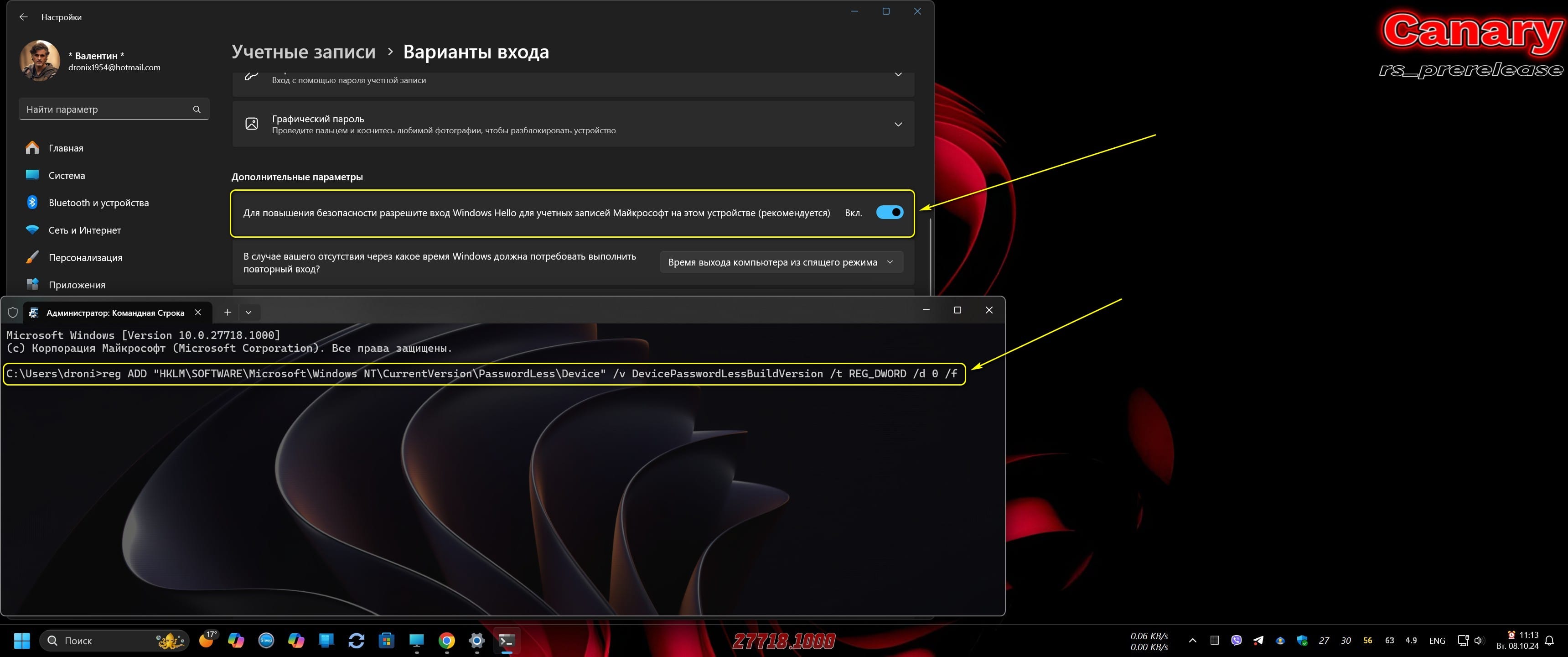
Is there any way to desactivate this with the terminal?
I've been creating scripts to automate my post-installation and would like to activate this function with it!

1728342101676.png
 

My Computer My Computer

At a glance

Windows 11Core i9 1090064gbRTX 4070TI
OS
Windows 11
Computer type
PC/Desktop
Manufacturer/Model
Asus
CPU
Core i9 10900
Motherboard
Asus Z490-H Gaming
Memory
64gb
Graphics Card(s)
RTX 4070TI
Hard Drives
Samsung Evo 970 1Tb
Is there any way to desactivate this with the terminal?
I've been creating scripts to automate my post-installation and would like to activate this function with it!

View attachment 111496

Sorry, those scripts I posted were a total fail. I ended up trying them.
 

My Computers My Computers

  • At a glance

    Windows 11 Pro 25H2 Build 26200.8894Intel(R) Core(TM) i7-4770K CPU @ 3.50GHz32.0 GB of I forget and the box is in storage.Gigabyte nVidia GeForce GTX 1660 Super OC 6GB
    OS
    Windows 11 Pro 25H2 Build 26200.8894
    Computer type
    PC/Desktop
    Manufacturer/Model
    Sin-built 2013
    CPU
    Intel(R) Core(TM) i7-4770K CPU @ 3.50GHz
    Motherboard
    ASUS ROG Maximus VI Formula
    Memory
    32.0 GB of I forget and the box is in storage.
    Graphics Card(s)
    Gigabyte nVidia GeForce GTX 1660 Super OC 6GB
    Sound Card
    ROG SupremeFX Formula 8-Channel High Definition Audio
    Monitor(s) Displays
    5 x LG 25MS500-B - 1 x 24MK430H-B - 1 x Wacom Pro 22" Touch Screen Tablet
    Screen Resolution
    All over the place
    Hard Drives
    Too many to list. OS on Samsung 1TB 870 QVO SATA
    PSU
    Silverstone 1500
    Case
    NZXT Phantom 820 Full-Tower Case
    Cooling
    Noctua NH-D15 Elite Class Dual Tower CPU Cooler / 6 x EziDIY 120mm / 2 x Corsair 140mm somethings / 1 x 140mm Thermaltake something / 2 x 200mm Corsair.
    Keyboard
    Corsair K95 / Logitech diNovo Edge Wireless
    Mouse
    Logitech: G402 / G502 / Mx Masters / Mx Air Cordless
    Internet Speed
    2000/500Mbps
    Browser
    All sorts
    Antivirus
    Kaspersky Premium
    Other Info
    ㅤㅤㅤㅤㅤㅤㅤㅤㅤㅤㅤㅤㅤㅤㅤㅤㅤㅤㅤㅤㅤㅤㅤㅤㅤㅤㅤㅤㅤㅤㅤㅤㅤㅤㅤㅤㅤㅤㅤㅤ⠀⠀⠀⠀⠀⠀⠀⠀⠀⠀
    TP-Link BE9300 WiFi 7 Bluetooth 5.4 (Archer TBE550E)
    TP-Link TX201 V1 2.5GB Lan

    Grandstream HT812 - VoIP
    ASUS DSL-AX82U - Mesh
    ASUS RT-AC68U - Mesh
    ASUS RT-BE88U Router

    Brother MFC-L2880DW Printer

    I’m on a horse.
  • At a glance

    Windows 11 Pro 25H2 Build 26200.8894 (Wifes)13th Generation Intel® Core™ i5-1340P Process...16GB LPDDR5-52001x Intel® Iris® Xe Graphics
    Operating System
    Windows 11 Pro 25H2 Build 26200.8894 (Wifes)
    Computer type
    Laptop
    Manufacturer/Model
    LENOVO Yoga 7 14IRL8 - Type 82YL
    CPU
    13th Generation Intel® Core™ i5-1340P Processor(Core™ i5-1340P)
    Memory
    16GB LPDDR5-5200
    Graphics card(s)
    1x Intel® Iris® Xe Graphics
    Sound Card
    Optimized with Dolby Atmos®
    Screen Resolution
    QHD 2880 x 1800 OLED
    Hard Drives
    M.2 512 GB SSD PCIe
    Mouse
    Logiteck MX Master 3S
    Internet Speed
    2000/500
    Antivirus
    Defender / Malwarebytes
    Other Info
    …still on a horse.


    Wireless Network: Wi-Fi 6E 2x2 AX; Bluetooth® 5.1 or above
    Ports: 1x 1 Novo button; 2 in 1 Audio Combo jack; Micro SD Card Reader; HDMI 1.4b; 2 x USB Type-C (TBT4)
    USB 3.2 Gen 2 DP 1.4a
    PD 3.0); 1 x USB 3.2 Gen1 Type A
    Camera
    1x 1080P FHD IR/RGB Hybrid with Privacy Shutter and Dual Array Microphone
    Graphics
    1x Intel® Iris® Xe Graphics
    Monitor
    14" WUXGA
    Form Factor
    Convertible Notebook
  • Windows 11 Pro 25H2 Build 26200.8894 (Wifes)

    Yoga 7 2-in-1 14IML9 - Type 83DJ

    Processor: Intel® Core™ Ultra 7 155H Processor(Core™ Ultra 7 155H)

    Memory: 32GB LPD5X-7467

    Hard Drive: 1 TB SSD PCIe

    Wireless Network: 1x Wi-Fi 6E 2x2 AX; Bluetooth® 5.1 or above

    Ports: 1 x HDMI 2.1 TMDS; 1 x Novo Button; 1 x Combo Audio Jack
    2 x USB-C (USB 4.0)
    1 x USB-A 3.2 Gen 1

    Camera: 1080P FHD IR Hybrid with Dual Microphone

    Graphics: Intel® Arc™ Graphics

    Monitor: 14" 2.8K

    ...Where's my horse?

My Computer My Computer

At a glance

Windows 11 Stable, Beta, Dev, CanaryAMD Ryzen 9 PRO 5950X128 GbIntel(R) Arc(TM) A380 Graphics (2 ГБ)
OS
Windows 11 Stable, Beta, Dev, Canary
Computer type
PC/Desktop
Manufacturer/Model
Micro-Star International Co., Ltd. MS-7D54
CPU
AMD Ryzen 9 PRO 5950X
Motherboard
MSI MAG X570S Tomahawk Max WiFi (MS-7D54) (2 PCI-E x1, 2 PCI-E x16, 2 M.2, 4 DDR4 DIMM, Audio, Video, 2.5GbE LAN, WiFi)
Memory
128 Gb
Graphics Card(s)
Intel(R) Arc(TM) A380 Graphics (2 ГБ)
Sound Card
Устройство с поддержкой High Definition Audio
Monitor(s) Displays
HP X34 [34" LCD] (6CM1300J5J) {2021}
Screen Resolution
3440x1440
Hard Drives
KINGSTON SFYRD2000G (2000 ГБ, PCI-E 4.0 x4)
PSU
Be Quiet! Dark Rock Pro 4
Case
Cooler Master HAF XB EVO
Internet Speed
1000 Mb/s
Browser
Chrome
Antivirus
Windows Defender
turning off "for improved security, etc." works but when I leave the page and go back it's turned back on.

Any ideas why that might be?

I do have a passwordless microsoft account signed in
 

My Computer My Computer

At a glance

Windows 11U7-265kG.SKILL Trident Z5 6400 (CL32) 64GBRtx 4080 Super
OS
Windows 11
Computer type
PC/Desktop
Manufacturer/Model
Intel
CPU
U7-265k
Motherboard
Asrock Z890 Nova
Memory
G.SKILL Trident Z5 6400 (CL32) 64GB
Graphics Card(s)
Rtx 4080 Super
Monitor(s) Displays
Samsung Odyssey Neo G8
Screen Resolution
4k
Hard Drives
WD SN850x 1TB
Samsung 990 Pro 1TB
Crucial P5 Plus 1TB
Sabrent Rocket 4.0 1TB
Seagate Exos X18 16TB
PSU
Corsair HX1500i
Case
Phanteks Enthoo Pro II
Cooling
Thermalright Frozen Notte 360 AIO
Internet Speed
1G Fiber
turning off "for improved security, etc." works but when I leave the page and go back it's turned back on.

Any ideas why that might be?

I do have a passwordless microsoft account signed in
Hello Joshwa, and welcome. :alien:

Did you see if using option 2 instead will allow the setting change to stick?
 

My Computers My Computers

  • At a glance

    Windows 11 Pro for WorkstationsIntel i7-8700K 5 GHz64 GB (4x16GB) G.SKILL TridentZ RGB DDR4 3600...ASUS ROG-STRIX-GTX1080TI-O11G-GAMING (11GB GD...
    OS
    Windows 11 Pro for Workstations
    Computer type
    PC/Desktop
    Manufacturer/Model
    Custom self build
    CPU
    Intel i7-8700K 5 GHz
    Motherboard
    ASUS ROG Maximus XI Formula Z390
    Memory
    64 GB (4x16GB) G.SKILL TridentZ RGB DDR4 3600 MHz (F4-3600C18D-32GTZR)
    Graphics Card(s)
    ASUS ROG-STRIX-GTX1080TI-O11G-GAMING (11GB GDDR5X)
    Sound Card
    Integrated Digital Audio (S/PDIF)
    Monitor(s) Displays
    2 x Samsung Odyssey G75 27"
    Screen Resolution
    2560x1440
    Hard Drives
    1TB Samsung 990 PRO M.2,
    4TB Samsung 990 PRO M.2,
    TerraMaster F8 SSD Plus NAS
    PSU
    Seasonic Prime Titanium 850W
    Case
    Thermaltake Core P3 wall mounted
    Cooling
    Corsair Hydro H115i
    Keyboard
    Amazon Basics Wired Full Keyboard MD005
    Mouse
    Logitech MX Master 4
    Internet Speed
    2 Gbps Download and 100 Mbps Upload
    Browser
    Chrome and Edge
    Antivirus
    Microsoft Defender
    Other Info
    Logitech Z625 speaker system,
    Logitech BRIO 4K Pro webcam,
    HP Color LaserJet Pro MFP M477fdn,
    CyberPower CP1500PFCLCD
    Galaxy S23 Plus phone
  • At a glance

    Windows 11 ProSnapdragon X Elite (12 core) 3.42 GHz16 GB LPDDR5x-7467 MHz
    Operating System
    Windows 11 Pro
    Computer type
    Laptop
    Manufacturer/Model
    Surface Laptop 7 Copilot+ PC
    CPU
    Snapdragon X Elite (12 core) 3.42 GHz
    Memory
    16 GB LPDDR5x-7467 MHz
    Monitor(s) Displays
    15" HDR
    Screen Resolution
    2496 x 1664
    Hard Drives
    1 TB SSD
    Internet Speed
    Wi-Fi 7 and Bluetooth 5.4
    Browser
    Chrome and Edge
    Antivirus
    Microsoft Defender
Thanks, but that all looks too complicated for me Shaun. I do not intend to use a password at all and because of that it states that facial recognition cannot be used. Yet it still flashes. I will try to 'uninstall' the IR sensor and if that does not work I will send the laptop back for a refund.
 

My Computer My Computer

At a glance

Windows 11 version 24H2
OS
Windows 11 version 24H2
Computer type
Laptop
Manufacturer/Model
Lenovo IdeaPad Slim 5 Gen 9 83DCCTO1WW
Browser
Firefox
Maybe I'm looking in the wrong place but I have no issue starting windows (11 24h2) without having to login or sign-in. But I always get the sign-in screen when waking from sleep. Anyway to get rid of that? Thanks.
 

My Computer My Computer

At a glance

10, 11
OS
10, 11
Back
Top Bottom