Privacy and Security Enable or Disable Personalized Offers in Windows 11

  • Thread starter Thread starter Brink
  • Start date Published: Start date Updated Updated:

Tailored_Experiences_banner.webp

This tutorial will show you how to enable or disable personalized offers (tailored experiences) for your account or all users in Windows 11.

Microsoft uses diagnostic data to keep Windows secure and up to date, troubleshoot problems, and make product improvements as described in more detail below. Regardless of whether you choose to send Optional diagnostic data, your device will be just as secure and will operate normally. This data is transmitted to Microsoft and stored with one or more unique identifiers that can help us recognize an individual user on an individual device and understand the device's service issues and use patterns.

If you choose to turn on Tailored experiences, Microsoft will use your Windows diagnostic data to offer you personalized tips, ads, and recommendations to enhance Microsoft experiences. If you have selected to turn off send optional diagnostic data (required only), personalization is based on information about your device, its settings and capabilities, and whether it is performing properly.  If you have selected to turn on send optional diagnostic data, personalization is also based on information about how you use apps and features, plus additional information about the health of your device. Microsoft does not use the content of crash dumps, websites you browse, speech, typing, or inking input data for personalization when we receive such data from customers who have selected to turn on send optional diagnostic data.

Tailored experiences include suggestions on how to customize and optimize Windows, as well as ads and recommendations for Microsoft and third-party products and services, features, apps, and hardware for your Windows experiences. For example, to help you get the most out of your device, Microsoft may tell you about features you may not know about or that are new. If you are having a problem with your Windows device, you may be offered a solution. You may be offered a chance to customize your lock screen with pictures, or to be shown more pictures of the kind you like, or fewer of the ones you don’t. Or, if you are running out of space on your hard drive, Windows may recommend you try OneDrive or purchase hardware to gain more space.

Reference:


Contents

  • Option One: Turn On or Off Personalized Offers for Current User in Settings
  • Option Two: Turn On or Off Personalized Offers for Current User using REG file
  • Option Three: Enable or Disable Personalized Offers for All or Specific Users in Local Group Policy Editor
  • Option Four: Enable or Disable Personalized Offers for Current User using REG file


Option One

Turn On or Off Personalized Offers for Current User in Settings


1 Open Settings (Win+I).

2 Click/tap on Privacy & security on the left side, and click/tap on Recommendations & offers under "Windows permissions" on the right side. (see screenshot below)


Recommendations_and_offers-1.webp

3 Turn On or Off Personalized offers for what you want. (see screenshot below)

Recommendations_and_offers-2.webp

4 You can now close Settings if you like.


Option Two

Turn On or Off Personalized Offers for Current User using REG file


1 Do step 2 (on) or step 3 (off) below for what you want.

2 Turn On Personalized Offers

A) Click/tap on the Download button below to download the file below, and go to step 4 below.​

Turn_ON_Tailored_experiences.reg


(Contents of REG file for reference)
Code:
Windows Registry Editor Version 5.00

[HKEY_CURRENT_USER\Software\Microsoft\Windows\CurrentVersion\Privacy]
"TailoredExperiencesWithDiagnosticDataEnabled"=dword:00000001

3 Turn Off Personalized Offers

A) Click/tap on the Download button below to download the file below, and go to step 4 below.​

Turn_OFF_Tailored_experiences.reg


(Contents of REG file for reference)
Code:
Windows Registry Editor Version 5.00

[HKEY_CURRENT_USER\Software\Microsoft\Windows\CurrentVersion\Privacy]
"TailoredExperiencesWithDiagnosticDataEnabled"=dword:00000000

4 Save the REG file to your desktop.

5 If you have Smart App Control turned on, you will need to unblock the downloaded REG file.

6 Double click/tap on the downloaded REG file to merge it.

7 When prompted, click/tap on Run, Yes (UAC), Yes, and OK to approve the merge.

8 You can now delete the downloaded REG file if you like.


Option Three

Enable or Disable Personalized Offers for All or Specific Users in Local Group Policy Editor


You must be signed in as an administrator to use this option.

The Local Group Policy Editor is only available in the Windows 11 Pro, Enterprise, and Education editions.

All editions can use Option Four to configure the same policy.


1 Open the all users, specific users or groups, or all users except administrators Local Group Policy Editor for how you want this policy applied.

2 Navigate to the policy location below in the left pane of the Local Group Policy Editor. (see screenshot below)

User Configuration > Administrative Templates > Windows Components > Cloud Content

Tailored_experiences_gpedit-1.png

3 In the right pane of Cloud Content in the Local Group Policy Editor, double click/tap on the Do not use diagnostic data for tailored experiences policy to edit it. (see screenshot above)

4 Do step 5 (enable) or step 6 (disable) below for what you want.

5 Enable Tailored Experiences

This is the default setting to allow using Option One and Option Two.


A) Select (dot) Not Configured, click/tap on OK, and go to step 7. (see screenshot below)​

Tailored_experiences_gpedit-2.png

6 Disable Tailored Experiences

This will override and prevent using Option One and Option Two.


A) Select (dot) Enabled, click/tap on OK, and go to step 7. (see screenshot below)​

Tailored_experiences_gpedit-3.png

7 You can now close the Local Group Policy Editor if you like.


Option Four

Enable or Disable Personalized Offers for Current User using REG file


You must be signed in as an administrator to use this option.


1 Do step 2 (enable) or step 3 (disable) below for what you want.


 2. Enable Tailored Experiences

This is the default setting to allow using Option One and Option Two.


A) Click/tap on the Download button below to download the file below, and go to step 4 below.​

Enable_Tailored_experiences.reg


(Contents of REG file for reference)
Code:
Windows Registry Editor Version 5.00

[HKEY_CURRENT_USER\Software\Policies\Microsoft\Windows\CloudContent]
"DisableTailoredExperiencesWithDiagnosticData"=-


 3. Disable Tailored Experiences

This will override and prevent using Option One and Option Two.


A) Click/tap on the Download button below to download the file below, and go to step 4 below.​

Disable_Tailored_experiences.reg


(Contents of REG file for reference)
Code:
Windows Registry Editor Version 5.00

[HKEY_CURRENT_USER\Software\Policies\Microsoft\Windows\CloudContent]
"DisableTailoredExperiencesWithDiagnosticData"=dword:00000001

4 Save the REG file to your desktop.

5 If you have Smart App Control turned on, you will need to unblock the downloaded REG file.

6 Double click/tap on the downloaded REG file to merge it.

7 When prompted, click/tap on Run, Yes (UAC), Yes, and OK to approve the merge.

8 You can now delete the downloaded REG file if you like.


That's it,
Shawn Brink


Attachments

Last edited:
GPO works like a champ on Win 11 Ent 22H2 22621.1848. Thank You, Brink
 

My Computer My Computer

At a glance

Windows 11 Enterprise
OS
Windows 11 Enterprise
Computer type
PC/Desktop
Manufacturer/Model
WMI says "To be Filled By OEM"
Keyboard
Plastic
Mouse
I have not seen any lately
Internet Speed
Insert AIM ICON :)
Browser
The first one I find to double click on.
Antivirus
Sandbox
I think the text to link to Option 4 and the heading for Option 4 in that section are incorrect. Should Option 4 be for "All Users" instead of "Current User" ?
 
Last edited:

My Computers My Computers

  • At a glance

    Windows 11 ProAMD Ryzen 9 7950X3DG.Skill Trident Z5 NEO RGB 64GB (2 x 32GB) DD...AMD Radeon RX 6950 XT (reference)
    OS
    Windows 11 Pro
    Computer type
    PC/Desktop
    Manufacturer/Model
    Custom self build
    CPU
    AMD Ryzen 9 7950X3D
    Motherboard
    NZXT N7 B650E (AM5)
    Memory
    G.Skill Trident Z5 NEO RGB 64GB (2 x 32GB) DDR5 6000 CL30-40-40-96 (F5-6000J3040G32GX2-TZ5NR)
    Graphics Card(s)
    AMD Radeon RX 6950 XT (reference)
    Sound Card
    Integrated Digital Audio (S/PDIF)
    Monitor(s) Displays
    2 x LG 29UM69G-B 29" Ultrawide Gaming Monitor
    Screen Resolution
    2560x1080
    Hard Drives
    2TB Samsung 990 PRO M.2
    PSU
    NZXT C1000W Gold
    Case
    NZXT H9 Elite
    Cooling
    NZXT Kraken Z73 RGB
    Keyboard
    Logitech MX Mechanical
    Mouse
    Logitech MX Master 3S
    Internet Speed
    1 Gbps synchronous
    Browser
    Firefox (w/ Total Cookie Protection and Multi-Account Containers)
    Other Info
    Logitech BRIO 4K Pro webcam
  • At a glance

    Windows 11 ProIntel Core i7-12700H32GB DDR5 4800NVIDIA® GeForce RTX™ 3050 Ti 4GB GDDR6
    Operating System
    Windows 11 Pro
    Computer type
    Laptop
    Manufacturer/Model
    Lenovo ThinkPad X1 Extreme Gen 5
    CPU
    Intel Core i7-12700H
    Motherboard
    21DECTO1WW
    Memory
    32GB DDR5 4800
    Graphics card(s)
    NVIDIA® GeForce RTX™ 3050 Ti 4GB GDDR6
    Hard Drives
    256GB Micron MTFDKBA256TFK SSD M.2
I think the text to link to Option 4 and the heading for Option 4 in that section are incorrect. Should Option for be for "All Users" instead of "Current User" ?
:shawn:

Option 4 does actually only get applied to the current user.
 

My Computers My Computers

  • At a glance

    Windows 11 Pro for WorkstationsIntel i7-8700K 5 GHz64 GB (4x16GB) G.SKILL TridentZ RGB DDR4 3600...ASUS ROG-STRIX-GTX1080TI-O11G-GAMING (11GB GD...
    OS
    Windows 11 Pro for Workstations
    Computer type
    PC/Desktop
    Manufacturer/Model
    Custom self build
    CPU
    Intel i7-8700K 5 GHz
    Motherboard
    ASUS ROG Maximus XI Formula Z390
    Memory
    64 GB (4x16GB) G.SKILL TridentZ RGB DDR4 3600 MHz (F4-3600C18D-32GTZR)
    Graphics Card(s)
    ASUS ROG-STRIX-GTX1080TI-O11G-GAMING (11GB GDDR5X)
    Sound Card
    Integrated Digital Audio (S/PDIF)
    Monitor(s) Displays
    2 x Samsung Odyssey G75 27"
    Screen Resolution
    2560x1440
    Hard Drives
    1TB Samsung 990 PRO M.2,
    4TB Samsung 990 PRO M.2,
    TerraMaster F8 SSD Plus NAS
    PSU
    Seasonic Prime Titanium 850W
    Case
    Thermaltake Core P3 wall mounted
    Cooling
    Corsair Hydro H115i
    Keyboard
    Amazon Basics Wired Full Keyboard MD005
    Mouse
    Logitech MX Master 4
    Internet Speed
    2 Gbps Download and 100 Mbps Upload
    Browser
    Chrome and Edge
    Antivirus
    Microsoft Defender
    Other Info
    Logitech Z625 speaker system,
    Logitech BRIO 4K Pro webcam,
    HP Color LaserJet Pro MFP M477fdn,
    CyberPower CP1500PFCLCD
    Galaxy S23 Plus phone
  • At a glance

    Windows 11 ProSnapdragon X Elite (12 core) 3.42 GHz16 GB LPDDR5x-7467 MHz
    Operating System
    Windows 11 Pro
    Computer type
    Laptop
    Manufacturer/Model
    Surface Laptop 7 Copilot+ PC
    CPU
    Snapdragon X Elite (12 core) 3.42 GHz
    Memory
    16 GB LPDDR5x-7467 MHz
    Monitor(s) Displays
    15" HDR
    Screen Resolution
    2496 x 1664
    Hard Drives
    1 TB SSD
    Internet Speed
    Wi-Fi 7 and Bluetooth 5.4
    Browser
    Chrome and Edge
    Antivirus
    Microsoft Defender
:shawn:

Option 4 does actually only get applied to the current user.
How does that differ from Option 2 on this page? Does DISABLING with Option 4 prevent a user turning it back ON? Does Option 4 prevent Windows Update turning it back ON (fingers crossed)?

I did have all of this "Experience" and "Advertisement" options turned OFF for months on several machines and I'm noticing that they are back ON today.
Thanks!
 

My Computers My Computers

  • At a glance

    Windows 11 ProAMD Ryzen 9 7950X3DG.Skill Trident Z5 NEO RGB 64GB (2 x 32GB) DD...AMD Radeon RX 6950 XT (reference)
    OS
    Windows 11 Pro
    Computer type
    PC/Desktop
    Manufacturer/Model
    Custom self build
    CPU
    AMD Ryzen 9 7950X3D
    Motherboard
    NZXT N7 B650E (AM5)
    Memory
    G.Skill Trident Z5 NEO RGB 64GB (2 x 32GB) DDR5 6000 CL30-40-40-96 (F5-6000J3040G32GX2-TZ5NR)
    Graphics Card(s)
    AMD Radeon RX 6950 XT (reference)
    Sound Card
    Integrated Digital Audio (S/PDIF)
    Monitor(s) Displays
    2 x LG 29UM69G-B 29" Ultrawide Gaming Monitor
    Screen Resolution
    2560x1080
    Hard Drives
    2TB Samsung 990 PRO M.2
    PSU
    NZXT C1000W Gold
    Case
    NZXT H9 Elite
    Cooling
    NZXT Kraken Z73 RGB
    Keyboard
    Logitech MX Mechanical
    Mouse
    Logitech MX Master 3S
    Internet Speed
    1 Gbps synchronous
    Browser
    Firefox (w/ Total Cookie Protection and Multi-Account Containers)
    Other Info
    Logitech BRIO 4K Pro webcam
  • At a glance

    Windows 11 ProIntel Core i7-12700H32GB DDR5 4800NVIDIA® GeForce RTX™ 3050 Ti 4GB GDDR6
    Operating System
    Windows 11 Pro
    Computer type
    Laptop
    Manufacturer/Model
    Lenovo ThinkPad X1 Extreme Gen 5
    CPU
    Intel Core i7-12700H
    Motherboard
    21DECTO1WW
    Memory
    32GB DDR5 4800
    Graphics card(s)
    NVIDIA® GeForce RTX™ 3050 Ti 4GB GDDR6
    Hard Drives
    256GB Micron MTFDKBA256TFK SSD M.2
How does that differ from Option 2 on this page? Does DISABLING with Option 4 prevent a user turning it back ON? Does Option 4 prevent Windows Update turning it back ON (fingers crossed)?

I did have all of this "Experience" and "Advertisement" options turned OFF for months on several machines and I'm noticing that they are back ON today.
Thanks!
Option 2 is to toggle the same setting in option 1.

Option 4 toggles the same group policy in option 3, but it only gets applied to the current user instead of all users. It also overrides and prevents using option 1 and 2 if disabled.
 

My Computers My Computers

  • At a glance

    Windows 11 Pro for WorkstationsIntel i7-8700K 5 GHz64 GB (4x16GB) G.SKILL TridentZ RGB DDR4 3600...ASUS ROG-STRIX-GTX1080TI-O11G-GAMING (11GB GD...
    OS
    Windows 11 Pro for Workstations
    Computer type
    PC/Desktop
    Manufacturer/Model
    Custom self build
    CPU
    Intel i7-8700K 5 GHz
    Motherboard
    ASUS ROG Maximus XI Formula Z390
    Memory
    64 GB (4x16GB) G.SKILL TridentZ RGB DDR4 3600 MHz (F4-3600C18D-32GTZR)
    Graphics Card(s)
    ASUS ROG-STRIX-GTX1080TI-O11G-GAMING (11GB GDDR5X)
    Sound Card
    Integrated Digital Audio (S/PDIF)
    Monitor(s) Displays
    2 x Samsung Odyssey G75 27"
    Screen Resolution
    2560x1440
    Hard Drives
    1TB Samsung 990 PRO M.2,
    4TB Samsung 990 PRO M.2,
    TerraMaster F8 SSD Plus NAS
    PSU
    Seasonic Prime Titanium 850W
    Case
    Thermaltake Core P3 wall mounted
    Cooling
    Corsair Hydro H115i
    Keyboard
    Amazon Basics Wired Full Keyboard MD005
    Mouse
    Logitech MX Master 4
    Internet Speed
    2 Gbps Download and 100 Mbps Upload
    Browser
    Chrome and Edge
    Antivirus
    Microsoft Defender
    Other Info
    Logitech Z625 speaker system,
    Logitech BRIO 4K Pro webcam,
    HP Color LaserJet Pro MFP M477fdn,
    CyberPower CP1500PFCLCD
    Galaxy S23 Plus phone
  • At a glance

    Windows 11 ProSnapdragon X Elite (12 core) 3.42 GHz16 GB LPDDR5x-7467 MHz
    Operating System
    Windows 11 Pro
    Computer type
    Laptop
    Manufacturer/Model
    Surface Laptop 7 Copilot+ PC
    CPU
    Snapdragon X Elite (12 core) 3.42 GHz
    Memory
    16 GB LPDDR5x-7467 MHz
    Monitor(s) Displays
    15" HDR
    Screen Resolution
    2496 x 1664
    Hard Drives
    1 TB SSD
    Internet Speed
    Wi-Fi 7 and Bluetooth 5.4
    Browser
    Chrome and Edge
    Antivirus
    Microsoft Defender
@Brink

Hi.
This setting has now moved to:
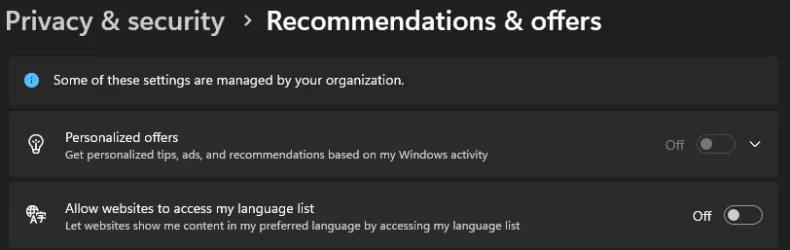
Privacy & Security > Recommendations And Offers (aka General) > Personalized Offers
(I think as with 25H2 the rollout should be complete (or not ?))

Maybe adding a quick note about this change should be mentioned in option one (for both ElevenForum users and search engines).
Registry entries and GPO haven't changed.
 

My Computer My Computer

At a glance

.
OS
.
@Brink

Hi.
This setting has now moved to:
Privacy & Security > Recommendations And Offers (aka General) > Personalized Offers
(I think as with 25H2 the rollout should be complete (or not ?))

Maybe adding a quick note about this change should be mentioned in option one (for both ElevenForum users and search engines).
Registry entries and GPO haven't changed.

Hello mate, :alien:

Option one is still the same for me in 25H2.

What language or region are you using? It may be worded different for another language/region.
 

My Computers My Computers

  • At a glance

    Windows 11 Pro for WorkstationsIntel i7-8700K 5 GHz64 GB (4x16GB) G.SKILL TridentZ RGB DDR4 3600...ASUS ROG-STRIX-GTX1080TI-O11G-GAMING (11GB GD...
    OS
    Windows 11 Pro for Workstations
    Computer type
    PC/Desktop
    Manufacturer/Model
    Custom self build
    CPU
    Intel i7-8700K 5 GHz
    Motherboard
    ASUS ROG Maximus XI Formula Z390
    Memory
    64 GB (4x16GB) G.SKILL TridentZ RGB DDR4 3600 MHz (F4-3600C18D-32GTZR)
    Graphics Card(s)
    ASUS ROG-STRIX-GTX1080TI-O11G-GAMING (11GB GDDR5X)
    Sound Card
    Integrated Digital Audio (S/PDIF)
    Monitor(s) Displays
    2 x Samsung Odyssey G75 27"
    Screen Resolution
    2560x1440
    Hard Drives
    1TB Samsung 990 PRO M.2,
    4TB Samsung 990 PRO M.2,
    TerraMaster F8 SSD Plus NAS
    PSU
    Seasonic Prime Titanium 850W
    Case
    Thermaltake Core P3 wall mounted
    Cooling
    Corsair Hydro H115i
    Keyboard
    Amazon Basics Wired Full Keyboard MD005
    Mouse
    Logitech MX Master 4
    Internet Speed
    2 Gbps Download and 100 Mbps Upload
    Browser
    Chrome and Edge
    Antivirus
    Microsoft Defender
    Other Info
    Logitech Z625 speaker system,
    Logitech BRIO 4K Pro webcam,
    HP Color LaserJet Pro MFP M477fdn,
    CyberPower CP1500PFCLCD
    Galaxy S23 Plus phone
  • At a glance

    Windows 11 ProSnapdragon X Elite (12 core) 3.42 GHz16 GB LPDDR5x-7467 MHz
    Operating System
    Windows 11 Pro
    Computer type
    Laptop
    Manufacturer/Model
    Surface Laptop 7 Copilot+ PC
    CPU
    Snapdragon X Elite (12 core) 3.42 GHz
    Memory
    16 GB LPDDR5x-7467 MHz
    Monitor(s) Displays
    15" HDR
    Screen Resolution
    2496 x 1664
    Hard Drives
    1 TB SSD
    Internet Speed
    Wi-Fi 7 and Bluetooth 5.4
    Browser
    Chrome and Edge
    Antivirus
    Microsoft Defender
Option one is still the same for me in 25H2.
Hum. I guess that answers the question if the rollout is complete or not ^^

windows settins - privacy - recommendations & offers.webp
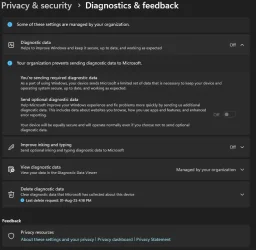
windows settins - privacy - diagnostics & feedback.webp

What language or region are you using? It may be worded different for another language/region.
My OS language is English US and I am in EEA.

This is the same setting. The registry values and GPO are the same and now control "Personalized Offers".
 

My Computer My Computer

At a glance

.
OS
.
Hum. I guess that answers the question if the rollout is complete or not ^^

View attachment 153804
View attachment 153803


My OS language is English US and I am in EEA.

This is the same setting. The registry values and GPO are the same and now control "Personalized Offers".

Could be an EEA thing. I noticed many settings are different for EEA.
 

My Computers My Computers

  • At a glance

    Windows 11 Pro for WorkstationsIntel i7-8700K 5 GHz64 GB (4x16GB) G.SKILL TridentZ RGB DDR4 3600...ASUS ROG-STRIX-GTX1080TI-O11G-GAMING (11GB GD...
    OS
    Windows 11 Pro for Workstations
    Computer type
    PC/Desktop
    Manufacturer/Model
    Custom self build
    CPU
    Intel i7-8700K 5 GHz
    Motherboard
    ASUS ROG Maximus XI Formula Z390
    Memory
    64 GB (4x16GB) G.SKILL TridentZ RGB DDR4 3600 MHz (F4-3600C18D-32GTZR)
    Graphics Card(s)
    ASUS ROG-STRIX-GTX1080TI-O11G-GAMING (11GB GDDR5X)
    Sound Card
    Integrated Digital Audio (S/PDIF)
    Monitor(s) Displays
    2 x Samsung Odyssey G75 27"
    Screen Resolution
    2560x1440
    Hard Drives
    1TB Samsung 990 PRO M.2,
    4TB Samsung 990 PRO M.2,
    TerraMaster F8 SSD Plus NAS
    PSU
    Seasonic Prime Titanium 850W
    Case
    Thermaltake Core P3 wall mounted
    Cooling
    Corsair Hydro H115i
    Keyboard
    Amazon Basics Wired Full Keyboard MD005
    Mouse
    Logitech MX Master 4
    Internet Speed
    2 Gbps Download and 100 Mbps Upload
    Browser
    Chrome and Edge
    Antivirus
    Microsoft Defender
    Other Info
    Logitech Z625 speaker system,
    Logitech BRIO 4K Pro webcam,
    HP Color LaserJet Pro MFP M477fdn,
    CyberPower CP1500PFCLCD
    Galaxy S23 Plus phone
  • At a glance

    Windows 11 ProSnapdragon X Elite (12 core) 3.42 GHz16 GB LPDDR5x-7467 MHz
    Operating System
    Windows 11 Pro
    Computer type
    Laptop
    Manufacturer/Model
    Surface Laptop 7 Copilot+ PC
    CPU
    Snapdragon X Elite (12 core) 3.42 GHz
    Memory
    16 GB LPDDR5x-7467 MHz
    Monitor(s) Displays
    15" HDR
    Screen Resolution
    2496 x 1664
    Hard Drives
    1 TB SSD
    Internet Speed
    Wi-Fi 7 and Bluetooth 5.4
    Browser
    Chrome and Edge
    Antivirus
    Microsoft Defender
Could be an EEA thing. I noticed many settings are different for EEA.
I don't think it's EEA related. You will probably have this modification soon or later.
Strange that you didn't get it with 25H2. But hey, Microsoft being Microsoft, that's not really a surprise.

In the Reference link of this tutorial:
Microsoft said:
Note: Tailored experiences is being replaced by Personalized offers in more recent versions of Windows. If you have not installed the latest Windows Update, you may still see Tailored experiences on your device. Learn more about Personalized offers in Windows 11

Anyway. The info is now available in the comments section.
And once you also get this changes, I'm sure the tutorial will be updated accordingly. :)
 

My Computer My Computer

At a glance

.
OS
.

Latest Support Threads

Back
Top Bottom