Apps Enable or Disable Recent Files History in Notepad app in Windows 11

  • Thread starter Thread starter Brink
  • Start date Published: Start date Updated Updated:
  • Tags Tags
    notepad

Notepad_banner.webp

This tutorial will show you how to turn on or off recent files history in the Notepad app for your account in Windows 11.

Notepad is a fast and simple text editor that can be used to view, edit, and search through plain text documents instantly.

With recent files, you can now reopen your recently closed files directly within Notepad. To access Recent Files, open Notepad and go to the File menu, where you will find a list of your recently used Notepad documents. Click on any file to instantly reopen and continue editing.

You can clear the Recent list at any time or turn off the Recent Files feature in app settings if you prefer not to keep a history of files recently closed in Notepad. Turning off recent files in Notepad does not cleat the recent list, it will only prevent it from showing.


EXAMPLE: Notepad recent files history turned on and off
Notepad_recent_files-ON.webp
Notepad_recent_files-OFF.webp


Here's How:

1 Open Notepad.

2 Click/tap on the Settings (gear) button. (see screenshot below)

Notepad_recent_files-1.webp

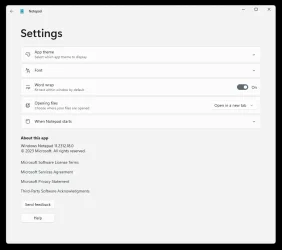
3 Under Opening Notepad in Settings, turn on (default) or off Recent Files for what you want. (see screenshot below)

Notepad_recent_files-2.webp


That's it,
Shawn Brink


Last edited:
I don't see what your SS shows...

Image1.webp
 

My Computers

System One System Two

  • OS
    Win 11 Home ♦♦♦26200.8655 ♦♦♦♦♦♦♦25H2
    Computer type
    PC/Desktop
    Manufacturer/Model
    Built by Ghot® [May 2020]
    CPU
    AMD Ryzen 7 3700X
    Motherboard
    Asus Pro WS X570-ACE (BIOS 5302)
    Memory
    G.Skill (F4-3200C14D-16GTZKW)
    Graphics Card(s)
    EVGA RTX 2070 (08G-P4-2171-KR)
    Sound Card
    Realtek ALC1220P / ALC S1220A
    Monitor(s) Displays
    Dell U3011 30"
    Screen Resolution
    2560 x 1600
    Hard Drives
    2x Samsung 860 EVO 500GB,
    WD 4TB Black FZBX - SATA III,
    WD 8TB Black FZBX - SATA III,
    DRW-24B1ST CD/DVD Burner
    PSU
    PC Power & Cooling 750W Quad EPS12V
    Case
    Cooler Master ATCS 840 Tower
    Cooling
    CM Hyper 212 EVO (push/pull)
    Keyboard
    Ducky DK9008 Shine II Blue LED
    Mouse
    Logitech Optical M-100
    Internet Speed
    300/300
    Browser
    Firefox (latest)
    Antivirus
    Bitdefender Total Security
    Other Info
    Speakers: Klipsch Pro Media 2.1
  • Operating System
    Windows XP Pro 32bit w/SP3
    Computer type
    PC/Desktop
    Manufacturer/Model
    Built by Ghot® (not in use)
    CPU
    AMD Athlon 64 X2 5000+ (OC'd @ 3.2Ghz)
    Motherboard
    ASUS M2N32-SLI Deluxe Wireless Edition
    Memory
    TWIN2X2048-6400C4DHX (2 x 1GB, DDR2 800)
    Graphics card(s)
    EVGA 256-P2-N758-TR GeForce 8600GT SSC
    Sound Card
    Onboard
    Monitor(s) Displays
    ViewSonic G90FB Black 19" Professional (CRT)
    Screen Resolution
    up to 2048 x 1536
    Hard Drives
    WD 36GB 10,000rpm Raptor SATA
    Seagate 80GB 7200rpm SATA
    Lite-On LTR-52246S CD/RW
    Lite-On LH-18A1P CD/DVD Burner
    PSU
    PC Power & Cooling Silencer 750 Quad EPS12V
    Case
    Generic Beige case, 80mm fans
    Cooling
    ZALMAN 9500A 92mm CPU Cooler
    Keyboard
    Logitech Classic Keybooard 200
    Mouse
    Logitech Optical M-BT96a
    Internet Speed
    300/300
    Browser
    Firefox 3.x ??
    Antivirus
    Symantec (Norton)
    Other Info
    Still assembled, still runs. Haven't turned it on for 15 years?
I don't see what your SS shows...

View attachment 142240

Hey mate, :alien:

Looks like you have an old app version.


My Computers

System One System Two

  • OS
    Windows 11 Pro for Workstations
    Computer type
    PC/Desktop
    Manufacturer/Model
    Custom self build
    CPU
    Intel i7-8700K 5 GHz
    Motherboard
    ASUS ROG Maximus XI Formula Z390
    Memory
    64 GB (4x16GB) G.SKILL TridentZ RGB DDR4 3600 MHz (F4-3600C18D-32GTZR)
    Graphics Card(s)
    ASUS ROG-STRIX-GTX1080TI-O11G-GAMING (11GB GDDR5X)
    Sound Card
    Integrated Digital Audio (S/PDIF)
    Monitor(s) Displays
    2 x Samsung Odyssey G75 27"
    Screen Resolution
    2560x1440
    Hard Drives
    1TB Samsung 990 PRO M.2,
    4TB Samsung 990 PRO M.2,
    TerraMaster F8 SSD Plus NAS
    PSU
    Seasonic Prime Titanium 850W
    Case
    Thermaltake Core P3 wall mounted
    Cooling
    Corsair Hydro H115i
    Keyboard
    Amazon Basics Wired Full Keyboard MD005
    Mouse
    Logitech MX Master 4
    Internet Speed
    2 Gbps Download and 100 Mbps Upload
    Browser
    Chrome and Edge
    Antivirus
    Microsoft Defender
    Other Info
    Logitech Z625 speaker system,
    Logitech BRIO 4K Pro webcam,
    HP Color LaserJet Pro MFP M477fdn,
    CyberPower CP1500PFCLCD
    Galaxy S23 Plus phone
  • Operating System
    Windows 11 Pro
    Computer type
    Laptop
    Manufacturer/Model
    Surface Laptop 7 Copilot+ PC
    CPU
    Snapdragon X Elite (12 core) 3.42 GHz
    Memory
    16 GB LPDDR5x-7467 MHz
    Monitor(s) Displays
    15" HDR
    Screen Resolution
    2496 x 1664
    Hard Drives
    1 TB SSD
    Internet Speed
    Wi-Fi 7 and Bluetooth 5.4
    Browser
    Chrome and Edge
    Antivirus
    Microsoft Defender
Hey mate, :alien:

Looks like you have an old app version.


I do have the old notepad installed, but that SS is from the new Notepad's settings.
 

My Computers

System One System Two

  • OS
    Win 11 Home ♦♦♦26200.8655 ♦♦♦♦♦♦♦25H2
    Computer type
    PC/Desktop
    Manufacturer/Model
    Built by Ghot® [May 2020]
    CPU
    AMD Ryzen 7 3700X
    Motherboard
    Asus Pro WS X570-ACE (BIOS 5302)
    Memory
    G.Skill (F4-3200C14D-16GTZKW)
    Graphics Card(s)
    EVGA RTX 2070 (08G-P4-2171-KR)
    Sound Card
    Realtek ALC1220P / ALC S1220A
    Monitor(s) Displays
    Dell U3011 30"
    Screen Resolution
    2560 x 1600
    Hard Drives
    2x Samsung 860 EVO 500GB,
    WD 4TB Black FZBX - SATA III,
    WD 8TB Black FZBX - SATA III,
    DRW-24B1ST CD/DVD Burner
    PSU
    PC Power & Cooling 750W Quad EPS12V
    Case
    Cooler Master ATCS 840 Tower
    Cooling
    CM Hyper 212 EVO (push/pull)
    Keyboard
    Ducky DK9008 Shine II Blue LED
    Mouse
    Logitech Optical M-100
    Internet Speed
    300/300
    Browser
    Firefox (latest)
    Antivirus
    Bitdefender Total Security
    Other Info
    Speakers: Klipsch Pro Media 2.1
  • Operating System
    Windows XP Pro 32bit w/SP3
    Computer type
    PC/Desktop
    Manufacturer/Model
    Built by Ghot® (not in use)
    CPU
    AMD Athlon 64 X2 5000+ (OC'd @ 3.2Ghz)
    Motherboard
    ASUS M2N32-SLI Deluxe Wireless Edition
    Memory
    TWIN2X2048-6400C4DHX (2 x 1GB, DDR2 800)
    Graphics card(s)
    EVGA 256-P2-N758-TR GeForce 8600GT SSC
    Sound Card
    Onboard
    Monitor(s) Displays
    ViewSonic G90FB Black 19" Professional (CRT)
    Screen Resolution
    up to 2048 x 1536
    Hard Drives
    WD 36GB 10,000rpm Raptor SATA
    Seagate 80GB 7200rpm SATA
    Lite-On LTR-52246S CD/RW
    Lite-On LH-18A1P CD/DVD Burner
    PSU
    PC Power & Cooling Silencer 750 Quad EPS12V
    Case
    Generic Beige case, 80mm fans
    Cooling
    ZALMAN 9500A 92mm CPU Cooler
    Keyboard
    Logitech Classic Keybooard 200
    Mouse
    Logitech Optical M-BT96a
    Internet Speed
    300/300
    Browser
    Firefox 3.x ??
    Antivirus
    Symantec (Norton)
    Other Info
    Still assembled, still runs. Haven't turned it on for 15 years?
I do have the old notepad installed, but that SS is from the new Notepad's settings.

Correct. Your screenshot shows it as an old version of the new Notepad.

It should be the current 11.2506.35.0 version instead.
 

My Computers

System One System Two

  • OS
    Windows 11 Pro for Workstations
    Computer type
    PC/Desktop
    Manufacturer/Model
    Custom self build
    CPU
    Intel i7-8700K 5 GHz
    Motherboard
    ASUS ROG Maximus XI Formula Z390
    Memory
    64 GB (4x16GB) G.SKILL TridentZ RGB DDR4 3600 MHz (F4-3600C18D-32GTZR)
    Graphics Card(s)
    ASUS ROG-STRIX-GTX1080TI-O11G-GAMING (11GB GDDR5X)
    Sound Card
    Integrated Digital Audio (S/PDIF)
    Monitor(s) Displays
    2 x Samsung Odyssey G75 27"
    Screen Resolution
    2560x1440
    Hard Drives
    1TB Samsung 990 PRO M.2,
    4TB Samsung 990 PRO M.2,
    TerraMaster F8 SSD Plus NAS
    PSU
    Seasonic Prime Titanium 850W
    Case
    Thermaltake Core P3 wall mounted
    Cooling
    Corsair Hydro H115i
    Keyboard
    Amazon Basics Wired Full Keyboard MD005
    Mouse
    Logitech MX Master 4
    Internet Speed
    2 Gbps Download and 100 Mbps Upload
    Browser
    Chrome and Edge
    Antivirus
    Microsoft Defender
    Other Info
    Logitech Z625 speaker system,
    Logitech BRIO 4K Pro webcam,
    HP Color LaserJet Pro MFP M477fdn,
    CyberPower CP1500PFCLCD
    Galaxy S23 Plus phone
  • Operating System
    Windows 11 Pro
    Computer type
    Laptop
    Manufacturer/Model
    Surface Laptop 7 Copilot+ PC
    CPU
    Snapdragon X Elite (12 core) 3.42 GHz
    Memory
    16 GB LPDDR5x-7467 MHz
    Monitor(s) Displays
    15" HDR
    Screen Resolution
    2496 x 1664
    Hard Drives
    1 TB SSD
    Internet Speed
    Wi-Fi 7 and Bluetooth 5.4
    Browser
    Chrome and Edge
    Antivirus
    Microsoft Defender
If you don't have the most recent Notepad, you can't disable Recent Files. Version 11.2312 -> W11 Dec 2023 app
 

My Computer

System One

  • OS
    Windows 7
“Is it possible to create this as a .reg file for Regedit?
 

My Computer

System One

  • OS
    Windows 11
    Computer type
    PC/Desktop
No, but you can use a script since UWP apps keep their config in a per-app settings.dat.

Run this batch script as Administrator:
Code:
@echo off
taskkill /f /im Notepad.exe > NUL 2>&1
timeout /t 2 > NUL

REM Hex values "bb,06,e7,a0,74,f5,da,01" is the logged UTC filesystem time, the actual value is irrelevant to the App
REM First hex value is 0 (on) or 1 (off)

(echo Windows Registry Editor Version 5.00 & echo. & echo [HKEY_LOCAL_MACHINE\TEMP\LocalState] & echo ^"RecentFilesEnabled^"=hex^(5f5e10b^):00,bb,06,e7,a0,74,f5,da,01) > temp.reg

reg load HKLM\TEMP "%LOCALAPPDATA%\Packages\Microsoft.WindowsNotepad_8wekyb3d8bbwe\Settings\settings.dat" > NUL
reg import temp.reg > NUL 2>&1
reg unload HKLM\TEMP > NUL

del /f temp.reg > NUL
 

My Computer

System One

  • OS
    Windows 7
No, but you can use a script since UWP apps keep their config in a per-app settings.dat.

Run this batch script as Administrator:
Code:
@echo off
taskkill /f /im Notepad.exe > NUL 2>&1
timeout /t 2 > NUL

REM Hex values "bb,06,e7,a0,74,f5,da,01" is the logged UTC filesystem time, the actual value is irrelevant to the App
REM First hex value is 0 (on) or 1 (off)

(echo Windows Registry Editor Version 5.00 & echo. & echo [HKEY_LOCAL_MACHINE\TEMP\LocalState] & echo ^"RecentFilesEnabled^"=hex^(5f5e10b^):00,bb,06,e7,a0,74,f5,da,01) > temp.reg

reg load HKLM\TEMP "%LOCALAPPDATA%\Packages\Microsoft.WindowsNotepad_8wekyb3d8bbwe\Settings\settings.dat" > NUL
reg import temp.reg > NUL 2>&1
reg unload HKLM\TEMP > NUL

del /f temp.reg > NUL
Thank you !!!!
 

My Computer

System One

  • OS
    Windows 11
    Computer type
    PC/Desktop
Oops, a minor mistake: the REM for "First hex value is 0 (on) or 1 (off)" is backwards.

I copied this script from another of my scripts (to disable video auto-play in the Store app), and for the other script the 0 and 1 values are reversed. But this script works even if the REM line is wrong. 0 is no recent files. 1 is show file history.
 

My Computer

System One

  • OS
    Windows 7
@garlin
Your code is not complete.
It works only for enabling "Recent Files" with a default empty list.
To disable the setting you also need to clear the list of recent files with the registry entry "RecentFiles".
Otherwise the setting will not be disabled.
See below.

To disable "Recent Files":
Code:
@echo off
taskkill /f /im Notepad.exe > NUL 2>&1
timeout /t 2 > NUL

REM Hex values "bb,06,e7,a0,74,f5,da,01" is the logged UTC filesystem time (timestamp).
REM The actual value is irrelevant to the App.

REM RecentFilesEnabled (5f5e10b) (bool)
REM First hex value is 1 (on) or 0 (off).

REM RecentFiles (5f5e10c) (string)
REM   if "RecentFilesEnabled" is disabled:
REM     Six first hex values: 5b,00,5d,00,00,00 (string "[]" in unicode format).
REM   if "RecentFilesEnabled" is Enabled:
REM     Hex values (without the timestamp): the list of recent files (see "RecentFilesFirstLoad" below).

REM RecentFilesFirstLoad (5f5e10b) (bool)
REM First hex value is 1 (on) or 0 (off)
REM Do nothing if "RecentFilesEnabled" is Disabled.
REM   Enabled:
REM     will populate "RecentFiles" with the list of recent files (if there are recent files).
REM     will be set to disabled once the recent files list has been populated.
REM     this is the behavior of the GUI setting toggle.
REM   Disabled:
REM     will not populate "RecentFiles" with the list of recent files.
REM     i.e. "Recent Files" will be enabled with an empty list.

(
    echo Windows Registry Editor Version 5.00
    echo.
    echo [HKEY_LOCAL_MACHINE\TEMP\LocalState]
    echo "RecentFilesEnabled"=hex^(5f5e10b^):00,bb,06,e7,a0,74,f5,da,01
    echo.
    echo [HKEY_LOCAL_MACHINE\TEMP\LocalState]
    echo "RecentFiles"=hex^(5f5e10c^):5b,00,5d,00,00,00,bb,06,e7,a0,74,f5,da,01
) > temp.reg

reg load HKLM\TEMP "%LOCALAPPDATA%\Packages\Microsoft.WindowsNotepad_8wekyb3d8bbwe\Settings\settings.dat" > NUL
reg import temp.reg > NUL 2>&1
reg unload HKLM\TEMP > NUL

del /f temp.reg > NUL

To enable "Recent Files":
Replace
Code:
echo "RecentFilesEnabled"=hex^(5f5e10b^):00,bb,06,e7,a0,74,f5,da,01
with
Code:
echo "RecentFilesEnabled"=hex^(5f5e10b^):01,bb,06,e7,a0,74,f5,da,01

Replace
Code:
echo "RecentFiles"=hex^(5f5e10c^):5b,00,5d,00,00,00,bb,06,e7,a0,74,f5,da,01
with
Code:
echo "RecentFilesFirstLoad"=hex^(5f5e10b^):01,bb,06,e7,a0,74,f5,da,01
or
Code:
echo "RecentFilesFirstLoad"=hex^(5f5e10b^):00,bb,06,e7,a0,74,f5,da,01
to have an empty list by default.

(to disable video auto-play in the Store app), and for the other script the 0 and 1 values are reversed.
Maybe it has changed since you made your script, but the value are not reversed for MS Store (22510.1401.2.0) video auto-play setting.
From time to time the value change or even the name of the registry key (not for this setting particularly but in general).
Code:
# on: 1 (default) | off: 0
$VideoAutoplayReg = @{
    Name  = 'VideoAutoplay'
    Value = $VideoAutoplay -eq 'Enabled' ? '1' : '0'
    Type  = '5f5e10b'
}
 
Last edited:

My Computer

System One

  • OS
    .
I'm only following how Microsoft designed the current version of Notepad (11.2508.38.0).

Turning off "Recent Files" (from the UI) doesn't explicitly clear the previous file history. It simply displays an empty list under File / Recent. When you re-enable "Recent Files", the file history returns intact.

To clear the recent list, you must have history enabled to see the last menu item for "Clear list".
I didn't design it this way. 🤷‍♂️
 

My Computer

System One

  • OS
    Windows 7
you could prevent the store app notepad from being able to write to the session folder... that'll keep it from storing history...

Code:
# Close Notepad
Get-Process -Name notepad -ErrorAction SilentlyContinue | Stop-Process -Force

$pkg = Join-Path $env:LOCALAPPDATA "Packages\Microsoft.WindowsNotepad_8wekyb3d8bbwe"
$localState = Join-Path $pkg "LocalState"
$sessionState = Join-Path $localState "Session State"

# Make sure folder exists
New-Item -ItemType Directory -Path $sessionState -Force | Out-Null

# Deny write to session for user
$acl = Get-Acl $sessionState
$rule = New-Object System.Security.AccessControl.FileSystemAccessRule("$env:USERNAME","Modify","ContainerInherit,ObjectInherit","None","Deny")
$acl.AddAccessRule($rule)
Set-Acl -Path $sessionState -AclObject $acl

pretty sure that's correct. i'm sure @garlin or @pseymour can tell me if/where it's wrong
 

My Computer

System One

  • OS
    Windows 11 Pro
Why do you need to break the app, when the original question was "How do I turn off this [one] setting?"

My point is Notepad doesn't clear the history when you toggle the slider switch. If you're trying to provide a script which both turns it off, and clears the history at the same time, then it can be written that way.

But that's a different feature than what Notepad does out of the box.
 

My Computer

System One

  • OS
    Windows 7
Why do you need to break the app, when the original question was "How do I turn off this [one] setting?"

My point is Notepad doesn't clear the history when you toggle the slider switch. If you're trying to provide a script which both turns it off, and clears the history at the same time, then it can be written that way.

But that's a different feature than what Notepad does out of the box.
preventing it from writing to the session does not break the app. it merely prevents an action. notepad is still fully functional. doing what I posted will (essentially; roundabout method of) keep recents from accumulating and showing.
 
Last edited:

My Computer

System One

  • OS
    Windows 11 Pro
Turning off "Recent Files" (from the UI) doesn't explicitly clear the previous file history. It simply displays an empty list under File / Recent. When you re-enable "Recent Files", the file history returns intact.

To clear the recent list, you must have history enabled to see the last menu item for "Clear list".
Clearing the list is not the same as deleting the list.

If you use "clear list" from the Notepad menu, it doesn't delete the "recent files" history.
That's why you still get that list if you right click on the Notepad icon in the Start Menu even if you clear the list in Notepad.

It just clear the list from that menu by setting "RecentFiles" to "[]" (i.e. display an empty list as you said, aka "clear list").
The GUI toggle do the same thing, it clear the list but doesn't delete it.
You can verify by enabling "Recent Files", clear the list via the menu, disable "Recent Files" and reenable it: the list reappears.

If "Recent Files" (GUI) is enabled and the registry entry "RecentFiles" is not empty (i.e. set to "[]"), setting "RecentFilesEnabled" to "0" will not disable the setting.
So if the list is empty (e.g. you manually cleared it or you never opened a file), your code will work.
But if the list already contains some recent files, your code will not work to disable the setting..
Just try ...
 

My Computer

System One

  • OS
    .

Latest Support Threads

Back
Top Bottom