Apps Enable or Disable Startup Apps in Windows 11

  • Thread starter Thread starter Brink
  • Start date Published: Start date Updated Updated:

Startup_apps_banner.png

This tutorial will show you how to enable or disable startup apps for your account or all users in Windows 11.

Startup apps are the apps that start automatically when you sign in to Windows 11.

References:

You must be signed in as an administrator to enable or disable startup apps for all users, but not for only your account (current user).


Contents


Option One

Enable or Disable Startup Apps in Task Manager


The Task Manager will enable or disable the startup items referenced in the registry keys below.

(Current User)
HKEY_CURRENT_USER\SOFTWARE\Microsoft\Windows\CurrentVersion\Explorer\StartupApproved\Run

(All Users)
HKEY_LOCAL_MACHINE\SOFTWARE\Microsoft\Windows\CurrentVersion\Explorer\StartupApproved\Run


1 Open Task Manager (Ctrl+Shift+Esc).

2 Do step 3 (enable) or step 4 (disable) below for what you want.

3 Enable Startup Apps

A) Click/tap on Startup apps in the left pane. (see screenshot below)​

B) Select a disabled startup app you want to enable.​

C) Click/tap on Enable on the command bar at the top, and go to step 5.​

If the Enable button is grayed out, then it means that you must be signed in as an administrator to enable it.


Startup_apps_Task_Manager-2.png

4 Disable Startup Apps

A) Click/tap on Startup apps in the left pane. (see screenshot below)​

B) Select an enabled startup app you want to disable.​

C) Click/tap on Disable on the command bar at the top, and go to step 5.​

If the Disable button is grayed out, then it means that you must be signed in as an administrator to disable it.


Startup_apps_Task_Manager-1.png

5 When finished, you can close Task Manager if you like.


Option Two

Enable or Disable Startup Apps in Settings


1 Open Settings (Win+I). (see screenshot below)

2 Click/tap on Apps on the left side, and click/tap on Startup on the right side. (see screenshot below)


Startup_apps_Settings-1.png

3 Turn On (enable) or Off (disable) Startup apps for what you want on the right side. (see screenshot below)

Startup_apps_Settings-2.png

4 When finished, you can close Settings if you like.


Option Three

Enable or Disable Startup Apps in App's Advanced Options


This option may not be available for some apps.


1 Open Settings (Win+I). (see screenshot below)

2 Click/tap on Apps on the left side, and click/tap on Installed apps on the right side. (see screenshot below)

System Components that were listed on the Settings > Apps > Installed Apps page have moved to their own page under Settings > System > System Components.


Startup_apps_advanced_options-1.png

3 Click/tap on the 3 dots button of an app (ex: "Microsoft Teams") you want, and click/tap on Advanced options in the menu. (see screenshot below)

Startup_apps_advanced_options-2.png

4 Turn On (enable) or Off (disable) Runs at log-in for what you want. (see screenshot below)

Startup_apps_advanced_options-3.png

5 When finished, you can close Settings if you like.


Option Four

Remove Startup Apps in Startup Folder


1 Open File Explorer (Win+E).

2 Copy and paste the path below you want into the address bar of File Explorer, and press Enter. (see screenshots below)

(Current User)​
shell:Startup

OR​

(All Users)​
shell:Common Startup

3 You can now delete anything you don't want in the Startup folder to remove it from running at startup.

User_Startup_folder.png

All_Users_Startup_folder.png


Option Five

Disable Startup Apps in Registry Editor


1 Open Windows Terminal, and select either Windows PowerShell or Command Prompt.

2 Copy and paste the appropriate command below into Windows Terminal, and press Enter to see a list of all startup apps for your account and their registry location. (see screenshot below step 3).

Windows PowerShell
Get-CimInstance Win32_StartupCommand | Select-Object Name, User, Location

OR​

Command Propmt
powershell -command "Get-CimInstance Win32_StartupCommand | Select-Object Name, User, Location"

3 Make note of the registry Location for the startup app Name you want to remove from running at startup for your account. (see screenshot below)

startup_items_command-1.webp

4 Open Registry Editor (regedit.exe).

5 Copy and paste the registry Location (ex: "HKU\S-1-5-21-2212846312-626644311-134141314-1001\SOFTWARE\Microsoft\Windows\CurrentVersion\Run") from step 3 for the startup app Name (ex: "Screenpresso") you want to remove into the address bar of Registry Editor, and press Enter to open that location. (see screenshot below step 6)

6 In the right pane, right click on the startup app Name (ex: "Screenpresso") you want to remove, and click/tap on Delete. (see screenshot below)

This will remove the app from the list of startup apps to disable it from running at startup.

It is recommended to export this registry key to a REG file first as a backup to be able to restore later if wanted.


wmic_startup-2.png

7 Click/tap on Yes to approve deleting. (see screenshot below)

wmic_startup-3.png

8 When finished removing Startup apps from the registry, you can close Windows Terminal and Registry Editor if you like.


That's it,
Shawn Brink


Related Tutorials

 
Last edited:
Tutorial updated to add option 4 to remove startup apps from Registry Editor. :-)
 

My Computers My Computers

  • At a glance

    Windows 11 Pro for WorkstationsIntel i7-8700K 5 GHz64 GB (4x16GB) G.SKILL TridentZ RGB DDR4 3600...ASUS ROG-STRIX-GTX1080TI-O11G-GAMING (11GB GD...

    OS
    Windows 11 Pro for Workstations

    Computer type
    PC/Desktop
    Manufacturer/Model
    Custom self build
    CPU
    Intel i7-8700K 5 GHz
    Motherboard
    ASUS ROG Maximus XI Formula Z390
    Memory
    64 GB (4x16GB) G.SKILL TridentZ RGB DDR4 3600 MHz (F4-3600C18D-32GTZR)
    Graphics Card(s)
    ASUS ROG-STRIX-GTX1080TI-O11G-GAMING (11GB GDDR5X)
    Sound Card
    Integrated Digital Audio (S/PDIF)
    Monitor(s) Displays
    2 x Samsung Odyssey G75 27"
    Screen Resolution
    2560x1440
    Hard Drives
    1TB Samsung 990 PRO M.2,
    4TB Samsung 990 PRO M.2,
    TerraMaster F8 SSD Plus NAS
    PSU
    Seasonic Prime Titanium 850W
    Case
    Thermaltake Core P3 wall mounted
    Cooling
    Corsair Hydro H115i
    Keyboard
    Amazon Basics Wired Full Keyboard MD005
    Mouse
    Logitech MX Master 4
    Internet Speed
    2 Gbps Download and 100 Mbps Upload
    Browser
    Chrome and Edge
    Antivirus
    Microsoft Defender
    Other Info
    Logitech Z625 speaker system,
    Logitech BRIO 4K Pro webcam,
    HP Color LaserJet Pro MFP M477fdn,
    CyberPower CP1500PFCLCD
    Galaxy S23 Plus phone
  • At a glance

    Windows 11 ProSnapdragon X Elite (12 core) 3.42 GHz16 GB LPDDR5x-7467 MHz
    Operating System
    Windows 11 Pro
    Computer type
    Laptop
    Manufacturer/Model
    Surface Laptop 7 Copilot+ PC
    CPU
    Snapdragon X Elite (12 core) 3.42 GHz
    Memory
    16 GB LPDDR5x-7467 MHz
    Monitor(s) Displays
    15" HDR
    Screen Resolution
    2496 x 1664
    Hard Drives
    1 TB SSD
    Internet Speed
    Wi-Fi 7 and Bluetooth 5.4
    Browser
    Chrome and Edge
    Antivirus
    Microsoft Defender
@Brink
Hi Shawn,
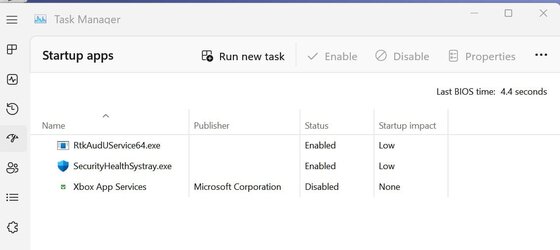
I have a dead (orphan) link in Task Manager Startup that I cannot get rid off (see attached Xbox App Services). It does not show up in any of the RUN registry hives and also not on the Powershell/Commands you mention in Option 4 (only the other 2 apps show). I had this before in Windows 10 but forgot how to remove it in the registry. Do you know perhaps?
It ended up in my Task Manager Startup (as disabled) after I disabled all the 4 Xbox services in Services, I did not uninstall anything so don't understand why I have this orphan link in Task Manager Startup. (Xbox Game bar is off in setings)
Thanks
Frank
 

Attachments

  • Brink.jpg
    Brink.jpg
    28.7 KB · Views: 128

My Computers My Computers

  • At a glance

    Windows 11 Home 25H2 build: 26200.8655Intel(R) Core(TM) Ultra 7 258V, 2200 Mhz, 8 C...32 GB LPDDR5X (soldered)Intel(R) Arc(TM) 140V GPU (16GB)
    OS
    Windows 11 Home 25H2 build: 26200.8655
    Computer type
    Laptop
    Manufacturer/Model
    Acer Swift A.I SF14-51T
    CPU
    Intel(R) Core(TM) Ultra 7 258V, 2200 Mhz, 8 Cores
    Motherboard
    Icefish_LNV, Version V1.15
    Memory
    32 GB LPDDR5X (soldered)
    Graphics Card(s)
    Intel(R) Arc(TM) 140V GPU (16GB)
    Sound Card
    RealTek + Intel Smart Sound
    Monitor(s) Displays
    14" IPS WUXGA
    Screen Resolution
    1920x1200x60Hz
    Hard Drives
    Micron_2550_MTFDKBA1T0TGE, NVMe Gen4, 1TB
    PSU
    45W USB-C GaN charger
    Case
    Full aluminum body
    Cooling
    1 fan
    Keyboard
    US with Backlight
    Mouse
    Precision Trackpad
    Internet Speed
    25 Mb/s 5G
    Browser
    Edge
    Antivirus
    Windows Defender
    Other Info
    BIOS Version/Date Insyde Corp. V1.15, 8/28/2025, Windows Hello IR camera with Facial recognition. Secure Boot 2026 KEK key installed
  • At a glance

    Windows 11 Home 25H2 build: 26200.8655Intel 12th Gen. i7 12700H, 14 cores, 2.3 GHz ...8GB LPDDR4 on board + 8GB LPDDR4 3200 MHz in ...Intel Iris Xe supports up to 4096 x 2304 @ 120Hz
    Operating System
    Windows 11 Home 25H2 build: 26200.8655
    Computer type
    Laptop
    Manufacturer/Model
    Asus Vivobook K3502Z S15 15" OLED
    CPU
    Intel 12th Gen. i7 12700H, 14 cores, 2.3 GHz (24M Cache, up to 4.7 GHz, 6P+8E cores)
    Motherboard
    Alder Lake-H, 1700-4700 MHz clock rate
    Memory
    8GB LPDDR4 on board + 8GB LPDDR4 3200 MHz in Dual Channel.
    Graphics card(s)
    Intel Iris Xe supports up to 4096 x 2304 @ 120Hz
    Sound Card
    Harman Kardon - DTS
    Monitor(s) Displays
    OLED 15.6inch 2.8K (2880 x 1620)
    Screen Resolution
    16:9 aspect ratio 0.2ms response time 120Hz refresh rate, 550nits
    Hard Drives
    512GB M.2 NVMe Gen4 PCIe 4.0 SSD, Micron_2450_MTFDKBA512TFK
    PSU
    90-Watt USB charger (Thunderbolt4)
    Case
    Metal lid, plastic case
    Cooling
    1 fan
    Keyboard
    With adjustable backlight
    Mouse
    Precision Trackpad
    Internet Speed
    ISP provides 15 mb/s WIFI LTE (4G), laptop WIFI 6 adapter.
    Browser
    Edge
    Antivirus
    Windows Defender
    Other Info
    BIOS American Megatrends International, LLC. 10.1.2.312, 13/03/2024. Network adapter: Intel Wi-Fi 6E AX211 160 MHz, Secure Boot 2026 KEK key installed
@Brink
Hi Shawn,
I have a dead (orphan) link in Task Manager Startup that I cannot get rid off (see attached Xbox App Services). It does not show up in any of the RUN registry hives and also not on the Powershell/Commands you mention in Option 4 (only the other 2 apps show). I had this before in Windows 10 but forgot how to remove it in the registry. Do you know perhaps?
It ended up in my Task Manager Startup (as disabled) after I disabled all the 4 Xbox services in Services, I did not uninstall anything so don't understand why I have this orphan link in Task Manager Startup. (Xbox Game bar is off in setings)
Thanks
Frank

Hello Frank, :-)

Interesting. Double check all the registry locations in option 3 below to see if it may be hiding in one of those.


My Computers My Computers

  • At a glance

    Windows 11 Pro for WorkstationsIntel i7-8700K 5 GHz64 GB (4x16GB) G.SKILL TridentZ RGB DDR4 3600...ASUS ROG-STRIX-GTX1080TI-O11G-GAMING (11GB GD...
    OS
    Windows 11 Pro for Workstations
    Computer type
    PC/Desktop
    Manufacturer/Model
    Custom self build
    CPU
    Intel i7-8700K 5 GHz
    Motherboard
    ASUS ROG Maximus XI Formula Z390
    Memory
    64 GB (4x16GB) G.SKILL TridentZ RGB DDR4 3600 MHz (F4-3600C18D-32GTZR)
    Graphics Card(s)
    ASUS ROG-STRIX-GTX1080TI-O11G-GAMING (11GB GDDR5X)
    Sound Card
    Integrated Digital Audio (S/PDIF)
    Monitor(s) Displays
    2 x Samsung Odyssey G75 27"
    Screen Resolution
    2560x1440
    Hard Drives
    1TB Samsung 990 PRO M.2,
    4TB Samsung 990 PRO M.2,
    TerraMaster F8 SSD Plus NAS
    PSU
    Seasonic Prime Titanium 850W
    Case
    Thermaltake Core P3 wall mounted
    Cooling
    Corsair Hydro H115i
    Keyboard
    Amazon Basics Wired Full Keyboard MD005
    Mouse
    Logitech MX Master 4
    Internet Speed
    2 Gbps Download and 100 Mbps Upload
    Browser
    Chrome and Edge
    Antivirus
    Microsoft Defender
    Other Info
    Logitech Z625 speaker system,
    Logitech BRIO 4K Pro webcam,
    HP Color LaserJet Pro MFP M477fdn,
    CyberPower CP1500PFCLCD
    Galaxy S23 Plus phone
  • At a glance

    Windows 11 ProSnapdragon X Elite (12 core) 3.42 GHz16 GB LPDDR5x-7467 MHz
    Operating System
    Windows 11 Pro
    Computer type
    Laptop
    Manufacturer/Model
    Surface Laptop 7 Copilot+ PC
    CPU
    Snapdragon X Elite (12 core) 3.42 GHz
    Memory
    16 GB LPDDR5x-7467 MHz
    Monitor(s) Displays
    15" HDR
    Screen Resolution
    2496 x 1664
    Hard Drives
    1 TB SSD
    Internet Speed
    Wi-Fi 7 and Bluetooth 5.4
    Browser
    Chrome and Edge
    Antivirus
    Microsoft Defender
Hello Frank, :-)

Interesting. Double check all the registry locations in option 3 below to see if it may be hiding in one of those.

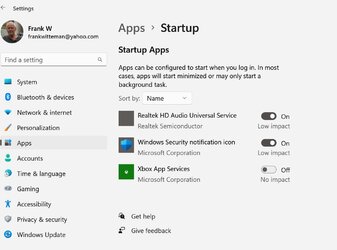
Hi Shawn.
I had checked all those RUN reg hives before, only 1 has the 2 Startup apps but not Xbox. I looked in Option 3 (W11) and found the Startup options (attached) but you can only disable not delete apps there. I may download Autoruns to remove that bad Startup link or just forget about it. Ran SFC /scannow and it found no issues. Also RESET the 3 Xbox apps to see if that would remove it and disabled Games option in Settings, all without results.
Thanks
Frank
 

Attachments

  • Brink2.jpg
    Brink2.jpg
    68.1 KB · Views: 126

My Computers My Computers

  • At a glance

    Windows 11 Home 25H2 build: 26200.8655Intel(R) Core(TM) Ultra 7 258V, 2200 Mhz, 8 C...32 GB LPDDR5X (soldered)Intel(R) Arc(TM) 140V GPU (16GB)
    OS
    Windows 11 Home 25H2 build: 26200.8655
    Computer type
    Laptop
    Manufacturer/Model
    Acer Swift A.I SF14-51T
    CPU
    Intel(R) Core(TM) Ultra 7 258V, 2200 Mhz, 8 Cores
    Motherboard
    Icefish_LNV, Version V1.15
    Memory
    32 GB LPDDR5X (soldered)
    Graphics Card(s)
    Intel(R) Arc(TM) 140V GPU (16GB)
    Sound Card
    RealTek + Intel Smart Sound
    Monitor(s) Displays
    14" IPS WUXGA
    Screen Resolution
    1920x1200x60Hz
    Hard Drives
    Micron_2550_MTFDKBA1T0TGE, NVMe Gen4, 1TB
    PSU
    45W USB-C GaN charger
    Case
    Full aluminum body
    Cooling
    1 fan
    Keyboard
    US with Backlight
    Mouse
    Precision Trackpad
    Internet Speed
    25 Mb/s 5G
    Browser
    Edge
    Antivirus
    Windows Defender
    Other Info
    BIOS Version/Date Insyde Corp. V1.15, 8/28/2025, Windows Hello IR camera with Facial recognition. Secure Boot 2026 KEK key installed
  • At a glance

    Windows 11 Home 25H2 build: 26200.8655Intel 12th Gen. i7 12700H, 14 cores, 2.3 GHz ...8GB LPDDR4 on board + 8GB LPDDR4 3200 MHz in ...Intel Iris Xe supports up to 4096 x 2304 @ 120Hz
    Operating System
    Windows 11 Home 25H2 build: 26200.8655
    Computer type
    Laptop
    Manufacturer/Model
    Asus Vivobook K3502Z S15 15" OLED
    CPU
    Intel 12th Gen. i7 12700H, 14 cores, 2.3 GHz (24M Cache, up to 4.7 GHz, 6P+8E cores)
    Motherboard
    Alder Lake-H, 1700-4700 MHz clock rate
    Memory
    8GB LPDDR4 on board + 8GB LPDDR4 3200 MHz in Dual Channel.
    Graphics card(s)
    Intel Iris Xe supports up to 4096 x 2304 @ 120Hz
    Sound Card
    Harman Kardon - DTS
    Monitor(s) Displays
    OLED 15.6inch 2.8K (2880 x 1620)
    Screen Resolution
    16:9 aspect ratio 0.2ms response time 120Hz refresh rate, 550nits
    Hard Drives
    512GB M.2 NVMe Gen4 PCIe 4.0 SSD, Micron_2450_MTFDKBA512TFK
    PSU
    90-Watt USB charger (Thunderbolt4)
    Case
    Metal lid, plastic case
    Cooling
    1 fan
    Keyboard
    With adjustable backlight
    Mouse
    Precision Trackpad
    Internet Speed
    ISP provides 15 mb/s WIFI LTE (4G), laptop WIFI 6 adapter.
    Browser
    Edge
    Antivirus
    Windows Defender
    Other Info
    BIOS American Megatrends International, LLC. 10.1.2.312, 13/03/2024. Network adapter: Intel Wi-Fi 6E AX211 160 MHz, Secure Boot 2026 KEK key installed
Hi Shawn.
I had checked all those RUN reg hives before, only 1 has the 2 Startup apps but not Xbox. I looked in Option 3 (W11) and found the Startup options (attached) but you can only disable not delete apps there. I may download Autoruns to remove that bad Startup link or just forget about it. Ran SFC /scannow and it found no issues. Also RESET the 3 Xbox apps to see if that would remove it and disabled Games option in Settings, all without results.
Thanks
Frank

I searched the registry, and couldn't find any reference for "Xbox App Services" either.
 

My Computers My Computers

  • At a glance

    Windows 11 Pro for WorkstationsIntel i7-8700K 5 GHz64 GB (4x16GB) G.SKILL TridentZ RGB DDR4 3600...ASUS ROG-STRIX-GTX1080TI-O11G-GAMING (11GB GD...
    OS
    Windows 11 Pro for Workstations
    Computer type
    PC/Desktop
    Manufacturer/Model
    Custom self build
    CPU
    Intel i7-8700K 5 GHz
    Motherboard
    ASUS ROG Maximus XI Formula Z390
    Memory
    64 GB (4x16GB) G.SKILL TridentZ RGB DDR4 3600 MHz (F4-3600C18D-32GTZR)
    Graphics Card(s)
    ASUS ROG-STRIX-GTX1080TI-O11G-GAMING (11GB GDDR5X)
    Sound Card
    Integrated Digital Audio (S/PDIF)
    Monitor(s) Displays
    2 x Samsung Odyssey G75 27"
    Screen Resolution
    2560x1440
    Hard Drives
    1TB Samsung 990 PRO M.2,
    4TB Samsung 990 PRO M.2,
    TerraMaster F8 SSD Plus NAS
    PSU
    Seasonic Prime Titanium 850W
    Case
    Thermaltake Core P3 wall mounted
    Cooling
    Corsair Hydro H115i
    Keyboard
    Amazon Basics Wired Full Keyboard MD005
    Mouse
    Logitech MX Master 4
    Internet Speed
    2 Gbps Download and 100 Mbps Upload
    Browser
    Chrome and Edge
    Antivirus
    Microsoft Defender
    Other Info
    Logitech Z625 speaker system,
    Logitech BRIO 4K Pro webcam,
    HP Color LaserJet Pro MFP M477fdn,
    CyberPower CP1500PFCLCD
    Galaxy S23 Plus phone
  • At a glance

    Windows 11 ProSnapdragon X Elite (12 core) 3.42 GHz16 GB LPDDR5x-7467 MHz
    Operating System
    Windows 11 Pro
    Computer type
    Laptop
    Manufacturer/Model
    Surface Laptop 7 Copilot+ PC
    CPU
    Snapdragon X Elite (12 core) 3.42 GHz
    Memory
    16 GB LPDDR5x-7467 MHz
    Monitor(s) Displays
    15" HDR
    Screen Resolution
    2496 x 1664
    Hard Drives
    1 TB SSD
    Internet Speed
    Wi-Fi 7 and Bluetooth 5.4
    Browser
    Chrome and Edge
    Antivirus
    Microsoft Defender
I searched the registry, and couldn't find any reference for "Xbox App Services" either.
Try combined XboxAppServices or XboxAppServices.exe and you may get 2 hits: HKEY_CLASSES_ROOT\PackagedCom\Package\Microsoft.GamingApp_2210.1001.58.0_x64__8wekyb3d8bbwe\Server\0 (Microsoft.Xbox.App) and
HKEY_LOCAL_MACHINE\SOFTWARE\Classes\PackagedCom\Package\Microsoft.GamingApp_2210.1001.58.0_x64__8wekyb3d8bbwe\Server\0 (XboxAppServices.exe) The 2nd key is the app in my Task Manager Startup but File Location (right click) is greyed-out meaning the program is no longer there?
 

My Computers My Computers

  • At a glance

    Windows 11 Home 25H2 build: 26200.8655Intel(R) Core(TM) Ultra 7 258V, 2200 Mhz, 8 C...32 GB LPDDR5X (soldered)Intel(R) Arc(TM) 140V GPU (16GB)
    OS
    Windows 11 Home 25H2 build: 26200.8655
    Computer type
    Laptop
    Manufacturer/Model
    Acer Swift A.I SF14-51T
    CPU
    Intel(R) Core(TM) Ultra 7 258V, 2200 Mhz, 8 Cores
    Motherboard
    Icefish_LNV, Version V1.15
    Memory
    32 GB LPDDR5X (soldered)
    Graphics Card(s)
    Intel(R) Arc(TM) 140V GPU (16GB)
    Sound Card
    RealTek + Intel Smart Sound
    Monitor(s) Displays
    14" IPS WUXGA
    Screen Resolution
    1920x1200x60Hz
    Hard Drives
    Micron_2550_MTFDKBA1T0TGE, NVMe Gen4, 1TB
    PSU
    45W USB-C GaN charger
    Case
    Full aluminum body
    Cooling
    1 fan
    Keyboard
    US with Backlight
    Mouse
    Precision Trackpad
    Internet Speed
    25 Mb/s 5G
    Browser
    Edge
    Antivirus
    Windows Defender
    Other Info
    BIOS Version/Date Insyde Corp. V1.15, 8/28/2025, Windows Hello IR camera with Facial recognition. Secure Boot 2026 KEK key installed
  • At a glance

    Windows 11 Home 25H2 build: 26200.8655Intel 12th Gen. i7 12700H, 14 cores, 2.3 GHz ...8GB LPDDR4 on board + 8GB LPDDR4 3200 MHz in ...Intel Iris Xe supports up to 4096 x 2304 @ 120Hz
    Operating System
    Windows 11 Home 25H2 build: 26200.8655
    Computer type
    Laptop
    Manufacturer/Model
    Asus Vivobook K3502Z S15 15" OLED
    CPU
    Intel 12th Gen. i7 12700H, 14 cores, 2.3 GHz (24M Cache, up to 4.7 GHz, 6P+8E cores)
    Motherboard
    Alder Lake-H, 1700-4700 MHz clock rate
    Memory
    8GB LPDDR4 on board + 8GB LPDDR4 3200 MHz in Dual Channel.
    Graphics card(s)
    Intel Iris Xe supports up to 4096 x 2304 @ 120Hz
    Sound Card
    Harman Kardon - DTS
    Monitor(s) Displays
    OLED 15.6inch 2.8K (2880 x 1620)
    Screen Resolution
    16:9 aspect ratio 0.2ms response time 120Hz refresh rate, 550nits
    Hard Drives
    512GB M.2 NVMe Gen4 PCIe 4.0 SSD, Micron_2450_MTFDKBA512TFK
    PSU
    90-Watt USB charger (Thunderbolt4)
    Case
    Metal lid, plastic case
    Cooling
    1 fan
    Keyboard
    With adjustable backlight
    Mouse
    Precision Trackpad
    Internet Speed
    ISP provides 15 mb/s WIFI LTE (4G), laptop WIFI 6 adapter.
    Browser
    Edge
    Antivirus
    Windows Defender
    Other Info
    BIOS American Megatrends International, LLC. 10.1.2.312, 13/03/2024. Network adapter: Intel Wi-Fi 6E AX211 160 MHz, Secure Boot 2026 KEK key installed
Try combined XboxAppServices or XboxAppServices.exe and you may get 2 hits: HKEY_CLASSES_ROOT\PackagedCom\Package\Microsoft.GamingApp_2210.1001.58.0_x64__8wekyb3d8bbwe\Server\0 (Microsoft.Xbox.App) and
HKEY_LOCAL_MACHINE\SOFTWARE\Classes\PackagedCom\Package\Microsoft.GamingApp_2210.1001.58.0_x64__8wekyb3d8bbwe\Server\0 (XboxAppServices.exe) The 2nd key is the app in my Task Manager Startup but File Location (right click) is greyed-out meaning the program is no longer there?

Those would reference the app package for it, but not related to startup apps. :(

As a test, you could try uninstalling the Microsoft.GamingApp using option 5 below to see if it may remove it.

Get-AppxPackage -AllUsers -PackageTypeFilter Bundle -Name "*Microsoft.GamingApp*" | Remove-AppxPackage -AllUsers


My Computers My Computers

  • At a glance

    Windows 11 Pro for WorkstationsIntel i7-8700K 5 GHz64 GB (4x16GB) G.SKILL TridentZ RGB DDR4 3600...ASUS ROG-STRIX-GTX1080TI-O11G-GAMING (11GB GD...
    OS
    Windows 11 Pro for Workstations
    Computer type
    PC/Desktop
    Manufacturer/Model
    Custom self build
    CPU
    Intel i7-8700K 5 GHz
    Motherboard
    ASUS ROG Maximus XI Formula Z390
    Memory
    64 GB (4x16GB) G.SKILL TridentZ RGB DDR4 3600 MHz (F4-3600C18D-32GTZR)
    Graphics Card(s)
    ASUS ROG-STRIX-GTX1080TI-O11G-GAMING (11GB GDDR5X)
    Sound Card
    Integrated Digital Audio (S/PDIF)
    Monitor(s) Displays
    2 x Samsung Odyssey G75 27"
    Screen Resolution
    2560x1440
    Hard Drives
    1TB Samsung 990 PRO M.2,
    4TB Samsung 990 PRO M.2,
    TerraMaster F8 SSD Plus NAS
    PSU
    Seasonic Prime Titanium 850W
    Case
    Thermaltake Core P3 wall mounted
    Cooling
    Corsair Hydro H115i
    Keyboard
    Amazon Basics Wired Full Keyboard MD005
    Mouse
    Logitech MX Master 4
    Internet Speed
    2 Gbps Download and 100 Mbps Upload
    Browser
    Chrome and Edge
    Antivirus
    Microsoft Defender
    Other Info
    Logitech Z625 speaker system,
    Logitech BRIO 4K Pro webcam,
    HP Color LaserJet Pro MFP M477fdn,
    CyberPower CP1500PFCLCD
    Galaxy S23 Plus phone
  • At a glance

    Windows 11 ProSnapdragon X Elite (12 core) 3.42 GHz16 GB LPDDR5x-7467 MHz
    Operating System
    Windows 11 Pro
    Computer type
    Laptop
    Manufacturer/Model
    Surface Laptop 7 Copilot+ PC
    CPU
    Snapdragon X Elite (12 core) 3.42 GHz
    Memory
    16 GB LPDDR5x-7467 MHz
    Monitor(s) Displays
    15" HDR
    Screen Resolution
    2496 x 1664
    Hard Drives
    1 TB SSD
    Internet Speed
    Wi-Fi 7 and Bluetooth 5.4
    Browser
    Chrome and Edge
    Antivirus
    Microsoft Defender
Those would reference the app package for it, but not related to startup apps. :(

As a test, you could try uninstalling the Microsoft.GamingApp using option 5 below to see if it may remove it.

Get-AppxPackage -AllUsers -PackageTypeFilter Bundle -Name "*Microsoft.GamingApp*" | Remove-AppxPackage -AllUsers

I get Access Denied (see attached), probably have to Take Ownership of the whole package folder or just of that file?
 

Attachments

  • Access denied.jpg
    Access denied.jpg
    61.1 KB · Views: 148

My Computers My Computers

  • At a glance

    Windows 11 Home 25H2 build: 26200.8655Intel(R) Core(TM) Ultra 7 258V, 2200 Mhz, 8 C...32 GB LPDDR5X (soldered)Intel(R) Arc(TM) 140V GPU (16GB)
    OS
    Windows 11 Home 25H2 build: 26200.8655
    Computer type
    Laptop
    Manufacturer/Model
    Acer Swift A.I SF14-51T
    CPU
    Intel(R) Core(TM) Ultra 7 258V, 2200 Mhz, 8 Cores
    Motherboard
    Icefish_LNV, Version V1.15
    Memory
    32 GB LPDDR5X (soldered)
    Graphics Card(s)
    Intel(R) Arc(TM) 140V GPU (16GB)
    Sound Card
    RealTek + Intel Smart Sound
    Monitor(s) Displays
    14" IPS WUXGA
    Screen Resolution
    1920x1200x60Hz
    Hard Drives
    Micron_2550_MTFDKBA1T0TGE, NVMe Gen4, 1TB
    PSU
    45W USB-C GaN charger
    Case
    Full aluminum body
    Cooling
    1 fan
    Keyboard
    US with Backlight
    Mouse
    Precision Trackpad
    Internet Speed
    25 Mb/s 5G
    Browser
    Edge
    Antivirus
    Windows Defender
    Other Info
    BIOS Version/Date Insyde Corp. V1.15, 8/28/2025, Windows Hello IR camera with Facial recognition. Secure Boot 2026 KEK key installed
  • At a glance

    Windows 11 Home 25H2 build: 26200.8655Intel 12th Gen. i7 12700H, 14 cores, 2.3 GHz ...8GB LPDDR4 on board + 8GB LPDDR4 3200 MHz in ...Intel Iris Xe supports up to 4096 x 2304 @ 120Hz
    Operating System
    Windows 11 Home 25H2 build: 26200.8655
    Computer type
    Laptop
    Manufacturer/Model
    Asus Vivobook K3502Z S15 15" OLED
    CPU
    Intel 12th Gen. i7 12700H, 14 cores, 2.3 GHz (24M Cache, up to 4.7 GHz, 6P+8E cores)
    Motherboard
    Alder Lake-H, 1700-4700 MHz clock rate
    Memory
    8GB LPDDR4 on board + 8GB LPDDR4 3200 MHz in Dual Channel.
    Graphics card(s)
    Intel Iris Xe supports up to 4096 x 2304 @ 120Hz
    Sound Card
    Harman Kardon - DTS
    Monitor(s) Displays
    OLED 15.6inch 2.8K (2880 x 1620)
    Screen Resolution
    16:9 aspect ratio 0.2ms response time 120Hz refresh rate, 550nits
    Hard Drives
    512GB M.2 NVMe Gen4 PCIe 4.0 SSD, Micron_2450_MTFDKBA512TFK
    PSU
    90-Watt USB charger (Thunderbolt4)
    Case
    Metal lid, plastic case
    Cooling
    1 fan
    Keyboard
    With adjustable backlight
    Mouse
    Precision Trackpad
    Internet Speed
    ISP provides 15 mb/s WIFI LTE (4G), laptop WIFI 6 adapter.
    Browser
    Edge
    Antivirus
    Windows Defender
    Other Info
    BIOS American Megatrends International, LLC. 10.1.2.312, 13/03/2024. Network adapter: Intel Wi-Fi 6E AX211 160 MHz, Secure Boot 2026 KEK key installed
I get Access Denied (see attached), probably have to Take Ownership of the whole package folder or just of that file?

It looks like you need to open an elevated PowerShell or Windows Terminal instead.

Open Windows Terminal (Admin), and select Windows Powershell.
 

My Computers My Computers

  • At a glance

    Windows 11 Pro for WorkstationsIntel i7-8700K 5 GHz64 GB (4x16GB) G.SKILL TridentZ RGB DDR4 3600...ASUS ROG-STRIX-GTX1080TI-O11G-GAMING (11GB GD...
    OS
    Windows 11 Pro for Workstations
    Computer type
    PC/Desktop
    Manufacturer/Model
    Custom self build
    CPU
    Intel i7-8700K 5 GHz
    Motherboard
    ASUS ROG Maximus XI Formula Z390
    Memory
    64 GB (4x16GB) G.SKILL TridentZ RGB DDR4 3600 MHz (F4-3600C18D-32GTZR)
    Graphics Card(s)
    ASUS ROG-STRIX-GTX1080TI-O11G-GAMING (11GB GDDR5X)
    Sound Card
    Integrated Digital Audio (S/PDIF)
    Monitor(s) Displays
    2 x Samsung Odyssey G75 27"
    Screen Resolution
    2560x1440
    Hard Drives
    1TB Samsung 990 PRO M.2,
    4TB Samsung 990 PRO M.2,
    TerraMaster F8 SSD Plus NAS
    PSU
    Seasonic Prime Titanium 850W
    Case
    Thermaltake Core P3 wall mounted
    Cooling
    Corsair Hydro H115i
    Keyboard
    Amazon Basics Wired Full Keyboard MD005
    Mouse
    Logitech MX Master 4
    Internet Speed
    2 Gbps Download and 100 Mbps Upload
    Browser
    Chrome and Edge
    Antivirus
    Microsoft Defender
    Other Info
    Logitech Z625 speaker system,
    Logitech BRIO 4K Pro webcam,
    HP Color LaserJet Pro MFP M477fdn,
    CyberPower CP1500PFCLCD
    Galaxy S23 Plus phone
  • At a glance

    Windows 11 ProSnapdragon X Elite (12 core) 3.42 GHz16 GB LPDDR5x-7467 MHz
    Operating System
    Windows 11 Pro
    Computer type
    Laptop
    Manufacturer/Model
    Surface Laptop 7 Copilot+ PC
    CPU
    Snapdragon X Elite (12 core) 3.42 GHz
    Memory
    16 GB LPDDR5x-7467 MHz
    Monitor(s) Displays
    15" HDR
    Screen Resolution
    2496 x 1664
    Hard Drives
    1 TB SSD
    Internet Speed
    Wi-Fi 7 and Bluetooth 5.4
    Browser
    Chrome and Edge
    Antivirus
    Microsoft Defender
It looks like you need to open an elevated PowerShell or Windows Terminal instead.

Open Windows Terminal (Admin), and select Windows Powershell.
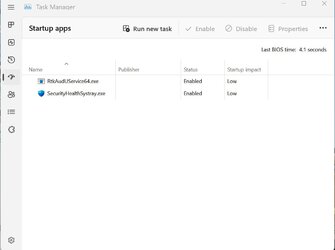
Thanks Shawn, I'll try it and always can reinstall it from the Windows store if want it back:-)

Update 07:30
Gone (see attached)!
Frank
 

Attachments

  • Brink3.jpg
    Brink3.jpg
    27.9 KB · Views: 148
Last edited:

My Computers My Computers

  • At a glance

    Windows 11 Home 25H2 build: 26200.8655Intel(R) Core(TM) Ultra 7 258V, 2200 Mhz, 8 C...32 GB LPDDR5X (soldered)Intel(R) Arc(TM) 140V GPU (16GB)
    OS
    Windows 11 Home 25H2 build: 26200.8655
    Computer type
    Laptop
    Manufacturer/Model
    Acer Swift A.I SF14-51T
    CPU
    Intel(R) Core(TM) Ultra 7 258V, 2200 Mhz, 8 Cores
    Motherboard
    Icefish_LNV, Version V1.15
    Memory
    32 GB LPDDR5X (soldered)
    Graphics Card(s)
    Intel(R) Arc(TM) 140V GPU (16GB)
    Sound Card
    RealTek + Intel Smart Sound
    Monitor(s) Displays
    14" IPS WUXGA
    Screen Resolution
    1920x1200x60Hz
    Hard Drives
    Micron_2550_MTFDKBA1T0TGE, NVMe Gen4, 1TB
    PSU
    45W USB-C GaN charger
    Case
    Full aluminum body
    Cooling
    1 fan
    Keyboard
    US with Backlight
    Mouse
    Precision Trackpad
    Internet Speed
    25 Mb/s 5G
    Browser
    Edge
    Antivirus
    Windows Defender
    Other Info
    BIOS Version/Date Insyde Corp. V1.15, 8/28/2025, Windows Hello IR camera with Facial recognition. Secure Boot 2026 KEK key installed
  • At a glance

    Windows 11 Home 25H2 build: 26200.8655Intel 12th Gen. i7 12700H, 14 cores, 2.3 GHz ...8GB LPDDR4 on board + 8GB LPDDR4 3200 MHz in ...Intel Iris Xe supports up to 4096 x 2304 @ 120Hz
    Operating System
    Windows 11 Home 25H2 build: 26200.8655
    Computer type
    Laptop
    Manufacturer/Model
    Asus Vivobook K3502Z S15 15" OLED
    CPU
    Intel 12th Gen. i7 12700H, 14 cores, 2.3 GHz (24M Cache, up to 4.7 GHz, 6P+8E cores)
    Motherboard
    Alder Lake-H, 1700-4700 MHz clock rate
    Memory
    8GB LPDDR4 on board + 8GB LPDDR4 3200 MHz in Dual Channel.
    Graphics card(s)
    Intel Iris Xe supports up to 4096 x 2304 @ 120Hz
    Sound Card
    Harman Kardon - DTS
    Monitor(s) Displays
    OLED 15.6inch 2.8K (2880 x 1620)
    Screen Resolution
    16:9 aspect ratio 0.2ms response time 120Hz refresh rate, 550nits
    Hard Drives
    512GB M.2 NVMe Gen4 PCIe 4.0 SSD, Micron_2450_MTFDKBA512TFK
    PSU
    90-Watt USB charger (Thunderbolt4)
    Case
    Metal lid, plastic case
    Cooling
    1 fan
    Keyboard
    With adjustable backlight
    Mouse
    Precision Trackpad
    Internet Speed
    ISP provides 15 mb/s WIFI LTE (4G), laptop WIFI 6 adapter.
    Browser
    Edge
    Antivirus
    Windows Defender
    Other Info
    BIOS American Megatrends International, LLC. 10.1.2.312, 13/03/2024. Network adapter: Intel Wi-Fi 6E AX211 160 MHz, Secure Boot 2026 KEK key installed
1781923900045.webp


anyone know where this lists' data is stored... either in reg or elsewhere? there are 2 apps i need (want to rename - elevated shortcuts via scheduled tasks) that do not show up in ANY of the numerous reg locations, nor the :startup folders. in task manager, they are listed as "Task Scheduler Configuration Tool" and "schtasks.exe". no clue where it even pulled those random names from, but i cannot find a way to change them. i'm sure someone here must know...

so, heres where i've looked:

HKEY_LOCAL_MACHINE\SOFTWARE\Microsoft\Windows\CurrentVersion\Run
HKEY_CURRENT_USER\SOFTWARE\WOW6432Node\Microsoft\Windows\CurrentVersion\Run
HKEY_LOCAL_MACHINE\SOFTWARE\WOW6432Node\Microsoft\Windows\CurrentVersion\Run
HKEY_CURRENT_USER\SOFTWARE\Microsoft\Windows\CurrentVersion\Explorer\StartupApproved\Run
HKEY_LOCAL_MACHINE\SOFTWARE\Microsoft\Windows\CurrentVersion\Explorer\StartupApproved\Run
HKEY_LOCAL_MACHINE\SOFTWARE\Microsoft\Shared Tools\MSConfig\startupreg
HKEY_CURRENT_USER\SOFTWARE\Microsoft\Shared Tools\MsConfig


%ProgramData%\Microsoft\Windows\Start Menu\Programs\Startup
%AppData%\Roaming\Microsoft\Windows\Start Menu\Programs\Startup


click on some apps in the list (in the image above), it will open
%systemdrive%\Windows\Installer\{CLSID}

but not for the 2 in question

* Ran Autoruns too. does not show them

* Edit 21 June - got the scheduled tasks fixed by giving in and just make an ahk exe to run them. then it utilized the names i wanted. everything is as cleaned as i can get it in regard to startup programs... i just CANNOT get rid of 3 uwp apps that are listed in the task manager startup tab. i found the reg keys HKCU\Software\Classes\Local Settings\Software\Microsoft\Windows\CurrentVersion\AppModel\SystemAppData\ and their subsequent startuptasks folders... but the dwords contained in them can only enable or disable the items. obviously, they do not show in the classic msconfig, so they are just 3 outstanding uwp apps that are set to disabled that are irritating my ocd haha. (and no... i dont want to uninstall terminal or the other 2 apps. just not necessary to run them at startup).... the mystery continues 😮‍💨
 
Last edited:

My Computer My Computer

At a glance

Windows 11 Pro
OS
Windows 11 Pro
View attachment 174700

anyone know where this lists' data is stored... either in reg or elsewhere? there are 2 apps i need (want to rename - elevated shortcuts via scheduled tasks) that do not show up in ANY of the numerous reg locations, nor the :startup folders. in task manager, they are listed as "Task Scheduler Configuration Tool" and "schtasks.exe". no clue where it even pulled those random names from, but i cannot find a way to change them. i'm sure someone here must know...

so, heres where i've looked:

HKEY_LOCAL_MACHINE\SOFTWARE\Microsoft\Windows\CurrentVersion\Run
HKEY_CURRENT_USER\SOFTWARE\WOW6432Node\Microsoft\Windows\CurrentVersion\Run
HKEY_LOCAL_MACHINE\SOFTWARE\WOW6432Node\Microsoft\Windows\CurrentVersion\Run
HKEY_CURRENT_USER\SOFTWARE\Microsoft\Windows\CurrentVersion\Explorer\StartupApproved\Run
HKEY_LOCAL_MACHINE\SOFTWARE\Microsoft\Windows\CurrentVersion\Explorer\StartupApproved\Run
HKEY_LOCAL_MACHINE\SOFTWARE\Microsoft\Shared Tools\MSConfig\startupreg
HKEY_CURRENT_USER\SOFTWARE\Microsoft\Shared Tools\MsConfig


%ProgramData%\Microsoft\Windows\Start Menu\Programs\Startup
%AppData%\Roaming\Microsoft\Windows\Start Menu\Programs\Startup


click on some apps in the list (in the image above), it will open
%systemdrive%\Windows\Installer\{CLSID}

but not for the 2 in question

* Ran Autoruns too. does not show them

* Edit 21 June - got the scheduled tasks fixed by giving in and just make an ahk exe to run them. then it utilized the names i wanted. everything is as cleaned as i can get it in regard to startup programs... i just CANNOT get rid of 3 uwp apps that are listed in the task manager startup tab. i found the reg keys HKCU\Software\Classes\Local Settings\Software\Microsoft\Windows\CurrentVersion\AppModel\SystemAppData\ and their subsequent startuptasks folders... but the dwords contained in them can only enable or disable the items. obviously, they do not show in the classic msconfig, so they are just 3 outstanding uwp apps that are set to disabled that are irritating my ocd haha. (and no... i dont want to uninstall terminal or the other 2 apps. just not necessary to run them at startup).... the mystery continues 😮‍💨
Startup‑enabled UWP apps do not store their autostart entries in the classic Run or RunOnce registry keys. Instead, Windows tracks them through AppX‑based tasks and declarations, not a single public registry path. The closest discoverable locations are Task Scheduler entries and AppX manifest data, not a normal registry key. So, UWP autostart is controlled by:
  • StartupTask declarations
  • Background tasks
  • Scheduled tasks
Some developers misuse background tasks by launching the main app from inside a UWP background task or by using a background trigger (UserPresent, SystemStartup) to force a visible launch. A UWP background task can call:
  • Launcher.LaunchUriAsync()
  • AppServiceConnection
  • Protocol activation
This can cause the main UWP UI to appear, even if Settings ➔ Apps ➔ Startup is disabled.

So if a background task is the culprit, then make sure that Settings ➔ Privacy & security ➔ App permissions ➔ Background apps is disabled for the app.

Some UWP apps cheat by bundling a Win32 helper executable using:
  • Desktop Bridge (Centennial)
  • MSIX Packaging Tool
  • Full‑trust process extension (<uap5:Extension Category="windows.fullTrustProcess">)
Win32 helper executables can appear in:
  • Task Manager ➔ Startup
  • Task Scheduler ➔ Task Scheduler Library ➔ Microsoft ➔ Windows ➔ AppID
  • Task Scheduler ➔ Task Scheduler Library ➔ Microsoft ➔ Windows ➔ PushToInstall
  • Task Scheduler ➔ Task Scheduler Library
  • shortcuts in shell:startup (i.e., "%APPDATA%\Microsoft\Windows\Start Menu\Programs\Startup")
 

My Computers My Computers

  • At a glance

    11 Homei7 13650HX16GB DDR5GeForce RTX 4060 Mobile
    OS
    11 Home
    Computer type
    Laptop
    Manufacturer/Model
    Asus TUF Gaming F16 (2024)
    CPU
    i7 13650HX
    Memory
    16GB DDR5
    Graphics Card(s)
    GeForce RTX 4060 Mobile
    Sound Card
    Eastern Electric MiniMax DAC Supreme; Emotiva UMC-200; Astell & Kern AK240
    Monitor(s) Displays
    Sony Bravia XR-55X90J
    Screen Resolution
    3840×2160
    Hard Drives
    512GB SSD internal
    37TB external
    PSU
    Li-ion
    Cooling
    2× Arc Flow Fans, 4× exhaust vents, 5× heatpipes
    Keyboard
    Logitech K800
    Mouse
    Logitech G402
    Internet Speed
    30Mbit/s up, 500Mbit/s down
    Browser
    FF
    Antivirus
    What's an antivirus?
  • At a glance

    11 Homei5 1135G716GB DDR4Intel Iris Xe
    Operating System
    11 Home
    Computer type
    Laptop
    Manufacturer/Model
    Medion S15450
    CPU
    i5 1135G7
    Memory
    16GB DDR4
    Graphics card(s)
    Intel Iris Xe
    Sound Card
    Eastern Electric MiniMax DAC Supreme; Emotiva UMC-200; Astell & Kern AK240
    Monitor(s) Displays
    Sony Bravia XR-55X90J
    Screen Resolution
    3840×2160
    Hard Drives
    2TB SSD internal
    37TB external
    PSU
    Li-ion
    Keyboard
    Logitech K800
    Mouse
    Logitech G402
    Internet Speed
    30Mbit/s up, 500Mbit/s down
    Browser
    FF
they dont run when i set them to not run at startup, so its not that they are not functioning properly in that aspect. i just want to remove them from the list (visually).
 

My Computer My Computer

At a glance

Windows 11 Pro
OS
Windows 11 Pro
Also, right-click on the app to enable or disable it.
 

My Computer My Computer

At a glance

Windows 11 Proi5-13400F16 GBRTX 4060
OS
Windows 11 Pro
Computer type
PC/Desktop
Manufacturer/Model
Custom Build
CPU
i5-13400F
Motherboard
Gigabyte B-760M
Memory
16 GB
Graphics Card(s)
RTX 4060
Sound Card
internal
Monitor(s) Displays
AOC 27 gaming
Screen Resolution
1920 x 1080
Hard Drives
Kingston 2 TB M.2
PSU
Thermaltake 700W
Case
DarkFlash C285P
Cooling
Kingsman KA-R240 ARGB Liquid Cooling
Keyboard
Redragon Kala
Mouse
Marvo G945
Internet Speed
400 Mbps DL/UL
Browser
Firefox, Mullvad
Antivirus
Kaspersky Standard
Other Info
Adguard for Desktop, Kerish PC Doctor, PerfectDisk Pro with OptiWrite, AOMEI Backupper Pro, Open-Shell, ExplorerPatcher

Latest Support Threads

Back
Top Bottom