
Hi,
My Laptop updated to the latest windows overnight and has a caused an error on my network that access our server. It is asking me to enter network credentials. (username and password)
-There is no username and password to access this computer/server.
-all folder permissions are switched off
-i've done a network reset and it still doesnt work.
I've had this issue in the past and to resolve it i had to uninstall the latest windows update. However, i would like to fix this issue to ensure I continue receiving updates.
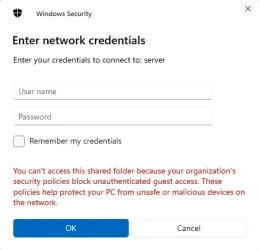
Thank you for your help.
My Laptop updated to the latest windows overnight and has a caused an error on my network that access our server. It is asking me to enter network credentials. (username and password)
-There is no username and password to access this computer/server.
-all folder permissions are switched off
-i've done a network reset and it still doesnt work.
I've had this issue in the past and to resolve it i had to uninstall the latest windows update. However, i would like to fix this issue to ensure I continue receiving updates.
Thank you for your help.
My Computer
At a glance
11
- OS
- 11
- Computer type
- Laptop
- Manufacturer/Model
- MSI






