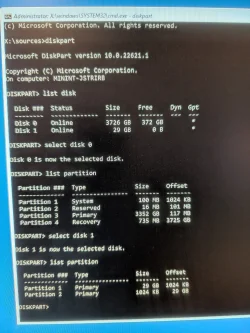
I noticed on one of my non-OS HDD, there was a EFI system partition, so I deleted it by following this: https://www.tomshardware.com/how-to/delete-efi-system-partition-windows .
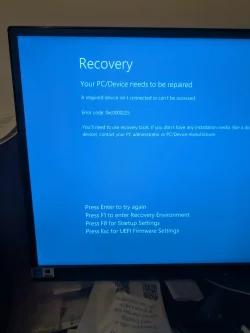
Now my windows 11 won't boot and gives Error code 0xc0000225 (I'm guessing when I initially installed the OS, I didn't unplug all the other HDDs, which is causing headaches for me right now).
I tried the /fixboot command but says Access Denied so I continued following this video:
.
Looka like something went wrong and I still couldn't boot, so I went to step 7 in this link: Revive Your PC with a Quick Command: Master the BCD Fix .
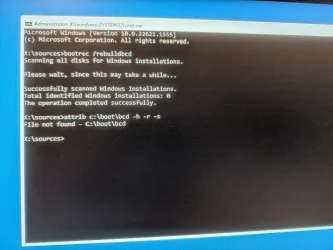
I typed " attrib c:\boot\bcd -h -r -s " , but I got File Not found.
What am I doing wrong? And can anyone help?
Now my windows 11 won't boot and gives Error code 0xc0000225 (I'm guessing when I initially installed the OS, I didn't unplug all the other HDDs, which is causing headaches for me right now).
I tried the /fixboot command but says Access Denied so I continued following this video:
Looka like something went wrong and I still couldn't boot, so I went to step 7 in this link: Revive Your PC with a Quick Command: Master the BCD Fix .
I typed " attrib c:\boot\bcd -h -r -s " , but I got File Not found.
What am I doing wrong? And can anyone help?
Attachments
My Computer
At a glance
11, (10 as a test secondary)AMD Ryzen 9 7950X3DKingston FURY Beast 32 GB (2 x 16 GB) DDR5-56...RTX 5080
- OS
- 11, (10 as a test secondary)
- Computer type
- PC/Desktop
- CPU
- AMD Ryzen 9 7950X3D
- Motherboard
- MSI MPG X670E CARBON WIFI
- Memory
- Kingston FURY Beast 32 GB (2 x 16 GB) DDR5-5600 CL36
- Graphics Card(s)
- RTX 5080
- Hard Drives
- C drive: Samsung SSD 870 EVO 4TB (win 11)
C Drive: Hitachi HTS545032B9A300 (win 10)
-WD WD1002FAEX 1tb
-Seagate ST3160812AS 160 gb
- PSU
- SeaSonic PRIME 1300 Gold 1300 W 80+ Gold
- Case
- Phanteks Enthoo Pro Tempered Glass ATX Full Tower Case
- Cooling
- Noctua NH-D15S