Solved Error: "To use System Restore, you must specify which Windows installation to restore...."


Bug locker

Well-known member
Member
VIP
Local time
6:30 PM
Posts
644
Location
Athens
OS
Windows 11 Pro
Hey all.
Last 2 days i tried to set and fix some things. These are enable/disable the WinRe , create missing WinRE.wim , create missing BCD file ,
enable/disable F8 menu. All done.
But sometime i tried to run System Restore (Restore point) from WinRE/WinPE.
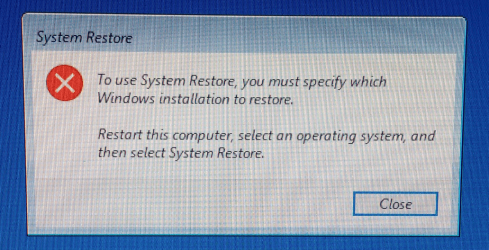
So i got a new problem : When i click to choose the "System Restore" , i take an error.
That it not happens if i do that from inside windows. Happens when i boot to WinPE from USB installation disk and reboot to WinRE e.g with Shift+Restart.
i search the internet and find some solutions with no success e.g:
1) Commands DISM , sfc , chkdsk , bootrec , bootsect , bcedit , bcdboot.
2) Startup repair via WinRE
I think the problem is that the system see more than operation systems. But i only have Win 11 and WinRE.

The message is : "To use System Restore, you must specify which Windows installation to restore.
Restart this computer, select an operating system, and then select System Restore".

1710440447726.png


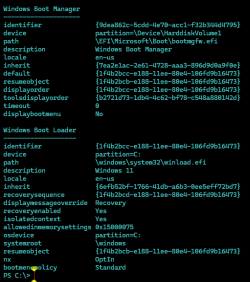
Current configuration:

1710441219712.png

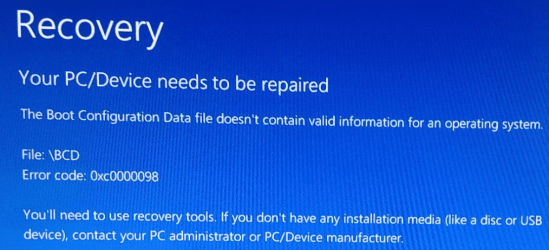
Sometime i took a new error :
1710440504464.png

Again i tried to solved with some solutions via internet with no luck.
Finally , by using an old utility that i find the "Startup Repair" the folder c:\BOOT have now many files and a BCD , instead
of the one it has before (time file).

And what if i cant boot and i need a system restore with boot at WinRE/PE ?
With the current data i cant. Any suggestions ?

Thanks.🤙
 
Windows Build/Version
win 11 pro 23H2 22631.3235

My Computer My Computer

At a glance

Windows 11 ProIntel 113700H16GBNVIDIA RTX 3050 ti
OS
Windows 11 Pro
Computer type
Laptop
Manufacturer/Model
HP Pavilion 17 cd2205nw
CPU
Intel 113700H
Memory
16GB
Graphics Card(s)
NVIDIA RTX 3050 ti
Screen Resolution
1980x1020
Hard Drives
Micron 512GB
Mouse
Logitech
Internet Speed
100Mbs
Browser
Vivaldi , Edge
Antivirus
Windows defender
Since I have only ONE OS per hard drive, I never have any of that Gobledegook.

A System Restore Point is made on ONE running issue of Windows and only reflects the system files on that ONE version of Windows. So to do a system restore, you must be running the version of Windows that made the restore point.
I thought that was common knowledge. ???

What else do you need?

TM :cool:
 
Since I have only ONE OS per hard drive, I never have any of that Gobledegook.

A System Restore Point is made on ONE running issue of Windows and only reflects the system files on that ONE version of Windows. So to do a system restore, you must be running the version of Windows that made the restore point.
I thought that was common knowledge. ???

What else do you need?

TM :cool:
I create RPs with Win 11 and try to restore from Win 11 installation USB.
Whats wrong ?
 

My Computer My Computer

At a glance

Windows 11 ProIntel 113700H16GBNVIDIA RTX 3050 ti
OS
Windows 11 Pro
Computer type
Laptop
Manufacturer/Model
HP Pavilion 17 cd2205nw
CPU
Intel 113700H
Memory
16GB
Graphics Card(s)
NVIDIA RTX 3050 ti
Screen Resolution
1980x1020
Hard Drives
Micron 512GB
Mouse
Logitech
Internet Speed
100Mbs
Browser
Vivaldi , Edge
Antivirus
Windows defender
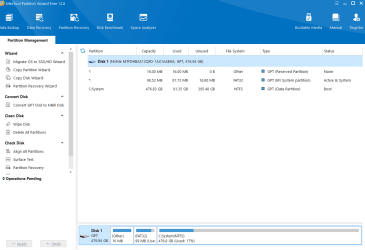
Could someone to tell me if my disks looks OK by comparing with his system ?
1710512269792.png
1710512328486.png

Thanks.
 

My Computer My Computer

At a glance

Windows 11 ProIntel 113700H16GBNVIDIA RTX 3050 ti
OS
Windows 11 Pro
Computer type
Laptop
Manufacturer/Model
HP Pavilion 17 cd2205nw
CPU
Intel 113700H
Memory
16GB
Graphics Card(s)
NVIDIA RTX 3050 ti
Screen Resolution
1980x1020
Hard Drives
Micron 512GB
Mouse
Logitech
Internet Speed
100Mbs
Browser
Vivaldi , Edge
Antivirus
Windows defender
Could someone to tell me if my disks looks OK
Yes, they look OK.
They look the same as mine.
[Like you, I had removed the Recovery partition.]


Denis
 

My Computer My Computer

At a glance

Windows 11 Home x64 Version 25H2 Build 26200....
OS
Windows 11 Home x64 Version 25H2 Build 26200.8037
Yes, they look OK.
They look the same as mine.
[Like you, I had removed the Recovery partition.]


Denis

Thanks ! (y)❤️❤️
(oops , thats mine with enabled WinRE , but its hidden)
(p.s I had speak with Microsoft's tel. support , HP's tel support , search all internet , ask here , and no suggestions or solution.
God only remains :crys:).
 

My Computer My Computer

At a glance

Windows 11 ProIntel 113700H16GBNVIDIA RTX 3050 ti
OS
Windows 11 Pro
Computer type
Laptop
Manufacturer/Model
HP Pavilion 17 cd2205nw
CPU
Intel 113700H
Memory
16GB
Graphics Card(s)
NVIDIA RTX 3050 ti
Screen Resolution
1980x1020
Hard Drives
Micron 512GB
Mouse
Logitech
Internet Speed
100Mbs
Browser
Vivaldi , Edge
Antivirus
Windows defender
Other people might have better suggestions involving using BCD commands.
I don't know enough to make such suggestions.

I would
1 Make a new system image of the C:\ drive
2 Clean install Windows
3 Restore my C:\ drive image to the C:\ drive of the new installation.


thats mine with enabled WinRE , but its hidden
I don't understand what you mean.


All the best,
Denis
 

My Computer My Computer

At a glance

Windows 11 Home x64 Version 25H2 Build 26200....
OS
Windows 11 Home x64 Version 25H2 Build 26200.8037
to specify os
from booted winre cmd prompt

rstrui.exe /offline:c:\windows

Finally , by using an old utility that i find the "Startup Repair" the folder c:\BOOT have now many files and a BCD , instead
of the one it has before (time file).

your %systemdrive%\boot folder should not be involved if you are efi booting
 
Last edited:

My Computers My Computers

  • At a glance

    Win7,Win11i7-97002x16gb 3600mhz
    OS
    Win7,Win11
    Computer type
    PC/Desktop
    CPU
    i7-9700
    Motherboard
    gigabyte b365m ds3h
    Memory
    2x16gb 3600mhz
    Monitor(s) Displays
    benq gw2480
    PSU
    bequiet pure power 11 400CM
    Cooling
    cryorig m9i
  • At a glance

    win7,win11i5-84002x8gb 3200
    Operating System
    win7,win11
    Computer type
    PC/Desktop
    CPU
    i5-8400
    Motherboard
    gigabyte b365m ds3h
    Memory
    2x8gb 3200
    PSU
    xfx pro 450
rstrui.exe is a Windows command [in the System32 folder along with the others].
Its use is shown in Option 2 of Do a System Restore - TenForumsTutorials
It opens the System restore user interface.
System restore user interface.png
This is the Windows 10 version of the interface.


Denis
 

My Computer My Computer

At a glance

Windows 11 Home x64 Version 25H2 Build 26200....
OS
Windows 11 Home x64 Version 25H2 Build 26200.8037
from booted winre cmd prompt

rstrui.exe /offline:c:\windows
Thanks.
I have tried. I took an error 0x80070057. I find some solutions and tried without results. :crys:
 

My Computer My Computer

At a glance

Windows 11 ProIntel 113700H16GBNVIDIA RTX 3050 ti
OS
Windows 11 Pro
Computer type
Laptop
Manufacturer/Model
HP Pavilion 17 cd2205nw
CPU
Intel 113700H
Memory
16GB
Graphics Card(s)
NVIDIA RTX 3050 ti
Screen Resolution
1980x1020
Hard Drives
Micron 512GB
Mouse
Logitech
Internet Speed
100Mbs
Browser
Vivaldi , Edge
Antivirus
Windows defender
Other people might have better suggestions involving using BCD commands.
I don't know enough to make such suggestions.

I would
1 Make a new system image of the C:\ drive
2 Clean install Windows
3 Restore my C:\ drive image to the C:\ drive of the new installation.


I don't understand what you mean.


All the best,
Denis
Please read my first post. I have tried BCD.
When you say "I would" do you mean "I suggest to you" ?
Mean Image Backup my c: , do clean install , and restore c: ?

I mean i haven't remove the Recovery partition (WinRE).
 

My Computer My Computer

At a glance

Windows 11 ProIntel 113700H16GBNVIDIA RTX 3050 ti
OS
Windows 11 Pro
Computer type
Laptop
Manufacturer/Model
HP Pavilion 17 cd2205nw
CPU
Intel 113700H
Memory
16GB
Graphics Card(s)
NVIDIA RTX 3050 ti
Screen Resolution
1980x1020
Hard Drives
Micron 512GB
Mouse
Logitech
Internet Speed
100Mbs
Browser
Vivaldi , Edge
Antivirus
Windows defender
When you say "I would" do you mean "I suggest to you" ?
Mean Image Backup my c: , do clean install , and restore c: ?
Yes, I suggest it because it is a viable way to proceed to remove the current fault.

But I would not be surprised if somebody who was knowledgeable about BCDEdit & BCDBoot stepped in and told you of a simpler & quicker way to fix the fault.


Denis
 

My Computer My Computer

At a glance

Windows 11 Home x64 Version 25H2 Build 26200....
OS
Windows 11 Home x64 Version 25H2 Build 26200.8037
I mean i haven't remove the Recovery partition (WinRE).

I do not know why a Recovery partition would not show up in those MTPW & Disk mgmt screenshots.
I do not know if that affects recovering form the problem.


Denis
 

My Computer My Computer

At a glance

Windows 11 Home x64 Version 25H2 Build 26200....
OS
Windows 11 Home x64 Version 25H2 Build 26200.8037
Yes, I suggest it because it is a viable way to proceed to remove the current fault.

But I would not be surprised if somebody who was knowledgeable about BCDEdit & BCDBoot stepped in and told you of a simpler & quicker way to fix the fault.


Denis
Perhaps the way you suggest works. But :
1) What if the system restore fails ? I lost all by job.
2) I have an HP laptop with an NVME disk (C). Windows installation has no driver.
When i bought the PC it has only DOS at disk. When i tried the clean install , Windows asks for the driver for the disk.
Finally i found it at HP's support page , but very difficult. Now i dont remember wich driver was and if try it
i have to try 5-6 drivers. I dont want to do it.

So , i thought the same with you : perhaps someone with knowledgeable or someone who had the same problem and solved ,
know the solution. Theoretically speaking isnt possible this problem hasnt a solution even by use of
the installation USB (outside from partitions of NVME).
But when i talk with Microsoft's tel. support finally the man said me
"this may only be known by the microsoft programmer who deals with partitions. I can only recommend a clean install.............".
 

My Computer My Computer

At a glance

Windows 11 ProIntel 113700H16GBNVIDIA RTX 3050 ti
OS
Windows 11 Pro
Computer type
Laptop
Manufacturer/Model
HP Pavilion 17 cd2205nw
CPU
Intel 113700H
Memory
16GB
Graphics Card(s)
NVIDIA RTX 3050 ti
Screen Resolution
1980x1020
Hard Drives
Micron 512GB
Mouse
Logitech
Internet Speed
100Mbs
Browser
Vivaldi , Edge
Antivirus
Windows defender
I do not know why a Recovery partition would not show up in those MTPW & Disk mgmt screenshots.
I do not know if that affects recovering form the problem.


Denis
No its normal either is hidden or not. By default is hidden. But if you do the procedure to large the partition of WinRE then will
appear as a new different partion of disk (c: or 0).
 

My Computer My Computer

At a glance

Windows 11 ProIntel 113700H16GBNVIDIA RTX 3050 ti
OS
Windows 11 Pro
Computer type
Laptop
Manufacturer/Model
HP Pavilion 17 cd2205nw
CPU
Intel 113700H
Memory
16GB
Graphics Card(s)
NVIDIA RTX 3050 ti
Screen Resolution
1980x1020
Hard Drives
Micron 512GB
Mouse
Logitech
Internet Speed
100Mbs
Browser
Vivaldi , Edge
Antivirus
Windows defender

My Computer My Computer

At a glance

Windows 11 Home x64 Version 25H2 Build 26200....
OS
Windows 11 Home x64 Version 25H2 Build 26200.8037

My Computer My Computer

At a glance

Windows 11 ProIntel 113700H16GBNVIDIA RTX 3050 ti
OS
Windows 11 Pro
Computer type
Laptop
Manufacturer/Model
HP Pavilion 17 cd2205nw
CPU
Intel 113700H
Memory
16GB
Graphics Card(s)
NVIDIA RTX 3050 ti
Screen Resolution
1980x1020
Hard Drives
Micron 512GB
Mouse
Logitech
Internet Speed
100Mbs
Browser
Vivaldi , Edge
Antivirus
Windows defender
No its normal either is hidden or not. By default is hidden
I have bought two Windows 11 computers so far [HP, Lenovo] and have upgraded one computer to Windows 11 [Dell].
In all these computers, Disk mgmt displayed the Recovery partition.
Disk mgmt  2.png


Denis
 
Last edited:

My Computer My Computer

At a glance

Windows 11 Home x64 Version 25H2 Build 26200....
OS
Windows 11 Home x64 Version 25H2 Build 26200.8037
I have bought two Windows 11 computers so far [HP, Lenovo] and have upgraded one computer to Windows 11 [Dell].
In all these computers, Dism mgmt displayed the Recovery partition.


Denis
I have bought two Windows 11 computers so far [HP, Lenovo] and have upgraded one computer to Windows 11 [Dell].
In all these computers, Dism mgmt displayed the Recovery partition.


Denis
Could you upload a screenshot of disk management where the Recovery partition is visible ?
Also note that many manufacturers like HP use them own Recovery partition. Maybe it is ?
How you know if the visible recovery partition is WinRE or other ?
 

My Computer My Computer

At a glance

Windows 11 ProIntel 113700H16GBNVIDIA RTX 3050 ti
OS
Windows 11 Pro
Computer type
Laptop
Manufacturer/Model
HP Pavilion 17 cd2205nw
CPU
Intel 113700H
Memory
16GB
Graphics Card(s)
NVIDIA RTX 3050 ti
Screen Resolution
1980x1020
Hard Drives
Micron 512GB
Mouse
Logitech
Internet Speed
100Mbs
Browser
Vivaldi , Edge
Antivirus
Windows defender
Could you upload a screenshot of disk management where the Recovery partition is visible.
I have.
You were so quick to reply that I had not had time to attach it by then. [I posted the text then went through my archives hunting for that diagram, hence the time lag]
That diagram is of the system as delivered. I had not changed anything.

How you know if the visible recovery partition is WinRE or other ?
It is WinRE.

Also note that many manufacturers like HP use them own Recovery partition. Maybe it is ?
No.
When makers put in a partition it is about 13GB because it contains a full system image of the system.


All the best,
Denis
 

My Computer My Computer

At a glance

Windows 11 Home x64 Version 25H2 Build 26200....
OS
Windows 11 Home x64 Version 25H2 Build 26200.8037

Latest Support Threads

Back
Top Bottom