Solved Error: "To use System Restore, you must specify which Windows installation to restore...."


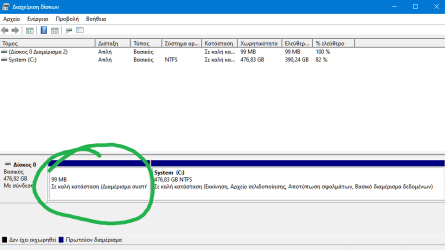
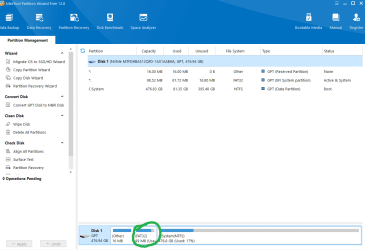
Could you upload a screenshot of disk management where the Recovery partition is visible.
Also note that many manufacturers like HP use them own Recovery partition. Maybe it is ?
How you know if the visible recovery partition is WinRE or other ?

I have.
You were so quick to reply that I had not had time to attach it by then. [I posted the text then went through my archives hunting for that diagram, hence the time lag]
That diagram is of the system as delivered. I had not changed anything.


It is WinRE.


No.
When makers put in a partition it is about 13GB because it contains a full system image of the system.


Denis
So you say that my disk must show the WinRE ?
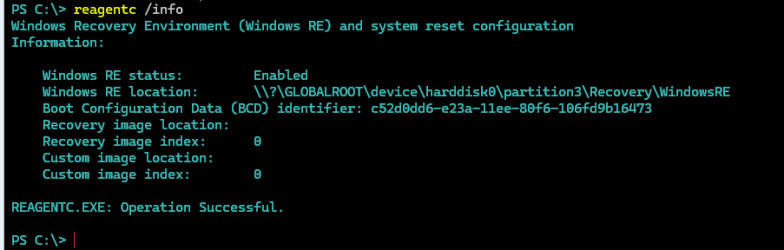
When i run reagentc /info its enabled.
When i reboot to WinRE with Shift+restart it reboot at WinRE
When i press f11 at startup it boots from WinRE.
So i think the WinRE is at the disk but is hidden.
Only when i try this procedure the WinRE appeared.
But if i remember right the problem remains.
Also remains when i run WinRE from Windows USB installation disk.
 

My Computer My Computer

At a glance

Windows 11 ProIntel 113700H16GBNVIDIA RTX 3050 ti
OS
Windows 11 Pro
Computer type
Laptop
Manufacturer/Model
HP Pavilion 17 cd2205nw
CPU
Intel 113700H
Memory
16GB
Graphics Card(s)
NVIDIA RTX 3050 ti
Screen Resolution
1980x1020
Hard Drives
Micron 512GB
Mouse
Logitech
Internet Speed
100Mbs
Browser
Vivaldi , Edge
Antivirus
Windows defender

Where does reagentc /info say your recovery files are?


Denis
 

My Computer My Computer

At a glance

Windows 11 Home x64 Version 25H2 Build 26200....
OS
Windows 11 Home x64 Version 25H2 Build 26200.8037

My Computer My Computer

At a glance

Windows 11 ProIntel 113700H16GBNVIDIA RTX 3050 ti
OS
Windows 11 Pro
Computer type
Laptop
Manufacturer/Model
HP Pavilion 17 cd2205nw
CPU
Intel 113700H
Memory
16GB
Graphics Card(s)
NVIDIA RTX 3050 ti
Screen Resolution
1980x1020
Hard Drives
Micron 512GB
Mouse
Logitech
Internet Speed
100Mbs
Browser
Vivaldi , Edge
Antivirus
Windows defender

That says your WinRE files are in the folder C:\Recovery.
So it seems that you relocated them & deleted your Recovery partition in the normal manner***.
So there's no mystery about why it is not shown in your Disk mgmt or MTPW diagrams.


***
reagentc /disable
delete the Recovery partition using MTPW
reagentc /enable


All the best,
Denis
 

My Computer My Computer

At a glance

Windows 11 Home x64 Version 25H2 Build 26200....
OS
Windows 11 Home x64 Version 25H2 Build 26200.8037
Αυτό σημαίνει ότι τα αρχεία WinRE βρίσκονται στο φάκελο C:\Recovery.
Φαίνεται λοιπόν ότι τα μετατοπίσατε και διαγράψατε το διαμέρισμα ανάκτησης με τον κανονικό τρόπο***.
Επομένως, δεν υπάρχει μυστήριο σχετικά με το γιατί δεν εμφανίζεται στα διαγράμματα Disk mgmt ή MTPW.


***
reagentc /disable
delete the Recovery partition using MTPW
reagentc /enable


Τα καλύτερα,
Could you upload 2 screenshots :
1) Disk management table.
2) reagent /info result.
I m trying to understand if something is wrong.
But when i follow the Microsoft's instructions to enlarger the WinRE partition , all was OK.
I guess if there is a proble that didnt work.
 

My Computer My Computer

At a glance

Windows 11 ProIntel 113700H16GBNVIDIA RTX 3050 ti
OS
Windows 11 Pro
Computer type
Laptop
Manufacturer/Model
HP Pavilion 17 cd2205nw
CPU
Intel 113700H
Memory
16GB
Graphics Card(s)
NVIDIA RTX 3050 ti
Screen Resolution
1980x1020
Hard Drives
Micron 512GB
Mouse
Logitech
Internet Speed
100Mbs
Browser
Vivaldi , Edge
Antivirus
Windows defender
There is no difference between our results.
Both our WinRE files are within the folder C:\Recovery [as shown in both your results & my results].

Nothing is wrong.
You can focus back on sorting out your fault. No action is needed about WinRE.

Denis
 

My Computer My Computer

At a glance

Windows 11 Home x64 Version 25H2 Build 26200....
OS
Windows 11 Home x64 Version 25H2 Build 26200.8037
There is no difference between our results.
Both our WinRE files are within the folder C:\Recovery [as shown in both your results & my results].

Nothing is wrong.

Denis
(y) (y) (y) (y) (y) (y) :-):-):-):-):-):-)

:party::party::party::party:

So our hopes are in knowledge and ........... god. :eyeroll:
 

My Computer My Computer

At a glance

Windows 11 ProIntel 113700H16GBNVIDIA RTX 3050 ti
OS
Windows 11 Pro
Computer type
Laptop
Manufacturer/Model
HP Pavilion 17 cd2205nw
CPU
Intel 113700H
Memory
16GB
Graphics Card(s)
NVIDIA RTX 3050 ti
Screen Resolution
1980x1020
Hard Drives
Micron 512GB
Mouse
Logitech
Internet Speed
100Mbs
Browser
Vivaldi , Edge
Antivirus
Windows defender
Or in system images.
I find them reliable.
I make a new one every month. If an image restoration failed I'd use the previous one.


Denis
 

My Computer My Computer

At a glance

Windows 11 Home x64 Version 25H2 Build 26200....
OS
Windows 11 Home x64 Version 25H2 Build 26200.8037
Yes so i did. But you and I dint after a clean install but at the current.
 

My Computer My Computer

At a glance

Windows 11 ProIntel 113700H16GBNVIDIA RTX 3050 ti
OS
Windows 11 Pro
Computer type
Laptop
Manufacturer/Model
HP Pavilion 17 cd2205nw
CPU
Intel 113700H
Memory
16GB
Graphics Card(s)
NVIDIA RTX 3050 ti
Screen Resolution
1980x1020
Hard Drives
Micron 512GB
Mouse
Logitech
Internet Speed
100Mbs
Browser
Vivaldi , Edge
Antivirus
Windows defender
Last 2 days i tried to set and fix some things. These are enable/disable the WinRe , create missing WinRE.wim , create missing BCD file ,
enable/disable F8 menu. All done.
But sometime i tried to run System Restore (Restore point) from WinRE/WinPE.
So i got a new problem : When i click to choose the "System Restore" , i take an error.
That it not happens if i do that from inside windows. Happens when i boot to WinPE from USB installation disk and reboot to WinRE e.g with Shift+Restart.

I think your problem is that you corrupted something in BCD when you were playing around with it.
Nothing indicates any fault within your C:\ drive.
I think that a clean install will fix the BCD-related fault and will create a sound EFI System partition. The computer will boot without any problems.
I think that then restoring your C:\ drive image onto the C:\ drive of the new installation will mean you have all your current settings, applications & files back.

This is a bigger job than working with BCD but I don't know what to do with that.
@NavyLCDR Perhaps you can advise the OP better than I can since you are competent in use of BCD commands.


All the best,
Denis
 

My Computer My Computer

At a glance

Windows 11 Home x64 Version 25H2 Build 26200....
OS
Windows 11 Home x64 Version 25H2 Build 26200.8037
I think your problem is that you corrupted something in BCD when you were playing around with it.
Nothing indicates any fault within your C:\ drive.
I think that a clean install will fix the BCD-related fault and will create a sound EFI System partition. The computer will boot without any problems.
I think that then restoring your C:\ drive image onto the C:\ drive of the new installation will mean you have all your current settings, applications & files back.

This is a bigger job than working with BCD but I don't know what to do with that.
@NavyLCDR Perhaps you can advise the OP better than I can since you are competent in use of BCD commands.


All the best,
Denis
And if it crashes ? I 'll lost everything.
 

My Computer My Computer

At a glance

Windows 11 ProIntel 113700H16GBNVIDIA RTX 3050 ti
OS
Windows 11 Pro
Computer type
Laptop
Manufacturer/Model
HP Pavilion 17 cd2205nw
CPU
Intel 113700H
Memory
16GB
Graphics Card(s)
NVIDIA RTX 3050 ti
Screen Resolution
1980x1020
Hard Drives
Micron 512GB
Mouse
Logitech
Internet Speed
100Mbs
Browser
Vivaldi , Edge
Antivirus
Windows defender
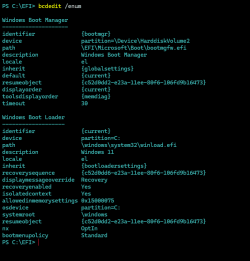
Please if anyone with no problem at WinRE , could post a screenshot result of bcdedit /enum to compare ?
Thanks !
1710605909593.png
 

My Computer My Computer

At a glance

Windows 11 ProIntel 113700H16GBNVIDIA RTX 3050 ti
OS
Windows 11 Pro
Computer type
Laptop
Manufacturer/Model
HP Pavilion 17 cd2205nw
CPU
Intel 113700H
Memory
16GB
Graphics Card(s)
NVIDIA RTX 3050 ti
Screen Resolution
1980x1020
Hard Drives
Micron 512GB
Mouse
Logitech
Internet Speed
100Mbs
Browser
Vivaldi , Edge
Antivirus
Windows defender
Well it looks the same as mine.

Windows 10 example

Windows Boot Manager
--------------------
identifier {bootmgr}
device partition=\Device\HarddiskVolume2
path \EFI\Microsoft\Boot\bootmgfw.efi
description Windows Boot Manager
locale en-GB
inherit {globalsettings}
default {current}
resumeobject {13e3c86c-1dbb-11ee-8ebe-8ee7468b6538}
displayorder {current}
toolsdisplayorder {memdiag}
timeout 30

Windows Boot Loader
-------------------
identifier {current}
device partition=C:
path \Windows\system32\winload.efi
description Windows 10
locale en-GB
inherit {bootloadersettings}
recoverysequence {61252ee5-1db6-11ee-99b6-98541b12b3e9}
displaymessageoverride Recovery
recoveryenabled Yes
isolatedcontext Yes
allowedinmemorysettings 0x15000075
osdevice partition=C:
systemroot \Windows
resumeobject {13e3c86c-1dbb-11ee-8ebe-8ee7468b6538}
nx OptIn
bootmenupolicy Standard


Windows 11 example [My Windows 11 has an extra entry because I have a boot menu with Safe mode on it]

Windows Boot Manager
--------------------
identifier {bootmgr}
device partition=\Device\HarddiskVolume1
path \EFI\Microsoft\Boot\bootmgfw.efi
description Windows Boot Manager
locale en-GB
inherit {globalsettings}
default {current}
resumeobject {91854384-1374-11ee-98ea-a5e178e95a6d}
displayorder {current}
{200c1967-15b1-11ee-890f-f46add8d0a8a}
toolsdisplayorder {memdiag}
timeout 3

Windows Boot Loader
-------------------
identifier {current}
device partition=C:
path \Windows\system32\winload.efi
description Windows 11
locale en-GB
inherit {bootloadersettings}
recoverysequence {ab3b7483-cc1f-11ee-b45e-f46add8d0a8a}
displaymessageoverride Recovery
recoveryenabled Yes
isolatedcontext Yes
allowedinmemorysettings 0x15000075
osdevice partition=C:
systemroot \Windows
resumeobject {91854384-1374-11ee-98ea-a5e178e95a6d}
nx OptIn
bootmenupolicy Legacy

Windows Boot Loader
-------------------
identifier {200c1967-15b1-11ee-890f-f46add8d0a8a}
device partition=C:
path \Windows\system32\winload.efi
description Safe mode
locale en-GB
inherit {bootloadersettings}
displaymessageoverride Recovery
recoveryenabled Yes
isolatedcontext Yes
allowedinmemorysettings 0x15000075
osdevice partition=C:
systemroot \Windows
resumeobject {91854384-1374-11ee-98ea-a5e178e95a6d}
nx OptIn
safeboot Minimal
bootmenupolicy Standard


Denis
 

My Computer My Computer

At a glance

Windows 11 Home x64 Version 25H2 Build 26200....
OS
Windows 11 Home x64 Version 25H2 Build 26200.8037
Well it looks the same as mine.

Windows 10 example

Windows Boot Manager
--------------------
identifier {bootmgr}
device partition=\Device\HarddiskVolume2
path \EFI\Microsoft\Boot\bootmgfw.efi
description Windows Boot Manager
locale en-GB
inherit {globalsettings}
default {current}
resumeobject {13e3c86c-1dbb-11ee-8ebe-8ee7468b6538}
displayorder {current}
toolsdisplayorder {memdiag}
timeout 30

Windows Boot Loader
-------------------
identifier {current}
device partition=C:
path \Windows\system32\winload.efi
description Windows 10
locale en-GB
inherit {bootloadersettings}
recoverysequence {61252ee5-1db6-11ee-99b6-98541b12b3e9}
displaymessageoverride Recovery
recoveryenabled Yes
isolatedcontext Yes
allowedinmemorysettings 0x15000075
osdevice partition=C:
systemroot \Windows
resumeobject {13e3c86c-1dbb-11ee-8ebe-8ee7468b6538}
nx OptIn
bootmenupolicy Standard


Windows 11 example [My Windows 11 has an extra entry because I have a boot menu with Safe mode on it]

Windows Boot Manager
--------------------
identifier {bootmgr}
device partition=\Device\HarddiskVolume1
path \EFI\Microsoft\Boot\bootmgfw.efi
description Windows Boot Manager
locale en-GB
inherit {globalsettings}
default {current}
resumeobject {91854384-1374-11ee-98ea-a5e178e95a6d}
displayorder {current}
{200c1967-15b1-11ee-890f-f46add8d0a8a}
toolsdisplayorder {memdiag}
timeout 3

Windows Boot Loader
-------------------
identifier {current}
device partition=C:
path \Windows\system32\winload.efi
description Windows 11
locale en-GB
inherit {bootloadersettings}
recoverysequence {ab3b7483-cc1f-11ee-b45e-f46add8d0a8a}
displaymessageoverride Recovery
recoveryenabled Yes
isolatedcontext Yes
allowedinmemorysettings 0x15000075
osdevice partition=C:
systemroot \Windows
resumeobject {91854384-1374-11ee-98ea-a5e178e95a6d}
nx OptIn
bootmenupolicy Legacy

Windows Boot Loader
-------------------
identifier {200c1967-15b1-11ee-890f-f46add8d0a8a}
device partition=C:
path \Windows\system32\winload.efi
description Safe mode
locale en-GB
inherit {bootloadersettings}
displaymessageoverride Recovery
recoveryenabled Yes
isolatedcontext Yes
allowedinmemorysettings 0x15000075
osdevice partition=C:
systemroot \Windows
resumeobject {91854384-1374-11ee-98ea-a5e178e95a6d}
nx OptIn
safeboot Minimal
bootmenupolicy Standard


Denis
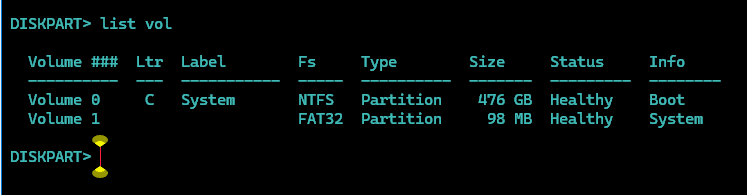
When i go to diskpart , i dont have partition=\Device\HarddiskVolume2
Instead you have partition=\Device\HarddiskVolume1 (Windows 11 Boot Manager)
Example:
1710612311368.png

Do you have Volume 2 ?

Also there is difference at Boot Loader :
Yours bootmenupolicy is Legacy , mine is standard.
 

My Computer My Computer

At a glance

Windows 11 ProIntel 113700H16GBNVIDIA RTX 3050 ti
OS
Windows 11 Pro
Computer type
Laptop
Manufacturer/Model
HP Pavilion 17 cd2205nw
CPU
Intel 113700H
Memory
16GB
Graphics Card(s)
NVIDIA RTX 3050 ti
Screen Resolution
1980x1020
Hard Drives
Micron 512GB
Mouse
Logitech
Internet Speed
100Mbs
Browser
Vivaldi , Edge
Antivirus
Windows defender
\Device\HarddiskVolume2
That's your EFI System partition,.
1710512269792.png

1710512328486.png


The number 2 makes sense in MTPW. In Disk mgmt, you have to count the 16MB that Disk mgmt does not display [but MTPW does].


All the best,
Denis
 

My Computer My Computer

At a glance

Windows 11 Home x64 Version 25H2 Build 26200....
OS
Windows 11 Home x64 Version 25H2 Build 26200.8037

My Computer My Computer

At a glance

Windows 11 ProIntel 113700H16GBNVIDIA RTX 3050 ti
OS
Windows 11 Pro
Computer type
Laptop
Manufacturer/Model
HP Pavilion 17 cd2205nw
CPU
Intel 113700H
Memory
16GB
Graphics Card(s)
NVIDIA RTX 3050 ti
Screen Resolution
1980x1020
Hard Drives
Micron 512GB
Mouse
Logitech
Internet Speed
100Mbs
Browser
Vivaldi , Edge
Antivirus
Windows defender
But yours bootmenupolicy is Legacy , mine is standard.
I said I had a boot menu.
I have mine set to a black & white screen version and that's called Legacy.
It is of no significance as far as I am aware.


Denis
 
Last edited:

My Computer My Computer

At a glance

Windows 11 Home x64 Version 25H2 Build 26200....
OS
Windows 11 Home x64 Version 25H2 Build 26200.8037
Hi,
To get a new RE partition you can mount 23h2 or which ever you have and keep files and apps and a new one will be created at the end of C

I added mine in front of C and made it larger so it's out of the way and I can use my disk as I want to.
Disk management is a old POS app use third party partition apps and see all partitions not just the ones windows wants you to

1710621846194.png

This will create a new RE partition at the end of C 2gb though so make it what ever you want to later
Anyway everything is on a thread i made a while back

Code:
REM After creating, shrink by 2 GB to make room for the Recovery Tools partition.
You can change that size to anything.

create partition primary
shrink desired=2048
format fs=ntfs quick label="Windows"

REM Since we shrank the partition by 2 GB, create the Recovery partition without specifying a size.
REM This will cause it to occupy all remaining space (in this case 2 GB).
REM Note that for a recovery partition we have to set a specific ID and attribute.

create partition primary
set id=de94bba4-06d1-4d40-a16a-bfd50179d6ac
GPT ATTRIBUTES=0x8000000000000001
format FS=NTFS quick label="Recovery Tools"

REM Type exit to exit from diskpart. If you are using these commands in a diskpart script,
REM leave off the exit

exit
 

My Computer My Computer

At a glance

Win-7-10-11Pro's10900k & 9940x & 5930kTrident-Z Royal 4000c16 2x16gb & Trident-Z 36...Titan Xp & 1080ti FTW3 & evga 980ti gaming
OS
Win-7-10-11Pro's
Computer type
PC/Desktop
Manufacturer/Model
Acer 17" Nitro 7840sn/ 2x16gb 5600c40/ 4060/ stock 1tb-os/ 4tb sn850x
CPU
10900k & 9940x & 5930k
Motherboard
z490-Apex & x299-Apex & x99-Sabertooth
Memory
Trident-Z Royal 4000c16 2x16gb & Trident-Z 3600c16 4x8gb & 3200c14 4x8gb
Graphics Card(s)
Titan Xp & 1080ti FTW3 & evga 980ti gaming
Sound Card
Onboard Realtek x3
Monitor(s) Displays
1-AOC G2460PG 24"G-Sync 144Hz/ 2nd 1-ASUS VG248QE 24"/ 3rd LG 43" series
Screen Resolution
1920-1080 not sure what the t.v is besides 43" class scales from 1920-1080 perfectly
Hard Drives
2-WD-sn850x 4tb/ 970evo+500gb/ 980 pro 2tb.
PSU
1000p2 & 1200p2 & 850p2
Case
D450 x2 & 1 Test bench in cherry Entertainment center
Cooling
Custom water loops x3 with 2x mora 360mm rads only 980ti gaming air cooled
Keyboard
G710+x3
Mouse
Redragon x3
Internet Speed
xfinity gigabyte
Browser
Firefox
Antivirus
mbam pro
I told you I had a boot menu.
I have mine set to a black & while screen and that's called Legacy.
It is of no significance as far as I am aware.


Denis
Please check that if you want.
Goto HKEY_LOCAL_MACHINE\SYSTEM\ControlSet001\Services\TrustedInstaller and tell me the data of Start value.
Hi,
To get a new RE partition you can mount 23h2 or which ever you have and keep files and apps and a new one will be created at the end of C

I added mine in front of C and made it larger so it's out of the way and I can use my disk as I want to.
Disk management is a old POS app use third party partition apps and see all partitions not just the ones windows wants you to

View attachment 90448

This will create a new RE partition at the end of C 2gb though so make it what ever you want to later
Anyway everything is on a thread i made a while back

Code:
REM After creating, shrink by 2 GB to make room for the Recovery Tools partition.
You can change that size to anything.

create partition primary
shrink desired=2048
format fs=ntfs quick label="Windows"

REM Since we shrank the partition by 2 GB, create the Recovery partition without specifying a size.
REM This will cause it to occupy all remaining space (in this case 2 GB).
REM Note that for a recovery partition we have to set a specific ID and attribute.

create partition primary
set id=de94bba4-06d1-4d40-a16a-bfd50179d6ac
GPT ATTRIBUTES=0x8000000000000001
format FS=NTFS quick label="Recovery Tools"

REM Type exit to exit from diskpart. If you are using these commands in a diskpart script,
REM leave off the exit

exit

Thanks.
I already tried this. It appears the WinRE at disk management and larger. But the problem remains.
 

My Computer My Computer

At a glance

Windows 11 ProIntel 113700H16GBNVIDIA RTX 3050 ti
OS
Windows 11 Pro
Computer type
Laptop
Manufacturer/Model
HP Pavilion 17 cd2205nw
CPU
Intel 113700H
Memory
16GB
Graphics Card(s)
NVIDIA RTX 3050 ti
Screen Resolution
1980x1020
Hard Drives
Micron 512GB
Mouse
Logitech
Internet Speed
100Mbs
Browser
Vivaldi , Edge
Antivirus
Windows defender
I told you I had a boot menu.
I have mine set to a black & while screen and that's called Legacy.
It is of no significance as far as I am aware.


Denis
Please check that if you want.
Goto HKEY_LOCAL_MACHINE\SYSTEM\ControlSet001\Services\TrustedInstaller key and tell me the data of Start value. Mine is 3.
 

My Computer My Computer

At a glance

Windows 11 ProIntel 113700H16GBNVIDIA RTX 3050 ti
OS
Windows 11 Pro
Computer type
Laptop
Manufacturer/Model
HP Pavilion 17 cd2205nw
CPU
Intel 113700H
Memory
16GB
Graphics Card(s)
NVIDIA RTX 3050 ti
Screen Resolution
1980x1020
Hard Drives
Micron 512GB
Mouse
Logitech
Internet Speed
100Mbs
Browser
Vivaldi , Edge
Antivirus
Windows defender

Latest Support Threads

Back
Top Bottom