Error when specifying user account picture


schmibble

Member
Member
Local time
12:51 AM
Posts
44
OS
Windows 11
Dacrone & Garlin, thanks for that important info in Location for User account pictures?. You answered the question I asked over in Clarification needed re specifying custom user account image (thanks to glaskuter for pointing me to the thread).

I created the correctly sized png (and one bitmap) graphics, double-checked the sizes and names. They're all correct. But when I tried to change the picture in Settings (per Change Account Picture in Windows 11) , I got an error message saying the operation failed. Ironically, in Settings the picture does now appear alongside my username and the heading, "Local Account". But it doesn't show up any of the other places it's supposed to.

Since the settings method didn't work for me (mostly), I tried Dacrone's method of attempting the Group Policy Editor. That seems to have worked--at least now my picture is showing up at the bottom of the Start Menu now. So if someone else has a problem with the Settings method, try the Group Policy way. If you have Home Edition like I do, there are multiple ways to enable the Group Policy Editor. I used a MajorGeeks batch file (do a search for "enable Group Policy Editor MajorGeeks batch"). We'll see over the next few days of use whether they picture shows up everywhere it should.
 
Windows Build/Version
24h2
Last edited:

My Computer

System One

  • OS
    Windows 11
    Computer type
    Laptop
    Manufacturer/Model
    ASUS
    CPU
    Intel i7-13620H 10-Core
    Motherboard
    ASUS TUF FX507
    Memory
    32GB DDR5
    Graphics Card(s)
    GeForce RTX 4070
    Sound Card
    onboard
    Monitor(s) Displays
    laptop screen or Dell U3223QE
    Screen Resolution
    1980 or 2160, depending on laptop screen or desktop monitor
    Hard Drives
    SSD
    PSU
    laptop
    Case
    laptop
    Cooling
    laptop
    Keyboard
    laptop
    Mouse
    logitech M525
    Internet Speed
    5g
    Browser
    Firefox
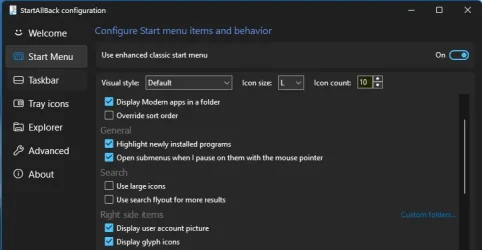
Have you got StartAllBack installed with 'Display user account picture' unticked?

SAB User account picture.webp
 

My Computers

System One System Two

  • OS
    Windows 11 Pro
    Computer type
    PC/Desktop
    Manufacturer/Model
    GMKtec K11
    CPU
    AMD Ryzen 9 8945HS
    Memory
    32GB DDR5 SO-DIMM
    Graphics Card(s)
    Integrated AMD Radeon 780M (4.00 GHz)
    Monitor(s) Displays
    Benq 2250HM
    Screen Resolution
    1920 x 1080
    Hard Drives
    1 TB PCIe 4.0 NVMe M.2 SSD
  • Operating System
    Windows 11 Home
    Computer type
    Laptop
    Manufacturer/Model
    ASUS Zenbook 14 OLED 14" Laptop - UX3405CA-QL192W
    CPU
    Intel® Core™ Ultra 7 - 255H processor
    Memory
    16 GB LPDDR5 SDRAM
    Graphics card(s)
    Intel Arc 140T onboard graphics
    Screen Resolution
    1920 x 1200 (16:10 WUXGA resolution) OLED Touchscreen
    Hard Drives
    1TB SSD
Thanks very much for replying. Good suggestion, but no, wasn't using StartAllBack. So why I got the error message using the Settings method still remains a puzzle.
 

My Computer

System One

  • OS
    Windows 11
    Computer type
    Laptop
    Manufacturer/Model
    ASUS
    CPU
    Intel i7-13620H 10-Core
    Motherboard
    ASUS TUF FX507
    Memory
    32GB DDR5
    Graphics Card(s)
    GeForce RTX 4070
    Sound Card
    onboard
    Monitor(s) Displays
    laptop screen or Dell U3223QE
    Screen Resolution
    1980 or 2160, depending on laptop screen or desktop monitor
    Hard Drives
    SSD
    PSU
    laptop
    Case
    laptop
    Cooling
    laptop
    Keyboard
    laptop
    Mouse
    logitech M525
    Internet Speed
    5g
    Browser
    Firefox
I've answered your other questions on this thread:
Clarification needed re specifying custom user account image

From my own research, I'm no longer a fan of the two common solutions provided online:
- Force overwrite the default Windows bitmap resources​
- Using a GPO to enforce a custom image​

Why? Because most folks (even technical ones) don't bother digging deeper, and figuring how Windows does this behind the scenes. Instead they use a sledgehammer approach to solving the problem.

By default, you don't have an user account image unless you're part of an Active Directory domain (someone assigned you an image) or have a Microsoft Account (where the image is synced from the account). What you see is the default bitmap that everyone who doesn't have a custom image shares.

After you pick a custom image from Settings, Windows creates a bunch of folders and new bitmaps from your chosen image. This is your personal image, and your data is independent from everyone else on the system.

Here's the flaws with the two solutions:

1. Force overwrite the default Windows bitmap (user.bmp) with a custom image.

This forces everyone to share the same image (assuming they didn't pick a custom image from Settings). If you don't pick an image, you get the default image. So a cheesy answer is to then overwrite the default image. While this works fine for a single-user system, it's not ideal for a PC with multiple users.

2. Use the GPO to enforce a custom image.

The reason for the GPO is to allow a company or organization to force everyone to use an approved image. They don't you to embarrass them with your image choices. This solution shares the same problem as #1. It's fine if there's only one user, but doesn't allow for other users to pick their own images.


Most users will tell you they don't care! Both solutions work for a single-user scenario. But if you happen to share a PC, then it doesn't work for everyone.
 

My Computer

System One

  • OS
    Windows 7
I'm a major fan of the theory behind directions. University tech-writing courses usually teach students to include theory when writing instructions, but in a parallel to the behavior you note, most tech writers don't bother. That's no good because readers aren't drones and if they have a little bit of extra knowledge, they'll start thinking about how the instructions might be modified a bit to maybe produce a somewhat different and customized outcome--but if they had the theory behind the original instructions, they'd realize that their goal wouldn't be achieved for some reason or other, or they'd know that their modification wouldn't work or would cause unintended and unwanted consequences (such as forcing the image on everyone), etc. Theory is waaaay important! Many thanks for being thorough.
 

My Computer

System One

  • OS
    Windows 11
    Computer type
    Laptop
    Manufacturer/Model
    ASUS
    CPU
    Intel i7-13620H 10-Core
    Motherboard
    ASUS TUF FX507
    Memory
    32GB DDR5
    Graphics Card(s)
    GeForce RTX 4070
    Sound Card
    onboard
    Monitor(s) Displays
    laptop screen or Dell U3223QE
    Screen Resolution
    1980 or 2160, depending on laptop screen or desktop monitor
    Hard Drives
    SSD
    PSU
    laptop
    Case
    laptop
    Cooling
    laptop
    Keyboard
    laptop
    Mouse
    logitech M525
    Internet Speed
    5g
    Browser
    Firefox
Back
Top Bottom