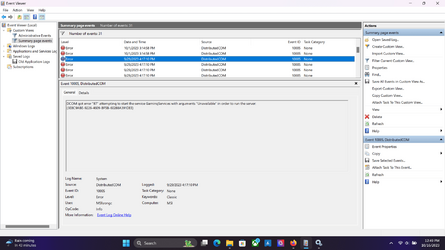
Event ID 10005 upon every reboot?


MetalAlchemist

Active member
Member
Local time
6:24 PM
Posts
10
OS
Windows 11 Home
So I'am getting this error upon every reboot now.
DCOM got error "1115" attempting to start the service wuauserv with arguments "Unavailable" in order to run the server:
{E60687F7-01A1-40AA-86AC-DB1CBF673334}

Why does this happen???

Edit: I would also get this error sometimes too.
DCOM got error "87" attempting to start the service GamingServices with arguments "Unavailable" in order to run the server:
{3E8C9ABE-9226-4609-BF5B-60288A391DEE}
Screenshot (52).png
 
Windows Build/Version
Windows 11 Home

Attachments

  • Screenshot (54).png
    Screenshot (54).png
    120.6 KB · Views: 2

My Computer

System One

  • OS
    Windows 11 Home
    Computer type
    Laptop
    Manufacturer/Model
    MSI Katana 15 B13VEK
    CPU
    13th Gen Intel(R) Core(TM) i7-13620H
    Motherboard
    MSI- MS 1585
    Memory
    16 GB
    Graphics Card(s)
    RTX 4050 (Laptop)
    Screen Resolution
    1920X1080P
    Hard Drives
    SAMSUNG MZVL41T0HBLB-00BTW
So I'am getting this error upon every reboot now.
DCOM got error "1115" attempting to start the service wuauserv with arguments "Unavailable" in order to run the server:
{E60687F7-01A1-40AA-86AC-DB1CBF673334}

Why does this happen???

Edit: I would also get this error sometimes too.
DCOM got error "87" attempting to start the service GamingServices with arguments "Unavailable" in order to run the server:
{3E8C9ABE-9226-4609-BF5B-60288A391DEE}
Hi and welcome to the forum. Please fill out your system specs in your profile.
Windows version/build are crucial in determining potential issues.

The first error is a failed attempt to reach Windows Update.
The component, which makes the link between hardware (device) and software (.dll) may be slower than the attempt at the connection itself.
There is really nothing to worry about. The second error is of the same nature.

If you want to keep your sanity, you should stay away from the Event Viewer unless there is a need for it.
 

My Computers

System One System Two

  • OS
    All Branches but Release
    Computer type
    Laptop
    Manufacturer/Model
    Acer Nitro ANV15-51
    CPU
    AMD Ryzen 7 7735HS 3200-4500 Mhz 8 cores x 2
    Motherboard
    Sportage_RBH
    Memory
    32 GB DDR5
    Graphics Card(s)
    Radeon Graphic / NVIDIA GeForce RTX 4060 8 GB GDDR6
    Sound Card
    AMD/Realtek(R) Audio
    Monitor(s) Displays
    Integrated Monitor (15.3"vis)
    Screen Resolution
    FHD 1920X1080 16:9 144Hz
    Hard Drives
    KINGSTON OM8SEP4512Q-AA 1TB
    Western Digital 256GB
    PSU
    19V DC 6.32 A 120 W
    Cooling
    Dual Fans
    Mouse
    MS Bluetooth
    Internet Speed
    Fiber 1GB Cox -us & 1GB Orange-fr
    Browser
    Edge Canary- Firefox Nightly-Chrome Dev-Chrome Dev
    Antivirus
    Windows Defender
  • Operating System
    Windows 11 Beta
    Computer type
    Laptop
    Manufacturer/Model
    Asus X751BP
    CPU
    AMD A9-9420
    Memory
    8 GB of DDR4
    Graphics card(s)
    AMD Radeon R5
    Screen Resolution
    1600x900
    Hard Drives
    Seagate 1 TB
I agree with OAT.

The Event logs exist for Windows' benefit not ours.
Event log entries might be recorded merely as hooks or triggers for other Windows processes to latch on to and successful completion of those other processes might well not be reflected in an Event log entry at all let alone one that can be recognised as being related to the original entry.
The existence of an entry in an Event log is not really a sufficient indicator that there is a problem.
The existence of an entry in an Event log is not really a sufficient indicator that there is a problem worth using your time & effort to investigate.
Conversely, if you are investigating a problem for which there are fault symptoms, Event logs can provide data that might be helpful.

I only look in Event logs if I'm investigating something.
If there's nothing to investigate then I don't look in them at all.


All the best,
Denis
 

My Computer

System One

  • OS
    Windows 11 Home x64 Version 25H2 Build 26200.8037
  • Like
Reactions: OAT
Hi and welcome to the forum. Please fill out your system specs in your profile.
Windows version/build are crucial in determining potential issues.

The first error is a failed attempt to reach Windows Update.
The component, which makes the link between hardware (device) and software (.dll) may be slower than the attempt at the connection itself.
There is really nothing to worry about. The second error is of the same nature.

If you want to keep your sanity, you should stay away from the Event Viewer unless there is a need for it.

Alright thanks , I ask since this MSI Laptop I got was meant to replace an older one. I have a main Desktop with Windows 10 on it but this Laptop is my first Windows 11 device and its not even 3 months old, that's why I'm a little on edge.
 

My Computer

System One

  • OS
    Windows 11 Home
    Computer type
    Laptop
    Manufacturer/Model
    MSI Katana 15 B13VEK
    CPU
    13th Gen Intel(R) Core(TM) i7-13620H
    Motherboard
    MSI- MS 1585
    Memory
    16 GB
    Graphics Card(s)
    RTX 4050 (Laptop)
    Screen Resolution
    1920X1080P
    Hard Drives
    SAMSUNG MZVL41T0HBLB-00BTW
FWIW, I agree with Denis. Windows has been throwing those DCOM errors ever since I started paying attention to that kind of stuff, back in the Vista/7 days. If you need the logs use them; if you don't, ignore them. These don't really signify IMO.
HTH,
--Ed---
PS: See this post from TenForums for a more general discussion of the DCOM thing. It may be somewhat reassuring: Event 10016 - DistributedCOM event resloution. Help? - Windows 10 Help Forums
 

My Computers

System One System Two

  • OS
    Windows 11
    Computer type
    Laptop
    Manufacturer/Model
    Lenovo X380 Yoga
    CPU
    i7-8650U (8th Gen/Kaby Lake)
    Motherboard
    20LH000MUS (U3E1)
    Memory
    16 GB
    Graphics Card(s)
    Intel UHD Graphics 620
    Sound Card
    Integrated Conexant SmartAudio HD
    Monitor(s) Displays
    FlexView Display
    Screen Resolution
    1920x1080
    Hard Drives
    Toshiba 1 TB PCIe x3 NVMe SSD
    external 5TB Seagate USB-C attached HDD
    PSU
    Lenovo integrated 65W power brick
    Case
    Laptop
    Cooling
    Laptop
    Keyboard
    Integrated Lenovo ThinkPad keyboard
    Mouse
    touchscreen, touchpad
    Internet Speed
    GbE (Spectrum/Charter)
    Browser
    all of em
    Antivirus
    Defender
    Other Info
    Purchased early 2019 as Windows Insider test PC
  • Operating System
    Windows 11
    Computer type
    PC/Desktop
    Manufacturer/Model
    DIY
    CPU
    Ryzen 5800X
    Motherboard
    Asrock B550 Extreme4
    Memory
    128 GB (4x32 DDR5-5600)
    Graphics card(s)
    NVIDIA 3070Ti
    Sound Card
    built-in
    Monitor(s) Displays
    2xDell 2707
    Screen Resolution
    1980x1200
    Hard Drives
    2XNVMe, multiple HDDs from 3 to 12 TB
    PSU
    Seasonic 650
    Case
    NZXT Flo 6
    Cooling
    dual-fan air cooler
    Keyboard
    Logitech Wave
    Mouse
    Logitech Logi
    Internet Speed
    GbE
    Browser
    all of 'em
    Antivirus
    Defender
    Other Info
    temperamental UEFI
Back
Top Bottom