Solved Event Viewer Admin Error


no1yak

Well-known member
Member
Local time
7:16 PM
Posts
110
Location
Psychiatric Ward Planet Fubar
OS
Win 11 Pro 25H2
After updating to ver 22000.285 I get this error in event viewer admin. These USB events were not present in win10. Anyone have any ideas on how to stop this error every time I open amin in event viewer.Screenshot 2021-10-17 125612.pngScreenshot 2021-10-17 125734.png
 

My Computers My Computers

  • At a glance

    Win 11 Pro 25H2Intel Ultra i7 270K PlusKingston Fury Renegrade 2x24 8400 M/tuMSI - GeForce RTX 5070 12 GB GAMING TRIO OC
    OS
    Win 11 Pro 25H2
    Computer type
    PC/Desktop
    Manufacturer/Model
    User Built
    CPU
    Intel Ultra i7 270K Plus
    Motherboard
    Asrock Taichi Z890 OCF
    Memory
    Kingston Fury Renegrade 2x24 8400 M/tu
    Graphics Card(s)
    MSI - GeForce RTX 5070 12 GB GAMING TRIO OC
    Sound Card
    Headphone DAC
    Monitor(s) Displays
    AOC QD OLED 4K 32" + Eizo 32" FlexScan 4K
    Screen Resolution
    3840x2160
    Hard Drives
    1x 9100 Pro 2TB Nvme 1x 990 Pro 2TB 1X 1TB 990 Pro
    PSU
    Be Quiet Pure Power 13 1K Watt ATX 3.1
    Case
    Corsair 5000T Air Flow
    Cooling
    Arctic Freezer 3 360 Pro
    Keyboard
    Cherry G80-3000N
    Mouse
    Corsair
    Internet Speed
    500Mbps
    Browser
    Firefox x64
    Antivirus
    Defender
    Other Info
    Backup software MR ver 10
  • At a glance

    Win 11 Pro 25H2Ultra i7 270K PlusKingston Fury 2x16 7200 M/tuMSI RTX 4070 Super OC 12 GB
    Operating System
    Win 11 Pro 25H2
    Computer type
    PC/Desktop
    Manufacturer/Model
    User Built
    CPU
    Ultra i7 270K Plus
    Motherboard
    Asus Z890 Strix - F
    Memory
    Kingston Fury 2x16 7200 M/tu
    Graphics card(s)
    MSI RTX 4070 Super OC 12 GB
    Sound Card
    Onboard
    Monitor(s) Displays
    KVM switch to AOC 4K 32" QD OLED
    Screen Resolution
    3840x2160
    Hard Drives
    Samsung 990 Pro 4TB+990 Pro 2TB +990 Pro 1TB
    PSU
    Super Flower Ledex 3 ATX 3.1 850 Watts
    Case
    Corsair 500d
    Cooling
    Noctua D15 Cromax
Hello,

I cannot find anything on an USBVideo\Analytic Event log. I do not have such an Entry on my computer either. Perhaps this is a Third Party addition, maybe a Webcam? This Entry is the source of your problem.

Anyway, I would begin by verifying the integrity of the WMI Repository. From an Elevated Command Prompt, execute the following command:
winmgmt /verifyrepository.
This command will either return "consistent" or "not consistent".

If the winmgmt /verifyrepository command returns "not consistent", then you try to salvage the repository. Salvage the repository will attempt to rebuild the repository, and merge the inconsistent repository. Use the following command
winmgmt /salvagerepository

If salavaging does not succeed in restoring the inconsistent repository, then the only option available is to reset the repository back to it's initial state:
winmgmt /resetrepository

If you wish, you may also back up the repository before you start.
winmgmt /backup

For further information on the winmgmt command see
 

My Computers My Computers

  • At a glance

    Windows 11AMD Ryzen 5 560016 GBSapphire Radeon RX 6500XT (8 GB version)
    OS
    Windows 11
    Computer type
    PC/Desktop
    CPU
    AMD Ryzen 5 5600
    Motherboard
    MSI B550-A Pro
    Memory
    16 GB
    Graphics Card(s)
    Sapphire Radeon RX 6500XT (8 GB version)
    Monitor(s) Displays
    BenQ Mobuiz EX2710Q QHD, Iiyama ProLite X23377HDS
    Hard Drives
    MSI Spatium M461 4TB
  • At a glance

    Windows 11Intel Celeron N4020
    Operating System
    Windows 11
    Computer type
    Laptop
    Manufacturer/Model
    Acer A114
    CPU
    Intel Celeron N4020
Hello,

I cannot find anything on an USBVideo\Analytic Event log. I do not have such an Entry on my computer either. Perhaps this is a Third Party addition, maybe a Webcam? This Entry is the source of your problem.

Anyway, I would begin by verifying the integrity of the WMI Repository. From an Elevated Command Prompt, execute the following command:
winmgmt /verifyrepository.
This command will either return "consistent" or "not consistent".

If the winmgmt /verifyrepository command returns "not consistent", then you try to salvage the repository. Salvage the repository will attempt to rebuild the repository, and merge the inconsistent repository. Use the following command
winmgmt /salvagerepository

If salavaging does not succeed in restoring the inconsistent repository, then the only option available is to reset the repository back to it's initial state:
winmgmt /resetrepository

If you wish, you may also back up the repository before you start.
winmgmt /backup

For further information on the winmgmt command see
Thanks for your reply, I've tried verify and comes back as consistant. No webcam or any new software added only 258 update. I'm going to uninstall the update and see if cleares the error. Will updat on what I find.

EDIT: Went back to 194 and that entry is not there in event viewer. So no errors when using Admin view. will download 258 and see if that error returns.
 
Last edited:

My Computers My Computers

  • At a glance

    Win 11 Pro 25H2Intel Ultra i7 270K PlusKingston Fury Renegrade 2x24 8400 M/tuMSI - GeForce RTX 5070 12 GB GAMING TRIO OC
    OS
    Win 11 Pro 25H2
    Computer type
    PC/Desktop
    Manufacturer/Model
    User Built
    CPU
    Intel Ultra i7 270K Plus
    Motherboard
    Asrock Taichi Z890 OCF
    Memory
    Kingston Fury Renegrade 2x24 8400 M/tu
    Graphics Card(s)
    MSI - GeForce RTX 5070 12 GB GAMING TRIO OC
    Sound Card
    Headphone DAC
    Monitor(s) Displays
    AOC QD OLED 4K 32" + Eizo 32" FlexScan 4K
    Screen Resolution
    3840x2160
    Hard Drives
    1x 9100 Pro 2TB Nvme 1x 990 Pro 2TB 1X 1TB 990 Pro
    PSU
    Be Quiet Pure Power 13 1K Watt ATX 3.1
    Case
    Corsair 5000T Air Flow
    Cooling
    Arctic Freezer 3 360 Pro
    Keyboard
    Cherry G80-3000N
    Mouse
    Corsair
    Internet Speed
    500Mbps
    Browser
    Firefox x64
    Antivirus
    Defender
    Other Info
    Backup software MR ver 10
  • At a glance

    Win 11 Pro 25H2Ultra i7 270K PlusKingston Fury 2x16 7200 M/tuMSI RTX 4070 Super OC 12 GB
    Operating System
    Win 11 Pro 25H2
    Computer type
    PC/Desktop
    Manufacturer/Model
    User Built
    CPU
    Ultra i7 270K Plus
    Motherboard
    Asus Z890 Strix - F
    Memory
    Kingston Fury 2x16 7200 M/tu
    Graphics card(s)
    MSI RTX 4070 Super OC 12 GB
    Sound Card
    Onboard
    Monitor(s) Displays
    KVM switch to AOC 4K 32" QD OLED
    Screen Resolution
    3840x2160
    Hard Drives
    Samsung 990 Pro 4TB+990 Pro 2TB +990 Pro 1TB
    PSU
    Super Flower Ledex 3 ATX 3.1 850 Watts
    Case
    Corsair 500d
    Cooling
    Noctua D15 Cromax
There is also a very nice (oldy but gooddy) tool called "Device Cleanup tool", which clears superfluous USB entries from the registry:
Tools for Windows (3rd tool on that page).
 

My Computer My Computer

At a glance

WIN 11 / WIN 10 dual bootIntel Pentium G 4400 (Skylake)DDR4 12 GBinternal (Intel HD 510)
OS
WIN 11 / WIN 10 dual boot
Computer type
PC/Desktop
Manufacturer/Model
No clue (x64 based) from 2016
CPU
Intel Pentium G 4400 (Skylake)
Motherboard
MS 7971, Bios: American Megatrend C.E0 (2018)
Memory
DDR4 12 GB
Graphics Card(s)
internal (Intel HD 510)
Hard Drives
2x Western Digital (no SSD)
Thanks for your reply, I've tried verify and comes back as consistant. No webcam or any new software added only 258 update. I'm going to uninstall the update and see if cleares the error. Will updat on what I find.

EDIT: Went back to 194 and that entry is not there in event viewer. So no errors when using Admin view. will download 258 and see if that error returns.
Hi,

I posted a similar thread with this error. I don't know why only a few of us get this error but for now here is the fix I found. The event viewer message says it all the event is not properly named. it should be named Microsoft-USB-Video/Analytic instead of USBVideo.

If you want to apply this fix:
1) Save a copy of your registry
2) Copy this reg command in a text file and save as Fix for WMI Viewer USB Video Analytic.reg

Code:
Windows Registry Editor Version 5.00

[HKEY_LOCAL_MACHINE\SOFTWARE\Microsoft\Windows\CurrentVersion\Setup\PnpResources\Registry\HKLM\SOFTWARE\Microsoft\Windows\CurrentVersion\WINEVT\Channels\Microsoft-Windows-USB-Video/Analytic]

[HKEY_LOCAL_MACHINE\SOFTWARE\Microsoft\Windows\CurrentVersion\Setup\PnpResources\Registry\HKLM\SOFTWARE\Microsoft\Windows\CurrentVersion\WINEVT\Channels\Microsoft-Windows-USB-Video/Analytic\ChannelAccess]
"Owners"=hex(7):75,00,73,00,62,00,76,00,69,00,64,00,65,00,6f,00,2e,00,69,00,6e,\
  00,66,00,00,00,00,00

[HKEY_LOCAL_MACHINE\SOFTWARE\Microsoft\Windows\CurrentVersion\Setup\PnpResources\Registry\HKLM\SOFTWARE\Microsoft\Windows\CurrentVersion\WINEVT\Channels\Microsoft-Windows-USB-Video/Analytic\Enabled]
"Owners"=hex(7):75,00,73,00,62,00,76,00,69,00,64,00,65,00,6f,00,2e,00,69,00,6e,\
  00,66,00,00,00,00,00

[HKEY_LOCAL_MACHINE\SOFTWARE\Microsoft\Windows\CurrentVersion\Setup\PnpResources\Registry\HKLM\SOFTWARE\Microsoft\Windows\CurrentVersion\WINEVT\Channels\Microsoft-Windows-USB-Video/Analytic\Isolation]
"Owners"=hex(7):75,00,73,00,62,00,76,00,69,00,64,00,65,00,6f,00,2e,00,69,00,6e,\
  00,66,00,00,00,00,00

[HKEY_LOCAL_MACHINE\SOFTWARE\Microsoft\Windows\CurrentVersion\Setup\PnpResources\Registry\HKLM\SOFTWARE\Microsoft\Windows\CurrentVersion\WINEVT\Channels\Microsoft-Windows-USB-Video/Analytic\OwningPublisher]
"Owners"=hex(7):75,00,73,00,62,00,76,00,69,00,64,00,65,00,6f,00,2e,00,69,00,6e,\
  00,66,00,00,00,00,00

[HKEY_LOCAL_MACHINE\SOFTWARE\Microsoft\Windows\CurrentVersion\Setup\PnpResources\Registry\HKLM\SOFTWARE\Microsoft\Windows\CurrentVersion\WINEVT\Channels\Microsoft-Windows-USB-Video/Analytic\Type]
"Owners"=hex(7):75,00,73,00,62,00,76,00,69,00,64,00,65,00,6f,00,2e,00,69,00,6e,\
  00,66,00,00,00,00,00

[HKEY_LOCAL_MACHINE\SOFTWARE\Microsoft\Windows\CurrentVersion\WINEVT\Channels\Microsoft-Windows-USB-Video/Analytic]
"OwningPublisher"="{da1d1dbd-3186-4fa2-bc2d-075efd9e43e2}"
"Enabled"=dword:00000001
"Isolation"=dword:00000001
"ChannelAccess"="O:BAG:SYD:(A;;0xf0007;;;SY)(A;;0x7;;;BA)(A;;0x3;;;BO)(A;;0x5;;;SO)(A;;0x1;;;IU)(A;;0x3;;;SU)(A;;0x1;;;S-1-5-3)(A;;0x2;;;S-1-5-33)(A;;0x1;;;S-1-5-32-573)"
"Type"=dword:00000002

[HKEY_LOCAL_MACHINE\SOFTWARE\Microsoft\Windows\CurrentVersion\WINEVT\Publishers\{da1d1dbd-3186-4fa2-bc2d-075efd9e43e2}]
@="Microsoft-Windows-USB-Video"
"ResourceFileName"=hex(2):25,00,53,00,79,00,73,00,74,00,65,00,6d,00,52,00,6f,\
  00,6f,00,74,00,25,00,5c,00,73,00,79,00,73,00,74,00,65,00,6d,00,33,00,32,00,\
  5c,00,64,00,72,00,69,00,76,00,65,00,72,00,73,00,5c,00,75,00,73,00,62,00,76,\
  00,69,00,64,00,65,00,6f,00,2e,00,73,00,79,00,73,00,00,00
"MessageFileName"=hex(2):25,00,53,00,79,00,73,00,74,00,65,00,6d,00,52,00,6f,00,\
  6f,00,74,00,25,00,5c,00,73,00,79,00,73,00,74,00,65,00,6d,00,33,00,32,00,5c,\
  00,64,00,72,00,69,00,76,00,65,00,72,00,73,00,5c,00,75,00,73,00,62,00,76,00,\
  69,00,64,00,65,00,6f,00,2e,00,73,00,79,00,73,00,00,00

[HKEY_LOCAL_MACHINE\SOFTWARE\Microsoft\Windows\CurrentVersion\WINEVT\Publishers\{da1d1dbd-3186-4fa2-bc2d-075efd9e43e2}\ChannelReferences]
"Count"=dword:00000001

[HKEY_LOCAL_MACHINE\SOFTWARE\Microsoft\Windows\CurrentVersion\WINEVT\Publishers\{da1d1dbd-3186-4fa2-bc2d-075efd9e43e2}\ChannelReferences\0]
@="Microsoft-Windows-USB-Video/Analytic"
"Id"=dword:00000010
"Flags"=dword:00000000

Reboot and try the viewer again, should work (well until next update and MS will mess it up again :rolleyes:
 

My Computer My Computer

At a glance

Windows 11 EducationIntel® Core™ i9-13900K Desktop Processor 16 (...G.Skill Ripjaws V Series 32gb (2x16gb) DDR4 3...Asus Dual Geforce Rtx™ 3060 TI Edition 8gb Gddr6
OS
Windows 11 Education
Computer type
PC/Desktop
CPU
Intel® Core™ i9-13900K Desktop Processor 16 (8P+8E)
Motherboard
Asus TUF Gaming Z790-PLUS WIFI D4
Memory
G.Skill Ripjaws V Series 32gb (2x16gb) DDR4 3600mhz
Graphics Card(s)
Asus Dual Geforce Rtx™ 3060 TI Edition 8gb Gddr6
Monitor(s) Displays
BenQ EW3270U 31.5” 3840x2160 UHD 16:9 HDR LED 4K LG 27UK850-W 27'' 4K UHD IPS LED Monitor with HDR10
Screen Resolution
3840x2160
Hard Drives
Samsung 990 with heatsink PRO PCIe 4.0 Gen 4 NVMe® SSD 1TB
WD_BLACK SN850X NVMe M.2 2280 1TB PCI-Express 4.0
Crucial T500 2TB Gen4
Samsung 970 Evo M.2 2280 2tb Pcie Gen3. X4
PSU
Corsair AXi Series AX860i Digital 860W 80 PLUS PSU
Case
Fractal Meshify C ATX Mid Tower Case
Keyboard
Logi MX Keys
Mouse
Logi M705
Internet Speed
400 mbs
Browser
Firefox
Antivirus
Eset NOD32
Other Info
Love fast boots
Hi,

I posted a similar thread with this error. I don't know why only a few of us get this error but for now here is the fix I found. The event viewer message says it all the event is not properly named. it should be named Microsoft-USB-Video/Analytic instead of USBVideo.

If you want to apply this fix:
1) Save a copy of your registry
2) Copy this reg command in a text file and save as Fix for WMI Viewer USB Video Analytic.reg

Code:
Windows Registry Editor Version 5.00

[HKEY_LOCAL_MACHINE\SOFTWARE\Microsoft\Windows\CurrentVersion\Setup\PnpResources\Registry\HKLM\SOFTWARE\Microsoft\Windows\CurrentVersion\WINEVT\Channels\Microsoft-Windows-USB-Video/Analytic]

[HKEY_LOCAL_MACHINE\SOFTWARE\Microsoft\Windows\CurrentVersion\Setup\PnpResources\Registry\HKLM\SOFTWARE\Microsoft\Windows\CurrentVersion\WINEVT\Channels\Microsoft-Windows-USB-Video/Analytic\ChannelAccess]
"Owners"=hex(7):75,00,73,00,62,00,76,00,69,00,64,00,65,00,6f,00,2e,00,69,00,6e,\
  00,66,00,00,00,00,00

[HKEY_LOCAL_MACHINE\SOFTWARE\Microsoft\Windows\CurrentVersion\Setup\PnpResources\Registry\HKLM\SOFTWARE\Microsoft\Windows\CurrentVersion\WINEVT\Channels\Microsoft-Windows-USB-Video/Analytic\Enabled]
"Owners"=hex(7):75,00,73,00,62,00,76,00,69,00,64,00,65,00,6f,00,2e,00,69,00,6e,\
  00,66,00,00,00,00,00

[HKEY_LOCAL_MACHINE\SOFTWARE\Microsoft\Windows\CurrentVersion\Setup\PnpResources\Registry\HKLM\SOFTWARE\Microsoft\Windows\CurrentVersion\WINEVT\Channels\Microsoft-Windows-USB-Video/Analytic\Isolation]
"Owners"=hex(7):75,00,73,00,62,00,76,00,69,00,64,00,65,00,6f,00,2e,00,69,00,6e,\
  00,66,00,00,00,00,00

[HKEY_LOCAL_MACHINE\SOFTWARE\Microsoft\Windows\CurrentVersion\Setup\PnpResources\Registry\HKLM\SOFTWARE\Microsoft\Windows\CurrentVersion\WINEVT\Channels\Microsoft-Windows-USB-Video/Analytic\OwningPublisher]
"Owners"=hex(7):75,00,73,00,62,00,76,00,69,00,64,00,65,00,6f,00,2e,00,69,00,6e,\
  00,66,00,00,00,00,00

[HKEY_LOCAL_MACHINE\SOFTWARE\Microsoft\Windows\CurrentVersion\Setup\PnpResources\Registry\HKLM\SOFTWARE\Microsoft\Windows\CurrentVersion\WINEVT\Channels\Microsoft-Windows-USB-Video/Analytic\Type]
"Owners"=hex(7):75,00,73,00,62,00,76,00,69,00,64,00,65,00,6f,00,2e,00,69,00,6e,\
  00,66,00,00,00,00,00

[HKEY_LOCAL_MACHINE\SOFTWARE\Microsoft\Windows\CurrentVersion\WINEVT\Channels\Microsoft-Windows-USB-Video/Analytic]
"OwningPublisher"="{da1d1dbd-3186-4fa2-bc2d-075efd9e43e2}"
"Enabled"=dword:00000001
"Isolation"=dword:00000001
"ChannelAccess"="O:BAG:SYD:(A;;0xf0007;;;SY)(A;;0x7;;;BA)(A;;0x3;;;BO)(A;;0x5;;;SO)(A;;0x1;;;IU)(A;;0x3;;;SU)(A;;0x1;;;S-1-5-3)(A;;0x2;;;S-1-5-33)(A;;0x1;;;S-1-5-32-573)"
"Type"=dword:00000002

[HKEY_LOCAL_MACHINE\SOFTWARE\Microsoft\Windows\CurrentVersion\WINEVT\Publishers\{da1d1dbd-3186-4fa2-bc2d-075efd9e43e2}]
@="Microsoft-Windows-USB-Video"
"ResourceFileName"=hex(2):25,00,53,00,79,00,73,00,74,00,65,00,6d,00,52,00,6f,\
  00,6f,00,74,00,25,00,5c,00,73,00,79,00,73,00,74,00,65,00,6d,00,33,00,32,00,\
  5c,00,64,00,72,00,69,00,76,00,65,00,72,00,73,00,5c,00,75,00,73,00,62,00,76,\
  00,69,00,64,00,65,00,6f,00,2e,00,73,00,79,00,73,00,00,00
"MessageFileName"=hex(2):25,00,53,00,79,00,73,00,74,00,65,00,6d,00,52,00,6f,00,\
  6f,00,74,00,25,00,5c,00,73,00,79,00,73,00,74,00,65,00,6d,00,33,00,32,00,5c,\
  00,64,00,72,00,69,00,76,00,65,00,72,00,73,00,5c,00,75,00,73,00,62,00,76,00,\
  69,00,64,00,65,00,6f,00,2e,00,73,00,79,00,73,00,00,00

[HKEY_LOCAL_MACHINE\SOFTWARE\Microsoft\Windows\CurrentVersion\WINEVT\Publishers\{da1d1dbd-3186-4fa2-bc2d-075efd9e43e2}\ChannelReferences]
"Count"=dword:00000001

[HKEY_LOCAL_MACHINE\SOFTWARE\Microsoft\Windows\CurrentVersion\WINEVT\Publishers\{da1d1dbd-3186-4fa2-bc2d-075efd9e43e2}\ChannelReferences\0]
@="Microsoft-Windows-USB-Video/Analytic"
"Id"=dword:00000010
"Flags"=dword:00000000

Reboot and try the viewer again, should work (well until next update and MS will mess it up again :rolleyes:
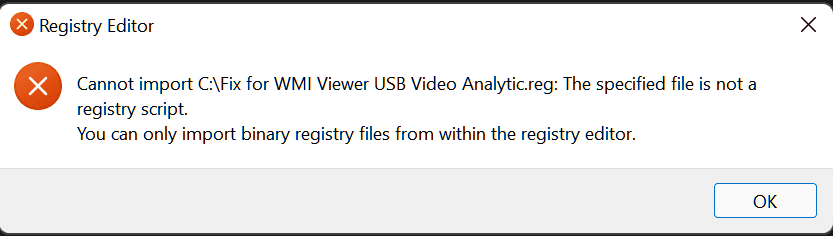
Thanks for the reg script, unfortunately I get this error so it won't load.
 

Attachments

  • Capture.PNG
    Capture.PNG
    5.7 KB · Views: 10

My Computers My Computers

  • At a glance

    Win 11 Pro 25H2Intel Ultra i7 270K PlusKingston Fury Renegrade 2x24 8400 M/tuMSI - GeForce RTX 5070 12 GB GAMING TRIO OC
    OS
    Win 11 Pro 25H2
    Computer type
    PC/Desktop
    Manufacturer/Model
    User Built
    CPU
    Intel Ultra i7 270K Plus
    Motherboard
    Asrock Taichi Z890 OCF
    Memory
    Kingston Fury Renegrade 2x24 8400 M/tu
    Graphics Card(s)
    MSI - GeForce RTX 5070 12 GB GAMING TRIO OC
    Sound Card
    Headphone DAC
    Monitor(s) Displays
    AOC QD OLED 4K 32" + Eizo 32" FlexScan 4K
    Screen Resolution
    3840x2160
    Hard Drives
    1x 9100 Pro 2TB Nvme 1x 990 Pro 2TB 1X 1TB 990 Pro
    PSU
    Be Quiet Pure Power 13 1K Watt ATX 3.1
    Case
    Corsair 5000T Air Flow
    Cooling
    Arctic Freezer 3 360 Pro
    Keyboard
    Cherry G80-3000N
    Mouse
    Corsair
    Internet Speed
    500Mbps
    Browser
    Firefox x64
    Antivirus
    Defender
    Other Info
    Backup software MR ver 10
  • At a glance

    Win 11 Pro 25H2Ultra i7 270K PlusKingston Fury 2x16 7200 M/tuMSI RTX 4070 Super OC 12 GB
    Operating System
    Win 11 Pro 25H2
    Computer type
    PC/Desktop
    Manufacturer/Model
    User Built
    CPU
    Ultra i7 270K Plus
    Motherboard
    Asus Z890 Strix - F
    Memory
    Kingston Fury 2x16 7200 M/tu
    Graphics card(s)
    MSI RTX 4070 Super OC 12 GB
    Sound Card
    Onboard
    Monitor(s) Displays
    KVM switch to AOC 4K 32" QD OLED
    Screen Resolution
    3840x2160
    Hard Drives
    Samsung 990 Pro 4TB+990 Pro 2TB +990 Pro 1TB
    PSU
    Super Flower Ledex 3 ATX 3.1 850 Watts
    Case
    Corsair 500d
    Cooling
    Noctua D15 Cromax
Hi,

Yes my bad, some keys will not change unless you do it as a trusted installer.
You can use Power-Run 1.5 from HERE. Run as ADMIN to access Reg Hive
1637096936584.png

1) Access this key :
HKEY_LOCAL_MACHINE\SOFTWARE\Microsoft\Windows\CurrentVersion\Setup\PnpResources\Registry\HKLM\SOFTWARE\Microsoft\Windows\CurrentVersion\WINEVT\Channels\Microsoft-Windows-USB-Video/Analytic

Make sure the folder name is like this:
Microsoft-Windows-USB-Video/Analytic

2)
Access this key :
HKEY_LOCAL_MACHINE\SOFTWARE\Microsoft\Windows\CurrentVersion\Setup\PnpResources\Registry\HKLM\SOFTWARE\Microsoft\Windows\CurrentVersion\WINEVT\Channels\Microsoft-Windows-USB-Video/Analytic

Make sure the folder name is like this:
Microsoft-Windows-USB-Video/Analytic


3) Access this key :
HKEY_LOCAL_MACHINE\SOFTWARE\Microsoft\Windows\CurrentVersion\WINEVT\Publishers\{da1d1dbd-3186-4fa2-bc2d-075efd9e43e2}

Right click the REG_SZ key and modify the value.
Make sure the value is written like this:
Microsoft-Windows-USB-Video


4) Click the (0) folder below the ChannelReference folder.

Right click the REG_SZ key and modify the value.
Make sure the value is written like this:
Microsoft-Windows-USB-Video

Reboot and let me know.
 

My Computer My Computer

At a glance

Windows 11 EducationIntel® Core™ i9-13900K Desktop Processor 16 (...G.Skill Ripjaws V Series 32gb (2x16gb) DDR4 3...Asus Dual Geforce Rtx™ 3060 TI Edition 8gb Gddr6
OS
Windows 11 Education
Computer type
PC/Desktop
CPU
Intel® Core™ i9-13900K Desktop Processor 16 (8P+8E)
Motherboard
Asus TUF Gaming Z790-PLUS WIFI D4
Memory
G.Skill Ripjaws V Series 32gb (2x16gb) DDR4 3600mhz
Graphics Card(s)
Asus Dual Geforce Rtx™ 3060 TI Edition 8gb Gddr6
Monitor(s) Displays
BenQ EW3270U 31.5” 3840x2160 UHD 16:9 HDR LED 4K LG 27UK850-W 27'' 4K UHD IPS LED Monitor with HDR10
Screen Resolution
3840x2160
Hard Drives
Samsung 990 with heatsink PRO PCIe 4.0 Gen 4 NVMe® SSD 1TB
WD_BLACK SN850X NVMe M.2 2280 1TB PCI-Express 4.0
Crucial T500 2TB Gen4
Samsung 970 Evo M.2 2280 2tb Pcie Gen3. X4
PSU
Corsair AXi Series AX860i Digital 860W 80 PLUS PSU
Case
Fractal Meshify C ATX Mid Tower Case
Keyboard
Logi MX Keys
Mouse
Logi M705
Internet Speed
400 mbs
Browser
Firefox
Antivirus
Eset NOD32
Other Info
Love fast boots
Hi,

Yes my bad, some keys will not change unless you do it as a trusted installer.
You can use Power-Run 1.5 from HERE. Run as ADMIN to access Reg Hive
View attachment 13815

1) Access this key :
HKEY_LOCAL_MACHINE\SOFTWARE\Microsoft\Windows\CurrentVersion\Setup\PnpResources\Registry\HKLM\SOFTWARE\Microsoft\Windows\CurrentVersion\WINEVT\Channels\Microsoft-Windows-USB-Video/Analytic

Make sure the folder name is like this:
Microsoft-Windows-USB-Video/Analytic

2)
Access this key :
HKEY_LOCAL_MACHINE\SOFTWARE\Microsoft\Windows\CurrentVersion\Setup\PnpResources\Registry\HKLM\SOFTWARE\Microsoft\Windows\CurrentVersion\WINEVT\Channels\Microsoft-Windows-USB-Video/Analytic

Make sure the folder name is like this:
Microsoft-Windows-USB-Video/Analytic


3) Access this key :
HKEY_LOCAL_MACHINE\SOFTWARE\Microsoft\Windows\CurrentVersion\WINEVT\Publishers\{da1d1dbd-3186-4fa2-bc2d-075efd9e43e2}

Right click the REG_SZ key and modify the value.
Make sure the value is written like this:
Microsoft-Windows-USB-Video


4) Click the (0) folder below the ChannelReference folder.

Right click the REG_SZ key and modify the value.
Make sure the value is written like this:
Microsoft-Windows-USB-Video

Reboot and let me know.
@Zardoc Many thanks for your time and effort, I've been using Power Run on and off for sometime. Carried out your instructions and it seems to have done the trick. Thanks once again.
 

My Computers My Computers

  • At a glance

    Win 11 Pro 25H2Intel Ultra i7 270K PlusKingston Fury Renegrade 2x24 8400 M/tuMSI - GeForce RTX 5070 12 GB GAMING TRIO OC
    OS
    Win 11 Pro 25H2
    Computer type
    PC/Desktop
    Manufacturer/Model
    User Built
    CPU
    Intel Ultra i7 270K Plus
    Motherboard
    Asrock Taichi Z890 OCF
    Memory
    Kingston Fury Renegrade 2x24 8400 M/tu
    Graphics Card(s)
    MSI - GeForce RTX 5070 12 GB GAMING TRIO OC
    Sound Card
    Headphone DAC
    Monitor(s) Displays
    AOC QD OLED 4K 32" + Eizo 32" FlexScan 4K
    Screen Resolution
    3840x2160
    Hard Drives
    1x 9100 Pro 2TB Nvme 1x 990 Pro 2TB 1X 1TB 990 Pro
    PSU
    Be Quiet Pure Power 13 1K Watt ATX 3.1
    Case
    Corsair 5000T Air Flow
    Cooling
    Arctic Freezer 3 360 Pro
    Keyboard
    Cherry G80-3000N
    Mouse
    Corsair
    Internet Speed
    500Mbps
    Browser
    Firefox x64
    Antivirus
    Defender
    Other Info
    Backup software MR ver 10
  • At a glance

    Win 11 Pro 25H2Ultra i7 270K PlusKingston Fury 2x16 7200 M/tuMSI RTX 4070 Super OC 12 GB
    Operating System
    Win 11 Pro 25H2
    Computer type
    PC/Desktop
    Manufacturer/Model
    User Built
    CPU
    Ultra i7 270K Plus
    Motherboard
    Asus Z890 Strix - F
    Memory
    Kingston Fury 2x16 7200 M/tu
    Graphics card(s)
    MSI RTX 4070 Super OC 12 GB
    Sound Card
    Onboard
    Monitor(s) Displays
    KVM switch to AOC 4K 32" QD OLED
    Screen Resolution
    3840x2160
    Hard Drives
    Samsung 990 Pro 4TB+990 Pro 2TB +990 Pro 1TB
    PSU
    Super Flower Ledex 3 ATX 3.1 850 Watts
    Case
    Corsair 500d
    Cooling
    Noctua D15 Cromax
These instructions make no sense. I did all of above, and doesn't work.
 
Last edited:

My Computer My Computer

At a glance

win11
OS
win11
After updating to ver 22000.285 I get this error in event viewer admin. These USB events were not present in win10. Anyone have any ideas on how to stop this error every time I open amin in event viewer.View attachment 10374View attachment 10375

Win 11 24H2 (26100.4652)
All of a sudden, after updates KB5062553, KB5056579 I got the same strange error for the first time...

This registry fix (deleting missing devices keys) seems to have worked:
1752181236527.webp

here is it (as backup):

Code:
Windows Registry Editor Version 5.00

[-HKEY_LOCAL_MACHINE\SOFTWARE\Microsoft\Windows\CurrentVersion\WINEVT\Channels\Microsoft-Windows-USBVideo/Analytic]

[-HKEY_LOCAL_MACHINE\SOFTWARE\Microsoft\Windows\CurrentVersion\Setup\PnpResources\Registry\HKLM\SOFTWARE\Microsoft\Windows\CurrentVersion\WINEVT\Channels\Microsoft-Windows-USBVideo/Analytic]

[-HKEY_LOCAL_MACHINE\SOFTWARE\Microsoft\Windows\CurrentVersion\Setup\PnpResources\Registry\HKLM\SOFTWARE\Microsoft\Windows\CurrentVersion\WINEVT\Channels\Microsoft-Windows-USB-Video/Analytic]

[-HKEY_LOCAL_MACHINE\SOFTWARE\Microsoft\Windows\CurrentVersion\WINEVT\Channels\Microsoft-Windows-USB-Video/Analytic]

[-HKEY_LOCAL_MACHINE\SOFTWARE\Microsoft\Windows\CurrentVersion\WINEVT\Publishers\{da1d1dbd-3186-4fa2-bc2d-075efd9e43e2}]
 
Last edited:

My Computer My Computer

At a glance

Windows 11 HomeIntel i9-13980HX32GB DDR5 5600MHzNVidia GTX 4090 Laptop 256bit 16GB 175W
OS
Windows 11 Home
Computer type
Laptop
Manufacturer/Model
ASUS ROG SCAR 18
CPU
Intel i9-13980HX
Memory
32GB DDR5 5600MHz
Graphics Card(s)
NVidia GTX 4090 Laptop 256bit 16GB 175W
Sound Card
Realtek ALC285 + Dolby Atmos
Monitor(s) Displays
G-Sync NE180QDM-NZ2 18" 16:10, FreeSync Premium XiaoMi Mi 34" 21:9
Screen Resolution
2560x1600@240Hz (internal), 3440x1440@144Hz (external)
Hard Drives
NVMe Lexar NM790 1TB 6GB/s, NVMe Lexar NM790 4TB 6GB/s
PSU
330W (laptop PSU)
Mouse
ROG Strix Carry Wireless-BT mouse
Other Info
4K UHD USB Archgon Star Blu-Ray 4K UHD,
8BitDo Arcade Stick,
Vader 4 Pro controller
Win 11 24H2 (26100.4652)
All of a sudden, after updates KB5062553, KB5056579 I got the same strange error for the first time...

This registry fix (deleting missing devices keys) seems to have worked:
View attachment 138980

here is it (as backup):

Code:
Windows Registry Editor Version 5.00

[-HKEY_LOCAL_MACHINE\SOFTWARE\Microsoft\Windows\CurrentVersion\WINEVT\Channels\Microsoft-Windows-USBVideo/Analytic]

[-HKEY_LOCAL_MACHINE\SOFTWARE\Microsoft\Windows\CurrentVersion\Setup\PnpResources\Registry\HKLM\SOFTWARE\Microsoft\Windows\CurrentVersion\WINEVT\Channels\Microsoft-Windows-USBVideo/Analytic]

[-HKEY_LOCAL_MACHINE\SOFTWARE\Microsoft\Windows\CurrentVersion\Setup\PnpResources\Registry\HKLM\SOFTWARE\Microsoft\Windows\CurrentVersion\WINEVT\Channels\Microsoft-Windows-USB-Video/Analytic]

[-HKEY_LOCAL_MACHINE\SOFTWARE\Microsoft\Windows\CurrentVersion\WINEVT\Channels\Microsoft-Windows-USB-Video/Analytic]

[-HKEY_LOCAL_MACHINE\SOFTWARE\Microsoft\Windows\CurrentVersion\WINEVT\Publishers\{da1d1dbd-3186-4fa2-bc2d-075efd9e43e2}]
I wrote the fix for this many years ago. It's as old as the Event 10016 DCOM Logging disable error. I have about 20 reg fixes for repeat issues that MS doesn't give a rat's butt about. They call the errors BY DESIGN. I have tried many times to report them through the insider channels, MVP contact. I even wrote a KB article many years ago about GOD mode messing with Word docs and crashing PC.
 

My Computer My Computer

At a glance

Windows 11 EducationIntel® Core™ i9-13900K Desktop Processor 16 (...G.Skill Ripjaws V Series 32gb (2x16gb) DDR4 3...Asus Dual Geforce Rtx™ 3060 TI Edition 8gb Gddr6
OS
Windows 11 Education
Computer type
PC/Desktop
CPU
Intel® Core™ i9-13900K Desktop Processor 16 (8P+8E)
Motherboard
Asus TUF Gaming Z790-PLUS WIFI D4
Memory
G.Skill Ripjaws V Series 32gb (2x16gb) DDR4 3600mhz
Graphics Card(s)
Asus Dual Geforce Rtx™ 3060 TI Edition 8gb Gddr6
Monitor(s) Displays
BenQ EW3270U 31.5” 3840x2160 UHD 16:9 HDR LED 4K LG 27UK850-W 27'' 4K UHD IPS LED Monitor with HDR10
Screen Resolution
3840x2160
Hard Drives
Samsung 990 with heatsink PRO PCIe 4.0 Gen 4 NVMe® SSD 1TB
WD_BLACK SN850X NVMe M.2 2280 1TB PCI-Express 4.0
Crucial T500 2TB Gen4
Samsung 970 Evo M.2 2280 2tb Pcie Gen3. X4
PSU
Corsair AXi Series AX860i Digital 860W 80 PLUS PSU
Case
Fractal Meshify C ATX Mid Tower Case
Keyboard
Logi MX Keys
Mouse
Logi M705
Internet Speed
400 mbs
Browser
Firefox
Antivirus
Eset NOD32
Other Info
Love fast boots

Latest Support Threads

Back
Top Bottom