External Hard Drives Ignoring "Turn off Hard Disk After" Setting – Mixed Results on Win 10/11


fa1rid

New member
Local time
6:45 PM
Posts
4
OS
Win 11
I have two laptops (Windows 10) and a mini-PC (Windows 11) with external USB hard drives connected. The "Turn off hard disk after" setting is set to 10 minutes on all devices, but the drives turn off at different times on each machine. One shuts off around 2 minutes, another at 3, another at 6, and during RDP sessions, it’s even shorter (one of them even turns off HDDs after 5 seconds which was driving me crazy). I'm using the same Hard Drives to test individually on each PC.

It seems like the timer is only respected if it's below an unknown max limit that varies per PC (if I set to it to 1 min it will turn off after 1 min). Anyone knows how to resolve this issue?

Win 11 23H2
Win 10 22H2
Win 10 21H2
 

My Computer My Computer

At a glance

Win 11
OS
Win 11
Serious question...what is the purpose, what is gained and/or prevented by turing off external hard drives? I have a Win10 desktop and a Win11 laptop, both have external USB hard drives attached. The laptop is new but both external drives have been in place literally for years. What am I missing??
 

My Computer My Computer

At a glance

Windows 11 Pro @2N23AMD Ryzen 716gb
OS
Windows 11 Pro @2N23
Computer type
Laptop
Manufacturer/Model
Dell
CPU
AMD Ryzen 7
Memory
16gb
Hard Drives
M2 2TB SSD
Browser
Edge
Antivirus
ioBit
I found a solution for 2.5" HDDs but not for 3.5" as the "USB Mass Storage Device" entry doesn't show up in device manager for 3.5" HDDs.
Disabling 'Allow the computer to turn off this device to save power' will prevent HDD to go into sleep.
If anyone knows why "USB Mass Storage Device" doesn't appear for 3.5" HDDs connected through USB please let me know.

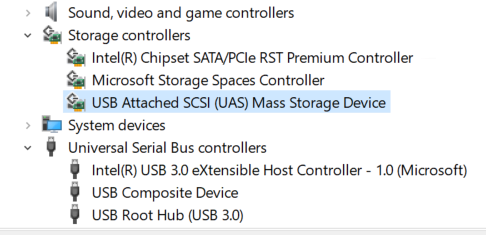
It seems it's appearing under "Storage Controllers" as "USB Attached SCSI (UAS) Mass Storage Device" but there is no "Power Management" tab.

H4XcDod.png
 

My Computer My Computer

At a glance

Win 11
OS
Win 11
Anyone found or knows a solution please?
 

My Computer My Computer

At a glance

Win 11
OS
Win 11
Anyone found or knows a solution please?
Check out 3 just below in your Device list, the Intel USB host controller can be turned off/on.
 

My Computers My Computers

  • At a glance

    All Branches but ReleaseAMD Ryzen 7 7735HS 3200-4500 Mhz 8 cores x 232 GB DDR5Radeon Graphic / NVIDIA GeForce RTX 4060 8 GB...
    OS
    All Branches but Release
    Computer type
    Laptop
    Manufacturer/Model
    Acer Nitro ANV15-51
    CPU
    AMD Ryzen 7 7735HS 3200-4500 Mhz 8 cores x 2
    Motherboard
    Sportage_RBH
    Memory
    32 GB DDR5
    Graphics Card(s)
    Radeon Graphic / NVIDIA GeForce RTX 4060 8 GB GDDR6
    Sound Card
    AMD/Realtek(R) Audio
    Monitor(s) Displays
    Integrated Monitor (15.3"vis)
    Screen Resolution
    FHD 1920X1080 16:9 144Hz
    Hard Drives
    KINGSTON OM8SEP4512Q-AA 1TB
    Western Digital 256GB
    PSU
    19V DC 6.32 A 120 W
    Cooling
    Dual Fans
    Mouse
    MS Bluetooth
    Internet Speed
    Fiber 1GB Cox -us & 1GB Orange-fr
    Browser
    Edge Canary- Firefox Nightly-Chrome Dev-Chrome Dev
    Antivirus
    Windows Defender
  • At a glance

    Windows 11 BetaAMD A9-94208 GB of DDR4AMD Radeon R5
    Operating System
    Windows 11 Beta
    Computer type
    Laptop
    Manufacturer/Model
    Asus X751BP
    CPU
    AMD A9-9420
    Memory
    8 GB of DDR4
    Graphics card(s)
    AMD Radeon R5
    Screen Resolution
    1600x900
    Hard Drives
    Seagate 1 TB
Check out 3 just below in your Device list, the Intel USB host controller can be turned off/on.
I tried that before you even mention it.
 

My Computer My Computer

At a glance

Win 11
OS
Win 11

Latest Support Threads

Back
Top Bottom