
LuckyEleven
New member
- Local time
- 5:25 PM
- Posts
- 21
- OS
- Windows 11
Hello Everyone,
I have a custom built PC with an Asus Z790 series motherboard. It is a DIY, not from any major manufacturer.
I have in it 5 bootable drives exact same size, mnaufacturer, and model, and each of which can be powered on or off when the system box is powered OFF.
Each of these drives was running Windows 10 Pro.
I am in the process of upgrading to Windows 11 Pro by mounting the 25H2 ISO from the drive and running setup.exe
I update Windows 10 Pro completely and turn off the antivirus before the upgrade to Windows 11.
I do not update Windows 11 during the upgrade, I wait till after Windows 11 is running.
Now here is the question:
I have upgraded 4 of the 5 drives so far.
The first 3 ended up with two recovery partitions. Here is a snapshot of one of them:
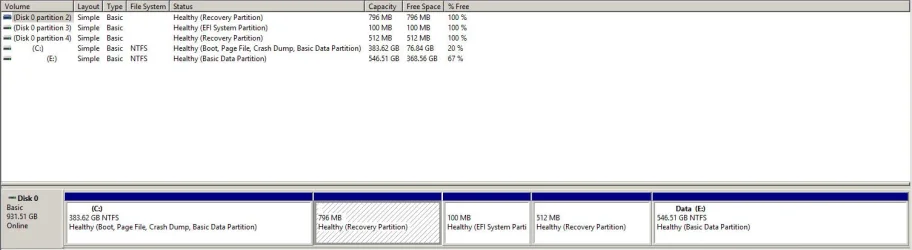
But the fourth drive I updated only ended up with one recovery partition. See image below:
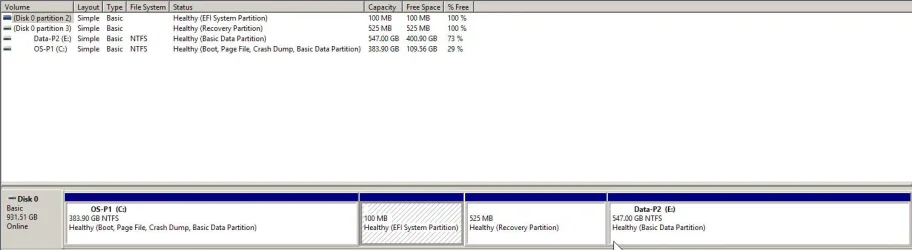
There is a different assortment of programs on each drive but the OS and all the hardware are exactly the same.
The only difference is the serial number of the hard drive.
Q1. Anyone have any idea why this happened?
Q2. How do I create the missing Recovery Partition and ensure that it is the same size and in the same order/place?
Q3. Is there anything I can do to prevent this anomaly when upgrading drive number 5?
I have a custom built PC with an Asus Z790 series motherboard. It is a DIY, not from any major manufacturer.
I have in it 5 bootable drives exact same size, mnaufacturer, and model, and each of which can be powered on or off when the system box is powered OFF.
Each of these drives was running Windows 10 Pro.
I am in the process of upgrading to Windows 11 Pro by mounting the 25H2 ISO from the drive and running setup.exe
I update Windows 10 Pro completely and turn off the antivirus before the upgrade to Windows 11.
I do not update Windows 11 during the upgrade, I wait till after Windows 11 is running.
Now here is the question:
I have upgraded 4 of the 5 drives so far.
The first 3 ended up with two recovery partitions. Here is a snapshot of one of them:
But the fourth drive I updated only ended up with one recovery partition. See image below:
There is a different assortment of programs on each drive but the OS and all the hardware are exactly the same.
The only difference is the serial number of the hard drive.
Q1. Anyone have any idea why this happened?
Q2. How do I create the missing Recovery Partition and ensure that it is the same size and in the same order/place?
Q3. Is there anything I can do to prevent this anomaly when upgrading drive number 5?
- Windows Build/Version
- Windows 11 25H2
My Computer
At a glance
Windows 11
- OS
- Windows 11





 I have one boot partition, and it boots one O/S version. I have several machines if I want to experiment, I just don't do it on my main work machine.






