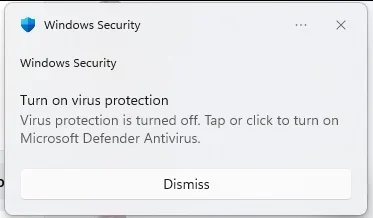
False "Turn on virus protection" notification appearing on startup despite protection being enabled


Jonas Grumby

Active member
Local time
9:06 PM
Posts
9
OS
Windows 11
Problem
For the past few days, I have been receiving a "Turn on virus protection" warning notification every time I start my system.

Actual Behavior
When I click the warning notification, it opens my antivirus settings. However, the dashboard shows that all protection features are already turned on and no action is needed.

Question
What could be causing this discrepancy or trigger on startup, and how can I resolve it?
1786716514529.webp
1786716817380.webp

Thank you.
 

My Computer My Computer

At a glance

Windows 11Intel(R) Core(TM) i7-9700F CPU @ 3.00GHz 3.00...16GBNVIDIA GeForce RTX 2060 SUPER
OS
Windows 11
Computer type
PC/Desktop
Manufacturer/Model
iBuyPower BB970
CPU
Intel(R) Core(TM) i7-9700F CPU @ 3.00GHz 3.00 GHz
Motherboard
ASRock B365M IB-R
Memory
16GB
Graphics Card(s)
NVIDIA GeForce RTX 2060 SUPER
Hard Drives
1TB HDD + 480GB Solid State Drive
Problem
For the past few days, I have been receiving a "Turn on virus protection" warning notification every time I start my system.

Actual Behavior
When I click the warning notification, it opens my antivirus settings. However, the dashboard shows that all protection features are already turned on and no action is needed.

Question
What could be causing this discrepancy or trigger on startup, and how can I resolve it?
View attachment 179645
View attachment 179646

Thank you.
This bug, which started all the way in the Canary branch, has made it all the way to your release.
Hopefully the next update will resolve that pesky issue as there is not much that can be done to correct it.
 

My Computers My Computers

  • At a glance

    All Branches but StableAMD Ryzen 7 7735HS 3200-4500 Mhz 8 cores x 232 GB DDR5Radeon Graphic / NVIDIA GeForce RTX 4060 8 GB...
    OS
    All Branches but Stable
    Computer type
    Laptop
    Manufacturer/Model
    Acer Nitro ANV15-51
    CPU
    AMD Ryzen 7 7735HS 3200-4500 Mhz 8 cores x 2
    Motherboard
    Sportage_RBH
    Memory
    32 GB DDR5
    Graphics Card(s)
    Radeon Graphic / NVIDIA GeForce RTX 4060 8 GB GDDR6
    Sound Card
    AMD/Realtek(R) Audio
    Monitor(s) Displays
    Integrated Monitor (15.3"vis)
    Screen Resolution
    FHD 1920X1080 16:9 144Hz
    Hard Drives
    KINGSTON OM8SEP4512Q-AA 1TB
    Western Digital 256GB
    PSU
    19V DC 6.32 A 120 W
    Cooling
    Dual Fans
    Mouse
    MS Bluetooth
    Internet Speed
    Fiber 1GB Cox -us & 1GB Orange-fr
    Browser
    Edge Canary- Firefox Nightly-Chrome Dev-Chrome Dev
    Antivirus
    Windows Defender
  • At a glance

    Windows 11 BetaAMD A9-94208 GB of DDR4AMD Radeon R5
    Operating System
    Windows 11 Beta
    Computer type
    Laptop
    Manufacturer/Model
    Asus X751BP
    CPU
    AMD A9-9420
    Memory
    8 GB of DDR4
    Graphics card(s)
    AMD Radeon R5
    Screen Resolution
    1600x900
    Hard Drives
    Seagate 1 TB

My Computer My Computer

At a glance

Windows 11AMD Ryzen 7 5700GMicron Technology DDR4-3200 16GBNVIDIA GeForce RTX 3060
OS
Windows 11
Computer type
PC/Desktop
Manufacturer/Model
HP Pavilion
CPU
AMD Ryzen 7 5700G
Motherboard
Erica6
Memory
Micron Technology DDR4-3200 16GB
Graphics Card(s)
NVIDIA GeForce RTX 3060
Sound Card
Realtek ALC671
Monitor(s) Displays
Samsung SyncMaster U28E590
Screen Resolution
3840 x 2160
Hard Drives
SAMSUNG MZVLQ1T0HALB-000H1
I tried all of the things in the Grok link (which seems like it has been deleted) and they didn't help. I'm just going to leave it alone since it seems to be a known bug and not a real security risk.
 

My Computer My Computer

At a glance

Windows 11Intel(R) Core(TM) i7-9700F CPU @ 3.00GHz 3.00...16GBNVIDIA GeForce RTX 2060 SUPER
OS
Windows 11
Computer type
PC/Desktop
Manufacturer/Model
iBuyPower BB970
CPU
Intel(R) Core(TM) i7-9700F CPU @ 3.00GHz 3.00 GHz
Motherboard
ASRock B365M IB-R
Memory
16GB
Graphics Card(s)
NVIDIA GeForce RTX 2060 SUPER
Hard Drives
1TB HDD + 480GB Solid State Drive
  • Like
Reactions: OAT
I tried all of the things in the Grok link (which seems like it has been deleted) and they didn't help. I'm just going to leave it alone since it seems to be a known bug and not a real security risk.
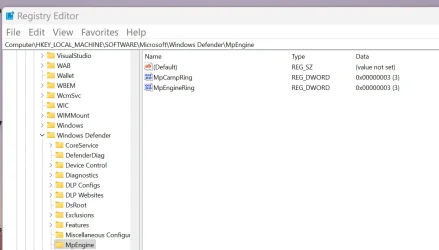
Are you on the Release Preview channel? The bug appeared on that build for some due to some machines getting a Beta Defender App release with a couple new registry keys as shown in the screen shot. It seems to be fixed with todays RP release. I had it till today's release.

Screenshot 2026-08-12 141001.webp
 

My Computers My Computers

  • At a glance

    Windows 11 26H2Intel Core Ultra 9 275HX (24-Core)64GB DDR5 6400MT/sNVIDIA GeForce RTX 5080 and Intel UHD Graphics
    OS
    Windows 11 26H2
    Computer type
    Laptop
    Manufacturer/Model
    Alienware 18 Area-51
    CPU
    Intel Core Ultra 9 275HX (24-Core)
    Motherboard
    Alienware
    Memory
    64GB DDR5 6400MT/s
    Graphics Card(s)
    NVIDIA GeForce RTX 5080 and Intel UHD Graphics
    Sound Card
    Onboard, Realtek high-performance Audio chips (ALC3329 & ALC1708))
    Monitor(s) Displays
    300HZ 18-inch QHD 500 nit Comfort View+
    Screen Resolution
    2560 x 1600
    Hard Drives
    2TB NVMe M.2 PCIe Gen 5 SSD
    Case
    Magnesium Alloy
    Cooling
    Advanced Cryo-Tech Quad-Fan Cooling system & large vapor chamber
    Keyboard
    Cherry MX ultra low profile mechanical keyboard with per key AlienFX RGB lighting
    Mouse
    Logitech MX Master 4
    Browser
    Vivaldi (main), Firefox, Chrome, Edge
    Antivirus
    MS Defender and Malwarebytes Free
  • At a glance

    Windows 11 26H2Qualcomm Snapdragon X Elite (12 Core) ARM bas...16GB LPDDR5Qualcomm Adreno X1-85
    Operating System
    Windows 11 26H2
    Computer type
    Laptop
    Manufacturer/Model
    Microsoft Surface Laptop 7
    CPU
    Qualcomm Snapdragon X Elite (12 Core) ARM based CPU
    Motherboard
    Microsoft Corp.
    Memory
    16GB LPDDR5
    Graphics card(s)
    Qualcomm Adreno X1-85
    Sound Card
    Omnisonic speakers with Dolby Atmos spatial sound
    Monitor(s) Displays
    120 Hz 13.8-inch 600 nit PixelSense Flow touchscreen
    Screen Resolution
    2304x1536
    Hard Drives
    1TB NVMe Gen 4 SSD
    Case
    Anodized Aluminum
    Cooling
    Traditional active cooling fan system
    Keyboard
    Mechanical QWERTY, backlit when in use
    Mouse
    Logitech MX Master 4 and Surface Arc Mouse
    Browser
    Vivaldi (main), Firefox, Chrome, Edge
    Antivirus
    MS Defender and Malwarebytes Free
Are you on the Release Preview channel? The bug appeared on that build for some due to some machines getting a Beta Defender App release with a couple new registry keys as shown in the screen shot. It seems to be fixed with todays RP release. I had it till today's release.

View attachment 179663
Thanks. I'm not on the Release Preview channel. Maybe I'll get it with the next regular update.
 

My Computer My Computer

At a glance

Windows 11Intel(R) Core(TM) i7-9700F CPU @ 3.00GHz 3.00...16GBNVIDIA GeForce RTX 2060 SUPER
OS
Windows 11
Computer type
PC/Desktop
Manufacturer/Model
iBuyPower BB970
CPU
Intel(R) Core(TM) i7-9700F CPU @ 3.00GHz 3.00 GHz
Motherboard
ASRock B365M IB-R
Memory
16GB
Graphics Card(s)
NVIDIA GeForce RTX 2060 SUPER
Hard Drives
1TB HDD + 480GB Solid State Drive

Latest Support Threads

Back
Top Bottom