File and folder properties are not visible in Windows Explorer


Doug4907

Well-known member
Member
Local time
12:33 PM
Posts
15
OS
Windows 11
I have an issue that I haven't seen before.

First I have a Windows 11 desktop Gen 14. Win 11 ver 24h2 build 26100.4652.

The issue: In Windows Explorer when I right click on a file or folder and then select Properties, I get no response. Zero response. Alt Enter is the keyboard shortcut for Properties and it too gives zero response.

However if I hover on a file, I get the brief Properties that are normally seen.

Can anyone offer a solution?

Regards good people,
Doug
 

My Computer

System One

  • OS
    Windows 11
    Computer type
    PC/Desktop
    Manufacturer/Model
    Various
Have you used any tweaks on your system?

If not then try these commands in an ADMIN powershell window.

DISM /online /Cleanup-Image /StartComponentCleanup

DISM /Online /Cleanup-Image /RestoreHealth

SFC /ScanNow
 

My Computers

System One System Two

  • OS
    Windows 11 Enterprise 25H2 26200 7462
    Computer type
    PC/Desktop
    Manufacturer/Model
    Custom Build
    CPU
    Intel XEON E5-2699 v3
    Motherboard
    ASUS X99-A
    Memory
    64GB Teamgroup UD4-3600
    Graphics Card(s)
    NVIDIA GeForce GTX 1080 Ti
    Sound Card
    Integrated
    Monitor(s) Displays
    ACER X34 Predator
    Screen Resolution
    3440 x 1440
    Hard Drives
    Crucial CT1000P 3P SSD8 1TB
    Crucial CT1000 BX500 SSD 1TB
    PSU
    GameMax Pro
    Case
    Fractal Design
    Cooling
    Corsair H110iGT + 6 140mm Fans
    Keyboard
    Corsair K4
    Mouse
    G-Skill G502
    Internet Speed
    300MBs
    Browser
    Chrome
    Antivirus
    OEM
    Other Info
    ASUS RT-AC87U Router
  • Operating System
    25H2 26200.5074
    Computer type
    Laptop
    Manufacturer/Model
    ASUS X555LA
    Memory
    8GB
    Browser
    Chrome
    Antivirus
    OEM
After doing what @Rollback_Jockey proposed, try to log in using another user's credentials and check if the same thing happens.
At least, we'll know if it's system-wide or just user's hive corruption/modification.
 

My Computers

System One System Two

  • OS
    All Branches but Release
    Computer type
    Laptop
    Manufacturer/Model
    Acer Nitro ANV15-51
    CPU
    AMD Ryzen 7 7735HS 3200-4500 Mhz 8 cores x 2
    Motherboard
    Sportage_RBH
    Memory
    32 GB DDR5
    Graphics Card(s)
    Radeon Graphic / NVIDIA GeForce RTX 4060 8 GB GDDR6
    Sound Card
    AMD/Realtek(R) Audio
    Monitor(s) Displays
    Integrated Monitor (15.3"vis)
    Screen Resolution
    FHD 1920X1080 16:9 144Hz
    Hard Drives
    KINGSTON OM8SEP4512Q-AA 1TB
    Western Digital 256GB
    PSU
    19V DC 6.32 A 120 W
    Cooling
    Dual Fans
    Mouse
    MS Bluetooth
    Internet Speed
    Fiber 1GB Cox -us & 1GB Orange-fr
    Browser
    Edge Canary- Firefox Nightly-Chrome Dev-Chrome Dev
    Antivirus
    Windows Defender
  • Operating System
    Windows 11 Beta
    Computer type
    Laptop
    Manufacturer/Model
    Asus X751BP
    CPU
    AMD A9-9420
    Memory
    8 GB of DDR4
    Graphics card(s)
    AMD Radeon R5
    Screen Resolution
    1600x900
    Hard Drives
    Seagate 1 TB
Hi Rollback Jockey,
No tweaks as far as I can remember.

I am very familiar with DISM. Unfortunately DISM crashes with errors every time I try to run it. I have also downloaded "Windows install" and tried DISM with that , but alas just more errors. I also tried copying the DISM folder from my wife's identical PC but that was no help. A google search shows DISM commonly failing.

My PC is new and Windows was installed just a few weeks ago. I am hoping to get more use of it before a rebuild. I am approaching 80 and these things, whilst doable are very taxing.

I pay for Adobe Acrobat Pro, and it constantly loses its registration. Several times Abobe personnel have logged in remotely to fix the issue. The problem in question appeared after their last re-registration

Hi Oat, I will need to instal another user to try your suggestion. I will try that but my 80 year old brain works slowly. Thanks for the suggestion.


Take care good people,
Doug
 

My Computer

System One

  • OS
    Windows 11
    Computer type
    PC/Desktop
    Manufacturer/Model
    Various
By the way, I am in Australia so time zones aren't helpful.
 

My Computer

System One

  • OS
    Windows 11
    Computer type
    PC/Desktop
    Manufacturer/Model
    Various
Hi Rollback Jockey,
No tweaks as far as I can remember.

I am very familiar with DISM. Unfortunately DISM crashes with errors every time I try to run it. I have also downloaded "Windows install" and tried DISM with that , but alas just more errors. I also tried copying the DISM folder from my wife's identical PC but that was no help. A google search shows DISM commonly failing.

My PC is new and Windows was installed just a few weeks ago. I am hoping to get more use of it before a rebuild. I am approaching 80 and these things, whilst doable are very taxing.

I pay for Adobe Acrobat Pro, and it constantly loses its registration. Several times Abobe personnel have logged in remotely to fix the issue. The problem in question appeared after their last re-registration

Hi Oat, I will need to instal another user to try your suggestion. I will try that but my 80 year old brain works slowly. Thanks for the suggestion.


Take care good people,
Doug
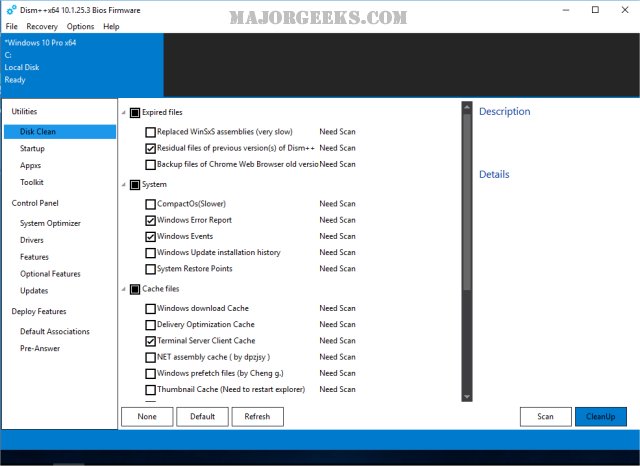
Have a look at DISM++ and see if that helps. You can set it via the Advanced menu to be selectable at boot so you can work with the image offline.


My Computers

System One System Two

  • OS
    Windows 11 Enterprise 25H2 26200 7462
    Computer type
    PC/Desktop
    Manufacturer/Model
    Custom Build
    CPU
    Intel XEON E5-2699 v3
    Motherboard
    ASUS X99-A
    Memory
    64GB Teamgroup UD4-3600
    Graphics Card(s)
    NVIDIA GeForce GTX 1080 Ti
    Sound Card
    Integrated
    Monitor(s) Displays
    ACER X34 Predator
    Screen Resolution
    3440 x 1440
    Hard Drives
    Crucial CT1000P 3P SSD8 1TB
    Crucial CT1000 BX500 SSD 1TB
    PSU
    GameMax Pro
    Case
    Fractal Design
    Cooling
    Corsair H110iGT + 6 140mm Fans
    Keyboard
    Corsair K4
    Mouse
    G-Skill G502
    Internet Speed
    300MBs
    Browser
    Chrome
    Antivirus
    OEM
    Other Info
    ASUS RT-AC87U Router
  • Operating System
    25H2 26200.5074
    Computer type
    Laptop
    Manufacturer/Model
    ASUS X555LA
    Memory
    8GB
    Browser
    Chrome
    Antivirus
    OEM
By the way, I am in Australia so time zones aren't helpful.

So am I.

Hi Oat, I will need to instal another user to try your suggestion. I will try that but my 80 year old brain works slowly. Thanks for the suggestion.

Add a local User Account to Windows 11:


Make it an Administrators Account if you like:


And/Or switch it to a Microsoft Account if you like:


You can remove it when you’re done checking:


If it turns out your current profile is broken or has been corrupted, you’ll have to start a thread or ask in here, how to move your stuff to the new user profile to replace your old profile. (IF you don’t feel like doing a fresh install)
 

My Computers

System One System Two

  • OS
    Windows 11 Pro 25H2 Build 26200.8524
    Computer type
    PC/Desktop
    Manufacturer/Model
    Sin-built 2013
    CPU
    Intel(R) Core(TM) i7-4770K CPU @ 3.50GHz
    Motherboard
    ASUS ROG Maximus VI Formula
    Memory
    32.0 GB of I forget and the box is in storage.
    Graphics Card(s)
    Gigabyte nVidia GeForce GTX 1660 Super OC 6GB
    Sound Card
    Onboard thingy
    Monitor(s) Displays
    5 x LG 25MS500-B - 1 x 24MK430H-B - 1 x Wacom Pro 22" Touch Screen Tablet
    Screen Resolution
    All over the place
    Hard Drives
    Too many to list.
    OS on Samsung 1TB 870 QVO SATA
    PSU
    Silverstone 1500
    Case
    NZXT Phantom 820 Full-Tower Case
    Cooling
    Noctua NH-D15 Elite Class Dual Tower CPU Cooler / 6 x EziDIY 120mm / 2 x Corsair 140mm somethings / 1 x 140mm Thermaltake something / 2 x 200mm Corsair.
    Keyboard
    Corsair K95 / Logitech diNovo Edge Wireless
    Mouse
    Logitech: G402 / G502 / Mx Masters / Mx Air Cordless
    Internet Speed
    2000/500Mbps
    Browser
    All sorts
    Antivirus
    Kaspersky Premium
    Other Info
    ㅤㅤㅤㅤㅤㅤㅤㅤㅤㅤㅤㅤㅤㅤㅤㅤㅤㅤㅤㅤㅤㅤㅤㅤㅤㅤㅤㅤㅤㅤㅤㅤㅤㅤㅤㅤㅤㅤㅤㅤ⠀⠀⠀⠀⠀⠀⠀⠀⠀⠀
    TP-Link BE9300 WiFi 7 Bluetooth 5.4 (Archer TBE550E)
    TP-Link TX201 V1 2.5GB Lan

    Grandstream HT812 - VoIP
    ASUS DSL-AX82U - Mesh
    ASUS RT-AC68U - Mesh
    ASUS RT-BE88U Router

    Brother MFC-L2880DW Printer

    I’m on a horse.
  • Operating System
    Windows 11 Pro 25H2 Build 26200.8524
    Computer type
    Laptop
    Manufacturer/Model
    LENOVO Yoga 7 14IRL8 - 7i EVO OLED 14" Touchscreen i5 12 Core 16GB/512GB
    CPU
    Intel Core 12th Gen i5-1240P Processor (1.7 - 4.4GHz)
    Memory
    16GB LPDDR5 RAM
    Graphics card(s)
    Intel Iris Xe Graphics Processor
    Sound Card
    Optimized with Dolby Atmos®
    Screen Resolution
    QHD 2880 x 1800 OLED
    Hard Drives
    M.2 512GB
    Antivirus
    Defender / Malwarebytes
    Other Info
    …still on a horse.
First, an apology for my late reply. My PC began throwing up additional, new numerous window errors, including "blue screens". DSIM wouldn't run with any of the available options. And ... so on.

I decided to reinstall windows. And then ran into trouble. Each time I selected the drive to install the OS I got a message that the selected disk was not available. Two days later, I realised/got help that I had to delete old partitions on the selected drive! Once that was done, windows installed quickly.

Now all works OK. Even properties display quickly and correctly.

I appreciate all the help on this forum. You guys are great.
Take care,
Doug
 

My Computer

System One

  • OS
    Windows 11
    Computer type
    PC/Desktop
    Manufacturer/Model
    Various
Back
Top Bottom