File Explorer - Decrease Space & Check Boxes


Quandary

Well-known member
Power User
VIP
Local time
1:58 AM
Posts
392
OS
Windows 11 Pro
I have just finished setting up a new ASUS Zenbook with Win 11 22631.3235, and the only remaining issue is with the two related setting of:
1. Decrease space between items (compact view)
2. Use check boxes to select items

Trying the various settings detailed in the excellent tips from the Tutorials section have no effect. I have concluded that it is likely controlled by some registry entry that has been set for a tablet mode configuration.

The lid on my older HP Spectre X360 can be opened to 360 degrees where it can be used as a tablet. In normal mode, File Explorer respects the 2 settings. In table mode File Explorer expands to increase space between items and adds the check boxes. Change the lid back to normal mode and File Explorer reverts. All logical.

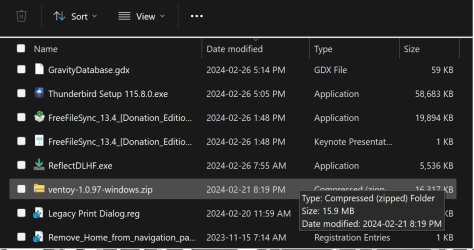
The lid on Zenbook can be opened to 180 degrees, turning it into a semi-tablet mode, but File Explorer only displays check boxes with spaces between items.

Any creative suggestions/fixes? If none, I will clean install Windows 11 and reinstall all my apps to change this File Explorer configuration.
 

My Computer My Computer

At a glance

Windows 11 ProIntel Core Ultra16GBIntel(R) Arc Graphics
OS
Windows 11 Pro
Computer type
Laptop
Manufacturer/Model
ASUS Zenbook 14 OLED
CPU
Intel Core Ultra
Memory
16GB
Graphics Card(s)
Intel(R) Arc Graphics
Sound Card
Realtek High Definition Audio(SST)
Screen Resolution
2880 x 1800
Hard Drives
500 GB NVMe SSD
Internet Speed
1,500Mbps
Browser
Firefox, Edge
Antivirus
Windows Defender
Are you trying to make the changes as User with Administrator rights? The first User created at initial setup gets those rights, additional Users get a choice. Standard Users can't make as many changes.

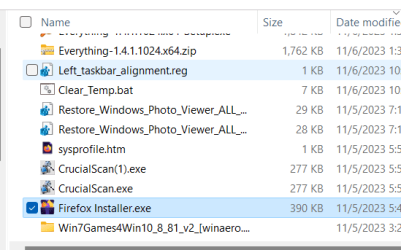
I set my Notebooks for both in View, Show.

1709500283676.png
 

My Computers My Computers

  • At a glance

    Win11 Pro RTM Version 24H2 Build 26100.4202Intel Core i5 11th Gen. 2.40GHz12GB
    OS
    Win11 Pro RTM Version 24H2 Build 26100.4202
    Computer type
    Laptop
    Manufacturer/Model
    Dell Vostro 3400
    CPU
    Intel Core i5 11th Gen. 2.40GHz
    Memory
    12GB
    Hard Drives
    256GB SSD NVMe M.2
  • At a glance

    Win11 Pro RTM Version 24H2 Build 26100.4202Intel Core i5 10th Gen. 2.90GHz16GBOnboard, no VGA, using a DisplayPort-to-VGA a...
    Operating System
    Win11 Pro RTM Version 24H2 Build 26100.4202
    Computer type
    PC/Desktop
    Manufacturer/Model
    Dell Vostro 5890
    CPU
    Intel Core i5 10th Gen. 2.90GHz
    Memory
    16GB
    Graphics card(s)
    Onboard, no VGA, using a DisplayPort-to-VGA adapter
    Monitor(s) Displays
    24" Dell
    Hard Drives
    512GB SSD NVMe, 4TB Seagate HDD
    Browser
    Firefox, Edge
    Antivirus
    Windows Defender/Microsoft Security
Hi,
Touch screen is more likely why.
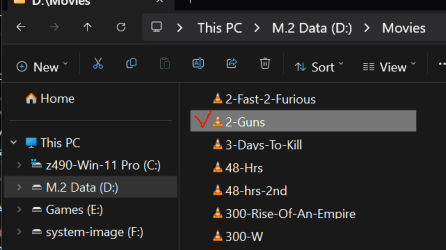
Hell I don't even use check boxes but MS leaves the space anyway to the left of a listing just in case I change my mind lol
1709507383508.png
 
Last edited:

My Computer My Computer

At a glance

Win-7-10-11Pro's10900k & 9940x & 5930kTrident-Z Royal 4000c16 2x16gb & Trident-Z 36...Titan Xp & 1080ti FTW3 & evga 980ti gaming
OS
Win-7-10-11Pro's
Computer type
PC/Desktop
Manufacturer/Model
Acer 17" Nitro 7840sn/ 2x16gb 5600c40/ 4060/ stock 1tb-os/ 4tb sn850x
CPU
10900k & 9940x & 5930k
Motherboard
z490-Apex & x299-Apex & x99-Sabertooth
Memory
Trident-Z Royal 4000c16 2x16gb & Trident-Z 3600c16 4x8gb & 3200c14 4x8gb
Graphics Card(s)
Titan Xp & 1080ti FTW3 & evga 980ti gaming
Sound Card
Onboard Realtek x3
Monitor(s) Displays
1-AOC G2460PG 24"G-Sync 144Hz/ 2nd 1-ASUS VG248QE 24"/ 3rd LG 43" series
Screen Resolution
1920-1080 not sure what the t.v is besides 43" class scales from 1920-1080 perfectly
Hard Drives
2-WD-sn850x 4tb/ 970evo+500gb/ 980 pro 2tb.
PSU
1000p2 & 1200p2 & 850p2
Case
D450 x2 & 1 Test bench in cherry Entertainment center
Cooling
Custom water loops x3 with 2x mora 360mm rads only 980ti gaming air cooled
Keyboard
G710+x3
Mouse
Redragon x3
Internet Speed
xfinity gigabyte
Browser
Firefox
Antivirus
mbam pro
Are you trying to make the changes as User with Administrator rights? The first User created at initial setup gets those rights, additional Users get a choice. Standard Users can't make as many changes.

I set my Notebooks for both in View, Show.
As a User with Admin rights. Here is my view, check boxes on every line and space between items.

Untitled.jpg
 

Attachments

  • 1709515834393.png
    1709515834393.png
    28.2 KB · Views: 3
  • 1709516177539.png
    1709516177539.png
    29.5 KB · Views: 3

My Computer My Computer

At a glance

Windows 11 ProIntel Core Ultra16GBIntel(R) Arc Graphics
OS
Windows 11 Pro
Computer type
Laptop
Manufacturer/Model
ASUS Zenbook 14 OLED
CPU
Intel Core Ultra
Memory
16GB
Graphics Card(s)
Intel(R) Arc Graphics
Sound Card
Realtek High Definition Audio(SST)
Screen Resolution
2880 x 1800
Hard Drives
500 GB NVMe SSD
Internet Speed
1,500Mbps
Browser
Firefox, Edge
Antivirus
Windows Defender

My Computers My Computers

  • At a glance

    11 Homei7 13650HX16GB DDR5GeForce RTX 4060 Mobile
    OS
    11 Home
    Computer type
    Laptop
    Manufacturer/Model
    Asus TUF Gaming F16 (2024)
    CPU
    i7 13650HX
    Memory
    16GB DDR5
    Graphics Card(s)
    GeForce RTX 4060 Mobile
    Sound Card
    Eastern Electric MiniMax DAC Supreme; Emotiva UMC-200; Astell & Kern AK240
    Monitor(s) Displays
    Sony Bravia XR-55X90J
    Screen Resolution
    3840×2160
    Hard Drives
    512GB SSD internal
    37TB external
    PSU
    Li-ion
    Cooling
    2× Arc Flow Fans, 4× exhaust vents, 5× heatpipes
    Keyboard
    Logitech K800
    Mouse
    Logitech G402
    Internet Speed
    30Mbit/s up, 500Mbit/s down
    Browser
    FF
    Antivirus
    What's an antivirus?
  • At a glance

    11 Homei5 1135G716GB DDR4Intel Iris Xe
    Operating System
    11 Home
    Computer type
    Laptop
    Manufacturer/Model
    Medion S15450
    CPU
    i5 1135G7
    Memory
    16GB DDR4
    Graphics card(s)
    Intel Iris Xe
    Sound Card
    Eastern Electric MiniMax DAC Supreme; Emotiva UMC-200; Astell & Kern AK240
    Monitor(s) Displays
    Sony Bravia XR-55X90J
    Screen Resolution
    3840×2160
    Hard Drives
    2TB SSD internal
    37TB external
    PSU
    Li-ion
    Keyboard
    Logitech K800
    Mouse
    Logitech G402
    Internet Speed
    30Mbit/s up, 500Mbit/s down
    Browser
    FF
Thanks... but that did not help.
- the first tip covers Win 11/10, but Tablet mode has been removed from Win 11
- I am not having rotation problems

Have given up trying to resolve and currently doing a clean install.

One of the last fix attempts was to export the registry entries for Explorer from a clean install to the problem version. Not only did that not work but caused Excel not to be able to open existing spreadsheets. Bizarre. A restore of the registry entry fixed that.
 

My Computer My Computer

At a glance

Windows 11 ProIntel Core Ultra16GBIntel(R) Arc Graphics
OS
Windows 11 Pro
Computer type
Laptop
Manufacturer/Model
ASUS Zenbook 14 OLED
CPU
Intel Core Ultra
Memory
16GB
Graphics Card(s)
Intel(R) Arc Graphics
Sound Card
Realtek High Definition Audio(SST)
Screen Resolution
2880 x 1800
Hard Drives
500 GB NVMe SSD
Internet Speed
1,500Mbps
Browser
Firefox, Edge
Antivirus
Windows Defender
Just to resurrect an old thread to add comething that I haven't seen elsewhere as a solution to the problem of unwanted checkboxes in file explorer:
HKLM/System/CurrentControlSet/Control/PriorityControl/ DWORD 'SystemDockMode' change to '1'.
It worked for me anyway!
 

My Computer My Computer

At a glance

win11
OS
win11
Computer type
PC/Desktop
Manufacturer/Model
homebuilt
if @Quandary comes back to this thread.. curious if you ever fixed it. why not just enable compact view, enable checkboxes and set tablet mode to never auto enable... there is no real "tablet mode" in windows 11 anyways...
 

My Computer My Computer

At a glance

Windows 11 Pro
OS
Windows 11 Pro
@dacrone Its been a while and maybe I should have marked this as solved, but the cause remains unknown. My solution was to do a complete reinstall as no combination of setting worked for what I needed.
 

My Computer My Computer

At a glance

Windows 11 ProIntel Core Ultra16GBIntel(R) Arc Graphics
OS
Windows 11 Pro
Computer type
Laptop
Manufacturer/Model
ASUS Zenbook 14 OLED
CPU
Intel Core Ultra
Memory
16GB
Graphics Card(s)
Intel(R) Arc Graphics
Sound Card
Realtek High Definition Audio(SST)
Screen Resolution
2880 x 1800
Hard Drives
500 GB NVMe SSD
Internet Speed
1,500Mbps
Browser
Firefox, Edge
Antivirus
Windows Defender
Back
Top Bottom