File Explorer - How can I easily use multiple directories while working?


maarkr

Well-known member
Member
Local time
7:22 AM
Posts
39
OS
11 Pro
So if I'm working on a project, in my case it's a music album and associated videos, I'm going back and forth between many directories and files. One issue is the number of directories... if I open pictures folder, I have maybe 100 folders to scroll down to get to one I need. Same for Documents folder. It would be nice if I could have a custom file explorer with only 10 directories or so listed for the type of project I'm working on, so I can build one instance for a music album project, etc. Any ideas?
 
Windows Build/Version
25H2 26200.7623

My Computer

System One

  • OS
    11 Pro
    Computer type
    PC/Desktop
    CPU
    Intel Core i9-12900kf
    Motherboard
    Gigabyte Z790 AX LGA1700
    Memory
    KLEVV CRAS XR5 RGB DDR5 32GB (2x16GB) 7000MHz
    Graphics Card(s)
    MSI Geforce RTX 2060 Super ARMOR OC 128bit PCIE3 8GbGDDR6
    Sound Card
    MOTU Ultralite mk4
    Monitor(s) Displays
    2
    Hard Drives
    Samsung 980 SSD NVme 1Tb
    other drives
    PSU
    Corsair 750w
Why not add the folders to Quick Access in File Explorer?

You can add/remove on the fly.
 

My Computers

System One System Two

  • OS
    Windows 11 Pro 25H2 Build 26200.8524
    Computer type
    PC/Desktop
    Manufacturer/Model
    Sin-built 2013
    CPU
    Intel(R) Core(TM) i7-4770K CPU @ 3.50GHz
    Motherboard
    ASUS ROG Maximus VI Formula
    Memory
    32.0 GB of I forget and the box is in storage.
    Graphics Card(s)
    Gigabyte nVidia GeForce GTX 1660 Super OC 6GB
    Sound Card
    Onboard thingy
    Monitor(s) Displays
    5 x LG 25MS500-B - 1 x 24MK430H-B - 1 x Wacom Pro 22" Touch Screen Tablet
    Screen Resolution
    All over the place
    Hard Drives
    Too many to list.
    OS on Samsung 1TB 870 QVO SATA
    PSU
    Silverstone 1500
    Case
    NZXT Phantom 820 Full-Tower Case
    Cooling
    Noctua NH-D15 Elite Class Dual Tower CPU Cooler / 6 x EziDIY 120mm / 2 x Corsair 140mm somethings / 1 x 140mm Thermaltake something / 2 x 200mm Corsair.
    Keyboard
    Corsair K95 / Logitech diNovo Edge Wireless
    Mouse
    Logitech: G402 / G502 / Mx Masters / Mx Air Cordless
    Internet Speed
    2000/500Mbps
    Browser
    All sorts
    Antivirus
    Kaspersky Premium
    Other Info
    ㅤㅤㅤㅤㅤㅤㅤㅤㅤㅤㅤㅤㅤㅤㅤㅤㅤㅤㅤㅤㅤㅤㅤㅤㅤㅤㅤㅤㅤㅤㅤㅤㅤㅤㅤㅤㅤㅤㅤㅤ⠀⠀⠀⠀⠀⠀⠀⠀⠀⠀
    TP-Link BE9300 WiFi 7 Bluetooth 5.4 (Archer TBE550E)
    TP-Link TX201 V1 2.5GB Lan

    Grandstream HT812 - VoIP
    ASUS DSL-AX82U - Mesh
    ASUS RT-AC68U - Mesh
    ASUS RT-BE88U Router

    Brother MFC-L2880DW Printer

    I’m on a horse.
  • Operating System
    Windows 11 Pro 25H2 Build 26200.8524
    Computer type
    Laptop
    Manufacturer/Model
    LENOVO Yoga 7 14IRL8 - 7i EVO OLED 14" Touchscreen i5 12 Core 16GB/512GB
    CPU
    Intel Core 12th Gen i5-1240P Processor (1.7 - 4.4GHz)
    Memory
    16GB LPDDR5 RAM
    Graphics card(s)
    Intel Iris Xe Graphics Processor
    Sound Card
    Optimized with Dolby Atmos®
    Screen Resolution
    QHD 2880 x 1800 OLED
    Hard Drives
    M.2 512GB
    Antivirus
    Defender / Malwarebytes
    Other Info
    …still on a horse.
Why not use multiple tab's?
 

My Computers

System One System Two

  • OS
    Windows 11 Enterprise 25H2 26200 7462
    Computer type
    PC/Desktop
    Manufacturer/Model
    Custom Build
    CPU
    Intel XEON E5-2699 v3
    Motherboard
    ASUS X99-A
    Memory
    64GB Teamgroup UD4-3600
    Graphics Card(s)
    NVIDIA GeForce GTX 1080 Ti
    Sound Card
    Integrated
    Monitor(s) Displays
    ACER X34 Predator
    Screen Resolution
    3440 x 1440
    Hard Drives
    Crucial CT1000P 3P SSD8 1TB
    Crucial CT1000 BX500 SSD 1TB
    PSU
    GameMax Pro
    Case
    Fractal Design
    Cooling
    Corsair H110iGT + 6 140mm Fans
    Keyboard
    Corsair K4
    Mouse
    G-Skill G502
    Internet Speed
    300MBs
    Browser
    Chrome
    Antivirus
    OEM
    Other Info
    ASUS RT-AC87U Router
  • Operating System
    25H2 26200.5074
    Computer type
    Laptop
    Manufacturer/Model
    ASUS X555LA
    Memory
    8GB
    Browser
    Chrome
    Antivirus
    OEM
I'm going back and forth between many directories
Why not use tabs in file explorer or multiple instances of explorer?
 

My Computers

System One System Two

  • OS
    Windows 11 Pro 25H2
    Computer type
    PC/Desktop
    Manufacturer/Model
    Dell Optiplex 7080
    CPU
    i9-10900 10 core 20 threads
    Motherboard
    DELL 0J37VM
    Memory
    32 gb
    Graphics Card(s)
    none-Intel UHD Graphics 630
    Sound Card
    Integrated Realtek
    Monitor(s) Displays
    Benq 27
    Screen Resolution
    2560x1440
    Hard Drives
    2x1tb Solidigm m.2 nvme /External drives 512gb Samsung m.2 sata+2tb Kingston m2.nvme
    PSU
    500w
    Case
    MT
    Cooling
    Dell Premium
    Keyboard
    Logitech wired
    Mouse
    Logitech wireless
    Internet Speed
    so slow I'm too embarrassed to tell
    Browser
    #1 Edge #2 Firefox
    Antivirus
    Defender+MWB Premium
  • Operating System
    Windows 11 Pro 24H2 26200.8457
    Computer type
    PC/Desktop
    Manufacturer/Model
    Beelink Mini PC SER5
    CPU
    AMD Ryzen 7 6800U
    Memory
    32 gb
    Graphics card(s)
    integrated
    Sound Card
    integrated
    Monitor(s) Displays
    Benq 27
    Screen Resolution
    2560x1440
    Hard Drives
    1TB Crucial nvme
    Keyboard
    Logitech wired
    Mouse
    Logitech wireless
    Internet Speed
    still too embarrassed to tell
    Browser
    Firefox
    Antivirus
    Defender
    Other Info
    System 3 is non compliant Dell 9020 i7-4770/24gb ram Win11 PRO 26200.8457
1. Multiple instances of File Explorer.
2. Multiple Tabs.
3. Snap to functionality.
4. Shortcuts.
5. Pin to, Quick Access and/or Start.

Combinations of those to suit your requirements.
 

My Computer

System One

  • OS
    Windows 11
10 tabs or 10 quick access links? This is what I found.

I just tried 10 tabs, ouch

Eventually, the tab names are truncated, system wonders what the hell is going on, and my wrist got tired screwing with them.

Hence Quick Access idea?
 

My Computers

System One System Two

  • OS
    Windows 11 Pro 25H2 Build 26200.8524
    Computer type
    PC/Desktop
    Manufacturer/Model
    Sin-built 2013
    CPU
    Intel(R) Core(TM) i7-4770K CPU @ 3.50GHz
    Motherboard
    ASUS ROG Maximus VI Formula
    Memory
    32.0 GB of I forget and the box is in storage.
    Graphics Card(s)
    Gigabyte nVidia GeForce GTX 1660 Super OC 6GB
    Sound Card
    Onboard thingy
    Monitor(s) Displays
    5 x LG 25MS500-B - 1 x 24MK430H-B - 1 x Wacom Pro 22" Touch Screen Tablet
    Screen Resolution
    All over the place
    Hard Drives
    Too many to list.
    OS on Samsung 1TB 870 QVO SATA
    PSU
    Silverstone 1500
    Case
    NZXT Phantom 820 Full-Tower Case
    Cooling
    Noctua NH-D15 Elite Class Dual Tower CPU Cooler / 6 x EziDIY 120mm / 2 x Corsair 140mm somethings / 1 x 140mm Thermaltake something / 2 x 200mm Corsair.
    Keyboard
    Corsair K95 / Logitech diNovo Edge Wireless
    Mouse
    Logitech: G402 / G502 / Mx Masters / Mx Air Cordless
    Internet Speed
    2000/500Mbps
    Browser
    All sorts
    Antivirus
    Kaspersky Premium
    Other Info
    ㅤㅤㅤㅤㅤㅤㅤㅤㅤㅤㅤㅤㅤㅤㅤㅤㅤㅤㅤㅤㅤㅤㅤㅤㅤㅤㅤㅤㅤㅤㅤㅤㅤㅤㅤㅤㅤㅤㅤㅤ⠀⠀⠀⠀⠀⠀⠀⠀⠀⠀
    TP-Link BE9300 WiFi 7 Bluetooth 5.4 (Archer TBE550E)
    TP-Link TX201 V1 2.5GB Lan

    Grandstream HT812 - VoIP
    ASUS DSL-AX82U - Mesh
    ASUS RT-AC68U - Mesh
    ASUS RT-BE88U Router

    Brother MFC-L2880DW Printer

    I’m on a horse.
  • Operating System
    Windows 11 Pro 25H2 Build 26200.8524
    Computer type
    Laptop
    Manufacturer/Model
    LENOVO Yoga 7 14IRL8 - 7i EVO OLED 14" Touchscreen i5 12 Core 16GB/512GB
    CPU
    Intel Core 12th Gen i5-1240P Processor (1.7 - 4.4GHz)
    Memory
    16GB LPDDR5 RAM
    Graphics card(s)
    Intel Iris Xe Graphics Processor
    Sound Card
    Optimized with Dolby Atmos®
    Screen Resolution
    QHD 2880 x 1800 OLED
    Hard Drives
    M.2 512GB
    Antivirus
    Defender / Malwarebytes
    Other Info
    …still on a horse.
Total Commander might be worth a shot for a.o. heavy duty file and folder jobs for which windows file explorer is too "light" or refuses. I just easily opened 10 tabs (each to a different folder / location) without total commander slowing down. And that was only using the left-hand half of the GUI.

The latest release is 11.56, at this site. It's legit.

Hope this helps.
 

My Computer

System One

  • OS
    W11 - 25H2 - 26200.8457 - Home.
    Computer type
    Laptop
    Manufacturer/Model
    Lenovo Ideapad 1 15ALC7 82R4
    CPU
    AMD Ryzen 5 5500U with Radeon AMD, 21000 MHz
    Memory
    16 GB
    Graphics Card(s)
    AMD Radeon Graphics
    Sound Card
    AMD, REALTEK
    Screen Resolution
    1920 x 1080
    Hard Drives
    SSD, 474 GB
    Keyboard
    German layout, standard PS/2
    Mouse
    Touchpad
    Internet Speed
    LAN, 50 MBit/s (down), 10 MBit/s (up)
    Browser
    FF with uBlock Origin feat. Surfshark
    Antivirus
    MS Defender (and careful surfing), sometimes VT online.
    Other Info
    BIOS (UEFI) JTCN60WW (10.04.2025), secure boot
Any ideas?
You probably weren't thinking of 3rd party software, but, here it is...,
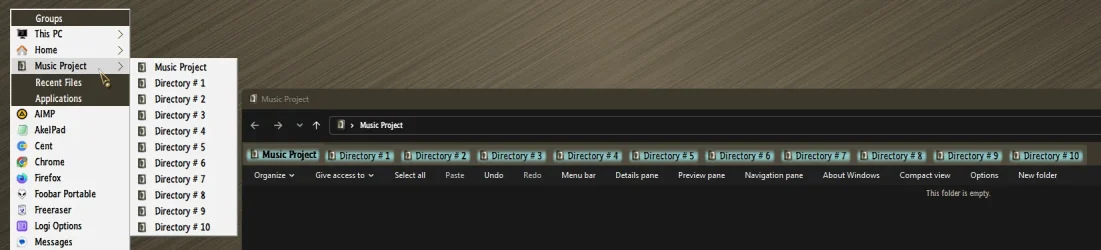
QTTabBar Explorer Enhancement. Create as many groups as you want, each open in tabs with a single click...

11906.webp
 
Last edited:

My Computers

System One System Two

  • OS
    Windows 11 Pro
    Computer type
    PC/Desktop
    Manufacturer/Model
    ASUS ROG Strix
  • Operating System
    Windows 11 Pro
    Computer type
    Laptop
    Manufacturer/Model
    ASUS VivoBook
Why don't you have a project directory for each project? If you keep media files on separate drives you could create symlinks to the relevant media directories within your project directory.
 

My Computers

System One System Two

  • OS
    Windows 11 25H2 Pro Build 26200
    Computer type
    PC/Desktop
    Manufacturer/Model
    MSI PRO ADL-U Cubi 5 (MS-B0A8)
    CPU
    i3-1215U
    Memory
    8GB
    Monitor(s) Displays
    Sony 43" 4k TV
    Screen Resolution
    3840x2160
    Hard Drives
    250GB NVMe M.2 PCIe Gen 3 SSD
    PSU
    External 65W
    Case
    Mini PC
    Browser
    FireFox
    Antivirus
    MS
  • Operating System
    Windows 11 Pro 25H2
    Computer type
    PC/Desktop
    Manufacturer/Model
    Dell Optiplex 3070 SFF
    CPU
    Intel i3-9100
    Memory
    16GB DDR4
    Monitor(s) Displays
    Dell S2721
    Screen Resolution
    3840 x 2160
    Hard Drives
    Samsung 500GB nvMe
    Case
    Dell small form factor
    Keyboard
    Cherry mechanical (Blue)
    Mouse
    Microsoft
    Antivirus
    MS Defender
Take a look at Q-Dir. Freeware
 

My Computer

System One

  • OS
    Win11 Pro 25H2 26200.8524
    Computer type
    Laptop
    Manufacturer/Model
    Lenovo IdeaPad 3 15IAU7
    CPU
    Processor: 12th Gen Intel(R) Core(TM) i7-1255U
    Memory
    40 GB
    Graphics Card(s)
    Intel
    Monitor(s) Displays
    15.6 FHD and 31.5 HP
    Screen Resolution
    1920x1080
    Hard Drives
    Numerous
    Mouse
    Track Ball EM01 NL Bluetooth
    Browser
    FireFox
    Antivirus
    MS
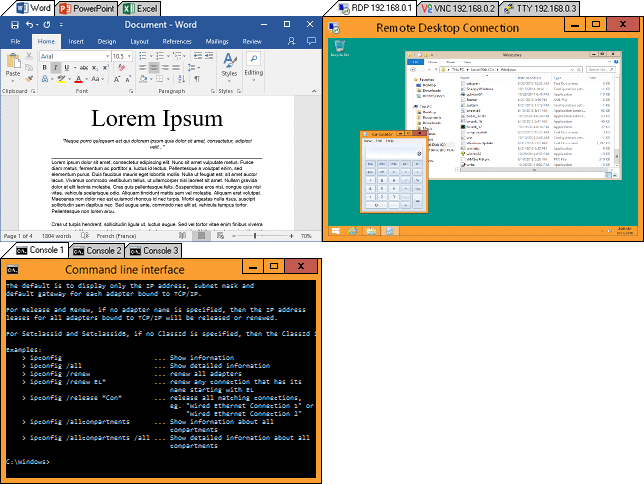
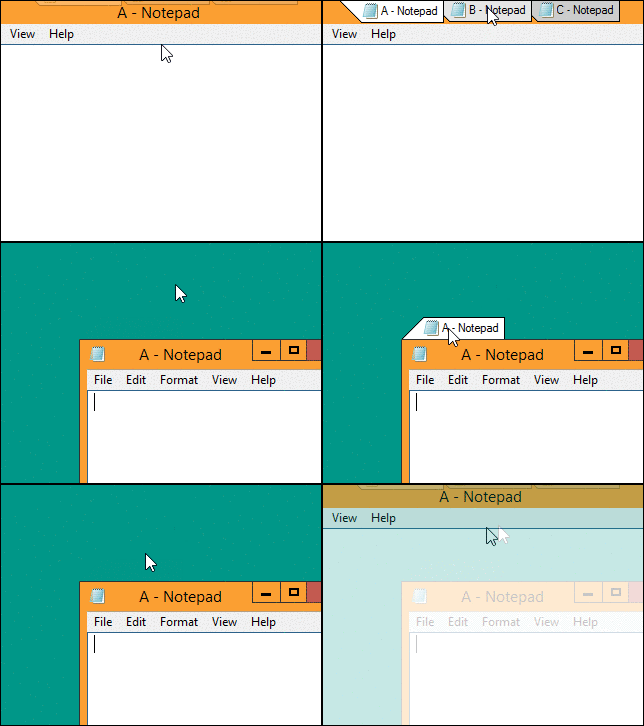
I also recommend: QTTabBar - which I use myself (check out its numerous plugins). Or use: TidyTabs (Pro) - which makes tabs from any program invisible and space-saving. How is it space-saving and invisible? Because you can hide tabs behind the edge and let them slide out when you hover over them with the cursor...

https://www.nurgo-software.com/products/tidytabs

Tabbify.gif


Discreet.gif
 

My Computer

System One

  • OS
    Windows 7 SP1 Ultimate
    Computer type
    PC/Desktop
    Manufacturer/Model
    Other
    CPU
    Intel i-7 6700K * 8-25°C 25-35°C max42°C @4.7GHz53°C
    Motherboard
    ASUS MAXIMUS VIII EXTREME - Intel Z170
    Memory
    Corsair Vengeance LPX DDR4 64 GB RAM 3 GHz
    Graphics Card(s)
    Asus StriX Gaming GeForce GTX 1080Ti OC11G
    Sound Card
    SoundBlaster X7 Platinum + Logitech Z906 Platinum
    Monitor(s) Displays
    Samsung SyncMaster TA550 27" Multimedial + Philips Momentum 559M1RYV 55" 4K HDR1000
    Screen Resolution
    1080p + 4K
    Hard Drives
    Intel SSD 750 Series 400GB PCIe 2.5" U.2
    SSD Samsung 960 Pro M.2 2TB > PCIe
    + Kingston Dual Portable 2TB
    + 2x Kingston Dual Portable 1TB
    ++ Synology DS1515+ 16 GB RAM + Noctua fan (5 disk)
    ++ Synology DS1318+ (8 disk)
    +++ Synology NAS: 5x 18TB Exos + 10TB Exos + ... (== 150 TB)
    PSU
    Corsai HX850i 850W
    Case
    Chieftec BigTower Bravo Series BA-01B-B-B + tuning
    Cooling
    Noctua NH-D15 + 2*14 cm Noctua Industrial 3000 PWM + Case: Noctua 14(12)cm Industrial ...
    Keyboard
    15x (Naya Create Pro / ZSA Voyager / ...)
    Mouse
    7x (MadCatz Cyborg M.M.O.7 / ...)
    Internet Speed
    VDSL 250/50 Mb/s
    Browser
    Opera
    Antivirus
    AVG
    Other Info
    My soft: Key³, ...
Maybe OP can try using tabs?
 

My Computers

System One System Two

  • OS
    Windows 11
    Computer type
    Laptop
    Manufacturer/Model
    HP Pavilion Laptop 15-cw1xxx
    CPU
    AMD Ryzen 5 3500U with Radeon Vega Mobile Gfx
    Memory
    8.00 GB
    Graphics Card(s)
    AMD Radeon(TM) Vega 8 Graphics
    Sound Card
    Realtek High Definition Audio
    Monitor(s) Displays
    Generic PnP Monitor
    Screen Resolution
    1920x1080
    Hard Drives
    LITEON CV8-8E128-HP (SSD)
    WDC WD10SPZX-60Z10T0 (Hard Drive)
    PSU
    Microsoft ACPI-Compliant Control Method Battery
    Case
    Proprietary HP Pavilion Laptop 15 shell
    Cooling
    Active Fan Cooling
    Keyboard
    Standard PS/2 Keyboard
    Mouse
    ELAN Clickpad
    Internet Speed
    35.50 Mbps download 23.44 Mbps upload
    Browser
    Edge
    Antivirus
    Windows Defender
  • Operating System
    Windows 11 24h2
    Computer type
    PC/Desktop
    Manufacturer/Model
    Apple iMac "Core i5" 2.7 21.5" (Late 2012)
    CPU
    Intel® Core™ i5-3330S Processor
    Motherboard
    Ivy Bridge (LGA 1155)
    Memory
    8.00 GB DDR3 1600 MHz
    Graphics card(s)
    NVIDIA GeForce GT 640M
    Sound Card
    Cirrus Logic CS4206B (AB 90)
    Monitor(s) Displays
    Generic Monitor (iMac)
    Screen Resolution
    1920x1080
    Hard Drives
    APPLE HDD HTS541010A9E662 (Hard Drive 1TB)
    PSU
    Integrated
    Case
    iMac Aluminum Body
    Cooling
    Fan
    Keyboard
    HP SK-2085
    Mouse
    Lenovo
    Internet Speed
    90.8 Mbps download 23.4 Mbps upload
    Browser
    Google Chrome
    Antivirus
    Windows Defender
Look at "Q-Dir"
 

My Computer

System One

  • OS
    Win11 Pro 25H2 26200.8524
    Computer type
    Laptop
    Manufacturer/Model
    Lenovo IdeaPad 3 15IAU7
    CPU
    Processor: 12th Gen Intel(R) Core(TM) i7-1255U
    Memory
    40 GB
    Graphics Card(s)
    Intel
    Monitor(s) Displays
    15.6 FHD and 31.5 HP
    Screen Resolution
    1920x1080
    Hard Drives
    Numerous
    Mouse
    Track Ball EM01 NL Bluetooth
    Browser
    FireFox
    Antivirus
    MS

Latest Support Threads

Back
Top Bottom