File Explorer Search Box Deficiencies - Fix?


Jackman100

New member
Local time
9:27 PM
Posts
2
OS
Windows 11
After upgrading to Windows 11 from Windows 10 I experienced the aggravating, annoying changes to File Explorer and especially to the File Explorer Search Box. Of the many unwelcome changes, when you click in the search box it no longer pops up the text for the previous search, or for the previous 3 searches, as it did for Windows 10. Every new search has to be laboriously re-typed or copied, re-pasted, re-edited and then performed. Also, the search box can no longer be re-sized/expanded so it's now impossible to see the entire text string for the search, making re-editing a chore. I closely manage the location and file names of my files, as well as their dates, so these deleted features are maddening. (I frequently use the "file.name:~=" and "datemodified:>=" search functions.) Is there any fix for these removed features?
 

My Computer

System One

  • OS
    Windows 11
    Computer type
    Laptop
    Manufacturer/Model
    HP
You might try the suggestions here. Start Menu or Taskbar Search Not Working in Windows 10/11 | Windows OS Hub

If you are using any 3rd party app that alters the GUI, uninstall it, restart. See if your windows search history works.

Since the issue started when you upgraded, your user account might have become corrupted. To prove whether it's a Windows issue or a user account issue, create another user account. Make it a local account and change it's account type to administrator. Restart and sign in with new account. If that account works as expected, it's not a Windows problem. It's your user account.
 

My Computers

System One System Two

  • OS
    Windows 11 Pro 25H2
    Computer type
    PC/Desktop
    Manufacturer/Model
    Dell Optiplex 7080
    CPU
    i9-10900 10 core 20 threads
    Motherboard
    DELL 0J37VM
    Memory
    32 gb
    Graphics Card(s)
    none-Intel UHD Graphics 630
    Sound Card
    Integrated Realtek
    Monitor(s) Displays
    Benq 27
    Screen Resolution
    2560x1440
    Hard Drives
    2x1tb Solidigm m.2 nvme /External drives 512gb Samsung m.2 sata+2tb Kingston m2.nvme
    PSU
    500w
    Case
    MT
    Cooling
    Dell Premium
    Keyboard
    Logitech wired
    Mouse
    Logitech wireless
    Internet Speed
    so slow I'm too embarrassed to tell
    Browser
    #1 Edge #2 Firefox
    Antivirus
    Defender+MWB Premium
  • Operating System
    Windows 11 Pro 24H2 26200.8457
    Computer type
    PC/Desktop
    Manufacturer/Model
    Beelink Mini PC SER5
    CPU
    AMD Ryzen 7 6800U
    Memory
    32 gb
    Graphics card(s)
    integrated
    Sound Card
    integrated
    Monitor(s) Displays
    Benq 27
    Screen Resolution
    2560x1440
    Hard Drives
    1TB Crucial nvme
    Keyboard
    Logitech wired
    Mouse
    Logitech wireless
    Internet Speed
    still too embarrassed to tell
    Browser
    Firefox
    Antivirus
    Defender
    Other Info
    System 3 is non compliant Dell 9020 i7-4770/24gb ram Win11 PRO 26200.8457

My Computer

System One

  • OS
    Windows 11 Pro
That’s been removed for a long time now.
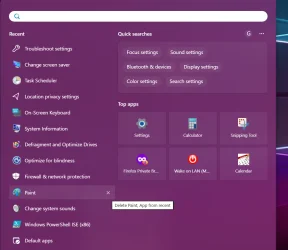
Maybe I am misunderstanding what his issue is, but I still have my recent windows searches in the left pane of the search window.
Screenshot 2025-10-01 001747.webp
 

My Computers

System One System Two

  • OS
    Windows 11 Pro 25H2
    Computer type
    PC/Desktop
    Manufacturer/Model
    Dell Optiplex 7080
    CPU
    i9-10900 10 core 20 threads
    Motherboard
    DELL 0J37VM
    Memory
    32 gb
    Graphics Card(s)
    none-Intel UHD Graphics 630
    Sound Card
    Integrated Realtek
    Monitor(s) Displays
    Benq 27
    Screen Resolution
    2560x1440
    Hard Drives
    2x1tb Solidigm m.2 nvme /External drives 512gb Samsung m.2 sata+2tb Kingston m2.nvme
    PSU
    500w
    Case
    MT
    Cooling
    Dell Premium
    Keyboard
    Logitech wired
    Mouse
    Logitech wireless
    Internet Speed
    so slow I'm too embarrassed to tell
    Browser
    #1 Edge #2 Firefox
    Antivirus
    Defender+MWB Premium
  • Operating System
    Windows 11 Pro 24H2 26200.8457
    Computer type
    PC/Desktop
    Manufacturer/Model
    Beelink Mini PC SER5
    CPU
    AMD Ryzen 7 6800U
    Memory
    32 gb
    Graphics card(s)
    integrated
    Sound Card
    integrated
    Monitor(s) Displays
    Benq 27
    Screen Resolution
    2560x1440
    Hard Drives
    1TB Crucial nvme
    Keyboard
    Logitech wired
    Mouse
    Logitech wireless
    Internet Speed
    still too embarrassed to tell
    Browser
    Firefox
    Antivirus
    Defender
    Other Info
    System 3 is non compliant Dell 9020 i7-4770/24gb ram Win11 PRO 26200.8457
Maybe I am misunderstanding what his issue is, but I still have my recent windows searches in the left pane of the search window.
After upgrading to Windows 11 from Windows 10 I experienced the aggravating, annoying changes to File Explorer and especially to the File Explorer Search Box. Of the many unwelcome changes, when you click in the search box it no longer pops up the text for the previous search,

wrong search area
 

My Computer

System One

  • OS
    Windows 11 Pro
Back
Top Bottom