File Explorer stops registering clicks, W11 context menu issues


djc5166

Member
Local time
9:42 PM
Posts
10
OS
Windows 11 Pro
Within the last month or two I've been running into the following issues with file explorer...


1) File explorer windows eventually stop registering mouse clicks.

The windows aren't hanging or crashing at all, and it seems like tabbing and keyboard controls still work to interact with the window, but I can no longer left or right-click on files/folders unless I open a new file explorer window. It's very specifically the window itself that stops reacting to mouse clicks, the desktop or anything else still responds normally.


2) W11 new context menu intermittently works.

Seems to work fine on a fresh boot, for awhile, but like my first issue-- eventually the 'new' context menu starts to show up intermittently, on every other right-click, alternating with the 'old' context menu. This only seems to happen on files, clicking on folders still show the new context menu every time.


I don't see any obvious errors or warnings in event viewer. and I've now run into this same issue on 3 different machines all running the same W11 version.
 
Windows Build/Version
26100.4064

My Computer My Computer

At a glance

Windows 11 ProAMD Ryzen 7 9800X3DG.SKILL Trident Z5 Neo 48GB DDR5-8000 CL40-48...MSI 5090 32G VANGUARD SOC
OS
Windows 11 Pro
Computer type
PC/Desktop
CPU
AMD Ryzen 7 9800X3D
Motherboard
ASUS ROG STRIX X870E-E GAMING WIFI
Memory
G.SKILL Trident Z5 Neo 48GB DDR5-8000 CL40-48-48-128
Graphics Card(s)
MSI 5090 32G VANGUARD SOC
Sound Card
Schiit Modius USB DAC
Monitor(s) Displays
ASUS PG32UQX, MSI 322URX
Screen Resolution
3840x2160
Hard Drives
Corsair MP700 PRO SE (4TB)
2x WD SN850X (8TB)
4x WD SN850X (4TB)
4x Samsung 870 EVO (4TB)
PSU
Corsair AX1600i
Case
LianLi O11 Dynamic Evo XL
Cooling
Corsair iCUE LINK H170i, VRM fan, x16 Case fans
Keyboard
Corsair K100
Mouse
Logitech G600
Internet Speed
1000/40mbps
3 different machines all running the same W11 vers
My current Version is 24H2 and Build is Build 26100.4061 on 4 Notebooks and 2 Desktops. Is the problem with a mouse [what type connection] or just the touchpad on Notebooks or attached mouse on Desktops? If a mouse used is it the same on different ones? If it's USB are different ports tried?
 

My Computers My Computers

  • At a glance

    Win11 Pro RTM Version 24H2 Build 26100.4202Intel Core i5 11th Gen. 2.40GHz12GB
    OS
    Win11 Pro RTM Version 24H2 Build 26100.4202
    Computer type
    Laptop
    Manufacturer/Model
    Dell Vostro 3400
    CPU
    Intel Core i5 11th Gen. 2.40GHz
    Memory
    12GB
    Hard Drives
    256GB SSD NVMe M.2
  • At a glance

    Win11 Pro RTM Version 24H2 Build 26100.4202Intel Core i5 10th Gen. 2.90GHz16GBOnboard, no VGA, using a DisplayPort-to-VGA a...
    Operating System
    Win11 Pro RTM Version 24H2 Build 26100.4202
    Computer type
    PC/Desktop
    Manufacturer/Model
    Dell Vostro 5890
    CPU
    Intel Core i5 10th Gen. 2.90GHz
    Memory
    16GB
    Graphics card(s)
    Onboard, no VGA, using a DisplayPort-to-VGA adapter
    Monitor(s) Displays
    24" Dell
    Hard Drives
    512GB SSD NVMe, 4TB Seagate HDD
    Browser
    Firefox, Edge
    Antivirus
    Windows Defender/Microsoft Security
My current Version is 24H2 and Build is Build 26100.4061 on 4 Notebooks and 2 Desktops. Is the problem with a mouse [what type connection] or just the touchpad on Notebooks or attached mouse on Desktops? If a mouse used is it the same on different ones? If it's USB are different ports tried?

All of the above, one is a laptop with track pad, one is a logitech g600 mouse (usb), another is a work machine with some generic lenovo or maybe dell usb mouse (honestly I couldn't tell you what it is).

Same issue on all 3.
 

My Computer My Computer

At a glance

Windows 11 ProAMD Ryzen 7 9800X3DG.SKILL Trident Z5 Neo 48GB DDR5-8000 CL40-48...MSI 5090 32G VANGUARD SOC
OS
Windows 11 Pro
Computer type
PC/Desktop
CPU
AMD Ryzen 7 9800X3D
Motherboard
ASUS ROG STRIX X870E-E GAMING WIFI
Memory
G.SKILL Trident Z5 Neo 48GB DDR5-8000 CL40-48-48-128
Graphics Card(s)
MSI 5090 32G VANGUARD SOC
Sound Card
Schiit Modius USB DAC
Monitor(s) Displays
ASUS PG32UQX, MSI 322URX
Screen Resolution
3840x2160
Hard Drives
Corsair MP700 PRO SE (4TB)
2x WD SN850X (8TB)
4x WD SN850X (4TB)
4x Samsung 870 EVO (4TB)
PSU
Corsair AX1600i
Case
LianLi O11 Dynamic Evo XL
Cooling
Corsair iCUE LINK H170i, VRM fan, x16 Case fans
Keyboard
Corsair K100
Mouse
Logitech G600
Internet Speed
1000/40mbps
Welcome to the forum. I would approach it in this manner.

1. First and foremost, if you are using some 3rd party software that alters the GUI, uninstall it, restart, and see if the issue is fixed.
Also turn off any 3rd party anti-virus software if you use any.

2.. Use a clean boot to make sure some software is not conflicting with Windows. If it does not happen in a clean boot state, you will need to use process of elimination to find the offending software. Clean Install Windows 11

If it does happen in clean boot, then you know the problem is with the OS so try the following steps.

3. Make sure you have no corrupt system files that is causing this problem. Open a command prompt as administrator and type
dism /online /cleanup-image /restorehealth
After it completes restart, go back into command prompt as admin and type
sfc /scannow
Pay attention to the scan results to see if SFC found anything it could not repair. I
Restart computer

If none of that fixes the issue do a repair install. Repair Install Windows 11 with an In-place Upgrade
 

My Computers My Computers

  • At a glance

    Windows 11 Pro 25H2 26200.8655i9-10900 10 core 20 threads32 gbnone-Intel UHD Graphics 630
    OS
    Windows 11 Pro 25H2 26200.8655
    Computer type
    PC/Desktop
    Manufacturer/Model
    Dell Optiplex 7080
    CPU
    i9-10900 10 core 20 threads
    Motherboard
    DELL 0J37VM
    Memory
    32 gb
    Graphics Card(s)
    none-Intel UHD Graphics 630
    Sound Card
    Integrated Realtek
    Monitor(s) Displays
    Benq 27
    Screen Resolution
    2560x1440
    Hard Drives
    2x1tb Solidigm m.2 nvme /External drives 512gb Samsung m.2 sata+2tb Kingston m2.nvme
    PSU
    500w
    Case
    MT
    Cooling
    Dell Premium
    Keyboard
    Logitech wired
    Mouse
    Logitech wireless
    Internet Speed
    so slow I'm too embarrassed to tell
    Browser
    #1 Edge #2 Firefox
    Antivirus
    Defender+MWB Premium
  • At a glance

    Windows 11 Pro 24H2 26200.8457AMD Ryzen 7 6800U32 gbintegrated
    Operating System
    Windows 11 Pro 24H2 26200.8457
    Computer type
    PC/Desktop
    Manufacturer/Model
    Beelink Mini PC SER5
    CPU
    AMD Ryzen 7 6800U
    Memory
    32 gb
    Graphics card(s)
    integrated
    Sound Card
    integrated
    Monitor(s) Displays
    Benq 27
    Screen Resolution
    2560x1440
    Hard Drives
    1TB Crucial nvme
    Keyboard
    Logitech wired
    Mouse
    Logitech wireless
    Internet Speed
    still too embarrassed to tell
    Browser
    Firefox
    Antivirus
    Defender
    Other Info
    System 3 is non compliant Dell 9020 i7-4770/24gb ram Win11 PRO 26200.8457
I forgot to include my Version is 24H2 Build 26100.4061 as of last Patch Tuesday 5/13/25.
 

My Computers My Computers

  • At a glance

    Win11 Pro RTM Version 24H2 Build 26100.4202Intel Core i5 11th Gen. 2.40GHz12GB
    OS
    Win11 Pro RTM Version 24H2 Build 26100.4202
    Computer type
    Laptop
    Manufacturer/Model
    Dell Vostro 3400
    CPU
    Intel Core i5 11th Gen. 2.40GHz
    Memory
    12GB
    Hard Drives
    256GB SSD NVMe M.2
  • At a glance

    Win11 Pro RTM Version 24H2 Build 26100.4202Intel Core i5 10th Gen. 2.90GHz16GBOnboard, no VGA, using a DisplayPort-to-VGA a...
    Operating System
    Win11 Pro RTM Version 24H2 Build 26100.4202
    Computer type
    PC/Desktop
    Manufacturer/Model
    Dell Vostro 5890
    CPU
    Intel Core i5 10th Gen. 2.90GHz
    Memory
    16GB
    Graphics card(s)
    Onboard, no VGA, using a DisplayPort-to-VGA adapter
    Monitor(s) Displays
    24" Dell
    Hard Drives
    512GB SSD NVMe, 4TB Seagate HDD
    Browser
    Firefox, Edge
    Antivirus
    Windows Defender/Microsoft Security
If none of that fixes the issue do a repair install. Repair Install Windows 11 with an In-place Upgrade

These are all already clean installs, I wiped everything once I started noticing these issues.

The only thing i really have is start11 so I guess I'll have to start there, although I have been using it for years at this point and never had any issues. Also haven't seen anyone else describe anything similar (yet).
 

My Computer My Computer

At a glance

Windows 11 ProAMD Ryzen 7 9800X3DG.SKILL Trident Z5 Neo 48GB DDR5-8000 CL40-48...MSI 5090 32G VANGUARD SOC
OS
Windows 11 Pro
Computer type
PC/Desktop
CPU
AMD Ryzen 7 9800X3D
Motherboard
ASUS ROG STRIX X870E-E GAMING WIFI
Memory
G.SKILL Trident Z5 Neo 48GB DDR5-8000 CL40-48-48-128
Graphics Card(s)
MSI 5090 32G VANGUARD SOC
Sound Card
Schiit Modius USB DAC
Monitor(s) Displays
ASUS PG32UQX, MSI 322URX
Screen Resolution
3840x2160
Hard Drives
Corsair MP700 PRO SE (4TB)
2x WD SN850X (8TB)
4x WD SN850X (4TB)
4x Samsung 870 EVO (4TB)
PSU
Corsair AX1600i
Case
LianLi O11 Dynamic Evo XL
Cooling
Corsair iCUE LINK H170i, VRM fan, x16 Case fans
Keyboard
Corsair K100
Mouse
Logitech G600
Internet Speed
1000/40mbps
Latest version of start11 is 2.5.1.3.
 

My Computers My Computers

  • At a glance

    Windows 11 Pro 25H2 26200.8655i9-10900 10 core 20 threads32 gbnone-Intel UHD Graphics 630
    OS
    Windows 11 Pro 25H2 26200.8655
    Computer type
    PC/Desktop
    Manufacturer/Model
    Dell Optiplex 7080
    CPU
    i9-10900 10 core 20 threads
    Motherboard
    DELL 0J37VM
    Memory
    32 gb
    Graphics Card(s)
    none-Intel UHD Graphics 630
    Sound Card
    Integrated Realtek
    Monitor(s) Displays
    Benq 27
    Screen Resolution
    2560x1440
    Hard Drives
    2x1tb Solidigm m.2 nvme /External drives 512gb Samsung m.2 sata+2tb Kingston m2.nvme
    PSU
    500w
    Case
    MT
    Cooling
    Dell Premium
    Keyboard
    Logitech wired
    Mouse
    Logitech wireless
    Internet Speed
    so slow I'm too embarrassed to tell
    Browser
    #1 Edge #2 Firefox
    Antivirus
    Defender+MWB Premium
  • At a glance

    Windows 11 Pro 24H2 26200.8457AMD Ryzen 7 6800U32 gbintegrated
    Operating System
    Windows 11 Pro 24H2 26200.8457
    Computer type
    PC/Desktop
    Manufacturer/Model
    Beelink Mini PC SER5
    CPU
    AMD Ryzen 7 6800U
    Memory
    32 gb
    Graphics card(s)
    integrated
    Sound Card
    integrated
    Monitor(s) Displays
    Benq 27
    Screen Resolution
    2560x1440
    Hard Drives
    1TB Crucial nvme
    Keyboard
    Logitech wired
    Mouse
    Logitech wireless
    Internet Speed
    still too embarrassed to tell
    Browser
    Firefox
    Antivirus
    Defender
    Other Info
    System 3 is non compliant Dell 9020 i7-4770/24gb ram Win11 PRO 26200.8457

My Computer My Computer

At a glance

Windows 11 ProAMD Ryzen 7 9800X3DG.SKILL Trident Z5 Neo 48GB DDR5-8000 CL40-48...MSI 5090 32G VANGUARD SOC
OS
Windows 11 Pro
Computer type
PC/Desktop
CPU
AMD Ryzen 7 9800X3D
Motherboard
ASUS ROG STRIX X870E-E GAMING WIFI
Memory
G.SKILL Trident Z5 Neo 48GB DDR5-8000 CL40-48-48-128
Graphics Card(s)
MSI 5090 32G VANGUARD SOC
Sound Card
Schiit Modius USB DAC
Monitor(s) Displays
ASUS PG32UQX, MSI 322URX
Screen Resolution
3840x2160
Hard Drives
Corsair MP700 PRO SE (4TB)
2x WD SN850X (8TB)
4x WD SN850X (4TB)
4x Samsung 870 EVO (4TB)
PSU
Corsair AX1600i
Case
LianLi O11 Dynamic Evo XL
Cooling
Corsair iCUE LINK H170i, VRM fan, x16 Case fans
Keyboard
Corsair K100
Mouse
Logitech G600
Internet Speed
1000/40mbps
You can export your start11 settings, Uninstall start 11 and restart. If that does not prove to be the problem you can always re-install it and inport your settings.
"Backup settings to a file" option within Start11 v2
 

My Computers My Computers

  • At a glance

    Windows 11 Pro 25H2 26200.8655i9-10900 10 core 20 threads32 gbnone-Intel UHD Graphics 630
    OS
    Windows 11 Pro 25H2 26200.8655
    Computer type
    PC/Desktop
    Manufacturer/Model
    Dell Optiplex 7080
    CPU
    i9-10900 10 core 20 threads
    Motherboard
    DELL 0J37VM
    Memory
    32 gb
    Graphics Card(s)
    none-Intel UHD Graphics 630
    Sound Card
    Integrated Realtek
    Monitor(s) Displays
    Benq 27
    Screen Resolution
    2560x1440
    Hard Drives
    2x1tb Solidigm m.2 nvme /External drives 512gb Samsung m.2 sata+2tb Kingston m2.nvme
    PSU
    500w
    Case
    MT
    Cooling
    Dell Premium
    Keyboard
    Logitech wired
    Mouse
    Logitech wireless
    Internet Speed
    so slow I'm too embarrassed to tell
    Browser
    #1 Edge #2 Firefox
    Antivirus
    Defender+MWB Premium
  • At a glance

    Windows 11 Pro 24H2 26200.8457AMD Ryzen 7 6800U32 gbintegrated
    Operating System
    Windows 11 Pro 24H2 26200.8457
    Computer type
    PC/Desktop
    Manufacturer/Model
    Beelink Mini PC SER5
    CPU
    AMD Ryzen 7 6800U
    Memory
    32 gb
    Graphics card(s)
    integrated
    Sound Card
    integrated
    Monitor(s) Displays
    Benq 27
    Screen Resolution
    2560x1440
    Hard Drives
    1TB Crucial nvme
    Keyboard
    Logitech wired
    Mouse
    Logitech wireless
    Internet Speed
    still too embarrassed to tell
    Browser
    Firefox
    Antivirus
    Defender
    Other Info
    System 3 is non compliant Dell 9020 i7-4770/24gb ram Win11 PRO 26200.8457
Disabling start11 seems to have fixed #1 so far. It's hard to tell for sure since its very intermittent, I'll have to post on their forums if that is indeed the issue.

#2 is still happening though, so must be due to something else. Will keep investigating.

Still surprised I haven't seen any posts anywhere about this, #1 is especially aggravating.
 

My Computer My Computer

At a glance

Windows 11 ProAMD Ryzen 7 9800X3DG.SKILL Trident Z5 Neo 48GB DDR5-8000 CL40-48...MSI 5090 32G VANGUARD SOC
OS
Windows 11 Pro
Computer type
PC/Desktop
CPU
AMD Ryzen 7 9800X3D
Motherboard
ASUS ROG STRIX X870E-E GAMING WIFI
Memory
G.SKILL Trident Z5 Neo 48GB DDR5-8000 CL40-48-48-128
Graphics Card(s)
MSI 5090 32G VANGUARD SOC
Sound Card
Schiit Modius USB DAC
Monitor(s) Displays
ASUS PG32UQX, MSI 322URX
Screen Resolution
3840x2160
Hard Drives
Corsair MP700 PRO SE (4TB)
2x WD SN850X (8TB)
4x WD SN850X (4TB)
4x Samsung 870 EVO (4TB)
PSU
Corsair AX1600i
Case
LianLi O11 Dynamic Evo XL
Cooling
Corsair iCUE LINK H170i, VRM fan, x16 Case fans
Keyboard
Corsair K100
Mouse
Logitech G600
Internet Speed
1000/40mbps
Last edited:

My Computer My Computer

At a glance

Windows 11Intel I7 6820 HQ QuadCore16 gbIntel HD 530, Nvidia Qudro M1000M
OS
Windows 11
Computer type
Laptop
Manufacturer/Model
Lenovo P50
CPU
Intel I7 6820 HQ QuadCore
Memory
16 gb
Graphics Card(s)
Intel HD 530, Nvidia Qudro M1000M
Sound Card
Realtek High Definition Audio
Monitor(s) Displays
1920x1080
Screen Resolution
Wide viewing angle & High density FlexView Display 1920x1080
Hard Drives
SSD
Under Network in file explorer. Do you have any broken links to mapped drives or shares? If so, that can cause a long delay.
 

My Computer My Computer

At a glance

Windows 11AMD R7 9700X64 gig DDR5 Trident Z-NeoNV 4070ti
OS
Windows 11
Computer type
PC/Desktop
Manufacturer/Model
Self
CPU
AMD R7 9700X
Motherboard
MSI Tomahawk 870
Memory
64 gig DDR5 Trident Z-Neo
Graphics Card(s)
NV 4070ti
Monitor(s) Displays
4 x 27" Acer
Screen Resolution
1440
Hard Drives
Samsung 980 x2
PSU
Corsair 1000wt
Case
Meshify2 XL
Cooling
Self made external chiller
Keyboard
Royal kludge
Internet Speed
2 gig
Browser
Firefox
Antivirus
n/a
No, the problem started with the update to Win11 26100,4202, after which it got worse but now solved.:-)
 

My Computer My Computer

At a glance

Windows 11Intel I7 6820 HQ QuadCore16 gbIntel HD 530, Nvidia Qudro M1000M
OS
Windows 11
Computer type
Laptop
Manufacturer/Model
Lenovo P50
CPU
Intel I7 6820 HQ QuadCore
Memory
16 gb
Graphics Card(s)
Intel HD 530, Nvidia Qudro M1000M
Sound Card
Realtek High Definition Audio
Monitor(s) Displays
1920x1080
Screen Resolution
Wide viewing angle & High density FlexView Display 1920x1080
Hard Drives
SSD
Hallo,
i have had the same Problem.
Solution:
Error found, problem solved,
the NVIDIA System control DLL (Desktop context menu) deactivated, it runs normal again.
Or use Classic ContextMenu:
see https://www.elevenforum.com/t/explorer-does-not-working-since-windows-11-24h2-26100-4202.37260/post-610370

Good to know ;-)

Thanks, I'll try this,

Both my issues persisted even after disabling the start11 items, so its not related to that.

NVCP on the context menu would be a common thing between my 3 systems. The nvidia drivers are one of the first things I am installing on a clean install...

Are you just disabling the Desktop->"Add desktop context menu" option in the control panel?
 

My Computer My Computer

At a glance

Windows 11 ProAMD Ryzen 7 9800X3DG.SKILL Trident Z5 Neo 48GB DDR5-8000 CL40-48...MSI 5090 32G VANGUARD SOC
OS
Windows 11 Pro
Computer type
PC/Desktop
CPU
AMD Ryzen 7 9800X3D
Motherboard
ASUS ROG STRIX X870E-E GAMING WIFI
Memory
G.SKILL Trident Z5 Neo 48GB DDR5-8000 CL40-48-48-128
Graphics Card(s)
MSI 5090 32G VANGUARD SOC
Sound Card
Schiit Modius USB DAC
Monitor(s) Displays
ASUS PG32UQX, MSI 322URX
Screen Resolution
3840x2160
Hard Drives
Corsair MP700 PRO SE (4TB)
2x WD SN850X (8TB)
4x WD SN850X (4TB)
4x Samsung 870 EVO (4TB)
PSU
Corsair AX1600i
Case
LianLi O11 Dynamic Evo XL
Cooling
Corsair iCUE LINK H170i, VRM fan, x16 Case fans
Keyboard
Corsair K100
Mouse
Logitech G600
Internet Speed
1000/40mbps
i Have Nvidia Control Panel with shellexview ( Nirsoft tool ) disabled, Its the DesktopContextmenu, but it helps only for 2 Win11 24h2 Systems,
NirLauncher - Download the latest package, this:Attention, the tool contains tools in which the virus scanners strike, i.e. add the exception!
Better ist

It helps on all my Win11 Systems, the explorer ist now very fast when i` clickung the right ContextMenu ;-) :-)
 
Last edited:

My Computer My Computer

At a glance

Windows 11Intel I7 6820 HQ QuadCore16 gbIntel HD 530, Nvidia Qudro M1000M
OS
Windows 11
Computer type
Laptop
Manufacturer/Model
Lenovo P50
CPU
Intel I7 6820 HQ QuadCore
Memory
16 gb
Graphics Card(s)
Intel HD 530, Nvidia Qudro M1000M
Sound Card
Realtek High Definition Audio
Monitor(s) Displays
1920x1080
Screen Resolution
Wide viewing angle & High density FlexView Display 1920x1080
Hard Drives
SSD
I don't have Start11 or any nvidia utility, but I still get the issue # 1 as described by OP.
 

My Computer My Computer

At a glance

Windows 11
OS
Windows 11
I'm still getting the issues I outlined, but maybe not as often as before? Honestly it is really hard to tell :LOL:
 

My Computer My Computer

At a glance

Windows 11 ProAMD Ryzen 7 9800X3DG.SKILL Trident Z5 Neo 48GB DDR5-8000 CL40-48...MSI 5090 32G VANGUARD SOC
OS
Windows 11 Pro
Computer type
PC/Desktop
CPU
AMD Ryzen 7 9800X3D
Motherboard
ASUS ROG STRIX X870E-E GAMING WIFI
Memory
G.SKILL Trident Z5 Neo 48GB DDR5-8000 CL40-48-48-128
Graphics Card(s)
MSI 5090 32G VANGUARD SOC
Sound Card
Schiit Modius USB DAC
Monitor(s) Displays
ASUS PG32UQX, MSI 322URX
Screen Resolution
3840x2160
Hard Drives
Corsair MP700 PRO SE (4TB)
2x WD SN850X (8TB)
4x WD SN850X (4TB)
4x Samsung 870 EVO (4TB)
PSU
Corsair AX1600i
Case
LianLi O11 Dynamic Evo XL
Cooling
Corsair iCUE LINK H170i, VRM fan, x16 Case fans
Keyboard
Corsair K100
Mouse
Logitech G600
Internet Speed
1000/40mbps
Hallo,
I have enough of the 24h2 and installed the 25h2 as InplaceUpgrade, the Explorer has been working perfectly since then, by the way you can uninstall the edge and the widget feeds are opened via the standard browser, with me Firefox. It is the Windows 11 25H2 26200.5702 Windows 11 Pro Insider Preview.
According to the info, you can use them until autumn, but you have to install the updates manually, then it becomes the final.
;-)
here english and german:
 
Last edited:

My Computer My Computer

At a glance

Windows 11Intel I7 6820 HQ QuadCore16 gbIntel HD 530, Nvidia Qudro M1000M
OS
Windows 11
Computer type
Laptop
Manufacturer/Model
Lenovo P50
CPU
Intel I7 6820 HQ QuadCore
Memory
16 gb
Graphics Card(s)
Intel HD 530, Nvidia Qudro M1000M
Sound Card
Realtek High Definition Audio
Monitor(s) Displays
1920x1080
Screen Resolution
Wide viewing angle & High density FlexView Display 1920x1080
Hard Drives
SSD
Yea nothing else I did was able to resolve these on any of my machines. Must be bugs within 24H2 itself.

I Will try 25H2 when it releases.
 

My Computer My Computer

At a glance

Windows 11 ProAMD Ryzen 7 9800X3DG.SKILL Trident Z5 Neo 48GB DDR5-8000 CL40-48...MSI 5090 32G VANGUARD SOC
OS
Windows 11 Pro
Computer type
PC/Desktop
CPU
AMD Ryzen 7 9800X3D
Motherboard
ASUS ROG STRIX X870E-E GAMING WIFI
Memory
G.SKILL Trident Z5 Neo 48GB DDR5-8000 CL40-48-48-128
Graphics Card(s)
MSI 5090 32G VANGUARD SOC
Sound Card
Schiit Modius USB DAC
Monitor(s) Displays
ASUS PG32UQX, MSI 322URX
Screen Resolution
3840x2160
Hard Drives
Corsair MP700 PRO SE (4TB)
2x WD SN850X (8TB)
4x WD SN850X (4TB)
4x Samsung 870 EVO (4TB)
PSU
Corsair AX1600i
Case
LianLi O11 Dynamic Evo XL
Cooling
Corsair iCUE LINK H170i, VRM fan, x16 Case fans
Keyboard
Corsair K100
Mouse
Logitech G600
Internet Speed
1000/40mbps
W11 context menu issues

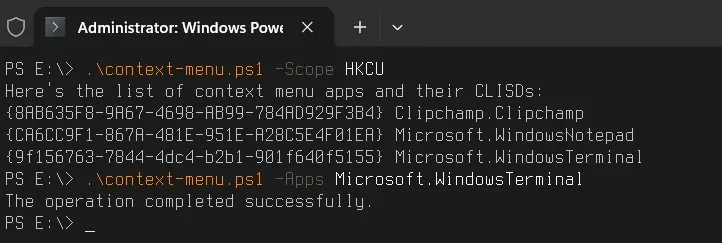
Maybe some application is not working well (not Microsoft).
You can try to hide it (this does not delete anything).

Example

1.webp

To restore it, just delete it in

Computer\HKEY_LOCAL_MACHINE\Software\Microsoft\Windows\CurrentVersion\Shell Extensions\Blocked

Or

Computer\HKEY_CURRENT_USER\Software\Microsoft\Windows\CurrentVersion\Shell Extensions\Blocked

Powershell:
<#
.SYNOPSIS
Removes application entries from the Windows file and folder context menus.
 
.DESCRIPTION
The script removes app context menu items from the new menu in Windows 11 and legacy menu in Windows 11/10.
The script takes care only of the apps registered via a manifest.
It collects extensions IDs from app manifests and blocks them via Windows Registry.
 
.PARAMETER Apps
Comma-separated list of app names to remove from the context menu.
If not provided, the script lists all registered apps and their CLSIDs.
 
.PARAMETER Scope
Accepts HKLM (all users) or HKCU (current user, default behavior).
 
.EXAMPLE
PS> .\context-menu.ps1
Lists all registered app names and their CLSIDs.
 
.EXAMPLE
PS> .\context-menu.ps1 -Apps onedrive,windowsnotepad,skype
Removes the listed apps from the current user context menu. Unique partial names are ok.
 
.EXAMPLE
PS> .\context-menu.ps1 -Apps onedrive,windowsnotepad,skype -Scope HKLM
Removes the listed apps from all users context menu. Unique partial names are ok.
 
.LINK
_https://www.outsidethebox.ms/22361/
#>
 
param(
    [Parameter()]
    [string[]]$Apps,
    [string]$Scope = 'HKCU'
    )
 
# script scope - HKCU (current user, default) or HKLM (all users) 
if ( ($Scope -ne 'HKCU') -and ($Scope -ne 'HKLM') ) {
    Write-Error 'Unacceptable scope. Use HKLM or HKCU.' -ErrorAction Stop
    }
 
$regpath = "$($Scope):Software\Microsoft\Windows\CurrentVersion\Shell Extensions\Blocked"
New-Item -Path $(Split-Path $regpath -Parent) -Name $(Split-Path $regpath -Leaf) -ErrorAction SilentlyContinue | Out-Null
 
# if no app list supplied, we'll get all registered apps and CLSIDs
if (-Not ($PSBoundParameters.ContainsKey('Apps'))) {
    Write-Host "Here's the list of context menu apps and their CLISDs:"
    $Apps = '*'
}
 
foreach ($app in $Apps) {
    # Get all manifests with registered context menu extensions
    $manifests = Get-ChildItem -Force "C:\Program Files\WindowsApps\*$App*\AppxManifest.xml"
    foreach ($manifest in $manifests) {
        $xml = [xml] (Get-Content ($manifest).FullName)
        $elem = $xml.get_DocumentElement()
        #Get app name and extension CLSIDs
        $app = $elem.Identity.Name
        $clsids = $elem.Applications.Application.Extensions.Extension.comServer.SurrogateServer.class.id       
        if ($Apps -ne '*') {
            # If apps were supplied, write CLSIDs to the registry
            foreach ($clsid in $clsids) {
            $name = '{' + $clsid + '}'
            New-ItemProperty -Path $regpath -Name $name -Type String -Value $app -Force | Out-Null
            }                     
                }
        else {
            # Output apps and their CLSIDs               
            foreach ($clsid in $clsids) {
                Write-Host "{$($clsid)} $($app)"
            }
        }               
    }
}
if ($Apps -ne '*') {
    # Restart explorer for the current user to apply the changes
    Get-Process explorer -IncludeUserName | where UserName -match $ENV:USERNAME | Stop-Process
    # Export REG-file to %temp%
    $regexportpath = $regpath.replace(':','\')
    reg export "$regexportpath" "$ENV:TEMP\context-menu.reg" /y
}
 

My Computer My Computer

At a glance

Microsoft Windows 11 HomeIntel Core i5-13490F2 x 16 Patriot Memory (PDP Systems) PSD516G56...GIGABYTE GeForce RTX 4070 WINDFORCE OC 12G (G...
OS
Microsoft Windows 11 Home
Computer type
PC/Desktop
Manufacturer/Model
MSI MS-7D98
CPU
Intel Core i5-13490F
Motherboard
MSI B760 GAMING PLUS WIFI
Memory
2 x 16 Patriot Memory (PDP Systems) PSD516G560081 6400MT (32-37-37-74); 1.35V)
Graphics Card(s)
GIGABYTE GeForce RTX 4070 WINDFORCE OC 12G (GV-N4070WF3OC-12GD)
Sound Card
Bluetooth Аудио
Monitor(s) Displays
INNOCN 15K1F
Screen Resolution
1920 x 1080
Hard Drives
WD_BLACK SN770 250GB
KINGSTON SNV2S1000G (ELFK0S.6)
PSU
Thermaltake Toughpower GF3 1000W
Case
CG560 - DeepCool
Cooling
ID-COOLING SE-224-XTS / 2 x 140Mm Fan - rear and top; 3 x 120Mm - front
Keyboard
Corsair K70 RGB TKL
Mouse
Corsair KATAR PRO XT
Internet Speed
100 Mbps
Browser
Firefox
Antivirus
Microsoft Defender Antivirus
Other Info
https://www.userbenchmark.com/UserRun/66553205

Latest Support Threads

Back
Top Bottom