
File opening size


modelman

Well-known member
Member
VIP
Local time
6:12 AM
Posts
117
OS
Windows11
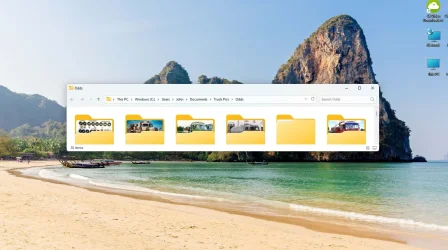
I have file explorer set to open maximised, but it always opens with just a strip. I always close it maximised, so how do I get it to always open maximised?

Any advice appreciated. W11 and Edge browser are up to date.File size.webp
 

My Computers My Computers

  • At a glance

    Windows11intel i12
    OS
    Windows11
    Computer type
    Laptop
    Manufacturer/Model
    Asus
    CPU
    intel i12
  • At a glance

    W11i5-124008GB
    Operating System
    W11
    Computer type
    PC/Desktop
    Manufacturer/Model
    HP
    CPU
    i5-12400
    Motherboard
    HP
    Memory
    8GB
    Internet Speed
    30mbps
    Browser
    Edge
    Antivirus
    Defender
I have file explorer set to open maximised, but it always opens with just a strip. I always close it maximised, so how do I get it to always open maximised?

Any advice appreciated. W11 and Edge browser are up to date.

resize it to how you want, hold CTRL and click the X to close it. that will make it open in that size next time. works with Maximized too.
 

My Computer My Computer

At a glance

Windows 11 Pro
OS
Windows 11 Pro
Thanks for that. I will give it a go when I turn off next.

I would have thought there should be some way to make it always open at whatever size you want though?
 

My Computers My Computers

  • At a glance

    Windows11intel i12
    OS
    Windows11
    Computer type
    Laptop
    Manufacturer/Model
    Asus
    CPU
    intel i12
  • At a glance

    W11i5-124008GB
    Operating System
    W11
    Computer type
    PC/Desktop
    Manufacturer/Model
    HP
    CPU
    i5-12400
    Motherboard
    HP
    Memory
    8GB
    Internet Speed
    30mbps
    Browser
    Edge
    Antivirus
    Defender
Normally windows reopen at the size and location they were last open.
Sometimes some people find this no longer happens. There have been previous discussions on this e.g. on tenforums.com

There are also 3rd party programs that let you preset a size and position for windows, noting not all windows are readily resizable.
 

My Computer My Computer

At a glance

Windows 11 Proi7-8650U16GBIntel UHD 620
OS
Windows 11 Pro
Computer type
Laptop
Manufacturer/Model
Lenovo t480s
CPU
i7-8650U
Memory
16GB
Graphics Card(s)
Intel UHD 620
Screen Resolution
1920x1080
Hard Drives
C SN810 SDCPNRY-512G-1006
Browser
Edge, Firefox
Antivirus
Defender
Thanks for that. I will give it a go when I turn off next.

I would have thought there should be some way to make it always open at whatever size you want though?
once you reset the sizing with the CTRL method it will stay that way from then on
 

My Computer My Computer

At a glance

Windows 11 Pro
OS
Windows 11 Pro
Thank you for your help, much appreciated.
 

My Computers My Computers

  • At a glance

    Windows11intel i12
    OS
    Windows11
    Computer type
    Laptop
    Manufacturer/Model
    Asus
    CPU
    intel i12
  • At a glance

    W11i5-124008GB
    Operating System
    W11
    Computer type
    PC/Desktop
    Manufacturer/Model
    HP
    CPU
    i5-12400
    Motherboard
    HP
    Memory
    8GB
    Internet Speed
    30mbps
    Browser
    Edge
    Antivirus
    Defender

Latest Support Threads

Back
Top Bottom




