- Local time
- 5:28 AM
- Posts
- 101
- Location
- Bloemfontein, South Africa
- OS
- Windows 11 Pro 25H2 (OS Build: 26200.7705)
Please can someone point me in the right direction.
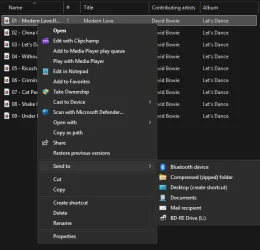
When looking at a file if you right click it you are given a menu of options, Microsoft have changed the menu putting "Show more options" at the bottom of it - while this works it involves an extra click for me, sure an extra click doesn't take a long time but it irritates me. I want the old menu back, I did it before, and I'm sure it's got a tutorial on how to do it, but I don't know what that menu is called so I can't search for it. Help.
When looking at a file if you right click it you are given a menu of options, Microsoft have changed the menu putting "Show more options" at the bottom of it - while this works it involves an extra click for me, sure an extra click doesn't take a long time but it irritates me. I want the old menu back, I did it before, and I'm sure it's got a tutorial on how to do it, but I don't know what that menu is called so I can't search for it. Help.
My Computer
At a glance
Windows 11 Pro 25H2 (OS Build: 26200.7705)i3-4160 @ 3.6GHz8 GBIntel HD Graphics 4400
- OS
- Windows 11 Pro 25H2 (OS Build: 26200.7705)
- Computer type
- PC/Desktop
- Manufacturer/Model
- Asus
- CPU
- i3-4160 @ 3.6GHz
- Motherboard
- Intel(R) Core(TM) i3-4160 CPU @ 3.60GHz 3.60 GHz
- Memory
- 8 GB
- Graphics Card(s)
- Intel HD Graphics 4400
- Sound Card
- Realtek High Definition Audio
- Monitor(s) Displays
- Sansui TV 32"
- Screen Resolution
- 1280 x 960
- Browser
- Microsoft Edge
- Antivirus
- Windows Defender, Malwarebytes Free