Solved Find password for user shown in Get-LocalUser


Paul Newton

Well-known member
Local time
9:04 PM
Posts
28
Location
Northamptonshire, UK
OS
Windows 11 Pro
Get-LocalUser shows the following:

1764602623683.webp
How can I find the passwords for the users Galaxy and pauln?
 
Windows Build/Version
Windows 11 Pro 24H2

My Computer My Computer

At a glance

Windows 11 Pro12th Gen i716GB DDR4Intel onboard
OS
Windows 11 Pro
Computer type
PC/Desktop
Manufacturer/Model
Dell
CPU
12th Gen i7
Memory
16GB DDR4
Graphics Card(s)
Intel onboard
Sound Card
Onboard
Monitor(s) Displays
Samsung
Screen Resolution
1920 x 1280
Hard Drives
512GB SSD
2 TB SATA HDD
Internet Speed
250 Mb/s
You can't.


Denis
 

My Computer My Computer

At a glance

Windows 11 Home x64 Version 25H2 Build 26200....
OS
Windows 11 Home x64 Version 25H2 Build 26200.8037
The owners of the users accounts would have to give you the passwords.
 

My Computers My Computers

  • At a glance

    Windows 11 Pro 25H2Intel Core i7-10700K16GB (8GB PC4-19200 DDR4 SDRAM x2)NVIDIA GeForce GTX 1050 TI
    OS
    Windows 11 Pro 25H2
    Computer type
    PC/Desktop
    Manufacturer/Model
    PowerSpec B746
    CPU
    Intel Core i7-10700K
    Motherboard
    ASRock Z490 Phantom Gaming 4/ax
    Memory
    16GB (8GB PC4-19200 DDR4 SDRAM x2)
    Graphics Card(s)
    NVIDIA GeForce GTX 1050 TI
    Sound Card
    Realtek Audio
    Monitor(s) Displays
    #1. LG ULTRAWIDE 34" #2. AOC Q32G2WG3 32"
    Screen Resolution
    #1. 3440 X 1440 #2. 1920 x 1080
    Hard Drives
    NVMe WDC WDS100T2B0C-00PXH0 1TB
    Samsung SSD 860 EVO 1TB
    PSU
    750 Watts (62.5A)
    Case
    PowerSpec/Lian Li ATX 205
    Keyboard
    Logitech K270
    Mouse
    Logitech M185
    Browser
    Microsoft Edge and Firefox
    Antivirus
    Webroot SecureAnywhere CE 26.1
  • At a glance

    Windows 11 Canary ChannelIntel Core i5-8400 CPU @ 2.80GHz16 MB DDR 4-2666
    Operating System
    Windows 11 Canary Channel
    Computer type
    PC/Desktop
    Manufacturer/Model
    PowerSpec G156
    CPU
    Intel Core i5-8400 CPU @ 2.80GHz
    Motherboard
    AsusTeK Prime B360M-A
    Memory
    16 MB DDR 4-2666
    Monitor(s) Displays
    23" Speptre HDMI 75Hz
    Screen Resolution
    1920x1080
    Hard Drives
    Samsung 970 EVO 500GB NVMe
    Keyboard
    Logitek K270
    Mouse
    Logitek M185
    Browser
    Firefox, Edge and Edge Canary
    Antivirus
    Windows Defender
Well, alternatively can I (as Administrator) reset the passwords?
 

My Computer My Computer

At a glance

Windows 11 Pro12th Gen i716GB DDR4Intel onboard
OS
Windows 11 Pro
Computer type
PC/Desktop
Manufacturer/Model
Dell
CPU
12th Gen i7
Memory
16GB DDR4
Graphics Card(s)
Intel onboard
Sound Card
Onboard
Monitor(s) Displays
Samsung
Screen Resolution
1920 x 1280
Hard Drives
512GB SSD
2 TB SATA HDD
Internet Speed
250 Mb/s
Well, alternatively can I (as Administrator) reset the passwords?
I doubt it. If it was that easy, passwords would be a waste of time
 

My Computers My Computers

  • At a glance

    Windows 11 Pro 25H2Intel Core i7-10700K16GB (8GB PC4-19200 DDR4 SDRAM x2)NVIDIA GeForce GTX 1050 TI
    OS
    Windows 11 Pro 25H2
    Computer type
    PC/Desktop
    Manufacturer/Model
    PowerSpec B746
    CPU
    Intel Core i7-10700K
    Motherboard
    ASRock Z490 Phantom Gaming 4/ax
    Memory
    16GB (8GB PC4-19200 DDR4 SDRAM x2)
    Graphics Card(s)
    NVIDIA GeForce GTX 1050 TI
    Sound Card
    Realtek Audio
    Monitor(s) Displays
    #1. LG ULTRAWIDE 34" #2. AOC Q32G2WG3 32"
    Screen Resolution
    #1. 3440 X 1440 #2. 1920 x 1080
    Hard Drives
    NVMe WDC WDS100T2B0C-00PXH0 1TB
    Samsung SSD 860 EVO 1TB
    PSU
    750 Watts (62.5A)
    Case
    PowerSpec/Lian Li ATX 205
    Keyboard
    Logitech K270
    Mouse
    Logitech M185
    Browser
    Microsoft Edge and Firefox
    Antivirus
    Webroot SecureAnywhere CE 26.1
  • At a glance

    Windows 11 Canary ChannelIntel Core i5-8400 CPU @ 2.80GHz16 MB DDR 4-2666
    Operating System
    Windows 11 Canary Channel
    Computer type
    PC/Desktop
    Manufacturer/Model
    PowerSpec G156
    CPU
    Intel Core i5-8400 CPU @ 2.80GHz
    Motherboard
    AsusTeK Prime B360M-A
    Memory
    16 MB DDR 4-2666
    Monitor(s) Displays
    23" Speptre HDMI 75Hz
    Screen Resolution
    1920x1080
    Hard Drives
    Samsung 970 EVO 500GB NVMe
    Keyboard
    Logitek K270
    Mouse
    Logitek M185
    Browser
    Firefox, Edge and Edge Canary
    Antivirus
    Windows Defender
Well, alternatively can I (as Administrator) reset the passwords?
Yes, if they are local user accounts rather than MSAccount-linked user accounts [which I suspect is the case for pauln].
The tutorials cover both cases.
Reset Password - ElevenForumTutorials
Change Password - ElevenForumTutorials
Change your Microsoft account password - Microsoft Support


Denis


Welcome to ElevenForum.

It's really worth making time to browse through the ElevenForum Tutorial index - there's a shortcut to it at the top of every ElevenForum page [within the Tutorials dropdown list].
- At the foot of the ElevenForum Tutorial index is a shortcut to download it as a spreadsheet.
- I download a new copy each month.
- By downloading it as a spreadsheet I can benefit from Excel's excellent filtering capabilities when I search for topics of interest.
- ElevenForum tutorials are also listed at Tutorials and there's a shortcut to that at the top of every page.

You can search ElevenForum using the search box in the top-right corner of all ElevenForum webpages or using Advanced Search - ElevenForum
- You can also search ElevenForum threads in many general search engines, such as Google, by adding site:elevenforum.com after your search term. For example,
Taskbar setup site:elevenforum.com
- [This is what the search box in the top-right corner of ElevenForum webpages does automatically]

 

My Computer My Computer

At a glance

Windows 11 Home x64 Version 25H2 Build 26200....
OS
Windows 11 Home x64 Version 25H2 Build 26200.8037

My Computer My Computer

At a glance

Windows 11 Pro12th Gen i716GB DDR4Intel onboard
OS
Windows 11 Pro
Computer type
PC/Desktop
Manufacturer/Model
Dell
CPU
12th Gen i7
Memory
16GB DDR4
Graphics Card(s)
Intel onboard
Sound Card
Onboard
Monitor(s) Displays
Samsung
Screen Resolution
1920 x 1280
Hard Drives
512GB SSD
2 TB SATA HDD
Internet Speed
250 Mb/s
I'll follow those up tomorrow
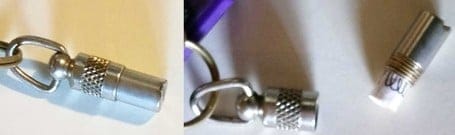
And, when you have sorted things out, write all your account passwords down somewhere secure yet readily accessible. Writing down their passwords is as effective as & is a lot cheaper than making 'Password reset disks' [which are only for local accounts anyway]. I always write user account passwords down on a strip of paper that I keep inside one of those dog nametag cylinder things attached to my main keyring -
225770d1546384105-admin-rights-win10-issue-dog-collar-id-tag.jpg

Here's a [UK] link for some example ID tags https://www.amazon.co.uk/Pet-Barrel-.../dp/B00DEB1JVQ There are lots of available choices but I bought ones that, like these, have a slot in the bottom for me to swing off so I can be confident they won't come apart accidentally while I'm out & about.
[Taken from my post Create two spare local, password-protected Admin accounts [post #2] in Windows 10, 11 - TenForums]


Denis
 

My Computer My Computer

At a glance

Windows 11 Home x64 Version 25H2 Build 26200....
OS
Windows 11 Home x64 Version 25H2 Build 26200.8037
Thank you so much, Denis. The links you sent me were very useful. In the end I went with

Set-LocalUser -Name "Brink2" -Password (ConvertTo-SecureString "NewPassword" -AsPlainText -Force)

I will also follow up on your suggestion "write all your account passwords down somewhere secure yet readily accessible"

Again, many thanks

Paul
 

My Computer My Computer

At a glance

Windows 11 Pro12th Gen i716GB DDR4Intel onboard
OS
Windows 11 Pro
Computer type
PC/Desktop
Manufacturer/Model
Dell
CPU
12th Gen i7
Memory
16GB DDR4
Graphics Card(s)
Intel onboard
Sound Card
Onboard
Monitor(s) Displays
Samsung
Screen Resolution
1920 x 1280
Hard Drives
512GB SSD
2 TB SATA HDD
Internet Speed
250 Mb/s
Paul,

I went with
Set-LocalUser -Name "Brink2" -Password (ConvertTo-SecureString "NewPassword" -AsPlainText -Force)

I understand that for Galaxy if that is a local user account.
I assume you used Option 7/8 for pauln if that is an MSAccount-linked user account.


Denis
 

My Computer My Computer

At a glance

Windows 11 Home x64 Version 25H2 Build 26200....
OS
Windows 11 Home x64 Version 25H2 Build 26200.8037
Back
Top Bottom