Finding Printer's IP Address


Powershell:
Get-Printer | Format-Table -Property @('Name', 'Type', 'PortName')

Code:
Name                                        Type PortName
----                                        ---- --------
Microsoft Print to PDF (redirected 2)      Local TS002
OneNote (Desktop) (redirected 2)           Local TS001
OneNote (Desktop)                          Local nul:
Microsoft Print to PDF                     Local PORTPROMPT:
\\TI...\P1....                        Connection 10.1.96.81
 

My Computer My Computer

At a glance

Windows 11 Pro 25H212th Gen Core i7-1260P64 GB Micron PC4-25600Intel Iris Xe Graphics
OS
Windows 11 Pro 25H2
Computer type
PC/Desktop
Manufacturer/Model
Intel NUC12WSHi7
CPU
12th Gen Core i7-1260P
Motherboard
NUC12WSBi7
Memory
64 GB Micron PC4-25600
Graphics Card(s)
Intel Iris Xe Graphics
Sound Card
on-board Realtek HD Audio
Monitor(s) Displays
Dell U3219Q
Screen Resolution
3840 x 2160
Hard Drives
Samsung SSD 990 PRO 1TB
Crucial MX500 2 TB
Antivirus
Microsoft Defender
Powershell:
Get-Printer | Format-Table -Property @('Name', 'Type', 'PortName')

Code:
Name                                        Type PortName
----                                        ---- --------
Microsoft Print to PDF (redirected 2)      Local TS002
OneNote (Desktop) (redirected 2)           Local TS001
OneNote (Desktop)                          Local nul:
Microsoft Print to PDF                     Local PORTPROMPT:
\\TI...\P1....                        Connection 10.1.96.81
I don't know about anyone else but that doesn't give the IP address for my printer...
Code:
Name                                   Type PortName                               
----                                   ---- --------                               
Print to Evernote                     Local FOXIT_Evernote:                       
OneNote (Desktop)                     Local nul:                                   
Microsoft Print to PDF                Local PORTPROMPT:                           
HP OfficeJet Pro 6970 PCL-3 (Network) Local WSD-99976466-560d-48c5-9a3b-c31dfcee39a3
Foxit PhantomPDF Printer              Local FOXIT_PDF:                             
Fax - HP OfficeJet Pro 6970           Local HPOJ6970_Fax_Port
 

My Computers My Computers

  • At a glance

    Windows 11 Pro 25H2 (26200.6901)AMD Ryzen 7 6800H with Radeon 680M GPU (486MB...Crucial DDR5-4800 (2400MHz) 32GB (2 x 16GB)NVIDIA RTX 3060 Laptop (6GB RAM)
    OS
    Windows 11 Pro 25H2 (26200.6901)
    Computer type
    Laptop
    Manufacturer/Model
    ASUS TUF Gaming A15 (2022)
    CPU
    AMD Ryzen 7 6800H with Radeon 680M GPU (486MB RAM)
    Memory
    Crucial DDR5-4800 (2400MHz) 32GB (2 x 16GB)
    Graphics Card(s)
    NVIDIA RTX 3060 Laptop (6GB RAM)
    Sound Card
    n/a
    Monitor(s) Displays
    15.6-inch
    Screen Resolution
    1920x1080 300Hz
    Hard Drives
    2 x Samsung 990 Evo Plus (2TB M.2 NVME SSD)
    PSU
    n/a
    Mouse
    Wireless Mouse M510
    Internet Speed
    2100Mbps/300Mbps
    Browser
    Firefox
    Antivirus
    Malwarebytes
  • At a glance

    Windows 11 Pro 25H2 (26200.8246)AMD Ryzen 7 5700X3DG.SKILL Flare X 32GB (2x16GB) DDR4ASUS ROG-STRIX-RTX3060TI-08G-V2-GAMING (RTX 3...
    Operating System
    Windows 11 Pro 25H2 (26200.8246)
    Computer type
    PC/Desktop
    Manufacturer/Model
    Custom build
    CPU
    AMD Ryzen 7 5700X3D
    Motherboard
    ASUS ROG Strix B550-F Gaming WiFi II
    Memory
    G.SKILL Flare X 32GB (2x16GB) DDR4
    Graphics card(s)
    ASUS ROG-STRIX-RTX3060TI-08G-V2-GAMING (RTX 3060-Ti, 8GB RAM)
    Monitor(s) Displays
    Samsung G50D IPS 27"
    Screen Resolution
    1440p/180Hz
    Hard Drives
    SAMSUNG 990 EVO Plus (2TB] M.2 NVME SSD
    SAMSUNG 990 EVO Plus (4TB) M.2 NVME SSD
    PSU
    Corsair RM750x (750 watts)
    Case
    Cooler Master MasterCase 5
    Cooling
    Scythe Mugen 6
    Keyboard
    Logitech K520 (MK540 keyboard/mouse combo)
    Mouse
    Logitech M310 (MK540 keyboard/mouse combo)
    Internet Speed
    2100 Mbps down / 300 Mbps up
    Browser
    Firefox, Edge, Chrome
    Antivirus
    Malwarebytes (Premium)
    Other Info
    ASUS Blu-ray Burner BW-16D1HT (SATA) || Western Digital Easystore 20TB USB 3.0 external hard drive used with Acronis True Image 2025 backup software || HP OfficeJet Pro 6975 Printer/Scanner

Run it in portable mode if you don’t want to install it. It’ll show you all IPs on your network.
 

My Computer My Computer

At a glance

Windows 11 Pro
OS
Windows 11 Pro
  • Like
Reactions: HDL

Run it in portable mode if you don’t want to install it. It’ll show you all IPs on your network.

Advanced IP Scanner found the IP address for my printer. Hint: if you set an IP range the search will go a lot faster. For example, I set the range for my network as 10.0.0.1-10.0.0.50.

PrinterIP.jpg
 

My Computers My Computers

  • At a glance

    Windows 11 Pro 25H2 (26200.6901)AMD Ryzen 7 6800H with Radeon 680M GPU (486MB...Crucial DDR5-4800 (2400MHz) 32GB (2 x 16GB)NVIDIA RTX 3060 Laptop (6GB RAM)
    OS
    Windows 11 Pro 25H2 (26200.6901)
    Computer type
    Laptop
    Manufacturer/Model
    ASUS TUF Gaming A15 (2022)
    CPU
    AMD Ryzen 7 6800H with Radeon 680M GPU (486MB RAM)
    Memory
    Crucial DDR5-4800 (2400MHz) 32GB (2 x 16GB)
    Graphics Card(s)
    NVIDIA RTX 3060 Laptop (6GB RAM)
    Sound Card
    n/a
    Monitor(s) Displays
    15.6-inch
    Screen Resolution
    1920x1080 300Hz
    Hard Drives
    2 x Samsung 990 Evo Plus (2TB M.2 NVME SSD)
    PSU
    n/a
    Mouse
    Wireless Mouse M510
    Internet Speed
    2100Mbps/300Mbps
    Browser
    Firefox
    Antivirus
    Malwarebytes
  • At a glance

    Windows 11 Pro 25H2 (26200.8246)AMD Ryzen 7 5700X3DG.SKILL Flare X 32GB (2x16GB) DDR4ASUS ROG-STRIX-RTX3060TI-08G-V2-GAMING (RTX 3...
    Operating System
    Windows 11 Pro 25H2 (26200.8246)
    Computer type
    PC/Desktop
    Manufacturer/Model
    Custom build
    CPU
    AMD Ryzen 7 5700X3D
    Motherboard
    ASUS ROG Strix B550-F Gaming WiFi II
    Memory
    G.SKILL Flare X 32GB (2x16GB) DDR4
    Graphics card(s)
    ASUS ROG-STRIX-RTX3060TI-08G-V2-GAMING (RTX 3060-Ti, 8GB RAM)
    Monitor(s) Displays
    Samsung G50D IPS 27"
    Screen Resolution
    1440p/180Hz
    Hard Drives
    SAMSUNG 990 EVO Plus (2TB] M.2 NVME SSD
    SAMSUNG 990 EVO Plus (4TB) M.2 NVME SSD
    PSU
    Corsair RM750x (750 watts)
    Case
    Cooler Master MasterCase 5
    Cooling
    Scythe Mugen 6
    Keyboard
    Logitech K520 (MK540 keyboard/mouse combo)
    Mouse
    Logitech M310 (MK540 keyboard/mouse combo)
    Internet Speed
    2100 Mbps down / 300 Mbps up
    Browser
    Firefox, Edge, Chrome
    Antivirus
    Malwarebytes (Premium)
    Other Info
    ASUS Blu-ray Burner BW-16D1HT (SATA) || Western Digital Easystore 20TB USB 3.0 external hard drive used with Acronis True Image 2025 backup software || HP OfficeJet Pro 6975 Printer/Scanner
  • Like
Reactions: HDL
I apologize if my post was misleading. The Windows 11 settings can lead you down a rabbit hole sometimes. I will repeat one of the methods again but show all the steps.

1. Open Windows 11 Settings
2. Select Bluetooth & devices
3. Scroll down and select Devices

View attachment 109626

4. Scroll down and select More devices and printer settings

View attachment 109627

5. Right-click on printer and select Properties

View attachment 109628

6. Select Web Services tab
7. Under Troubleshooting Information is IP address

View attachment 109630
Thank you for all that but I still cannot get what you show. I followed your steps exactly and come up short because I have no Web Services tab. I have no idea why this is but it's not there. Please see attachment.

NoWeb.jpg
Do you know anything I can do to get that Web Services tab.
 

My Computer My Computer

At a glance

Windows 11 Pro ver. 24H212th Grn. Intel i7-12700K 3600 Mhz 12 Cores64 GB DDR5NVIDIA GeForce GTX 1650
OS
Windows 11 Pro ver. 24H2
Computer type
PC/Desktop
Manufacturer/Model
ACPI x64-based PC
CPU
12th Grn. Intel i7-12700K 3600 Mhz 12 Cores
Motherboard
ASUSTeK - Prime Z690-P WIFI
Memory
64 GB DDR5
Graphics Card(s)
NVIDIA GeForce GTX 1650
Sound Card
NVIDIA High Definition Audio
Monitor(s) Displays
ViewSonic
Screen Resolution
1920 x 1080
Hard Drives
HDS72252 5VLAT80 2 Tb ssd Hard drive
PSU
850 Watt Power Supply
Case
19" high desktop
Cooling
A lot of fans
Keyboard
Logitech
Mouse
Logitech
Internet Speed
500 Mg
Browser
FF
Antivirus
Windows Defendor & Malwarebytes
Other Info
2 Asus Blu-Ray burners - BW - 16D1HT
Thank you for all that but I still cannot get what you show. I followed your steps exactly and come up short because I have no Web Services tab. I have no idea why this is but it's not there. Please see attachment.

View attachment 109661
Do you know anything I can do to get that Web Services tab.
I suggest you download the Advanced IP Scanner as shown in Post #23. I showed it found the IP address for my printer in Post #24.
 

My Computers My Computers

  • At a glance

    Windows 11 Pro 25H2 (26200.6901)AMD Ryzen 7 6800H with Radeon 680M GPU (486MB...Crucial DDR5-4800 (2400MHz) 32GB (2 x 16GB)NVIDIA RTX 3060 Laptop (6GB RAM)
    OS
    Windows 11 Pro 25H2 (26200.6901)
    Computer type
    Laptop
    Manufacturer/Model
    ASUS TUF Gaming A15 (2022)
    CPU
    AMD Ryzen 7 6800H with Radeon 680M GPU (486MB RAM)
    Memory
    Crucial DDR5-4800 (2400MHz) 32GB (2 x 16GB)
    Graphics Card(s)
    NVIDIA RTX 3060 Laptop (6GB RAM)
    Sound Card
    n/a
    Monitor(s) Displays
    15.6-inch
    Screen Resolution
    1920x1080 300Hz
    Hard Drives
    2 x Samsung 990 Evo Plus (2TB M.2 NVME SSD)
    PSU
    n/a
    Mouse
    Wireless Mouse M510
    Internet Speed
    2100Mbps/300Mbps
    Browser
    Firefox
    Antivirus
    Malwarebytes
  • At a glance

    Windows 11 Pro 25H2 (26200.8246)AMD Ryzen 7 5700X3DG.SKILL Flare X 32GB (2x16GB) DDR4ASUS ROG-STRIX-RTX3060TI-08G-V2-GAMING (RTX 3...
    Operating System
    Windows 11 Pro 25H2 (26200.8246)
    Computer type
    PC/Desktop
    Manufacturer/Model
    Custom build
    CPU
    AMD Ryzen 7 5700X3D
    Motherboard
    ASUS ROG Strix B550-F Gaming WiFi II
    Memory
    G.SKILL Flare X 32GB (2x16GB) DDR4
    Graphics card(s)
    ASUS ROG-STRIX-RTX3060TI-08G-V2-GAMING (RTX 3060-Ti, 8GB RAM)
    Monitor(s) Displays
    Samsung G50D IPS 27"
    Screen Resolution
    1440p/180Hz
    Hard Drives
    SAMSUNG 990 EVO Plus (2TB] M.2 NVME SSD
    SAMSUNG 990 EVO Plus (4TB) M.2 NVME SSD
    PSU
    Corsair RM750x (750 watts)
    Case
    Cooler Master MasterCase 5
    Cooling
    Scythe Mugen 6
    Keyboard
    Logitech K520 (MK540 keyboard/mouse combo)
    Mouse
    Logitech M310 (MK540 keyboard/mouse combo)
    Internet Speed
    2100 Mbps down / 300 Mbps up
    Browser
    Firefox, Edge, Chrome
    Antivirus
    Malwarebytes (Premium)
    Other Info
    ASUS Blu-ray Burner BW-16D1HT (SATA) || Western Digital Easystore 20TB USB 3.0 external hard drive used with Acronis True Image 2025 backup software || HP OfficeJet Pro 6975 Printer/Scanner
  • Like
Reactions: HDL
I suggest you download the Advanced IP Scanner as shown in Post #23. I showed it found the IP address for my printer in Post #24.
Not sure you saw one of my post above #8 but on my phone I have an Eero app, which is my WiFi Mesh. If I open that app I can see every device's IP address that is currently connected to my WiFi.

Do you or anyone else have any idea why I do not have that Web Services tab, that you showed in your attachments, available to me?
 

My Computer My Computer

At a glance

Windows 11 Pro ver. 24H212th Grn. Intel i7-12700K 3600 Mhz 12 Cores64 GB DDR5NVIDIA GeForce GTX 1650
OS
Windows 11 Pro ver. 24H2
Computer type
PC/Desktop
Manufacturer/Model
ACPI x64-based PC
CPU
12th Grn. Intel i7-12700K 3600 Mhz 12 Cores
Motherboard
ASUSTeK - Prime Z690-P WIFI
Memory
64 GB DDR5
Graphics Card(s)
NVIDIA GeForce GTX 1650
Sound Card
NVIDIA High Definition Audio
Monitor(s) Displays
ViewSonic
Screen Resolution
1920 x 1080
Hard Drives
HDS72252 5VLAT80 2 Tb ssd Hard drive
PSU
850 Watt Power Supply
Case
19" high desktop
Cooling
A lot of fans
Keyboard
Logitech
Mouse
Logitech
Internet Speed
500 Mg
Browser
FF
Antivirus
Windows Defendor & Malwarebytes
Other Info
2 Asus Blu-Ray burners - BW - 16D1HT
i am not sure this has been mentioned .. but.
do you have access to your router as the printer IP address would be within the router connections.

hope this is of help, best of luck. Steve ..
 

My Computers My Computers

  • At a glance

    Debian 13 KDE .. Windows 11 HomeRyzen 7 5825u64GB DDR4 3200Ryzen 7 5825u
    OS
    Debian 13 KDE .. Windows 11 Home
    Computer type
    PC/Desktop
    Manufacturer/Model
    HP 24" AiO
    CPU
    Ryzen 7 5825u
    Motherboard
    HP
    Memory
    64GB DDR4 3200
    Graphics Card(s)
    Ryzen 7 5825u
    Sound Card
    RealTek
    Monitor(s) Displays
    24" HP AiO
    Screen Resolution
    1920 x 1080 @60 Hz
    Hard Drives
    1TB WD Blue SN580 M2 SSD Partitioned.
    2x 1TB USB HDD External Backup/Storage.
    PSU
    90W external power brick
    Case
    24" All in One
    Cooling
    Default Air Cooling
    Keyboard
    HP WiFi UK extended
    Mouse
    HP WiFi 3 Button
    Internet Speed
    1GB full fibre
    Browser
    Edge & Firefox
    Antivirus
    AVG Internet Security/Windows Defender
    Other Info
    Mainly Open Source Software
  • At a glance

    Ubuntu 22.04.5 LTSi5 7200u16GB DDR4Intel
    Operating System
    Ubuntu 22.04.5 LTS
    Computer type
    Laptop
    Manufacturer/Model
    Dell 13" Latitude 2017
    CPU
    i5 7200u
    Motherboard
    Dell
    Memory
    16GB DDR4
    Graphics card(s)
    Intel
    Sound Card
    Intel
    Monitor(s) Displays
    13" Dell Laptop
    Hard Drives
    250GB Crucial 2.5" SSD
    Mouse
    Generic WiFi 3 button
    Internet Speed
    WiFi only
    Browser
    Firefox
    Antivirus
    ClamAV TK
    Other Info
    Mainly Open Source Software
I suggest you download the Advanced IP Scanner as shown in Post #23. I showed it found the IP address for my printer in Post #24.
I took your advice and ran that Advanced IP Scanner. It worked great, so thank you again.
 

My Computer My Computer

At a glance

Windows 11 Pro ver. 24H212th Grn. Intel i7-12700K 3600 Mhz 12 Cores64 GB DDR5NVIDIA GeForce GTX 1650
OS
Windows 11 Pro ver. 24H2
Computer type
PC/Desktop
Manufacturer/Model
ACPI x64-based PC
CPU
12th Grn. Intel i7-12700K 3600 Mhz 12 Cores
Motherboard
ASUSTeK - Prime Z690-P WIFI
Memory
64 GB DDR5
Graphics Card(s)
NVIDIA GeForce GTX 1650
Sound Card
NVIDIA High Definition Audio
Monitor(s) Displays
ViewSonic
Screen Resolution
1920 x 1080
Hard Drives
HDS72252 5VLAT80 2 Tb ssd Hard drive
PSU
850 Watt Power Supply
Case
19" high desktop
Cooling
A lot of fans
Keyboard
Logitech
Mouse
Logitech
Internet Speed
500 Mg
Browser
FF
Antivirus
Windows Defendor & Malwarebytes
Other Info
2 Asus Blu-Ray burners - BW - 16D1HT
Do you or anyone else have any idea why I do not have that Web Services tab, that you showed in your attachments, available to me?


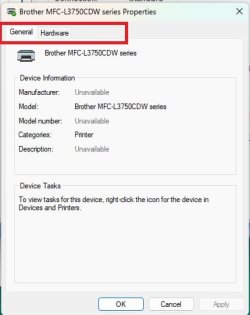
Probably for the same reason my Brother printer doesn't,

1727120353202.png

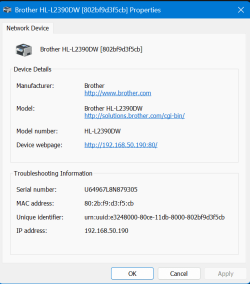
Just like yours it isn't actually connected to my computer but to my router (same reason that it doesn't show up under Printers in Device Manager). Yet if I come at it through Network in File Explorer it does show both the IPv4 and IPv6 addresses,

1727120489883.png

P.S. If you haven't, when you click on the device webpage link it should open a status/maintenance page for the printer.
 

My Computer My Computer

At a glance

Windows 11Ryzen 5 5600T-Force Vulcan Z - 32 GB (2x16) @ 3600 MHzSapphire RX 7600
OS
Windows 11
Computer type
PC/Desktop
CPU
Ryzen 5 5600
Motherboard
MSI B550 Tomahawk
Memory
T-Force Vulcan Z - 32 GB (2x16) @ 3600 MHz
Graphics Card(s)
Sapphire RX 7600
Monitor(s) Displays
Sansui ES-G27F2Q
Screen Resolution
2560 x 1440P
Hard Drives
XPG SX8200 240GB M.2 PCIe Gen3x4 NVMe
Samsung 850 EVO 250 GB
Adata SU800 1 TB
WD Black SN750 500GB
PSU
EVGA SuperNOVA 650 G3
Case
Deepcool CK500WH
Cooling
Thermalright Frozen Warframe 240 SE, plus 3 140 MM case fans (2 in front, 1 in rear)
Keyboard
Logitech G213 Prodigy
Mouse
Logitech ERGO M575
  • Like
Reactions: HDL
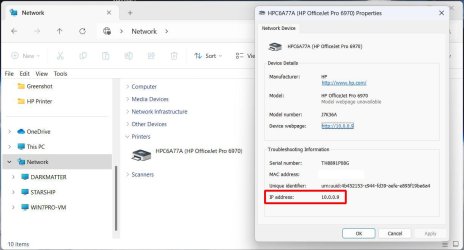
The OP didn't say whether he looked for the printer in File Explorer > Network. If it is then right-click on it and select Properties.
Of course the printer has to be turned on for it to show up there.

Printer IP Network.jpg
 

My Computers My Computers

  • At a glance

    Windows 11 Pro 25H2 (26200.6901)AMD Ryzen 7 6800H with Radeon 680M GPU (486MB...Crucial DDR5-4800 (2400MHz) 32GB (2 x 16GB)NVIDIA RTX 3060 Laptop (6GB RAM)
    OS
    Windows 11 Pro 25H2 (26200.6901)
    Computer type
    Laptop
    Manufacturer/Model
    ASUS TUF Gaming A15 (2022)
    CPU
    AMD Ryzen 7 6800H with Radeon 680M GPU (486MB RAM)
    Memory
    Crucial DDR5-4800 (2400MHz) 32GB (2 x 16GB)
    Graphics Card(s)
    NVIDIA RTX 3060 Laptop (6GB RAM)
    Sound Card
    n/a
    Monitor(s) Displays
    15.6-inch
    Screen Resolution
    1920x1080 300Hz
    Hard Drives
    2 x Samsung 990 Evo Plus (2TB M.2 NVME SSD)
    PSU
    n/a
    Mouse
    Wireless Mouse M510
    Internet Speed
    2100Mbps/300Mbps
    Browser
    Firefox
    Antivirus
    Malwarebytes
  • At a glance

    Windows 11 Pro 25H2 (26200.8246)AMD Ryzen 7 5700X3DG.SKILL Flare X 32GB (2x16GB) DDR4ASUS ROG-STRIX-RTX3060TI-08G-V2-GAMING (RTX 3...
    Operating System
    Windows 11 Pro 25H2 (26200.8246)
    Computer type
    PC/Desktop
    Manufacturer/Model
    Custom build
    CPU
    AMD Ryzen 7 5700X3D
    Motherboard
    ASUS ROG Strix B550-F Gaming WiFi II
    Memory
    G.SKILL Flare X 32GB (2x16GB) DDR4
    Graphics card(s)
    ASUS ROG-STRIX-RTX3060TI-08G-V2-GAMING (RTX 3060-Ti, 8GB RAM)
    Monitor(s) Displays
    Samsung G50D IPS 27"
    Screen Resolution
    1440p/180Hz
    Hard Drives
    SAMSUNG 990 EVO Plus (2TB] M.2 NVME SSD
    SAMSUNG 990 EVO Plus (4TB) M.2 NVME SSD
    PSU
    Corsair RM750x (750 watts)
    Case
    Cooler Master MasterCase 5
    Cooling
    Scythe Mugen 6
    Keyboard
    Logitech K520 (MK540 keyboard/mouse combo)
    Mouse
    Logitech M310 (MK540 keyboard/mouse combo)
    Internet Speed
    2100 Mbps down / 300 Mbps up
    Browser
    Firefox, Edge, Chrome
    Antivirus
    Malwarebytes (Premium)
    Other Info
    ASUS Blu-ray Burner BW-16D1HT (SATA) || Western Digital Easystore 20TB USB 3.0 external hard drive used with Acronis True Image 2025 backup software || HP OfficeJet Pro 6975 Printer/Scanner
  • Like
Reactions: HDL
Probably for the same reason my Brother printer doesn't,

View attachment 109721

Just like yours it isn't actually connected to my computer but to my router (same reason that it doesn't show up under Printers in Device Manager). Yet if I come at it through Network in File Explorer it does show both the IPv4 and IPv6 addresses,

View attachment 109722

P.S. If you haven't, when you click on the device webpage link it should open a status/maintenance page for the printer.
Thank you for the reply. I don't know what you mean by this: "P.S. If you haven't, when you click on the device webpage link it should open a status/maintenance page for the printer."
 

My Computer My Computer

At a glance

Windows 11 Pro ver. 24H212th Grn. Intel i7-12700K 3600 Mhz 12 Cores64 GB DDR5NVIDIA GeForce GTX 1650
OS
Windows 11 Pro ver. 24H2
Computer type
PC/Desktop
Manufacturer/Model
ACPI x64-based PC
CPU
12th Grn. Intel i7-12700K 3600 Mhz 12 Cores
Motherboard
ASUSTeK - Prime Z690-P WIFI
Memory
64 GB DDR5
Graphics Card(s)
NVIDIA GeForce GTX 1650
Sound Card
NVIDIA High Definition Audio
Monitor(s) Displays
ViewSonic
Screen Resolution
1920 x 1080
Hard Drives
HDS72252 5VLAT80 2 Tb ssd Hard drive
PSU
850 Watt Power Supply
Case
19" high desktop
Cooling
A lot of fans
Keyboard
Logitech
Mouse
Logitech
Internet Speed
500 Mg
Browser
FF
Antivirus
Windows Defendor & Malwarebytes
Other Info
2 Asus Blu-Ray burners - BW - 16D1HT
The OP didn't say whether he looked for the printer in File Explorer > Network. If it is then right-click on it and select Properties.
Of course the printer has to be turned on for it to show up there.

View attachment 109736
I didn't know when I posted thread I could do that. I just followed those steps now and got all the information I would have needed. Please see attachment. Thanks again for the help.

Network.jpg
 

My Computer My Computer

At a glance

Windows 11 Pro ver. 24H212th Grn. Intel i7-12700K 3600 Mhz 12 Cores64 GB DDR5NVIDIA GeForce GTX 1650
OS
Windows 11 Pro ver. 24H2
Computer type
PC/Desktop
Manufacturer/Model
ACPI x64-based PC
CPU
12th Grn. Intel i7-12700K 3600 Mhz 12 Cores
Motherboard
ASUSTeK - Prime Z690-P WIFI
Memory
64 GB DDR5
Graphics Card(s)
NVIDIA GeForce GTX 1650
Sound Card
NVIDIA High Definition Audio
Monitor(s) Displays
ViewSonic
Screen Resolution
1920 x 1080
Hard Drives
HDS72252 5VLAT80 2 Tb ssd Hard drive
PSU
850 Watt Power Supply
Case
19" high desktop
Cooling
A lot of fans
Keyboard
Logitech
Mouse
Logitech
Internet Speed
500 Mg
Browser
FF
Antivirus
Windows Defendor & Malwarebytes
Other Info
2 Asus Blu-Ray burners - BW - 16D1HT
I didn't know when I posted thread I could do that. I just followed those steps now and got all the information I would have needed. Please see attachment. Thanks again for the help.

View attachment 109739
Thank you for the reply. I don't know what you mean by this: "P.S. If you haven't, when you click on the device webpage link it should open a status/maintenance page for the printer."
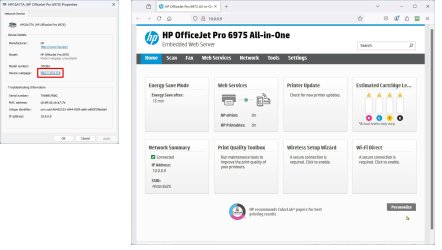
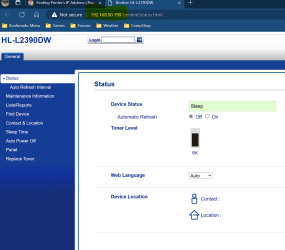
If you show the Properties page like you just did then double-click on the Device webpage link. You will bring up a page something like this:

Maintenance.jpg
 

My Computers My Computers

  • At a glance

    Windows 11 Pro 25H2 (26200.6901)AMD Ryzen 7 6800H with Radeon 680M GPU (486MB...Crucial DDR5-4800 (2400MHz) 32GB (2 x 16GB)NVIDIA RTX 3060 Laptop (6GB RAM)
    OS
    Windows 11 Pro 25H2 (26200.6901)
    Computer type
    Laptop
    Manufacturer/Model
    ASUS TUF Gaming A15 (2022)
    CPU
    AMD Ryzen 7 6800H with Radeon 680M GPU (486MB RAM)
    Memory
    Crucial DDR5-4800 (2400MHz) 32GB (2 x 16GB)
    Graphics Card(s)
    NVIDIA RTX 3060 Laptop (6GB RAM)
    Sound Card
    n/a
    Monitor(s) Displays
    15.6-inch
    Screen Resolution
    1920x1080 300Hz
    Hard Drives
    2 x Samsung 990 Evo Plus (2TB M.2 NVME SSD)
    PSU
    n/a
    Mouse
    Wireless Mouse M510
    Internet Speed
    2100Mbps/300Mbps
    Browser
    Firefox
    Antivirus
    Malwarebytes
  • At a glance

    Windows 11 Pro 25H2 (26200.8246)AMD Ryzen 7 5700X3DG.SKILL Flare X 32GB (2x16GB) DDR4ASUS ROG-STRIX-RTX3060TI-08G-V2-GAMING (RTX 3...
    Operating System
    Windows 11 Pro 25H2 (26200.8246)
    Computer type
    PC/Desktop
    Manufacturer/Model
    Custom build
    CPU
    AMD Ryzen 7 5700X3D
    Motherboard
    ASUS ROG Strix B550-F Gaming WiFi II
    Memory
    G.SKILL Flare X 32GB (2x16GB) DDR4
    Graphics card(s)
    ASUS ROG-STRIX-RTX3060TI-08G-V2-GAMING (RTX 3060-Ti, 8GB RAM)
    Monitor(s) Displays
    Samsung G50D IPS 27"
    Screen Resolution
    1440p/180Hz
    Hard Drives
    SAMSUNG 990 EVO Plus (2TB] M.2 NVME SSD
    SAMSUNG 990 EVO Plus (4TB) M.2 NVME SSD
    PSU
    Corsair RM750x (750 watts)
    Case
    Cooler Master MasterCase 5
    Cooling
    Scythe Mugen 6
    Keyboard
    Logitech K520 (MK540 keyboard/mouse combo)
    Mouse
    Logitech M310 (MK540 keyboard/mouse combo)
    Internet Speed
    2100 Mbps down / 300 Mbps up
    Browser
    Firefox, Edge, Chrome
    Antivirus
    Malwarebytes (Premium)
    Other Info
    ASUS Blu-ray Burner BW-16D1HT (SATA) || Western Digital Easystore 20TB USB 3.0 external hard drive used with Acronis True Image 2025 backup software || HP OfficeJet Pro 6975 Printer/Scanner
  • Like
Reactions: HDL

My Computer My Computer

At a glance

Windows 11Ryzen 5 5600T-Force Vulcan Z - 32 GB (2x16) @ 3600 MHzSapphire RX 7600
OS
Windows 11
Computer type
PC/Desktop
CPU
Ryzen 5 5600
Motherboard
MSI B550 Tomahawk
Memory
T-Force Vulcan Z - 32 GB (2x16) @ 3600 MHz
Graphics Card(s)
Sapphire RX 7600
Monitor(s) Displays
Sansui ES-G27F2Q
Screen Resolution
2560 x 1440P
Hard Drives
XPG SX8200 240GB M.2 PCIe Gen3x4 NVMe
Samsung 850 EVO 250 GB
Adata SU800 1 TB
WD Black SN750 500GB
PSU
EVGA SuperNOVA 650 G3
Case
Deepcool CK500WH
Cooling
Thermalright Frozen Warframe 240 SE, plus 3 140 MM case fans (2 in front, 1 in rear)
Keyboard
Logitech G213 Prodigy
Mouse
Logitech ERGO M575
  • Like
Reactions: HDL

My Computer My Computer

At a glance

Windows 11 Pro ver. 24H212th Grn. Intel i7-12700K 3600 Mhz 12 Cores64 GB DDR5NVIDIA GeForce GTX 1650
OS
Windows 11 Pro ver. 24H2
Computer type
PC/Desktop
Manufacturer/Model
ACPI x64-based PC
CPU
12th Grn. Intel i7-12700K 3600 Mhz 12 Cores
Motherboard
ASUSTeK - Prime Z690-P WIFI
Memory
64 GB DDR5
Graphics Card(s)
NVIDIA GeForce GTX 1650
Sound Card
NVIDIA High Definition Audio
Monitor(s) Displays
ViewSonic
Screen Resolution
1920 x 1080
Hard Drives
HDS72252 5VLAT80 2 Tb ssd Hard drive
PSU
850 Watt Power Supply
Case
19" high desktop
Cooling
A lot of fans
Keyboard
Logitech
Mouse
Logitech
Internet Speed
500 Mg
Browser
FF
Antivirus
Windows Defendor & Malwarebytes
Other Info
2 Asus Blu-Ray burners - BW - 16D1HT

Latest Support Threads

Back
Top Bottom