I posted this on both mozillazine forum and bugzilla; so far no fixes.
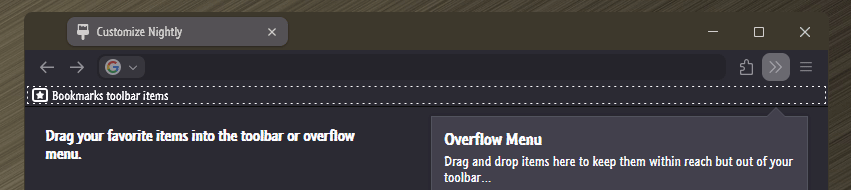
When I open a new Firefox session (Firefox portable, latest version), the title bar is not colored. If I open a new window, it is. Both of these windows are using the same profile, so I can't believe it has anything to do with the profile. I tried to find a setting in the about:config options, but didn't see anything that looked good.
Opening Firefox in safe mode, the initial window's title bar is colored.
Any ideas how to correct this?
When I open a new Firefox session (Firefox portable, latest version), the title bar is not colored. If I open a new window, it is. Both of these windows are using the same profile, so I can't believe it has anything to do with the profile. I tried to find a setting in the about:config options, but didn't see anything that looked good.
Opening Firefox in safe mode, the initial window's title bar is colored.
Any ideas how to correct this?
My Computer
At a glance
Windows 11 23H2 22631.4460AMD
- OS
- Windows 11 23H2 22631.4460
- Computer type
- PC/Desktop
- CPU
- AMD
- Motherboard
- ASRock




![How to Enable [static] Windows Accent Color in Firefox Title Bar - AskVG.webp](https://www.elevenforum.com/data/attachments/158/158081-6b218068921238930d08569ecfbd339b.jpg?hash=SYLztP3vCf "How to Enable [static] Windows Accent Color in Firefox Title Bar - AskVG.webp")