Solved Firewall


Timmy 2 toes

Well-known member
Member
Local time
5:33 AM
Posts
464
OS
win11
Hi
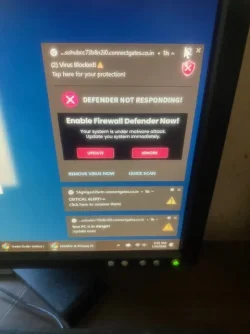
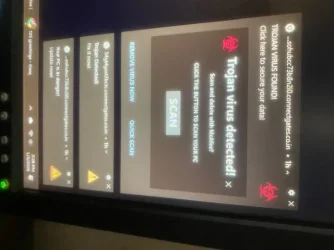
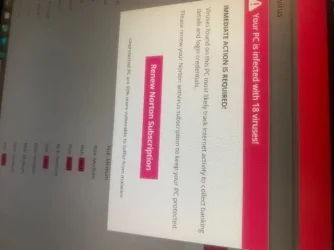
Where did all this stuff come from just popped up i scanned with malware bytes no threats what causes this when I X Them out more pop up?
Thank you
TIMMY 2 TOESIMG_4601.webp
 

Attachments

  • IMG_4600.webp
    IMG_4600.webp
    21.2 KB · Views: 1
  • IMG_4602.webp
    IMG_4602.webp
    23.8 KB · Views: 2

My Computer

System One

  • OS
    win11
    Computer type
    PC/Desktop
    Manufacturer/Model
    DELL INSPRON
    CPU
    13TH GEN INTEL
    Monitor(s) Displays
    DELL
    Keyboard
    AMZN
    Browser
    EDGE
    Antivirus
    NONE
It's more scareware, the notifications are coming from Chrome. You either allowed push notifications for a shady site or potentially installed something that did.
 

My Computer

System One

  • OS
    Linux Mint
    Computer type
    Laptop
    Manufacturer/Model
    System76 Lemur Pro
I would start with:
1. As a precaution check that the Firewall is running in Windows 11.
2. Use Revo Uninstaller and completely uninstall Chrome.
3. Check the installed apps list in Windows to make sure there aren't any unwanted apps listed. If so uninstall them
4. Run Disk Cleanup. Also clean out temp files and cookies.
5. Do a complete virus scan again as a precaution.
5. Reinstall Chrome.
 

My Computers

System One System Two

  • OS
    Windows 11 Pro 25H2
    Computer type
    PC/Desktop
    Manufacturer/Model
    Homebuilt
    CPU
    Intel Core i9 13900K
    Motherboard
    Asus ProArt Z790 Creator WiFi - Bios 3107
    Memory
    Corsair Dominator Platinum 64gb 5600MT/s DDR5 Dual Channel
    Graphics Card(s)
    Sapphire NITRO+ AMD Radeon RX 7900 XTX Vapor-X 24GB
    Sound Card
    External DAC: Cambridge Audio DACMagic200M - Headphone Amp: Topping L50
    Monitor(s) Displays
    Panasonic MX950 Mini LED 55" TV 120hz
    Screen Resolution
    3840 x 2160 120hz
    Hard Drives
    Samsung 980 Pro 2TB (OS)
    Samsung 980 Pro 1TB (Files)
    Lexar NZ790 4TB
    LaCie d2 Professional 6TB external - USB 3.1
    Seagate Expansion 16TB external - USB 3.2
    Seagate One Touch 18TB external HD - USB 3.0
    PSU
    Corsair RM1200x Shift
    Case
    Corsair RGB Smart Case 5000x (white)
    Cooling
    Corsair iCue H150i Elite Capellix XT
    Keyboard
    Incase Ergonomic USB (Microsoft clone)
    Mouse
    Logitech MX Master 3S
    Internet Speed
    Fibre 900/500 Mbps
    Browser
    Microsoft Edge Chromium
    Antivirus
    Bitdefender Total Security
    Other Info
    AMD Radeon Software & Drivers 26.1.1
    Hasleo Backup Suite
    Dashlane password manager
    Kensington Verimark fingerprint reader
    Logitech Brio 4K webcam
    Orico 10-port powered USB 3.0 hub
  • Operating System
    Windows 11 Pro 25H2
    Computer type
    Laptop
    Manufacturer/Model
    Asus Vivobook X1605VA
    CPU
    Intel® Core™ i9-13900H
    Motherboard
    Asus X1605VA bios 309
    Memory
    32GB DDR4-3200 Dual channel
    Graphics card(s)
    *Intel Iris Xᵉ Graphics G7
    Sound Card
    Realtek | Intel SST Bluetooth & USB
    Monitor(s) Displays
    16.0-inch, WUXGA 16:10 aspect ratio, IPS-level Panel
    Screen Resolution
    1920 x 1200 60hz
    Hard Drives
    512GB M.2 NVMe™ PCIe® 3.0 SSD
    Mouse
    Logitech MX Ergo Trackball
    Antivirus
    Bitdefender Total Security
    Other Info
    720p Webcam
    WiFi & USB to ethernet
  • Like
Reactions: Gas
@Timmy 2 toes
It is unclear where your image 4602 is coming from, (which is why we constantly beg you to use full screenshots instead of your phone), but, it looks like an in-page pop-up, which raises the suspicion whether you should even be on that page in the first place!

The others are Chrome Push Notifications because they follow your accent color and they have the Chrome logo in the upper left hand corner.

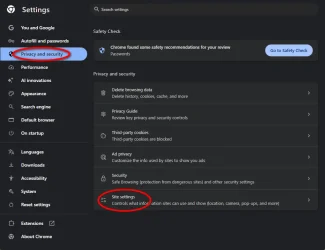
Open Chrome Settings and go to Privacy and security, click on Site settings:
11831.webp

In Site settings, under Permissions, click on Notifications:
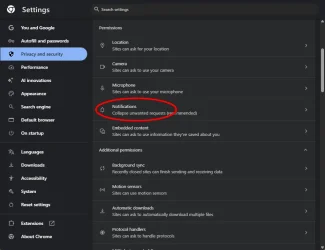
11832.webp

Scroll through the 'Allowed to send notifications' list..., on each entry, determine if it's a trusted site or not..., if not, click the 3 dot menu and choose Block:
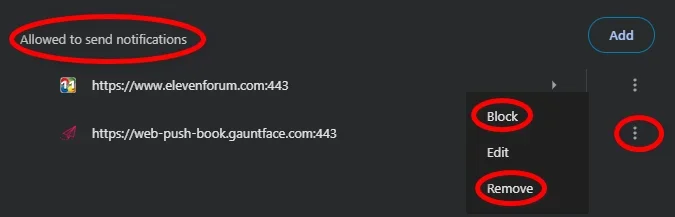
11836.webp

If you choose Remove, you're simply resetting permissions. If that is the case, don't click Allow on any of these from an untrusted site:
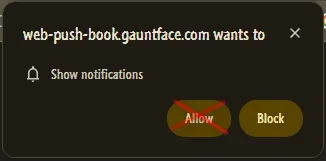
11837.webp

You can also disable Notifications entirely, except for the ones on the Allowed list:
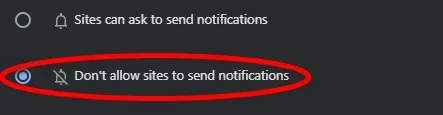
11838.webp
 

My Computers

System One System Two

  • OS
    Windows 11 Pro
    Computer type
    PC/Desktop
    Manufacturer/Model
    ASUS ROG Strix
  • Operating System
    Windows 11 Pro
    Computer type
    Laptop
    Manufacturer/Model
    ASUS VivoBook
Hey T2T, as @Edwin said, this is more scareware like you reported last week regarding McAfee. Your browser is compromised. Have you followed any of the suggestions you were given then. Until you completely clean up Chrome and your Chrome profile in appdata, there's no telling what garbage will pop up.
 

My Computers

System One System Two

  • OS
    Windows 11 Pro 25H2 26200.8655
    Computer type
    PC/Desktop
    Manufacturer/Model
    Dell Optiplex 7080
    CPU
    i9-10900 10 core 20 threads
    Motherboard
    DELL 0J37VM
    Memory
    32 gb
    Graphics Card(s)
    none-Intel UHD Graphics 630
    Sound Card
    Integrated Realtek
    Monitor(s) Displays
    Benq 27
    Screen Resolution
    2560x1440
    Hard Drives
    2x1tb Solidigm m.2 nvme /External drives 512gb Samsung m.2 sata+2tb Kingston m2.nvme
    PSU
    500w
    Case
    MT
    Cooling
    Dell Premium
    Keyboard
    Logitech wired
    Mouse
    Logitech wireless
    Internet Speed
    so slow I'm too embarrassed to tell
    Browser
    #1 Edge #2 Firefox
    Antivirus
    Defender+MWB Premium
  • Operating System
    Windows 11 Pro 24H2 26200.8457
    Computer type
    PC/Desktop
    Manufacturer/Model
    Beelink Mini PC SER5
    CPU
    AMD Ryzen 7 6800U
    Memory
    32 gb
    Graphics card(s)
    integrated
    Sound Card
    integrated
    Monitor(s) Displays
    Benq 27
    Screen Resolution
    2560x1440
    Hard Drives
    1TB Crucial nvme
    Keyboard
    Logitech wired
    Mouse
    Logitech wireless
    Internet Speed
    still too embarrassed to tell
    Browser
    Firefox
    Antivirus
    Defender
    Other Info
    System 3 is non compliant Dell 9020 i7-4770/24gb ram Win11 PRO 26200.8457
You should get rid of Chrome and just use the broweser that came with windows which is Edge. It would be a lot safer for you.
 

My Computers

System One System Two

  • OS
    Windows 11 25H2 26200.7705
    Computer type
    PC/Desktop
    Manufacturer/Model
    Dell xps8910
    CPU
    Intel core I7 6700
    Motherboard
    OWPMFG Z170 Skylake
    Memory
    32gbytes DDR4 1066mhz dual
    Graphics Card(s)
    nvidia GT730
    Sound Card
    Nvidia GK 208
    Monitor(s) Displays
    Dell del40e8
    Screen Resolution
    1920X1080
    Hard Drives
    Intel M.2 512G NVME / Samsung SSD 850 250G / Toshiba 1TB / WD 1TB
    PSU
    450W
    Case
    Mid
    Cooling
    Standard
    Keyboard
    Wired Perixx
    Mouse
    Logitech wireless MX Master
    Internet Speed
    150 Mbs Starlink
    Browser
    Firefox and Edge
    Antivirus
    Windows defender
  • Operating System
    Windows 11 Pro 25H2 26200.6584
    Computer type
    Laptop
    Manufacturer/Model
    Asus BR1100CKA
    CPU
    Intel Celeron N4500 @ 1.10 GHz
    Motherboard
    Asustek
    Memory
    4.00 GB
    Graphics card(s)
    On board
    Sound Card
    On board
    Monitor(s) Displays
    standard
    Screen Resolution
    1366x768
    Hard Drives
    Crucial 500Gb NVME M.2 SSD / 58GB Factory SSD
    Case
    Laptop
    Cooling
    Heatsink
    Keyboard
    Builtin
    Mouse
    Touchpad
    Internet Speed
    25mbs/Viasat
    Browser
    Edge/Firefox
    Antivirus
    Windows
Back
Top Bottom