First BSOD in Almost Two Years - Shutting Down Laptop


steamship

Well-known member
Local time
4:40 AM
Posts
50
Location
Londonderry, Northern Ireland
OS
Windows 11 Pro 25H2 (26200.8655)
Was using the laptop for about three hours, using a combination on Chrome, Excel, Photo Viewer, Windows Explorer and Calculator. Was also using the Snip tool to record the full screen to try and capture a pop-up window. Everything was fine, I had closed all the apps and was doing the Windows 'Shut down' when the BSOD appeared. The laptop restarted instead of shutting down. I've since shut the laptop with no issues. Curious to see what caused it.

 
Windows Build/Version
Windows 11 Pro 23H2 OS build 22631.3155

My Computer My Computer

At a glance

Windows 11 Pro 25H2 (26200.8655)AMD Ryzen 7 5800H2 x 32GB Kingston Fury 4800MHzAMD Radeon RX 6600M
OS
Windows 11 Pro 25H2 (26200.8655)
Computer type
Laptop
Manufacturer/Model
HP Omen 16
CPU
AMD Ryzen 7 5800H
Memory
2 x 32GB Kingston Fury 4800MHz
Graphics Card(s)
AMD Radeon RX 6600M
Screen Resolution
2560 x 1440
Hard Drives
WD Blue 2TB
Samsung 1TB
Browser
Chrome
Don't worry about an odd blue screen. If it continues to happen, let us know.
 

My Computer My Computer

At a glance

W11
OS
W11
Computer type
PC/Desktop
Manufacturer/Model
2 HP Desktops, 1 Dell Desktop, 2 Dell XPS Laptops, 1 HP Laptop
Keyboard
Logitech
Mouse
Logitech MX Master 4 & 3
Internet Speed
500 mps
Browser
Firefox
Antivirus
Bitdefender
Please make sure that links are available without sign in.

Sign in​

to continue to Google Drive
 

My Computer My Computer

At a glance

Windows 10Intel(R) Core(TM) i7-4800MQ CPU @ 2.70GHz16 GB Total: Manufacturer : Samsung MemoryTyp...NVIDIA Quadro K3100M; Intel(R) HD Graphics 4600
OS
Windows 10
Computer type
Laptop
Manufacturer/Model
HP
CPU
Intel(R) Core(TM) i7-4800MQ CPU @ 2.70GHz
Motherboard
Product : 190A Version : KBC Version 94.56
Memory
16 GB Total: Manufacturer : Samsung MemoryType : DDR3 FormFactor : SODIMM Capacity : 8GB Speed : 1600
Graphics Card(s)
NVIDIA Quadro K3100M; Intel(R) HD Graphics 4600
Sound Card
IDT High Definition Audio CODEC; PNP Device ID HDAUDIO\FUNC_01&VEN_111D&DEV_76E0
Hard Drives
Model Hitachi HTS727575A9E364
Antivirus
Microsoft Defender
Other Info
Mobile Workstation
Please make sure that links are available without sign in.

Sign in​

to continue to Google Drive
Thanks. Made the relevant change. Shows how much I use Google Drive.
 

My Computer My Computer

At a glance

Windows 11 Pro 25H2 (26200.8655)AMD Ryzen 7 5800H2 x 32GB Kingston Fury 4800MHzAMD Radeon RX 6600M
OS
Windows 11 Pro 25H2 (26200.8655)
Computer type
Laptop
Manufacturer/Model
HP Omen 16
CPU
AMD Ryzen 7 5800H
Memory
2 x 32GB Kingston Fury 4800MHz
Graphics Card(s)
AMD Radeon RX 6600M
Screen Resolution
2560 x 1440
Hard Drives
WD Blue 2TB
Samsung 1TB
Browser
Chrome
Please perform the following steps:


1) Run Tuneup plus > post a share link


2) Run gather_additional_dump_files >post a share link


3) Run administrative command prompt (acp):

PowerShell $D=(New-Object -ComObject Wscript.Shell).SpecialFolders(4);Compress-Archive "%WinDir%\MEMORY.DMP" "$D\Memory_dmp"

Post a share link


4) Uninstall Internet download manager


5) The BIOS Version/Date AMI F.17, 22/09/2023

Upgrade the BIOS: F17 > F18


6) Download and install: HP PC Hardware Diagnostics UEFI – v10.3.0.0


7) Create a new restore point:


8) Run the HP UEFI Hardware diagnostics overnight while sleeping in loop until error:

Power on the computer while repetitively clicking F2 or F10 > HP UEFI Hardware diagnostics > system > extensive > loop until error >

the next day if it has made two or more loops > click esc > take pictures >

post images or share links into this thread displaying the tests performed with results


9) Run HD Sentinel (trial version) (all drives)
Post share links for results on these tabs
a) Overview
b) Temperature
c) SMART


Code:
      Drive: C:
 Free Space: 415.1 GB
Total Space: 593.9 GB
File System: NTFS
      Model: SAMSUNG MZVL21T0HCLR-00BH1

      Drive: D:
 Free Space: 146.3 GB
Total Space: 206.1 GB
File System: NTFS
      Model: SAMSUNG MZVL21T0HCLR-00BH1

      Drive: E:
 Free Space: 1508.9 GB
Total Space: 1907.7 GB
File System: NTFS
      Model: WD Blue SN570 2TB


Code:
Event[13963]
  Log Name: System
  Source: Microsoft-Windows-WHEA-Logger
  Date: 2024-02-23T18:49:34.5890000Z
  Event ID: 17
  Task: N/A
  Level: Warning
  Opcode: Info  g
  Keyword: N/A
  User: S-1-5-19
  User Name: NT AUTHORITY\LOCAL SERVICE
  Computer: Omen16
  Description:
A corrected hardware error has occurred.

Component: PCI Express Root Port
Error Source: Advanced Error Reporting (PCI Express)

Primary Bus:Device:Function: 0x0:0x2:0x4
Secondary Bus:Device:Function: 0x0:0x0:0x0
Primary Device Name:PCI\VEN_1022&DEV_14BA&SUBSYS_14531022&REV_00
Secondary Device Name:

Code:
Event[13817]
  Log Name: System
  Source: disk
  Date: 2024-02-23T15:01:11.4750000Z
  Event ID: 11
  Task: N/A
  Level: Error
  Opcode: N/A
  Keyword: Classic,
  User: N/A
  User Name: N/A
  Computer: Omen16
  Description:
The driver detected a controller error on \Device\Harddisk2\DR2.


Code:
idmwfp    IDMWFP    c:\windows\system32\drivers\idmwfp.sys

 

My Computer My Computer

At a glance

Windows 10Intel(R) Core(TM) i7-4800MQ CPU @ 2.70GHz16 GB Total: Manufacturer : Samsung MemoryTyp...NVIDIA Quadro K3100M; Intel(R) HD Graphics 4600
OS
Windows 10
Computer type
Laptop
Manufacturer/Model
HP
CPU
Intel(R) Core(TM) i7-4800MQ CPU @ 2.70GHz
Motherboard
Product : 190A Version : KBC Version 94.56
Memory
16 GB Total: Manufacturer : Samsung MemoryType : DDR3 FormFactor : SODIMM Capacity : 8GB Speed : 1600
Graphics Card(s)
NVIDIA Quadro K3100M; Intel(R) HD Graphics 4600
Sound Card
IDT High Definition Audio CODEC; PNP Device ID HDAUDIO\FUNC_01&VEN_111D&DEV_76E0
Hard Drives
Model Hitachi HTS727575A9E364
Antivirus
Microsoft Defender
Other Info
Mobile Workstation
Again, none of this is required for just one BSOD. You can ignore it unless it starts to happen more frequently.
 

My Computer My Computer

At a glance

W11
OS
W11
Computer type
PC/Desktop
Manufacturer/Model
2 HP Desktops, 1 Dell Desktop, 2 Dell XPS Laptops, 1 HP Laptop
Keyboard
Logitech
Mouse
Logitech MX Master 4 & 3
Internet Speed
500 mps
Browser
Firefox
Antivirus
Bitdefender
Again, none of this is required for just one BSOD. You can ignore it unless it starts to happen more frequently.
Spot on - everybody gets an occasional BSOD. It is regular BSODs that are the problem.

No point in wasting time on those diagnostic scripts that will tell you sfa anyway!
 

My Computer My Computer

At a glance

Windows 11 Pro + Win11 Canary VM.I9 13th gen i9-13900H 2.60 GHZ16 GB solderedIntegrated Intel Iris XE
OS
Windows 11 Pro + Win11 Canary VM.
Computer type
Laptop
Manufacturer/Model
ASUS Zenbook 14
CPU
I9 13th gen i9-13900H 2.60 GHZ
Motherboard
Yep, Laptop has one.
Memory
16 GB soldered
Graphics Card(s)
Integrated Intel Iris XE
Sound Card
Realtek built in
Monitor(s) Displays
laptop OLED screen
Screen Resolution
2880x1800 touchscreen
Hard Drives
1 TB NVME SSD (only weakness is only one slot)
PSU
Internal + 65W thunderbolt USB4 charger
Case
Yep, got one
Cooling
Stella Artois (UK pint cans - 568 ml) - extra cost.
Keyboard
Built in UK keybd
Mouse
Bluetooth , wireless dongled, wired
Internet Speed
900 mbs (ethernet), wifi 6 typical 350-450 mb/s both up and down
Browser
Edge
Antivirus
Defender
Other Info
TPM 2.0, 2xUSB4 thunderbolt, 1xUsb3 (usb a), 1xUsb-c, hdmi out, 3.5 mm audio out/in combo, ASUS backlit trackpad (inc. switchable number pad)

Macrium Reflect Home V8
Office 365 Family (6 users each 1TB onedrive space)
Hyper-V (a vm runs almost as fast as my older laptop)
zbook - Wow, that's a lot for a single BSOD.

Regarding #5 & #6, I tend to let Windows 11 or the HP Support Assistant tell me when updates are available, as opposed to going looking for them. Looking on the HP site, they don't list Windows 11 23H2. Out of curiosity, I'll run #9 to see if it picks up anything.

allan - My thoughts as well. Going to run the HD Sentinel whilst I'm not using it for anything.
 

My Computer My Computer

At a glance

Windows 11 Pro 25H2 (26200.8655)AMD Ryzen 7 5800H2 x 32GB Kingston Fury 4800MHzAMD Radeon RX 6600M
OS
Windows 11 Pro 25H2 (26200.8655)
Computer type
Laptop
Manufacturer/Model
HP Omen 16
CPU
AMD Ryzen 7 5800H
Memory
2 x 32GB Kingston Fury 4800MHz
Graphics Card(s)
AMD Radeon RX 6600M
Screen Resolution
2560 x 1440
Hard Drives
WD Blue 2TB
Samsung 1TB
Browser
Chrome
The log findings can be ignored for the minimalist approach.


The BIOS upgrade was for improved security.

It's not a necessity to improve security so it can wait until?


Many times live kernel dumps are tolerated so you can ignore them too.


Controller errors can be tolerated too so even though there were 24 in 30 days the minimalist can also ignore them.
 
Last edited:

My Computer My Computer

At a glance

Windows 10Intel(R) Core(TM) i7-4800MQ CPU @ 2.70GHz16 GB Total: Manufacturer : Samsung MemoryTyp...NVIDIA Quadro K3100M; Intel(R) HD Graphics 4600
OS
Windows 10
Computer type
Laptop
Manufacturer/Model
HP
CPU
Intel(R) Core(TM) i7-4800MQ CPU @ 2.70GHz
Motherboard
Product : 190A Version : KBC Version 94.56
Memory
16 GB Total: Manufacturer : Samsung MemoryType : DDR3 FormFactor : SODIMM Capacity : 8GB Speed : 1600
Graphics Card(s)
NVIDIA Quadro K3100M; Intel(R) HD Graphics 4600
Sound Card
IDT High Definition Audio CODEC; PNP Device ID HDAUDIO\FUNC_01&VEN_111D&DEV_76E0
Hard Drives
Model Hitachi HTS727575A9E364
Antivirus
Microsoft Defender
Other Info
Mobile Workstation
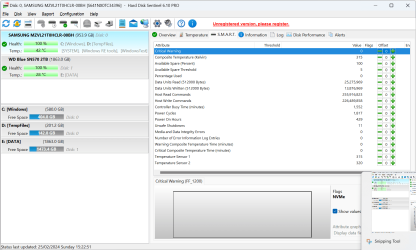
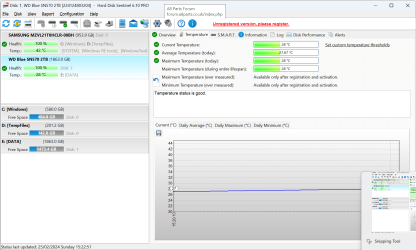
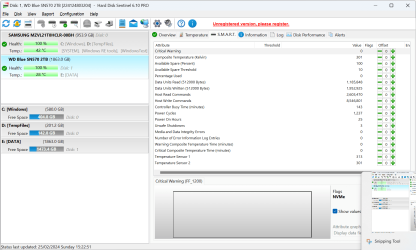
zbook - Results from #9 (HDD Sentinel) as follows. The 'Short Self-test' came back clear on both drives.
 

Attachments

  • Screenshot 2024-02-25 152356.png
    Screenshot 2024-02-25 152356.png
    66.9 KB · Views: 1
  • Screenshot 2024-02-25 152405.png
    Screenshot 2024-02-25 152405.png
    100 KB · Views: 1
  • Screenshot 2024-02-25 152412.png
    Screenshot 2024-02-25 152412.png
    95.3 KB · Views: 1
  • Screenshot 2024-02-25 152426.png
    Screenshot 2024-02-25 152426.png
    68.6 KB · Views: 1
  • Screenshot 2024-02-25 152433.png
    Screenshot 2024-02-25 152433.png
    103.3 KB · Views: 1
  • Screenshot 2024-02-25 152439.png
    Screenshot 2024-02-25 152439.png
    103.5 KB · Views: 1

My Computer My Computer

At a glance

Windows 11 Pro 25H2 (26200.8655)AMD Ryzen 7 5800H2 x 32GB Kingston Fury 4800MHzAMD Radeon RX 6600M
OS
Windows 11 Pro 25H2 (26200.8655)
Computer type
Laptop
Manufacturer/Model
HP Omen 16
CPU
AMD Ryzen 7 5800H
Memory
2 x 32GB Kingston Fury 4800MHz
Graphics Card(s)
AMD Radeon RX 6600M
Screen Resolution
2560 x 1440
Hard Drives
WD Blue 2TB
Samsung 1TB
Browser
Chrome

Latest Support Threads

Back
Top Bottom