Solved Fixing Win11 without reformat/reinstall?


See the prior post #37:

Asus video

Question Dump stack text
 

My Computer

System One

  • OS
    Windows 10
    Computer type
    Laptop
    Manufacturer/Model
    HP
    CPU
    Intel(R) Core(TM) i7-4800MQ CPU @ 2.70GHz
    Motherboard
    Product : 190A Version : KBC Version 94.56
    Memory
    16 GB Total: Manufacturer : Samsung MemoryType : DDR3 FormFactor : SODIMM Capacity : 8GB Speed : 1600
    Graphics Card(s)
    NVIDIA Quadro K3100M; Intel(R) HD Graphics 4600
    Sound Card
    IDT High Definition Audio CODEC; PNP Device ID HDAUDIO\FUNC_01&VEN_111D&DEV_76E0
    Hard Drives
    Model Hitachi HTS727575A9E364
    Antivirus
    Microsoft Defender
    Other Info
    Mobile Workstation
If you're able to perform recurrent startup repairs then you may be able to create a new srttrail.txt.

Do you mean Advanced startup (WinRE) from post 17? Every repair option from this screen fails except going to Command Prompt:

1767499528188.webp

Had you been able to get these files:

C:\windows\minidump
C:\windows\memory.dmp
setupdiag


See the prior edited thread.
c:\Windows\Minidump directory is empty.

c:\Windows\MEMORY.DMP is 5GB. Too big for an attachment here.

Where is setupdialog supposed to be? I have a 0 byte setuperr.log and a 641 byte setupact.log in c:\Windows:

1767500338900.webp
 

My Computers

System One System Two

  • OS
    Windows 11 Pro 25H2 (OS Build 26200.8524)
    Computer type
    Laptop
    Manufacturer/Model
    ASUS - ProArt PX13
    CPU
    AMD Ryzen AI 9 HX 370 w/Radeon 890M
    Motherboard
    AMI HN7306WU
    Memory
    32GB
    Graphics Card(s)
    NVIDIA GeForce RTX 4050 (and IGP Radeon 890M)
    Monitor(s) Displays
    external 24" Dell P2415Q
    Screen Resolution
    3840 x 2160 on external Dell, 2880 x 1800 on laptop screen
    Hard Drives
    1TB WD SSD
    Browser
    Vivaldi, Brave, Edge
    Antivirus
    Avast (free version)
  • Operating System
    Windows 11 Pro, 21H2 (Build 22000.376)
    Computer type
    Tablet
    Manufacturer/Model
    Surface Pro 6
    CPU
    i7-8650U
    Memory
    16 GB
    Graphics card(s)
    iGPU (Intel® UHD Graphics 620)
    Monitor(s) Displays
    Dell P2415Q
    Screen Resolution
    3840 x 2160 on external Dell, 2736 x 1824 on SP6 screen
    Hard Drives
    512GB PCIe Gen 3 x2 SSD
    Browser
    Vivaldi, Comodo Dragon, Edge
    Antivirus
    Avast (free edition)
Do you know were srtrail.txt would be? i.e. What directory/folder?

c:\windows\system32\logfiles\srt\srttrail.txt
%windir%\system32\logfiles\srt\srttrail.txt
srttrail.txt file attached

Timestamp is 8:18pm (CST) which I think was about the time the boot-up issue started?
 

Attachments

My Computers

System One System Two

  • OS
    Windows 11 Pro 25H2 (OS Build 26200.8524)
    Computer type
    Laptop
    Manufacturer/Model
    ASUS - ProArt PX13
    CPU
    AMD Ryzen AI 9 HX 370 w/Radeon 890M
    Motherboard
    AMI HN7306WU
    Memory
    32GB
    Graphics Card(s)
    NVIDIA GeForce RTX 4050 (and IGP Radeon 890M)
    Monitor(s) Displays
    external 24" Dell P2415Q
    Screen Resolution
    3840 x 2160 on external Dell, 2880 x 1800 on laptop screen
    Hard Drives
    1TB WD SSD
    Browser
    Vivaldi, Brave, Edge
    Antivirus
    Avast (free version)
  • Operating System
    Windows 11 Pro, 21H2 (Build 22000.376)
    Computer type
    Tablet
    Manufacturer/Model
    Surface Pro 6
    CPU
    i7-8650U
    Memory
    16 GB
    Graphics card(s)
    iGPU (Intel® UHD Graphics 620)
    Monitor(s) Displays
    Dell P2415Q
    Screen Resolution
    3840 x 2160 on external Dell, 2736 x 1824 on SP6 screen
    Hard Drives
    512GB PCIe Gen 3 x2 SSD
    Browser
    Vivaldi, Comodo Dragon, Edge
    Antivirus
    Avast (free edition)
Do you mean Advanced startup (WinRE) from post 17? Every repair option from this screen fails except going to Command Prompt:

View attachment 158830


c:\Windows\Minidump directory is empty.

c:\Windows\MEMORY.DMP is 5GB. Too big for an attachment here.

Where is setupdialog supposed to be? I have a 0 byte setuperr.log and a 641 byte setupact.log in c:\Windows:

View attachment 158832


Post #38 displayed setupdiag


Setupact.log may have information about what had caused the upgrade repair.


Please see the prior post questions on Dump stack text.


srttrail.txt:
 

My Computer

System One

  • OS
    Windows 10
    Computer type
    Laptop
    Manufacturer/Model
    HP
    CPU
    Intel(R) Core(TM) i7-4800MQ CPU @ 2.70GHz
    Motherboard
    Product : 190A Version : KBC Version 94.56
    Memory
    16 GB Total: Manufacturer : Samsung MemoryType : DDR3 FormFactor : SODIMM Capacity : 8GB Speed : 1600
    Graphics Card(s)
    NVIDIA Quadro K3100M; Intel(R) HD Graphics 4600
    Sound Card
    IDT High Definition Audio CODEC; PNP Device ID HDAUDIO\FUNC_01&VEN_111D&DEV_76E0
    Hard Drives
    Model Hitachi HTS727575A9E364
    Antivirus
    Microsoft Defender
    Other Info
    Mobile Workstation

My Computers

System One System Two

  • OS
    Windows 11 Pro 25H2 (OS Build 26200.8524)
    Computer type
    Laptop
    Manufacturer/Model
    ASUS - ProArt PX13
    CPU
    AMD Ryzen AI 9 HX 370 w/Radeon 890M
    Motherboard
    AMI HN7306WU
    Memory
    32GB
    Graphics Card(s)
    NVIDIA GeForce RTX 4050 (and IGP Radeon 890M)
    Monitor(s) Displays
    external 24" Dell P2415Q
    Screen Resolution
    3840 x 2160 on external Dell, 2880 x 1800 on laptop screen
    Hard Drives
    1TB WD SSD
    Browser
    Vivaldi, Brave, Edge
    Antivirus
    Avast (free version)
  • Operating System
    Windows 11 Pro, 21H2 (Build 22000.376)
    Computer type
    Tablet
    Manufacturer/Model
    Surface Pro 6
    CPU
    i7-8650U
    Memory
    16 GB
    Graphics card(s)
    iGPU (Intel® UHD Graphics 620)
    Monitor(s) Displays
    Dell P2415Q
    Screen Resolution
    3840 x 2160 on external Dell, 2736 x 1824 on SP6 screen
    Hard Drives
    512GB PCIe Gen 3 x2 SSD
    Browser
    Vivaldi, Comodo Dragon, Edge
    Antivirus
    Avast (free edition)

My Computers

System One System Two

  • OS
    Windows 11 Pro 25H2 (OS Build 26200.8524)
    Computer type
    Laptop
    Manufacturer/Model
    ASUS - ProArt PX13
    CPU
    AMD Ryzen AI 9 HX 370 w/Radeon 890M
    Motherboard
    AMI HN7306WU
    Memory
    32GB
    Graphics Card(s)
    NVIDIA GeForce RTX 4050 (and IGP Radeon 890M)
    Monitor(s) Displays
    external 24" Dell P2415Q
    Screen Resolution
    3840 x 2160 on external Dell, 2880 x 1800 on laptop screen
    Hard Drives
    1TB WD SSD
    Browser
    Vivaldi, Brave, Edge
    Antivirus
    Avast (free version)
  • Operating System
    Windows 11 Pro, 21H2 (Build 22000.376)
    Computer type
    Tablet
    Manufacturer/Model
    Surface Pro 6
    CPU
    i7-8650U
    Memory
    16 GB
    Graphics card(s)
    iGPU (Intel® UHD Graphics 620)
    Monitor(s) Displays
    Dell P2415Q
    Screen Resolution
    3840 x 2160 on external Dell, 2736 x 1824 on SP6 screen
    Hard Drives
    512GB PCIe Gen 3 x2 SSD
    Browser
    Vivaldi, Comodo Dragon, Edge
    Antivirus
    Avast (free edition)
Any new rows after moving the right scroll bar?
 

My Computer

System One

  • OS
    Windows 10
    Computer type
    Laptop
    Manufacturer/Model
    HP
    CPU
    Intel(R) Core(TM) i7-4800MQ CPU @ 2.70GHz
    Motherboard
    Product : 190A Version : KBC Version 94.56
    Memory
    16 GB Total: Manufacturer : Samsung MemoryType : DDR3 FormFactor : SODIMM Capacity : 8GB Speed : 1600
    Graphics Card(s)
    NVIDIA Quadro K3100M; Intel(R) HD Graphics 4600
    Sound Card
    IDT High Definition Audio CODEC; PNP Device ID HDAUDIO\FUNC_01&VEN_111D&DEV_76E0
    Hard Drives
    Model Hitachi HTS727575A9E364
    Antivirus
    Microsoft Defender
    Other Info
    Mobile Workstation
Had you been able to get these files:

C:\windows\minidump
C:\windows\memory.dmp
setupdiag
setupdiag is a directory off of c:\Windows\Logs\ and contains one file: setupdiagresults.xml, and it's attached to this message, but I get an error message when opening it in Edge or Vivaldi...

[edited to add: apparently I can't attach a .xml file to a message?]
 
Last edited:

My Computers

System One System Two

  • OS
    Windows 11 Pro 25H2 (OS Build 26200.8524)
    Computer type
    Laptop
    Manufacturer/Model
    ASUS - ProArt PX13
    CPU
    AMD Ryzen AI 9 HX 370 w/Radeon 890M
    Motherboard
    AMI HN7306WU
    Memory
    32GB
    Graphics Card(s)
    NVIDIA GeForce RTX 4050 (and IGP Radeon 890M)
    Monitor(s) Displays
    external 24" Dell P2415Q
    Screen Resolution
    3840 x 2160 on external Dell, 2880 x 1800 on laptop screen
    Hard Drives
    1TB WD SSD
    Browser
    Vivaldi, Brave, Edge
    Antivirus
    Avast (free version)
  • Operating System
    Windows 11 Pro, 21H2 (Build 22000.376)
    Computer type
    Tablet
    Manufacturer/Model
    Surface Pro 6
    CPU
    i7-8650U
    Memory
    16 GB
    Graphics card(s)
    iGPU (Intel® UHD Graphics 620)
    Monitor(s) Displays
    Dell P2415Q
    Screen Resolution
    3840 x 2160 on external Dell, 2736 x 1824 on SP6 screen
    Hard Drives
    512GB PCIe Gen 3 x2 SSD
    Browser
    Vivaldi, Comodo Dragon, Edge
    Antivirus
    Avast (free edition)
Any new rows after moving the right scroll bar?
Hoo boy, I must be getting tired. Totally missed that:

1767502675205.webp

What was it you wanted to check?

Advanced\SATA Configuration is "SATA Mode Selection: AHCI."
 

My Computers

System One System Two

  • OS
    Windows 11 Pro 25H2 (OS Build 26200.8524)
    Computer type
    Laptop
    Manufacturer/Model
    ASUS - ProArt PX13
    CPU
    AMD Ryzen AI 9 HX 370 w/Radeon 890M
    Motherboard
    AMI HN7306WU
    Memory
    32GB
    Graphics Card(s)
    NVIDIA GeForce RTX 4050 (and IGP Radeon 890M)
    Monitor(s) Displays
    external 24" Dell P2415Q
    Screen Resolution
    3840 x 2160 on external Dell, 2880 x 1800 on laptop screen
    Hard Drives
    1TB WD SSD
    Browser
    Vivaldi, Brave, Edge
    Antivirus
    Avast (free version)
  • Operating System
    Windows 11 Pro, 21H2 (Build 22000.376)
    Computer type
    Tablet
    Manufacturer/Model
    Surface Pro 6
    CPU
    i7-8650U
    Memory
    16 GB
    Graphics card(s)
    iGPU (Intel® UHD Graphics 620)
    Monitor(s) Displays
    Dell P2415Q
    Screen Resolution
    3840 x 2160 on external Dell, 2736 x 1824 on SP6 screen
    Hard Drives
    512GB PCIe Gen 3 x2 SSD
    Browser
    Vivaldi, Comodo Dragon, Edge
    Antivirus
    Avast (free edition)
Please display:
SATA
NVMe
 

My Computer

System One

  • OS
    Windows 10
    Computer type
    Laptop
    Manufacturer/Model
    HP
    CPU
    Intel(R) Core(TM) i7-4800MQ CPU @ 2.70GHz
    Motherboard
    Product : 190A Version : KBC Version 94.56
    Memory
    16 GB Total: Manufacturer : Samsung MemoryType : DDR3 FormFactor : SODIMM Capacity : 8GB Speed : 1600
    Graphics Card(s)
    NVIDIA Quadro K3100M; Intel(R) HD Graphics 4600
    Sound Card
    IDT High Definition Audio CODEC; PNP Device ID HDAUDIO\FUNC_01&VEN_111D&DEV_76E0
    Hard Drives
    Model Hitachi HTS727575A9E364
    Antivirus
    Microsoft Defender
    Other Info
    Mobile Workstation
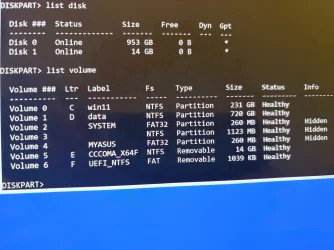
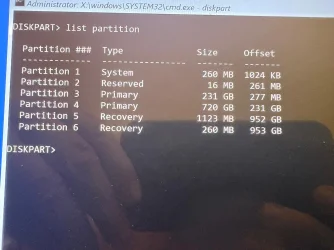
Open Windows RE > command prompt > type:

bcdedit
bcdedit | find "osdevice"
bootsect /nt60 all
bootrec /fixboot
diskpart
lis dis
lis vol
sel dis 0
det dis
lis par
sel dis 1
det dis
lis par

Post a share link.
 

My Computer

System One

  • OS
    Windows 10
    Computer type
    Laptop
    Manufacturer/Model
    HP
    CPU
    Intel(R) Core(TM) i7-4800MQ CPU @ 2.70GHz
    Motherboard
    Product : 190A Version : KBC Version 94.56
    Memory
    16 GB Total: Manufacturer : Samsung MemoryType : DDR3 FormFactor : SODIMM Capacity : 8GB Speed : 1600
    Graphics Card(s)
    NVIDIA Quadro K3100M; Intel(R) HD Graphics 4600
    Sound Card
    IDT High Definition Audio CODEC; PNP Device ID HDAUDIO\FUNC_01&VEN_111D&DEV_76E0
    Hard Drives
    Model Hitachi HTS727575A9E364
    Antivirus
    Microsoft Defender
    Other Info
    Mobile Workstation

My Computers

System One System Two

  • OS
    Windows 11 Pro 25H2 (OS Build 26200.8524)
    Computer type
    Laptop
    Manufacturer/Model
    ASUS - ProArt PX13
    CPU
    AMD Ryzen AI 9 HX 370 w/Radeon 890M
    Motherboard
    AMI HN7306WU
    Memory
    32GB
    Graphics Card(s)
    NVIDIA GeForce RTX 4050 (and IGP Radeon 890M)
    Monitor(s) Displays
    external 24" Dell P2415Q
    Screen Resolution
    3840 x 2160 on external Dell, 2880 x 1800 on laptop screen
    Hard Drives
    1TB WD SSD
    Browser
    Vivaldi, Brave, Edge
    Antivirus
    Avast (free version)
  • Operating System
    Windows 11 Pro, 21H2 (Build 22000.376)
    Computer type
    Tablet
    Manufacturer/Model
    Surface Pro 6
    CPU
    i7-8650U
    Memory
    16 GB
    Graphics card(s)
    iGPU (Intel® UHD Graphics 620)
    Monitor(s) Displays
    Dell P2415Q
    Screen Resolution
    3840 x 2160 on external Dell, 2736 x 1824 on SP6 screen
    Hard Drives
    512GB PCIe Gen 3 x2 SSD
    Browser
    Vivaldi, Comodo Dragon, Edge
    Antivirus
    Avast (free edition)
Open Windows RE > command prompt > type:

bcdedit

1767505531774.webp
1767505554684.webp
bcdedit | find "osdevice"
bootsect /nt60 all
bootrec /fixboot
diskpart
lis dis
lis vol
sel dis 0
det dis
lis par
sel dis 1
det dis
lis par

Post a share link.
Give me some time. This is going to take a while.

What's a share link?
 

My Computers

System One System Two

  • OS
    Windows 11 Pro 25H2 (OS Build 26200.8524)
    Computer type
    Laptop
    Manufacturer/Model
    ASUS - ProArt PX13
    CPU
    AMD Ryzen AI 9 HX 370 w/Radeon 890M
    Motherboard
    AMI HN7306WU
    Memory
    32GB
    Graphics Card(s)
    NVIDIA GeForce RTX 4050 (and IGP Radeon 890M)
    Monitor(s) Displays
    external 24" Dell P2415Q
    Screen Resolution
    3840 x 2160 on external Dell, 2880 x 1800 on laptop screen
    Hard Drives
    1TB WD SSD
    Browser
    Vivaldi, Brave, Edge
    Antivirus
    Avast (free version)
  • Operating System
    Windows 11 Pro, 21H2 (Build 22000.376)
    Computer type
    Tablet
    Manufacturer/Model
    Surface Pro 6
    CPU
    i7-8650U
    Memory
    16 GB
    Graphics card(s)
    iGPU (Intel® UHD Graphics 620)
    Monitor(s) Displays
    Dell P2415Q
    Screen Resolution
    3840 x 2160 on external Dell, 2736 x 1824 on SP6 screen
    Hard Drives
    512GB PCIe Gen 3 x2 SSD
    Browser
    Vivaldi, Comodo Dragon, Edge
    Antivirus
    Avast (free edition)
dropbox
google drive
GoFile.io

Also run Windows RE > post a share link
dism /image:c:\ /get-drivers /format:table
 

My Computer

System One

  • OS
    Windows 10
    Computer type
    Laptop
    Manufacturer/Model
    HP
    CPU
    Intel(R) Core(TM) i7-4800MQ CPU @ 2.70GHz
    Motherboard
    Product : 190A Version : KBC Version 94.56
    Memory
    16 GB Total: Manufacturer : Samsung MemoryType : DDR3 FormFactor : SODIMM Capacity : 8GB Speed : 1600
    Graphics Card(s)
    NVIDIA Quadro K3100M; Intel(R) HD Graphics 4600
    Sound Card
    IDT High Definition Audio CODEC; PNP Device ID HDAUDIO\FUNC_01&VEN_111D&DEV_76E0
    Hard Drives
    Model Hitachi HTS727575A9E364
    Antivirus
    Microsoft Defender
    Other Info
    Mobile Workstation

Attachments

  • 1767506281839.webp
    1767506281839.webp
    123.3 KB · Views: 1
Last edited:

My Computers

System One System Two

  • OS
    Windows 11 Pro 25H2 (OS Build 26200.8524)
    Computer type
    Laptop
    Manufacturer/Model
    ASUS - ProArt PX13
    CPU
    AMD Ryzen AI 9 HX 370 w/Radeon 890M
    Motherboard
    AMI HN7306WU
    Memory
    32GB
    Graphics Card(s)
    NVIDIA GeForce RTX 4050 (and IGP Radeon 890M)
    Monitor(s) Displays
    external 24" Dell P2415Q
    Screen Resolution
    3840 x 2160 on external Dell, 2880 x 1800 on laptop screen
    Hard Drives
    1TB WD SSD
    Browser
    Vivaldi, Brave, Edge
    Antivirus
    Avast (free version)
  • Operating System
    Windows 11 Pro, 21H2 (Build 22000.376)
    Computer type
    Tablet
    Manufacturer/Model
    Surface Pro 6
    CPU
    i7-8650U
    Memory
    16 GB
    Graphics card(s)
    iGPU (Intel® UHD Graphics 620)
    Monitor(s) Displays
    Dell P2415Q
    Screen Resolution
    3840 x 2160 on external Dell, 2736 x 1824 on SP6 screen
    Hard Drives
    512GB PCIe Gen 3 x2 SSD
    Browser
    Vivaldi, Comodo Dragon, Edge
    Antivirus
    Avast (free edition)

Attachments

  • 1767506773518.webp
    1767506773518.webp
    172.4 KB · Views: 1

My Computers

System One System Two

  • OS
    Windows 11 Pro 25H2 (OS Build 26200.8524)
    Computer type
    Laptop
    Manufacturer/Model
    ASUS - ProArt PX13
    CPU
    AMD Ryzen AI 9 HX 370 w/Radeon 890M
    Motherboard
    AMI HN7306WU
    Memory
    32GB
    Graphics Card(s)
    NVIDIA GeForce RTX 4050 (and IGP Radeon 890M)
    Monitor(s) Displays
    external 24" Dell P2415Q
    Screen Resolution
    3840 x 2160 on external Dell, 2880 x 1800 on laptop screen
    Hard Drives
    1TB WD SSD
    Browser
    Vivaldi, Brave, Edge
    Antivirus
    Avast (free version)
  • Operating System
    Windows 11 Pro, 21H2 (Build 22000.376)
    Computer type
    Tablet
    Manufacturer/Model
    Surface Pro 6
    CPU
    i7-8650U
    Memory
    16 GB
    Graphics card(s)
    iGPU (Intel® UHD Graphics 620)
    Monitor(s) Displays
    Dell P2415Q
    Screen Resolution
    3840 x 2160 on external Dell, 2736 x 1824 on SP6 screen
    Hard Drives
    512GB PCIe Gen 3 x2 SSD
    Browser
    Vivaldi, Comodo Dragon, Edge
    Antivirus
    Avast (free edition)
Open Windows RE > command prompt > type:

dism /image:c:\ /get-drivers /format:table
mountvol Y: /s
bcdboot C:\Windows /s Y: /f UEFI

Post share links.


My Computer

System One

  • OS
    Windows 10
    Computer type
    Laptop
    Manufacturer/Model
    HP
    CPU
    Intel(R) Core(TM) i7-4800MQ CPU @ 2.70GHz
    Motherboard
    Product : 190A Version : KBC Version 94.56
    Memory
    16 GB Total: Manufacturer : Samsung MemoryType : DDR3 FormFactor : SODIMM Capacity : 8GB Speed : 1600
    Graphics Card(s)
    NVIDIA Quadro K3100M; Intel(R) HD Graphics 4600
    Sound Card
    IDT High Definition Audio CODEC; PNP Device ID HDAUDIO\FUNC_01&VEN_111D&DEV_76E0
    Hard Drives
    Model Hitachi HTS727575A9E364
    Antivirus
    Microsoft Defender
    Other Info
    Mobile Workstation
dropbox
google drive
GoFile.io

Also run Windows RE > post a share link
dism /image:c:\ /get-drivers /format:table
What kind of a file am I supposed to create? All I can do is take photos with my camera...
 

My Computers

System One System Two

  • OS
    Windows 11 Pro 25H2 (OS Build 26200.8524)
    Computer type
    Laptop
    Manufacturer/Model
    ASUS - ProArt PX13
    CPU
    AMD Ryzen AI 9 HX 370 w/Radeon 890M
    Motherboard
    AMI HN7306WU
    Memory
    32GB
    Graphics Card(s)
    NVIDIA GeForce RTX 4050 (and IGP Radeon 890M)
    Monitor(s) Displays
    external 24" Dell P2415Q
    Screen Resolution
    3840 x 2160 on external Dell, 2880 x 1800 on laptop screen
    Hard Drives
    1TB WD SSD
    Browser
    Vivaldi, Brave, Edge
    Antivirus
    Avast (free version)
  • Operating System
    Windows 11 Pro, 21H2 (Build 22000.376)
    Computer type
    Tablet
    Manufacturer/Model
    Surface Pro 6
    CPU
    i7-8650U
    Memory
    16 GB
    Graphics card(s)
    iGPU (Intel® UHD Graphics 620)
    Monitor(s) Displays
    Dell P2415Q
    Screen Resolution
    3840 x 2160 on external Dell, 2736 x 1824 on SP6 screen
    Hard Drives
    512GB PCIe Gen 3 x2 SSD
    Browser
    Vivaldi, Comodo Dragon, Edge
    Antivirus
    Avast (free edition)
If you have a working windows computer and a flash drive with free space then on the problematic computer files can be saved to > notepad > flash drive > upload working computer


Otherwise continue to post images.
 

My Computer

System One

  • OS
    Windows 10
    Computer type
    Laptop
    Manufacturer/Model
    HP
    CPU
    Intel(R) Core(TM) i7-4800MQ CPU @ 2.70GHz
    Motherboard
    Product : 190A Version : KBC Version 94.56
    Memory
    16 GB Total: Manufacturer : Samsung MemoryType : DDR3 FormFactor : SODIMM Capacity : 8GB Speed : 1600
    Graphics Card(s)
    NVIDIA Quadro K3100M; Intel(R) HD Graphics 4600
    Sound Card
    IDT High Definition Audio CODEC; PNP Device ID HDAUDIO\FUNC_01&VEN_111D&DEV_76E0
    Hard Drives
    Model Hitachi HTS727575A9E364
    Antivirus
    Microsoft Defender
    Other Info
    Mobile Workstation
Please reboot > take pictures > post images error messages or codes
 

My Computer

System One

  • OS
    Windows 10
    Computer type
    Laptop
    Manufacturer/Model
    HP
    CPU
    Intel(R) Core(TM) i7-4800MQ CPU @ 2.70GHz
    Motherboard
    Product : 190A Version : KBC Version 94.56
    Memory
    16 GB Total: Manufacturer : Samsung MemoryType : DDR3 FormFactor : SODIMM Capacity : 8GB Speed : 1600
    Graphics Card(s)
    NVIDIA Quadro K3100M; Intel(R) HD Graphics 4600
    Sound Card
    IDT High Definition Audio CODEC; PNP Device ID HDAUDIO\FUNC_01&VEN_111D&DEV_76E0
    Hard Drives
    Model Hitachi HTS727575A9E364
    Antivirus
    Microsoft Defender
    Other Info
    Mobile Workstation
Back
Top Bottom