FlyOobe / Flyby11


Wolfzz

Well-known member
Guru
VIP
Local time
2:37 PM
Posts
1,938
Location
Perth Australia
OS
Windows 11 Pro

Flyoobe 1.31.531

Flyby11, now known as Flyoobe, is a lightweight patching utility built to remove the restrictions that Microsoft enforces during the installation of Windows 11, particularly version 24H2. By bypassing hardware checks such as TPM, Secure Boot, CPU generation, and RAM requirements, it enables installation on devices that would otherwise be blocked as unsupported. Designed for simplicity and efficiency, Flyby11 provides a minimal yet effective solution for enthusiasts, IT admins, and power users who want to deploy Windows 11 seamlessly across a wider range of systems.

Flyoobe also enhances the Windows Out-of-Box Experience (OOBE) by removing several limitations that typically appear during first-time setup. It can disable mandatory Microsoft account sign-in requirements, allowing the creation of a local account without workarounds. The tool also bypasses region and network checks, making it possible to complete setup even when internet access is unavailable or restricted.

Flyby11 (Flyoobe) key features:
  • Bypasses TPM requirement
  • Bypasses Secure Boot requirement
  • Bypasses unsupported CPU checks
  • Bypasses minimum RAM requirement
  • Removes other Windows 11 setup restrictions
  • Works with Windows 11 version 24H2
  • Lightweight and portable tool
  • No installation required
  • Simple interface and usage
What’s new in Flyoobe 1.31:
  • The OOBE installer has been improved and expanded. It’s now possible to manually search and install app packages directly from the Winget manifest using the new “Install custom Winget package” option. The feature is a bit more barebones than UnigetUI, but intentionally lightweight to keep Flyoobe fast and efficient as it covers everything essential.
  • Leveled up the Apps OOBE page (Debloater) and upgraded both the backend and UI for easier navigation, lightning-fast app removal, and smarter batch operations
  • The navigation system introduced in version 1.30 has been refined, especially the way menus expand, collapse, and guide the user through the interface.
  • The OOBE “Personalization” page has been visually polished for a cleaner and more consistent look.
  • A new log and activity manager has been added, accessible from the “More (⋯)” menu in the top-right corner. It allows you to monitor all Flyoobe operations and notifications in one place. Next to it, the Settings and About App buttons are now separated into their own dedicated menus
  • Cleaned up the Experience OOBE page and removed the "Issues" section, since it's now partially covered by the Extensions and Installer OOBE
  • The predecessor Flyby11, on which this app was originally based a few versions ago, is no longer being promoted here.
  • Everything Flyby11 could do is now fully integrated into Flyoobe, which I highly recommend switching to as its far more stable during the upgrade process. The Flyby11.exe still exists within Flyoobe as a native helper and background process.
  • However, if you prefer the slightly lighter version of Flyby11 (with fewer options), you can still find it in the previous FlyOOBE releases
  • Minor fixes and improvements
 
Last edited:

My Computer

System One

  • OS
    Windows 11 Pro
    Computer type
    PC/Desktop
    Manufacturer/Model
    Custom Build
    CPU
    Intel Core i9 12900KF
    Motherboard
    ASUS ROG Maximus Z690 Hero
    Memory
    Corsair 64GB DDR5 Vengeance C40 5200Mhz
    Graphics Card(s)
    ASUS GeForce RTX 3090 ROG Strix OC 24GB
    Sound Card
    OnBoard
    Monitor(s) Displays
    Acer Predator XB323UGP 32" QHD G-SYNC-C 144Hz 1MS IPS LED
    Screen Resolution
    2560 x 1440
    Hard Drives
    1x Samsung 980 Pro Series Gen4 250GB M.2 NVMe
    1x Samsung 980 Pro Series Gen4 500GB M.2 NVMe
    2x Samsung 980 Pro Series Gen4 2TB M.2 NVMe
    PSU
    Corsair AX1200i 1200W 80PLUS Titanium Modular
    Case
    Corsair 4000D Black Case w/ Tempered Glass Side Panel
    Cooling
    Noctua NH-U12A Chromax Black CPU Cooler, 4x Noctua 120mm Fans
    Keyboard
    Logitech MK545
    Mouse
    Logitech MX Master 3
    Internet Speed
    Fixed Wireless 150mbps/75mbps
    Browser
    Firefox
    Antivirus
    Kaspersky
    Other Info
    Thrustmaster TS-PC RACER
    Fanatec CSL Elite Pedals with the Load Cell Kit
    Yamaha Amp with Bose Speakers

Flyoobe 1.40.564

What’s new in 1.40

  • Completely reimagined the UpgradeOOBE / Flyby11 process (the Upgrade in FlyOOBE step) and expanded it with AutoPilot features.
    You can now either perform the upgrade manually in three simple steps (choose download source, import ISO, set advanced options) or just hit the new AutoPilot button
    , which guides you through the entire upgrade automatically. One click, one smooth upgrade. It's never been easier. 😉
  • The app name is now officially written as FlyOOBE for better clarity and trust
    Writing OOBE (Out-of-Box Experience) in uppercase makes the acronym instantly recognizable.
    "Fly" + "OOBE" looks balanced and professional, while Flyoobe tended to blur visually.
    With the capitalized version, more people naturally read it as "fly-oo-bee" and not flaiohb? 😆 The app binary now ships as FlyOOBE instead of Flyo.exe “You can spell the name freely. For marketing and external use we stick to FlyOOBE (OOBE in caps) to make the Out-of-Box Experience explicit
  • Winpilot is becoming part of FlyOOBE. I'm merging Winpilot into FlyOOBE as a native module and will keep iterating on it. Going forward, Winpilot will live as an integrated FlyOOBE module and continue to evolve.
    In short: FlyOOBE is Winpilot. Winpilot is FlyOOBE. Note: Windows Autopilot = Microsoft thing, not mine 😉
  • Minor fixes and improvements
 

My Computer

System One

  • OS
    Windows 11 Pro
    Computer type
    PC/Desktop
    Manufacturer/Model
    Custom Build
    CPU
    Intel Core i9 12900KF
    Motherboard
    ASUS ROG Maximus Z690 Hero
    Memory
    Corsair 64GB DDR5 Vengeance C40 5200Mhz
    Graphics Card(s)
    ASUS GeForce RTX 3090 ROG Strix OC 24GB
    Sound Card
    OnBoard
    Monitor(s) Displays
    Acer Predator XB323UGP 32" QHD G-SYNC-C 144Hz 1MS IPS LED
    Screen Resolution
    2560 x 1440
    Hard Drives
    1x Samsung 980 Pro Series Gen4 250GB M.2 NVMe
    1x Samsung 980 Pro Series Gen4 500GB M.2 NVMe
    2x Samsung 980 Pro Series Gen4 2TB M.2 NVMe
    PSU
    Corsair AX1200i 1200W 80PLUS Titanium Modular
    Case
    Corsair 4000D Black Case w/ Tempered Glass Side Panel
    Cooling
    Noctua NH-U12A Chromax Black CPU Cooler, 4x Noctua 120mm Fans
    Keyboard
    Logitech MK545
    Mouse
    Logitech MX Master 3
    Internet Speed
    Fixed Wireless 150mbps/75mbps
    Browser
    Firefox
    Antivirus
    Kaspersky
    Other Info
    Thrustmaster TS-PC RACER
    Fanatec CSL Elite Pedals with the Load Cell Kit
    Yamaha Amp with Bose Speakers
Sure. Using the words AutoPilot while calling your app FlyOOBE isn't deliberately confusing...
 

My Computer

System One

  • OS
    Windows 7
What is the difference when compared to rufus?
 

My Computer

System One

  • OS
    Windows 10
    Computer type
    PC/Desktop
    Manufacturer/Model
    Asus
FlyOobe is one those @builtbybel tools that has an identity crisis. It can:

- Add a selection of Windows tweaks. OK, I don't understand why an install/upgrade tool needs to do that.
- Backup your drivers using pnputil
- Run an in-place repair install for you (just launches it)
- Run Rufus for you
- Run MCT for you
- Mount the ISO image for you
- Run a Windows Reset for you
- Run Setup.exe from a mounted ISO for you
- Run Ventoy to create an USB drive for you
- Allows for FlyOobe extensions

Do you really need it? No, but it's goofy and entertaining with colorful bells & whistles. If you enjoy that experience. They're really not adding unique features that aren't provided elsewhere.

It's the only ISO installer which comes with a full color press kit!!
 

My Computer

System One

  • OS
    Windows 7

FlyOOBE 1.41​

What’s new in 1.41

  • Previously, the upgrade process (Flyby11) only worked on CPUs that passed the compatibility check. You can now delete CpuCheckNative.dll from the app folder to skip the CPU check - proceed at your own risk. The CPU check is always performed by FlyOOBE during the upgrade, but there are cases where skipping it is also supported.
  • The update check has been completely redesigned and moved to GitHub Pages. This setup will also allow to offer helpful guides and additional documentation there in the future
  • Fixed an issue where the Installer OOBE Page didn’t properly update the progress bar during app installation
  • Fixed a bug where the Apps OOBE Page (Debloater) didn’t correctly reflect progress while uninstalling apps
  • Several input dialog windows have been redesigned and improved-
  • Updated Bloatware and installer signatures
  • Minot fixes and improvements
 

My Computer

System One

  • OS
    Windows 11 Pro
    Computer type
    PC/Desktop
    Manufacturer/Model
    Custom Build
    CPU
    Intel Core i9 12900KF
    Motherboard
    ASUS ROG Maximus Z690 Hero
    Memory
    Corsair 64GB DDR5 Vengeance C40 5200Mhz
    Graphics Card(s)
    ASUS GeForce RTX 3090 ROG Strix OC 24GB
    Sound Card
    OnBoard
    Monitor(s) Displays
    Acer Predator XB323UGP 32" QHD G-SYNC-C 144Hz 1MS IPS LED
    Screen Resolution
    2560 x 1440
    Hard Drives
    1x Samsung 980 Pro Series Gen4 250GB M.2 NVMe
    1x Samsung 980 Pro Series Gen4 500GB M.2 NVMe
    2x Samsung 980 Pro Series Gen4 2TB M.2 NVMe
    PSU
    Corsair AX1200i 1200W 80PLUS Titanium Modular
    Case
    Corsair 4000D Black Case w/ Tempered Glass Side Panel
    Cooling
    Noctua NH-U12A Chromax Black CPU Cooler, 4x Noctua 120mm Fans
    Keyboard
    Logitech MK545
    Mouse
    Logitech MX Master 3
    Internet Speed
    Fixed Wireless 150mbps/75mbps
    Browser
    Firefox
    Antivirus
    Kaspersky
    Other Info
    Thrustmaster TS-PC RACER
    Fanatec CSL Elite Pedals with the Load Cell Kit
    Yamaha Amp with Bose Speakers

FlyOOBE 1.42​

What's new in 1.42

  • Split the upgrade tool out
    • FlyOOBE was tightly coupled with the upgrade/bypass tool Flyby11 (aka UpgradeOOBE). I’ve completely detached UpgradeOOBE (the Windows 10 → 11 migration assistant) from FlyOOBE
    • FlyOOBE now focuses 100% on customizing Windows 11
    • UpgradeOOBE (Flyby11) focuses only on upgrading to Windows 11 and runs as a standalone app
    • Safety-first separation: Due to false positives from security tools, this split was the obvious next step. If Microsoft or other AV solutions ever flag something again, only UpgradeOOBE can be affected. FlyOOBE will remain untouched. Currently there are no detections and FlyOOBE is not classified as harmful or a hack tool.
  • Community input
    • I’m running a poll about FlyOOBE’s future design direction.
    • Even though WinUI + Windows App SDK would blow up the app size (a WinUI build would be ~333× larger than the current WinForms app), I'll keep the poll open and continue iterating on the current version.
  • Modernization & polish
    • The current release got a UI refresh and new features
    • You can now pick a background image (see intro video)
    • Brand-new App Settings view
    • Improved update process
    • Reinstall OOBE page renamed to Advanced
    • Menu reorganized and simplified
  • UpgradeOOBE (Flyby11) specifics
    • Fully standalone, does not require FlyOOBE (and vice versa)
    • Depends only on CpuCheckNative.dll, which can be removed to allow upgrade attempts on unsupported CPUs (SSE4.2 still required in practice)
  • Under the hood
    • Large-scale code refactors
    • Prep work for more extensive OOBE pages
    • UI and navigation tweaks to make things cleaner and more intuitive
  • Future considerations
    • Possible FlyOOBE Lite edition that ships without the Extensions/Scripts folder by default — PowerShell scripts are commonly abused by fileless malware, so a light build could be safer for some users.
    • Potential option to download official scripts on demand from GitHub (like a mini store), rather than bundling them.
 

My Computer

System One

  • OS
    Windows 11 Pro
    Computer type
    PC/Desktop
    Manufacturer/Model
    Custom Build
    CPU
    Intel Core i9 12900KF
    Motherboard
    ASUS ROG Maximus Z690 Hero
    Memory
    Corsair 64GB DDR5 Vengeance C40 5200Mhz
    Graphics Card(s)
    ASUS GeForce RTX 3090 ROG Strix OC 24GB
    Sound Card
    OnBoard
    Monitor(s) Displays
    Acer Predator XB323UGP 32" QHD G-SYNC-C 144Hz 1MS IPS LED
    Screen Resolution
    2560 x 1440
    Hard Drives
    1x Samsung 980 Pro Series Gen4 250GB M.2 NVMe
    1x Samsung 980 Pro Series Gen4 500GB M.2 NVMe
    2x Samsung 980 Pro Series Gen4 2TB M.2 NVMe
    PSU
    Corsair AX1200i 1200W 80PLUS Titanium Modular
    Case
    Corsair 4000D Black Case w/ Tempered Glass Side Panel
    Cooling
    Noctua NH-U12A Chromax Black CPU Cooler, 4x Noctua 120mm Fans
    Keyboard
    Logitech MK545
    Mouse
    Logitech MX Master 3
    Internet Speed
    Fixed Wireless 150mbps/75mbps
    Browser
    Firefox
    Antivirus
    Kaspersky
    Other Info
    Thrustmaster TS-PC RACER
    Fanatec CSL Elite Pedals with the Load Cell Kit
    Yamaha Amp with Bose Speakers

FlyOOBE 1.50​

What's new in 1.50

  • Background rendering rework: The background selection feature introduced in the previous version has been reworked for better performance and stability.
    You can now select a background style via Settings > Pick background
    The old image-based handler was replaced with an internal gradient-based renderer.
    This removes issues with locked image files, unreleased GDI objects, and redundant event handlers.
    The update significantly reduces memory usage and improves rendering speed and overall UI responsiveness
  • Added support for script-driven input fields for the Extensions engine via # Input: true and # InputPlaceholder: Uses positional args for maximum compatibility, with optional console / silent / log host modes, status + progress, and a clean placeholder UX.
  • New Extension script: ViVeTool Bridge
    Wrapper to enable/disable/query hidden Windows features by ID. Supports comma-separated ID lists
  • New Extension script: Ninite Bulk Installer
    Builds the Ninite bundle URL from app slugs/names, downloads to Desktop (predictable filename), and launches Installer
  • New Extension script: Winget Bulk Installer
    Quickly installs multiple packages in one run (IDs separated by space/comma/newline)
  • Online Update Checker redesigned in full retro style, think Windows 2000 meets GameBoy 😆
 

My Computer

System One

  • OS
    Windows 11 Pro
    Computer type
    PC/Desktop
    Manufacturer/Model
    Custom Build
    CPU
    Intel Core i9 12900KF
    Motherboard
    ASUS ROG Maximus Z690 Hero
    Memory
    Corsair 64GB DDR5 Vengeance C40 5200Mhz
    Graphics Card(s)
    ASUS GeForce RTX 3090 ROG Strix OC 24GB
    Sound Card
    OnBoard
    Monitor(s) Displays
    Acer Predator XB323UGP 32" QHD G-SYNC-C 144Hz 1MS IPS LED
    Screen Resolution
    2560 x 1440
    Hard Drives
    1x Samsung 980 Pro Series Gen4 250GB M.2 NVMe
    1x Samsung 980 Pro Series Gen4 500GB M.2 NVMe
    2x Samsung 980 Pro Series Gen4 2TB M.2 NVMe
    PSU
    Corsair AX1200i 1200W 80PLUS Titanium Modular
    Case
    Corsair 4000D Black Case w/ Tempered Glass Side Panel
    Cooling
    Noctua NH-U12A Chromax Black CPU Cooler, 4x Noctua 120mm Fans
    Keyboard
    Logitech MK545
    Mouse
    Logitech MX Master 3
    Internet Speed
    Fixed Wireless 150mbps/75mbps
    Browser
    Firefox
    Antivirus
    Kaspersky
    Other Info
    Thrustmaster TS-PC RACER
    Fanatec CSL Elite Pedals with the Load Cell Kit
    Yamaha Amp with Bose Speakers

FlyOOBE (ex-Flyby11) 1.51​

What's new in 1.51

  • The extensions system has been improved again. The PowerShell-based engine has been expanded, and Flyby11 (UpgradeOOBE.exe) is now included as a native extension within FlyOOBE. On Windows 10 systems, a dedicated upgrade tile will appear on the home dashboard, allowing users to launch the Windows 11 upgrade workflow directly, with help instructions included
  • Extensions now also display their author or source, such as Flyby11 by Belim or the ViVeTool-bridge by Albacore. This adds transparency and helps users understand where each tool originates from. This feature will be expanded further in future updates, and developers who wish to share their own scripts or tools will be able to integrate them into FlyOOBE more easily.
  • Updated Extensions docs
  • This update improves FlyOOBE’s behavior on some high-resolution displays. Several UI scaling issues on 4K screens and Windows scaling levels above 200% have been fixed. Elements such as tiles, layout spacing, and navigation now scale consistently and no longer overlap.
 

My Computer

System One

  • OS
    Windows 11 Pro
    Computer type
    PC/Desktop
    Manufacturer/Model
    Custom Build
    CPU
    Intel Core i9 12900KF
    Motherboard
    ASUS ROG Maximus Z690 Hero
    Memory
    Corsair 64GB DDR5 Vengeance C40 5200Mhz
    Graphics Card(s)
    ASUS GeForce RTX 3090 ROG Strix OC 24GB
    Sound Card
    OnBoard
    Monitor(s) Displays
    Acer Predator XB323UGP 32" QHD G-SYNC-C 144Hz 1MS IPS LED
    Screen Resolution
    2560 x 1440
    Hard Drives
    1x Samsung 980 Pro Series Gen4 250GB M.2 NVMe
    1x Samsung 980 Pro Series Gen4 500GB M.2 NVMe
    2x Samsung 980 Pro Series Gen4 2TB M.2 NVMe
    PSU
    Corsair AX1200i 1200W 80PLUS Titanium Modular
    Case
    Corsair 4000D Black Case w/ Tempered Glass Side Panel
    Cooling
    Noctua NH-U12A Chromax Black CPU Cooler, 4x Noctua 120mm Fans
    Keyboard
    Logitech MK545
    Mouse
    Logitech MX Master 3
    Internet Speed
    Fixed Wireless 150mbps/75mbps
    Browser
    Firefox
    Antivirus
    Kaspersky
    Other Info
    Thrustmaster TS-PC RACER
    Fanatec CSL Elite Pedals with the Load Cell Kit
    Yamaha Amp with Bose Speakers
FlyOOBE 2.0 Final
Here is what is new in Flyoobe 2.0:
  • Modernized and simplified Interface: cleaner, more focused, and less overwhelming, making the initial setup much easier for new and casual users
  • Improved perfomance: The app is faster and more responsive, with reduced loading times and better resource management
  • Extensions engine completely reworked under the hood, now using a new internal filtering system with a category dropdown.
  • A brand-new app icon finally featuring a smart, friendly little bee inside 🐝 (I might've cheated a bit and let AI help with that one 😉)
  • Improved global search and refresh behavior for smoother control updates across views
  • New centralized Home dashboard that intelligently categorizes and recommends OOBE setup pages and extensions. Many items are now discoverable via keyword tags. (The first experimental Copilot integration has been temporarily removed while refined.)
  • Large-scale refactoring and transition to primarily asynchronous processing. Search, filtering, and loading operations no longer cause UI hangs
  • New back navigation system with a full stack-based history, allowing you to rewind through previous pages just like in a browser
  • Extensions shipped with the app can now also be uninstalled just like user-added ones
  • New native activity monitor logs system actions in real time and can provide contextual help for extensions (when supported).
  • Improved UI scaling and clarity on high-DPI displays
  • New indexing system for all OOBE pages and extensions based on metadata, allowing tools like Flyby11 to be found using simple keywords such as ESU, 10, or 11
  • New modern Copilot-inspired designs can now be found in the settings menu
  • Extensions.md has been updated accordingly
  • Dozens of Minor Fixes and Quality Improvements

 
Last edited:

My Computer

System One

  • OS
    Windows 11 Pro
    Computer type
    PC/Desktop
    Manufacturer/Model
    Custom Build
    CPU
    Intel Core i9 12900KF
    Motherboard
    ASUS ROG Maximus Z690 Hero
    Memory
    Corsair 64GB DDR5 Vengeance C40 5200Mhz
    Graphics Card(s)
    ASUS GeForce RTX 3090 ROG Strix OC 24GB
    Sound Card
    OnBoard
    Monitor(s) Displays
    Acer Predator XB323UGP 32" QHD G-SYNC-C 144Hz 1MS IPS LED
    Screen Resolution
    2560 x 1440
    Hard Drives
    1x Samsung 980 Pro Series Gen4 250GB M.2 NVMe
    1x Samsung 980 Pro Series Gen4 500GB M.2 NVMe
    2x Samsung 980 Pro Series Gen4 2TB M.2 NVMe
    PSU
    Corsair AX1200i 1200W 80PLUS Titanium Modular
    Case
    Corsair 4000D Black Case w/ Tempered Glass Side Panel
    Cooling
    Noctua NH-U12A Chromax Black CPU Cooler, 4x Noctua 120mm Fans
    Keyboard
    Logitech MK545
    Mouse
    Logitech MX Master 3
    Internet Speed
    Fixed Wireless 150mbps/75mbps
    Browser
    Firefox
    Antivirus
    Kaspersky
    Other Info
    Thrustmaster TS-PC RACER
    Fanatec CSL Elite Pedals with the Load Cell Kit
    Yamaha Amp with Bose Speakers

FlyOOBE 2.1.790


FlyOOBE key features:
  • Bypasses TPM requirement
  • Bypasses Secure Boot requirement
  • Bypasses unsupported CPU checks
  • Bypasses minimum RAM requirement
  • Removes other Windows 11 setup restrictions
  • Works with Windows 11 version 24H2
  • Lightweight and portable tool
  • No installation required
  • Simple interface and usage
What’s new in FlyOOBE 2.1:
  • The UI introduced back in version 2.0 has now been fully finalized and cleaned up once more. The main form hasn’t looked this polished in a long time. You can now seamlessly switch between the OOBE and Extensions. Going forward, the focus will shift even more toward Extensions, so a clean UI arrives at just the right time.
Other changes:
  • Several debloating/cleanup modules have been bumped to a higher tier and now dig up even more (and even deeper) AI-infused junk. Still no AgenticOS takeover in sight- but with Microsoft’s latest moves… let’s just say: enjoy the peace while it lasts ;)
  • Memory usage reduced even further
  • Fixed various DPI-related issues
  • Optimized extension loading
  • Extensive code refactoring
  • The full source code for v2 will be pushed soon
 

My Computer

System One

  • OS
    Windows 11 Pro
    Computer type
    PC/Desktop
    Manufacturer/Model
    Custom Build
    CPU
    Intel Core i9 12900KF
    Motherboard
    ASUS ROG Maximus Z690 Hero
    Memory
    Corsair 64GB DDR5 Vengeance C40 5200Mhz
    Graphics Card(s)
    ASUS GeForce RTX 3090 ROG Strix OC 24GB
    Sound Card
    OnBoard
    Monitor(s) Displays
    Acer Predator XB323UGP 32" QHD G-SYNC-C 144Hz 1MS IPS LED
    Screen Resolution
    2560 x 1440
    Hard Drives
    1x Samsung 980 Pro Series Gen4 250GB M.2 NVMe
    1x Samsung 980 Pro Series Gen4 500GB M.2 NVMe
    2x Samsung 980 Pro Series Gen4 2TB M.2 NVMe
    PSU
    Corsair AX1200i 1200W 80PLUS Titanium Modular
    Case
    Corsair 4000D Black Case w/ Tempered Glass Side Panel
    Cooling
    Noctua NH-U12A Chromax Black CPU Cooler, 4x Noctua 120mm Fans
    Keyboard
    Logitech MK545
    Mouse
    Logitech MX Master 3
    Internet Speed
    Fixed Wireless 150mbps/75mbps
    Browser
    Firefox
    Antivirus
    Kaspersky
    Other Info
    Thrustmaster TS-PC RACER
    Fanatec CSL Elite Pedals with the Load Cell Kit
    Yamaha Amp with Bose Speakers
No fancy tool is needed to upgrade and 'unsupported PC from Windows 10 to 11. Just download the Windows 11 ISO file for your region, mount it and run setup.exe /product server from an admin command prompt
 

My Computer

System One

  • OS
    Windows 11 Pro
    Computer type
    PC/Desktop
    Manufacturer/Model
    Self build
    CPU
    Core i7-13700K
    Motherboard
    Asus TUF Gaming Plus WiFi Z790
    Memory
    64 GB Kingston Fury Beast DDR5
    Graphics Card(s)
    Gigabyte GeForce RTX 2060 Super Gaming OC 8G
    Sound Card
    Realtek S1200A
    Monitor(s) Displays
    Viewsonic VP2770 & Dell (secondary)
    Screen Resolution
    2560 x 1440
    Hard Drives
    Kingston KC3000 2TB NVME SSD & SATA HDDs & SSD
    PSU
    EVGA SuperNova G2 850W
    Case
    Nanoxia Deep Silence 1
    Cooling
    Noctua NH-D14
    Keyboard
    Microsoft Digital Media Pro
    Mouse
    Logitech Wireless
    Internet Speed
    80 Mb / s
    Browser
    Chrome
    Antivirus
    Defender, Malwarebytes Free & AdwCleaner
I just went to upgrade my Dell XPS-8700 using FlyOOBE 2.1, and now the computer appears to be "bricked." It looks like the c:/ drive has had all the partitions removed, and the only place I can get to is the hardware configuration. I've tried booting off a USB drive, off the c: drive and off a DVD, but all I get is a drive read error message.
 

My Computer

System One

  • OS
    Windows 11
    Computer type
    PC/Desktop
    Manufacturer/Model
    Dell XPS 8950
    CPU
    12th Gen Intel(R) Core(TM) i7-12700K 3.60 GHz
    Memory
    32.0 GB
    Graphics Card(s)
    NVIDIA GeForce RTX 3090
    Monitor(s) Displays
    Dell U2723QE
That's not really possible. Removing Windows 11 requirements shouldn't do anything to your hardware.
 

My Computers

System One System Two

  • OS
    Windows 11 Education For 25H2
    Computer type
    Laptop
    Manufacturer/Model
    HP ZBook G2
    CPU
    Intel® Core i7 5500u
    Motherboard
    HP
    Memory
    8 GB
    Graphics Card(s)
    Intel HD Family Graphics 5500 AMD Firepro 4150M
    Sound Card
    Realtek High Audio
    Hard Drives
    1 TB SSD
    Mouse
    HP USB Mouse
    Antivirus
    Windows Defender
  • Operating System
    Windows 11 Pro For Workstations 25H2
    Computer type
    Laptop
    Manufacturer/Model
    HP Zbook G4
    CPU
    Xeon 1535m v6
    Motherboard
    HP
    Memory
    32 GB
    Graphics card(s)
    AMD Quadro Pro 4100
    Sound Card
    Bang and Olufson Audio
    Hard Drives
    1TB SSD
    Mouse
    HP USB Mouse
    Antivirus
    Windows Defender
The hardware seems to be working just fine. I can get into the setup in order to select the boot order, etc. The computer just can't find any operating system on any of the drives I try to boot from - it's behaving like FlyOOBE deleted the partitions off the C: drive.
 

My Computer

System One

  • OS
    Windows 11
    Computer type
    PC/Desktop
    Manufacturer/Model
    Dell XPS 8950
    CPU
    12th Gen Intel(R) Core(TM) i7-12700K 3.60 GHz
    Memory
    32.0 GB
    Graphics Card(s)
    NVIDIA GeForce RTX 3090
    Monitor(s) Displays
    Dell U2723QE
The hardware seems to be working just fine. I can get into the setup in order to select the boot order, etc. The computer just can't find any operating system on any of the drives I try to boot from - it's behaving like FlyOOBE deleted the partitions off the C: drive.
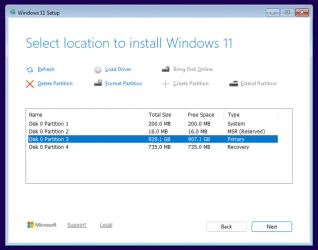
You can check whether your Windows partition still exists, and whether any files remain on it, by booting from a Windows 10 installation USB flash drive and opening the drive/partition selection screen (as shown in the image below).

A Windows 11 installation USB will also work, but since your system doesn’t meet the Windows 11 hardware requirements, you’ll need to create the USB using Rufus. When creating it, make sure to enable the option “Remove requirement for 4GB+ RAM, Secure Boot and TPM 2.0.”

How to boot from a Windows 10/11 USB on a Dell XPS-8700:

Turn on the system and immediately start tapping F12 repeatedly when the Dell logo appears. This opens the one-time boot menu, where you can select the USB flash drive or access BIOS setup and diagnostics.

Once you reach the Windows setup screen, you’ll be able to see all detected partitions and determine whether the system drive was altered or wiped.

Windows 11.webp
 

My Computers

System One System Two

  • OS
    Windows 11 Pro
    Computer type
    PC/Desktop
    CPU
    AMD Ryzen 9 9950X3D
    Motherboard
    ASRock B650E Taichi Lite
    Memory
    Kingston FURY Beast 64GB (2x32GB) DDR5 6000MT/s
    Graphics Card(s)
    ASUS TUF Gaming Radeon RX 9070 OC Edition 16GB GDDR6
    Hard Drives
    Solidigm P44 Pro 2TB M.2 NVMe SSD
  • Operating System
    Windows 11 Home
    Computer type
    Laptop
    Manufacturer/Model
    Lenovo Legion Pro 7i Gen 10 16"
    CPU
    Intel Core Ultra 9 275HX
    Memory
    64GB (2x 32GB) DDR5-6400
    Graphics card(s)
    NVIDIA GeForce RTX 5080 16GB GDDR7 Laptop GPU
    Hard Drives
    2x 1TB M.2 NVMe SSD (SK Hynix)

FlyOOBE 2.2.812​

  • Polished the action buttons with a modern compact mode: show icon + label by default, then switch to a sleek icon-only look while active (just like native Windows 11 apps)
  • Further sped up app startup and trimmed memory usage, not that it was ever a bloated XAML/WinUI monster like the Windows 11 Start menu or Explorer… but hey, every millisecond counts (yes, Im currently at war with Microsofts performance choices. Maybe one day theyll fix real performance issues instead of adding another glowing Copilot button. And honestly, it hurts watching an OS you once loved slowly being run into the ground by the wrong priorities and decisions; lets see how long it takes until they manage to chase me away to another shore as well)
  • Flyby11 is back in its classic outfit inside FlyOOBE: the UpgradeOOBE (Flyby11) UI has been simplified and brought closer to the original look, while the built-in Autopilot has been upgraded to guide you more autonomously through the Windows 11 installation
    Note: The ConsumerESU script from https://github.com/abbodi1406/ConsumerESU/
    is currently unavailable on GitHub (either removed or temporarily blocked, similar to a past false-positive suspension that also briefly affected my own profile)
 

My Computer

System One

  • OS
    Windows 11 Pro
    Computer type
    PC/Desktop
    Manufacturer/Model
    Custom Build
    CPU
    Intel Core i9 12900KF
    Motherboard
    ASUS ROG Maximus Z690 Hero
    Memory
    Corsair 64GB DDR5 Vengeance C40 5200Mhz
    Graphics Card(s)
    ASUS GeForce RTX 3090 ROG Strix OC 24GB
    Sound Card
    OnBoard
    Monitor(s) Displays
    Acer Predator XB323UGP 32" QHD G-SYNC-C 144Hz 1MS IPS LED
    Screen Resolution
    2560 x 1440
    Hard Drives
    1x Samsung 980 Pro Series Gen4 250GB M.2 NVMe
    1x Samsung 980 Pro Series Gen4 500GB M.2 NVMe
    2x Samsung 980 Pro Series Gen4 2TB M.2 NVMe
    PSU
    Corsair AX1200i 1200W 80PLUS Titanium Modular
    Case
    Corsair 4000D Black Case w/ Tempered Glass Side Panel
    Cooling
    Noctua NH-U12A Chromax Black CPU Cooler, 4x Noctua 120mm Fans
    Keyboard
    Logitech MK545
    Mouse
    Logitech MX Master 3
    Internet Speed
    Fixed Wireless 150mbps/75mbps
    Browser
    Firefox
    Antivirus
    Kaspersky
    Other Info
    Thrustmaster TS-PC RACER
    Fanatec CSL Elite Pedals with the Load Cell Kit
    Yamaha Amp with Bose Speakers
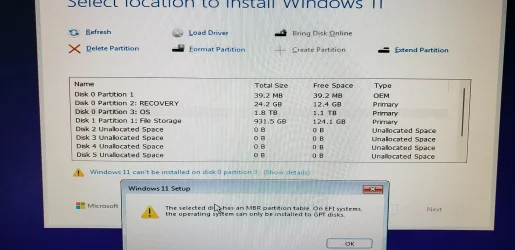
After a lot of jerking around and making changes in the setup and bios I was finally able to get to an installation screen. And then I get this.

What now?

The install is also asking for a license number for Win-11. Do I use the one from the previously installed Win-10, or what?
 

Attachments

  • 20251129_130541.webp
    20251129_130541.webp
    466.8 KB · Views: 3

My Computer

System One

  • OS
    Windows 11
    Computer type
    PC/Desktop
    Manufacturer/Model
    Dell XPS 8950
    CPU
    12th Gen Intel(R) Core(TM) i7-12700K 3.60 GHz
    Memory
    32.0 GB
    Graphics Card(s)
    NVIDIA GeForce RTX 3090
    Monitor(s) Displays
    Dell U2723QE
After a lot of jerking around and making changes in the setup and bios I was finally able to get to an installation screen. And then I get this
The selected disk has an MBR partition table. On EFI systems, the operating system can only be installed to GPT disks.

This error message means that you booted the USB in UEFI mode, but the disk is partitioned using MBR. In other words, you cannot install Windows because the boot mode does not match the disk’s partition style. If you want to perform a clean install, delete all partitions until only one ‘Unallocated Space’ entry remains. The error message will disappear, and you can then select Next.

Installing with UEFI / GPT

  1. Boot the USB in UEFI mode (in the boot menu, select your USB with the UEFI prefix).
  2. Delete all partitions until only one Unallocated Space entry remains, then select Next.
  3. Setup detects that the system was booted in UEFI mode, reformats the drive using the GPT partition style, and begins installation.

Installing with BIOS / MBR

  1. Boot the USB in BIOS mode (in the boot menu, select your USB without the UEFI prefix).
  2. Delete all partitions until only one Unallocated Space entry remains, then select Next.
  3. Setup detects that the system was booted in BIOS mode, reformats the drive using the MBR partition style, and begins installation.

After Windows is installed, the computer will automatically boot using the same mode it was installed with.
 

My Computers

System One System Two

  • OS
    Windows 11 Pro
    Computer type
    PC/Desktop
    CPU
    AMD Ryzen 9 9950X3D
    Motherboard
    ASRock B650E Taichi Lite
    Memory
    Kingston FURY Beast 64GB (2x32GB) DDR5 6000MT/s
    Graphics Card(s)
    ASUS TUF Gaming Radeon RX 9070 OC Edition 16GB GDDR6
    Hard Drives
    Solidigm P44 Pro 2TB M.2 NVMe SSD
  • Operating System
    Windows 11 Home
    Computer type
    Laptop
    Manufacturer/Model
    Lenovo Legion Pro 7i Gen 10 16"
    CPU
    Intel Core Ultra 9 275HX
    Memory
    64GB (2x 32GB) DDR5-6400
    Graphics card(s)
    NVIDIA GeForce RTX 5080 16GB GDDR7 Laptop GPU
    Hard Drives
    2x 1TB M.2 NVMe SSD (SK Hynix)

FlyOOBE 2.3.833​


My Computer

System One

  • OS
    Windows 11 Pro
    Computer type
    PC/Desktop
    Manufacturer/Model
    Custom Build
    CPU
    Intel Core i9 12900KF
    Motherboard
    ASUS ROG Maximus Z690 Hero
    Memory
    Corsair 64GB DDR5 Vengeance C40 5200Mhz
    Graphics Card(s)
    ASUS GeForce RTX 3090 ROG Strix OC 24GB
    Sound Card
    OnBoard
    Monitor(s) Displays
    Acer Predator XB323UGP 32" QHD G-SYNC-C 144Hz 1MS IPS LED
    Screen Resolution
    2560 x 1440
    Hard Drives
    1x Samsung 980 Pro Series Gen4 250GB M.2 NVMe
    1x Samsung 980 Pro Series Gen4 500GB M.2 NVMe
    2x Samsung 980 Pro Series Gen4 2TB M.2 NVMe
    PSU
    Corsair AX1200i 1200W 80PLUS Titanium Modular
    Case
    Corsair 4000D Black Case w/ Tempered Glass Side Panel
    Cooling
    Noctua NH-U12A Chromax Black CPU Cooler, 4x Noctua 120mm Fans
    Keyboard
    Logitech MK545
    Mouse
    Logitech MX Master 3
    Internet Speed
    Fixed Wireless 150mbps/75mbps
    Browser
    Firefox
    Antivirus
    Kaspersky
    Other Info
    Thrustmaster TS-PC RACER
    Fanatec CSL Elite Pedals with the Load Cell Kit
    Yamaha Amp with Bose Speakers
Back
Top Bottom