Has MS Caught on with Flyoobe?


sunclad

New member
Local time
3:48 AM
Posts
3
Location
Massachusetts
OS
Windows 11
So a few months back I used Flyoobe to update an older Lenovo Thinkpad, model T420. Windows 11 took OK and it installed version 24H2 which at the time seemed fine. I only use this as a back up and only recently started to use it regularly once again while working in a remote office. I leave my primary system at home.

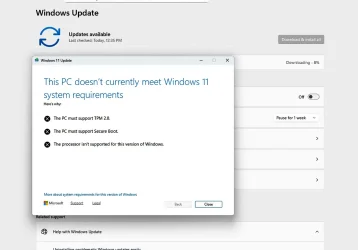
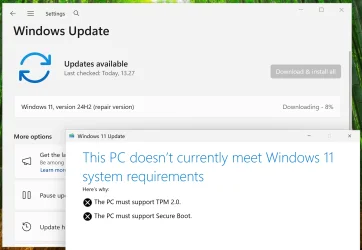
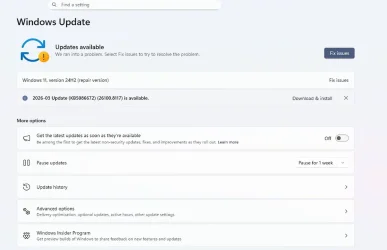
On a check I decided to see if there were any Windows Updates to be installed and I was confronted with a KB5086672 (26100.8117) download. This is a March 2026 update that a lot of systems took. MY home system (Win 11 25H2) took it with no issues. I then moved to download it to the Lenovo T420 and the system popped up that I do not have the TPM and it refused to allow the update to be installed. It seems that Microsoft built in a TPM checker with this update. See attached images 1 and 2.

I am wondering if anyone else has had this show up that used Fly to install Win 11? It was somewhat expected that MS might eventually catch on with Flyoobe. Is this the bellwether?

Now, more recently I updated a Lenovo H30 desktop to Windows 11 but the ISO I used with Fly was for 25H2. So far no warnings but this install was done within the last 48 hrs so I have the latest 25H2 on board.

So the question is, if MS if blocking this now would downloading the most recent ISO be the course to follow now for my trusty T420, or might that get blocked as well at some point?

Is there a specific Flyoobe sub for this or a forum for discussion elsewhere?

ThanksWindow1.webpWindow2.webp
 

My Computer My Computer

At a glance

Windows 11
OS
Windows 11
Computer type
Laptop
Manufacturer/Model
Acer
you can use a Rufus made USB stick with Windows on
and then do the in place repair using the setup.exe within the USB stick.

also have you updated your secure boot keys?
this maybe of help if you need to.

best of luck Steve ..
 

My Computers My Computers

  • At a glance

    Debian 13 KDE .. Windows 11 HomeRyzen 7 5825u64GB DDR4 3200Ryzen 7 5825u
    OS
    Debian 13 KDE .. Windows 11 Home
    Computer type
    PC/Desktop
    Manufacturer/Model
    HP 24" AiO
    CPU
    Ryzen 7 5825u
    Motherboard
    HP
    Memory
    64GB DDR4 3200
    Graphics Card(s)
    Ryzen 7 5825u
    Sound Card
    RealTek
    Monitor(s) Displays
    24" HP AiO
    Screen Resolution
    1920 x 1080 @60 Hz
    Hard Drives
    1TB WD Blue SN580 M2 SSD Partitioned.
    2x 1TB USB HDD External Backup/Storage.
    PSU
    90W external power brick
    Case
    24" All in One
    Cooling
    Default Air Cooling
    Keyboard
    HP WiFi UK extended
    Mouse
    HP WiFi 3 Button
    Internet Speed
    1GB full fibre
    Browser
    Edge & Firefox
    Antivirus
    AVG Internet Security/Windows Defender
    Other Info
    Mainly Open Source Software
  • At a glance

    Ubuntu 22.04.5 LTSi5 7200u16GB DDR4Intel
    Operating System
    Ubuntu 22.04.5 LTS
    Computer type
    Laptop
    Manufacturer/Model
    Dell 13" Latitude 2017
    CPU
    i5 7200u
    Motherboard
    Dell
    Memory
    16GB DDR4
    Graphics card(s)
    Intel
    Sound Card
    Intel
    Monitor(s) Displays
    13" Dell Laptop
    Hard Drives
    250GB Crucial 2.5" SSD
    Mouse
    Generic WiFi 3 button
    Internet Speed
    WiFi only
    Browser
    Firefox
    Antivirus
    ClamAV TK
    Other Info
    Mainly Open Source Software
It was somewhat expected that MS might eventually catch on with Flyoobe. Is this the bellwether?
Rufus has been around a lot longer and it's obvious MS couldn't care less. Indeed, as fast as MS introduce another hurdle, Rufus tweaks itself and all continues on its merry way.

For Rufus, it's almost as if Windows has become open-source software

If this FlyOOBE thing is not working, it's probably because it hasn't been updated to workaround whatever was the latest MS Windows security machination
 

My Computers My Computers

  • At a glance

    Windows 11 2xH2 (latest update ... forever anal)Intel i5-124008GBNVIDIA GeForce GT730
    OS
    Windows 11 2xH2 (latest update ... forever anal)
    Computer type
    PC/Desktop
    Manufacturer/Model
    HP Slim S01
    CPU
    Intel i5-12400
    Memory
    8GB
    Graphics Card(s)
    NVIDIA GeForce GT730
    Sound Card
    OOBE
    Monitor(s) Displays
    Acer 32"
    Screen Resolution
    1920x1080
    Hard Drives
    512GB KIOXIA NVMe
    1TB SATA SSD
    PSU
    OOBE
    Case
    OOBE
    Cooling
    OOBE
    Keyboard
    BT
    Mouse
    BT
    Browser
    Brave FFox Chrome Opera
    Antivirus
    KIS
  • At a glance

    Windows 11 Pro 2xH2 (latest update ... 4ever ...i7-1165G7 @ 2.80GHzIntel Iris Xe Graphics
    Operating System
    Windows 11 Pro 2xH2 (latest update ... 4ever anal)
    Computer type
    Laptop
    Manufacturer/Model
    HP Pavillion 15
    CPU
    i7-1165G7 @ 2.80GHz
    Graphics card(s)
    Intel Iris Xe Graphics
    Hard Drives
    Samsung NVMe 512GB
    + numerous/multiple SSD Type C USB enclosures
    Internet Speed
    NBN FTTN 50
    Browser
    Brave
    Antivirus
    KIS
It seems that Microsoft built in a TPM checker with this update. See attached images 1 and 2.
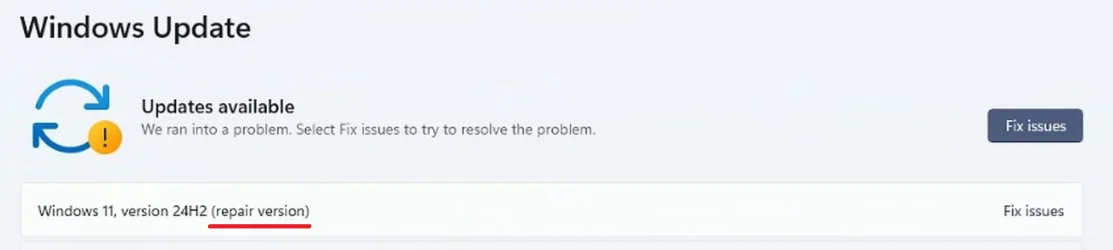
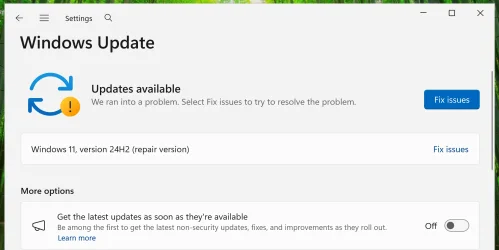
If what you clicked was the "Fix issues" button, then you're not getting a cumulative update. You're getting a set of repair files to fix your Windows installation. That would be the reason for the system compliance check.
 

My Computer My Computer

At a glance

Windows 11 Pro 25H212th Gen Core i7-1260P64 GB Micron PC4-25600Intel Iris Xe Graphics
OS
Windows 11 Pro 25H2
Computer type
PC/Desktop
Manufacturer/Model
Intel NUC12WSHi7
CPU
12th Gen Core i7-1260P
Motherboard
NUC12WSBi7
Memory
64 GB Micron PC4-25600
Graphics Card(s)
Intel Iris Xe Graphics
Sound Card
on-board Realtek HD Audio
Monitor(s) Displays
Dell U3219Q
Screen Resolution
3840 x 2160
Hard Drives
Samsung SSD 990 PRO 1TB
Crucial MX500 2 TB
Antivirus
Microsoft Defender
Yes, I am getting that "Fix Issues" button and that is the result. So it appears I may have to go the full installation route again which will hopefully work. That will be a weekend project however. The system is in place in usage by me and one other.
 

My Computer My Computer

At a glance

Windows 11
OS
Windows 11
Computer type
Laptop
Manufacturer/Model
Acer
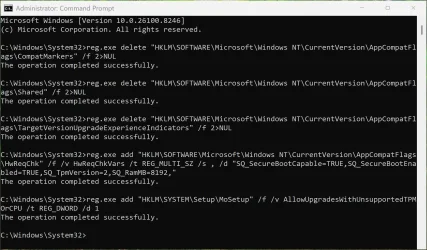
You should first try this command as Admin, and then re-run Windows Update.
It might prevent the update check.
Code:
reg add HKLM\System\Setup\MoSetup /v AllowUpgradesWithUnsupportedTPMOrCPU /t REG_DWORD /d 1 /f
 

My Computer My Computer

At a glance

Windows 7
OS
Windows 7
repair version.webp

Your screenshot shows "Windows 11, version 24H2 (repair version)." The installation fails because the system does not meet Windows 11 hardware requirements, which the installer verifies before proceeding.

How to fix it:

To perform a repair install on a system that doesn't meet Windows 11 system requirements, you will need to perform option three here first, then do the steps in an option in this tutorial below.

Contents
  • Option One: Repair Install Windows 11 using Windows Update
  • Option Two: Repair Install Windows 11 using ISO or USB Installation Media


I have not tested that registry tweak myself; in my opinion, the easiest way to bypass the system requirements is as follows:

- Mount (open) the Windows 11 ISO file. It will appear as a virtual drive, allowing you to access its files as if it were a physical disc.
- Run the following command, replacing "X" with the drive letter of the mounted ISO file:

X:\setup.exe /product server
 

My Computers My Computers

  • At a glance

    Windows 11 ProAMD Ryzen 9 9950X3DKingston FURY Beast 64GB (2x32GB) DDR5 6000MT/sASUS TUF Gaming Radeon RX 9070 OC Edition 16G...
    OS
    Windows 11 Pro
    Computer type
    PC/Desktop
    CPU
    AMD Ryzen 9 9950X3D
    Motherboard
    ASRock B650E Taichi Lite
    Memory
    Kingston FURY Beast 64GB (2x32GB) DDR5 6000MT/s
    Graphics Card(s)
    ASUS TUF Gaming Radeon RX 9070 OC Edition 16GB GDDR6
    Hard Drives
    Solidigm P44 Pro 2TB M.2 NVMe SSD
  • At a glance

    Windows 11 HomeIntel Core Ultra 9 275HX64GB (2x 32GB) DDR5-6400NVIDIA GeForce RTX 5080 16GB GDDR7 Laptop GPU
    Operating System
    Windows 11 Home
    Computer type
    Laptop
    Manufacturer/Model
    Lenovo Legion Pro 7i Gen 10 16"
    CPU
    Intel Core Ultra 9 275HX
    Memory
    64GB (2x 32GB) DDR5-6400
    Graphics card(s)
    NVIDIA GeForce RTX 5080 16GB GDDR7 Laptop GPU
    Hard Drives
    2x 1TB M.2 NVMe SSD (SK Hynix)
I have not tested that registry tweak myself.

I tested this in a virtual machine. "Fix problems using Windows Update" works on an unsupported system if you first run the commands mentioned in the link below. Note that these commands only work in an elevated Command Prompt (Administrator).

To perform a repair install on a system that doesn't meet Windows 11 system requirements, you will need to perform option three here first, then do the steps in an option in this tutorial below.

Option One: Repair Install Windows 11 using Windows Update

1.webp

2.webp

3.webp

"Fix problems using Windows Update" reinstalls the exact version and build of Windows currently installed, not just the base feature version. It does not remove any files, settings, or apps.

Edit:

Use Option Two in the link below to perform a repair install (in-place upgrade) to a newer feature update. To bypass the system requirements check on an unsupported system, you can, for example, use the command X:\setup.exe /product server (replace “X” with the drive letter of the Windows 11 USB flash drive or mounted ISO file). Alternatively, you can use a Rufus-created Windows 11 USB flash drive.

Option Two: Repair Install Windows 11 using ISO or USB Installation Media
 
Last edited:

My Computers My Computers

  • At a glance

    Windows 11 ProAMD Ryzen 9 9950X3DKingston FURY Beast 64GB (2x32GB) DDR5 6000MT/sASUS TUF Gaming Radeon RX 9070 OC Edition 16G...
    OS
    Windows 11 Pro
    Computer type
    PC/Desktop
    CPU
    AMD Ryzen 9 9950X3D
    Motherboard
    ASRock B650E Taichi Lite
    Memory
    Kingston FURY Beast 64GB (2x32GB) DDR5 6000MT/s
    Graphics Card(s)
    ASUS TUF Gaming Radeon RX 9070 OC Edition 16GB GDDR6
    Hard Drives
    Solidigm P44 Pro 2TB M.2 NVMe SSD
  • At a glance

    Windows 11 HomeIntel Core Ultra 9 275HX64GB (2x 32GB) DDR5-6400NVIDIA GeForce RTX 5080 16GB GDDR7 Laptop GPU
    Operating System
    Windows 11 Home
    Computer type
    Laptop
    Manufacturer/Model
    Lenovo Legion Pro 7i Gen 10 16"
    CPU
    Intel Core Ultra 9 275HX
    Memory
    64GB (2x 32GB) DDR5-6400
    Graphics card(s)
    NVIDIA GeForce RTX 5080 16GB GDDR7 Laptop GPU
    Hard Drives
    2x 1TB M.2 NVMe SSD (SK Hynix)
Thanks to all. The system is in daily usage right now and is working fine for now. In this instance it appears that I will need to run FLY again and gat a fresh copy of the ISO to get passed this "Fix" issue.

Thanks much.
 

My Computer My Computer

At a glance

Windows 11
OS
Windows 11
Computer type
Laptop
Manufacturer/Model
Acer

Latest Support Threads

Back
Top Bottom