Folder Options settings in the View tab


Pnokio

Well-known member
Member
Local time
6:04 PM
Posts
354
Location
Scotland UK
OS
Windows 11 Home 25H2 64-Bit
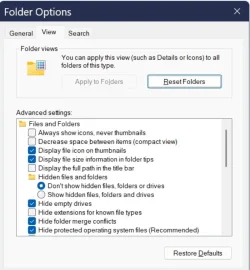
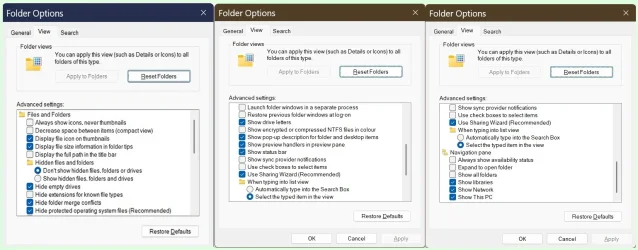
Cheers Shawn, now all I need to find is the Folder Options settings in the View tab. Normally I set it to use a single click.
 

My Computer

System One

  • OS
    Windows 11 Home 25H2 64-Bit
    Computer type
    Laptop
    Manufacturer/Model
    asus f515ja
    CPU
    Intel(R) Core(TM) i5-1035G1 CPU @ 1.00GHz 1.19 GHz
    Motherboard
    ASUSTeK COMPUTER INC. X515JA (U3E1)
    Memory
    8.00GB HDD
    Graphics Card(s)
    Standard Monitor on Intel UHD Graphics
    Sound Card
    Realtek HDA
    Screen Resolution
    1366 x 768 x 60
    Hard Drives
    1HDD 2 Partitions
    Mouse
    Logitech Cordless
    Internet Speed
    38mbps
    Browser
    Chrome+FF
    Antivirus
    Malwarebytes (Premium)
    Other Info
    When I find it.
Cheers Shawn, now all I need to find is the Folder Options settings in the View tab. Normally I set it to use a single click.

This?


My Computers

System One System Two

  • OS
    Windows 11 Pro for Workstations
    Computer type
    PC/Desktop
    Manufacturer/Model
    Custom self build
    CPU
    Intel i7-8700K 5 GHz
    Motherboard
    ASUS ROG Maximus XI Formula Z390
    Memory
    64 GB (4x16GB) G.SKILL TridentZ RGB DDR4 3600 MHz (F4-3600C18D-32GTZR)
    Graphics Card(s)
    ASUS ROG-STRIX-GTX1080TI-O11G-GAMING (11GB GDDR5X)
    Sound Card
    Integrated Digital Audio (S/PDIF)
    Monitor(s) Displays
    2 x Samsung Odyssey G75 27"
    Screen Resolution
    2560x1440
    Hard Drives
    1TB Samsung 990 PRO M.2,
    4TB Samsung 990 PRO M.2,
    TerraMaster F8 SSD Plus NAS
    PSU
    Seasonic Prime Titanium 850W
    Case
    Thermaltake Core P3 wall mounted
    Cooling
    Corsair Hydro H115i
    Keyboard
    Amazon Basics Wired Full Keyboard MD005
    Mouse
    Logitech MX Master 4
    Internet Speed
    2 Gbps Download and 100 Mbps Upload
    Browser
    Chrome and Edge
    Antivirus
    Microsoft Defender
    Other Info
    Logitech Z625 speaker system,
    Logitech BRIO 4K Pro webcam,
    HP Color LaserJet Pro MFP M477fdn,
    CyberPower CP1500PFCLCD
    Galaxy S23 Plus phone
  • Operating System
    Windows 11 Pro
    Computer type
    Laptop
    Manufacturer/Model
    Surface Laptop 7 Copilot+ PC
    CPU
    Snapdragon X Elite (12 core) 3.42 GHz
    Memory
    16 GB LPDDR5x-7467 MHz
    Monitor(s) Displays
    15" HDR
    Screen Resolution
    2496 x 1664
    Hard Drives
    1 TB SSD
    Internet Speed
    Wi-Fi 7 and Bluetooth 5.4
    Browser
    Chrome and Edge
    Antivirus
    Microsoft Defender
This?

You have misunderstood my request. I have used Single click to open for years, its the other options on the View tab settings i'm lookng for.
 

My Computer

System One

  • OS
    Windows 11 Home 25H2 64-Bit
    Computer type
    Laptop
    Manufacturer/Model
    asus f515ja
    CPU
    Intel(R) Core(TM) i5-1035G1 CPU @ 1.00GHz 1.19 GHz
    Motherboard
    ASUSTeK COMPUTER INC. X515JA (U3E1)
    Memory
    8.00GB HDD
    Graphics Card(s)
    Standard Monitor on Intel UHD Graphics
    Sound Card
    Realtek HDA
    Screen Resolution
    1366 x 768 x 60
    Hard Drives
    1HDD 2 Partitions
    Mouse
    Logitech Cordless
    Internet Speed
    38mbps
    Browser
    Chrome+FF
    Antivirus
    Malwarebytes (Premium)
    Other Info
    When I find it.
Is the View tab not there in Folder Options?

Which specific settings are you looking for?
 

My Computers

System One System Two

  • OS
    Windows 11 Pro for Workstations
    Computer type
    PC/Desktop
    Manufacturer/Model
    Custom self build
    CPU
    Intel i7-8700K 5 GHz
    Motherboard
    ASUS ROG Maximus XI Formula Z390
    Memory
    64 GB (4x16GB) G.SKILL TridentZ RGB DDR4 3600 MHz (F4-3600C18D-32GTZR)
    Graphics Card(s)
    ASUS ROG-STRIX-GTX1080TI-O11G-GAMING (11GB GDDR5X)
    Sound Card
    Integrated Digital Audio (S/PDIF)
    Monitor(s) Displays
    2 x Samsung Odyssey G75 27"
    Screen Resolution
    2560x1440
    Hard Drives
    1TB Samsung 990 PRO M.2,
    4TB Samsung 990 PRO M.2,
    TerraMaster F8 SSD Plus NAS
    PSU
    Seasonic Prime Titanium 850W
    Case
    Thermaltake Core P3 wall mounted
    Cooling
    Corsair Hydro H115i
    Keyboard
    Amazon Basics Wired Full Keyboard MD005
    Mouse
    Logitech MX Master 4
    Internet Speed
    2 Gbps Download and 100 Mbps Upload
    Browser
    Chrome and Edge
    Antivirus
    Microsoft Defender
    Other Info
    Logitech Z625 speaker system,
    Logitech BRIO 4K Pro webcam,
    HP Color LaserJet Pro MFP M477fdn,
    CyberPower CP1500PFCLCD
    Galaxy S23 Plus phone
  • Operating System
    Windows 11 Pro
    Computer type
    Laptop
    Manufacturer/Model
    Surface Laptop 7 Copilot+ PC
    CPU
    Snapdragon X Elite (12 core) 3.42 GHz
    Memory
    16 GB LPDDR5x-7467 MHz
    Monitor(s) Displays
    15" HDR
    Screen Resolution
    2496 x 1664
    Hard Drives
    1 TB SSD
    Internet Speed
    Wi-Fi 7 and Bluetooth 5.4
    Browser
    Chrome and Edge
    Antivirus
    Microsoft Defender
It's the Advanved Settings i'm looking for.
 

Attachments

  • RR.webp
    RR.webp
    44.4 KB · Views: 1

My Computer

System One

  • OS
    Windows 11 Home 25H2 64-Bit
    Computer type
    Laptop
    Manufacturer/Model
    asus f515ja
    CPU
    Intel(R) Core(TM) i5-1035G1 CPU @ 1.00GHz 1.19 GHz
    Motherboard
    ASUSTeK COMPUTER INC. X515JA (U3E1)
    Memory
    8.00GB HDD
    Graphics Card(s)
    Standard Monitor on Intel UHD Graphics
    Sound Card
    Realtek HDA
    Screen Resolution
    1366 x 768 x 60
    Hard Drives
    1HDD 2 Partitions
    Mouse
    Logitech Cordless
    Internet Speed
    38mbps
    Browser
    Chrome+FF
    Antivirus
    Malwarebytes (Premium)
    Other Info
    When I find it.
Without more details on what you are wanting for them, you can check each setting in the tutorial index below for registry options if that's what you were wanting.


My Computers

System One System Two

  • OS
    Windows 11 Pro for Workstations
    Computer type
    PC/Desktop
    Manufacturer/Model
    Custom self build
    CPU
    Intel i7-8700K 5 GHz
    Motherboard
    ASUS ROG Maximus XI Formula Z390
    Memory
    64 GB (4x16GB) G.SKILL TridentZ RGB DDR4 3600 MHz (F4-3600C18D-32GTZR)
    Graphics Card(s)
    ASUS ROG-STRIX-GTX1080TI-O11G-GAMING (11GB GDDR5X)
    Sound Card
    Integrated Digital Audio (S/PDIF)
    Monitor(s) Displays
    2 x Samsung Odyssey G75 27"
    Screen Resolution
    2560x1440
    Hard Drives
    1TB Samsung 990 PRO M.2,
    4TB Samsung 990 PRO M.2,
    TerraMaster F8 SSD Plus NAS
    PSU
    Seasonic Prime Titanium 850W
    Case
    Thermaltake Core P3 wall mounted
    Cooling
    Corsair Hydro H115i
    Keyboard
    Amazon Basics Wired Full Keyboard MD005
    Mouse
    Logitech MX Master 4
    Internet Speed
    2 Gbps Download and 100 Mbps Upload
    Browser
    Chrome and Edge
    Antivirus
    Microsoft Defender
    Other Info
    Logitech Z625 speaker system,
    Logitech BRIO 4K Pro webcam,
    HP Color LaserJet Pro MFP M477fdn,
    CyberPower CP1500PFCLCD
    Galaxy S23 Plus phone
  • Operating System
    Windows 11 Pro
    Computer type
    Laptop
    Manufacturer/Model
    Surface Laptop 7 Copilot+ PC
    CPU
    Snapdragon X Elite (12 core) 3.42 GHz
    Memory
    16 GB LPDDR5x-7467 MHz
    Monitor(s) Displays
    15" HDR
    Screen Resolution
    2496 x 1664
    Hard Drives
    1 TB SSD
    Internet Speed
    Wi-Fi 7 and Bluetooth 5.4
    Browser
    Chrome and Edge
    Antivirus
    Microsoft Defender
Back
Top Bottom