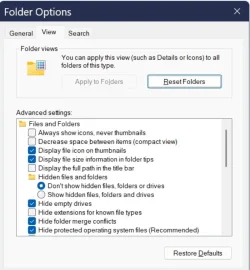
Folder Options settings in the View tab


Pnokio

Well-known member
Member
Local time
3:20 PM
Posts
356
Location
Scotland UK
OS
Windows 11 Home 25H2 64-Bit
Cheers Shawn, now all I need to find is the Folder Options settings in the View tab. Normally I set it to use a single click.
 

My Computer

System One

  • OS
    Windows 11 Home 25H2 64-Bit
    Computer type
    Laptop
    Manufacturer/Model
    asus f515ja
    CPU
    Intel(R) Core(TM) i5-1035G1 CPU @ 1.00GHz 1.19 GHz
    Motherboard
    ASUSTeK COMPUTER INC. X515JA (U3E1)
    Memory
    8.00GB HDD
    Graphics Card(s)
    Standard Monitor on Intel UHD Graphics
    Sound Card
    Realtek HDA
    Screen Resolution
    1366 x 768 x 60
    Hard Drives
    1HDD 2 Partitions
    Mouse
    Logitech Cordless
    Internet Speed
    38mbps
    Browser
    Chrome+FF
    Antivirus
    Malwarebytes (Premium)
    Other Info
    When I find it.
Cheers Shawn, now all I need to find is the Folder Options settings in the View tab. Normally I set it to use a single click.

This?


My Computers

System One System Two

  • OS
    Windows 11 Pro for Workstations
    Computer type
    PC/Desktop
    Manufacturer/Model
    Custom self build
    CPU
    Intel i7-8700K 5 GHz
    Motherboard
    ASUS ROG Maximus XI Formula Z390
    Memory
    64 GB (4x16GB) G.SKILL TridentZ RGB DDR4 3600 MHz (F4-3600C18D-32GTZR)
    Graphics Card(s)
    ASUS ROG-STRIX-GTX1080TI-O11G-GAMING (11GB GDDR5X)
    Sound Card
    Integrated Digital Audio (S/PDIF)
    Monitor(s) Displays
    2 x Samsung Odyssey G75 27"
    Screen Resolution
    2560x1440
    Hard Drives
    1TB Samsung 990 PRO M.2,
    4TB Samsung 990 PRO M.2,
    TerraMaster F8 SSD Plus NAS
    PSU
    Seasonic Prime Titanium 850W
    Case
    Thermaltake Core P3 wall mounted
    Cooling
    Corsair Hydro H115i
    Keyboard
    Amazon Basics Wired Full Keyboard MD005
    Mouse
    Logitech MX Master 4
    Internet Speed
    2 Gbps Download and 100 Mbps Upload
    Browser
    Chrome and Edge
    Antivirus
    Microsoft Defender
    Other Info
    Logitech Z625 speaker system,
    Logitech BRIO 4K Pro webcam,
    HP Color LaserJet Pro MFP M477fdn,
    CyberPower CP1500PFCLCD
    Galaxy S23 Plus phone
  • Operating System
    Windows 11 Pro
    Computer type
    Laptop
    Manufacturer/Model
    Surface Laptop 7 Copilot+ PC
    CPU
    Snapdragon X Elite (12 core) 3.42 GHz
    Memory
    16 GB LPDDR5x-7467 MHz
    Monitor(s) Displays
    15" HDR
    Screen Resolution
    2496 x 1664
    Hard Drives
    1 TB SSD
    Internet Speed
    Wi-Fi 7 and Bluetooth 5.4
    Browser
    Chrome and Edge
    Antivirus
    Microsoft Defender
This?

You have misunderstood my request. I have used Single click to open for years, its the other options on the View tab settings i'm lookng for.
 

My Computer

System One

  • OS
    Windows 11 Home 25H2 64-Bit
    Computer type
    Laptop
    Manufacturer/Model
    asus f515ja
    CPU
    Intel(R) Core(TM) i5-1035G1 CPU @ 1.00GHz 1.19 GHz
    Motherboard
    ASUSTeK COMPUTER INC. X515JA (U3E1)
    Memory
    8.00GB HDD
    Graphics Card(s)
    Standard Monitor on Intel UHD Graphics
    Sound Card
    Realtek HDA
    Screen Resolution
    1366 x 768 x 60
    Hard Drives
    1HDD 2 Partitions
    Mouse
    Logitech Cordless
    Internet Speed
    38mbps
    Browser
    Chrome+FF
    Antivirus
    Malwarebytes (Premium)
    Other Info
    When I find it.
Is the View tab not there in Folder Options?

Which specific settings are you looking for?


My Computers

System One System Two

  • OS
    Windows 11 Pro for Workstations
    Computer type
    PC/Desktop
    Manufacturer/Model
    Custom self build
    CPU
    Intel i7-8700K 5 GHz
    Motherboard
    ASUS ROG Maximus XI Formula Z390
    Memory
    64 GB (4x16GB) G.SKILL TridentZ RGB DDR4 3600 MHz (F4-3600C18D-32GTZR)
    Graphics Card(s)
    ASUS ROG-STRIX-GTX1080TI-O11G-GAMING (11GB GDDR5X)
    Sound Card
    Integrated Digital Audio (S/PDIF)
    Monitor(s) Displays
    2 x Samsung Odyssey G75 27"
    Screen Resolution
    2560x1440
    Hard Drives
    1TB Samsung 990 PRO M.2,
    4TB Samsung 990 PRO M.2,
    TerraMaster F8 SSD Plus NAS
    PSU
    Seasonic Prime Titanium 850W
    Case
    Thermaltake Core P3 wall mounted
    Cooling
    Corsair Hydro H115i
    Keyboard
    Amazon Basics Wired Full Keyboard MD005
    Mouse
    Logitech MX Master 4
    Internet Speed
    2 Gbps Download and 100 Mbps Upload
    Browser
    Chrome and Edge
    Antivirus
    Microsoft Defender
    Other Info
    Logitech Z625 speaker system,
    Logitech BRIO 4K Pro webcam,
    HP Color LaserJet Pro MFP M477fdn,
    CyberPower CP1500PFCLCD
    Galaxy S23 Plus phone
  • Operating System
    Windows 11 Pro
    Computer type
    Laptop
    Manufacturer/Model
    Surface Laptop 7 Copilot+ PC
    CPU
    Snapdragon X Elite (12 core) 3.42 GHz
    Memory
    16 GB LPDDR5x-7467 MHz
    Monitor(s) Displays
    15" HDR
    Screen Resolution
    2496 x 1664
    Hard Drives
    1 TB SSD
    Internet Speed
    Wi-Fi 7 and Bluetooth 5.4
    Browser
    Chrome and Edge
    Antivirus
    Microsoft Defender
It's the Advanved Settings i'm looking for.
 

Attachments

  • RR.webp
    RR.webp
    44.4 KB · Views: 1

My Computer

System One

  • OS
    Windows 11 Home 25H2 64-Bit
    Computer type
    Laptop
    Manufacturer/Model
    asus f515ja
    CPU
    Intel(R) Core(TM) i5-1035G1 CPU @ 1.00GHz 1.19 GHz
    Motherboard
    ASUSTeK COMPUTER INC. X515JA (U3E1)
    Memory
    8.00GB HDD
    Graphics Card(s)
    Standard Monitor on Intel UHD Graphics
    Sound Card
    Realtek HDA
    Screen Resolution
    1366 x 768 x 60
    Hard Drives
    1HDD 2 Partitions
    Mouse
    Logitech Cordless
    Internet Speed
    38mbps
    Browser
    Chrome+FF
    Antivirus
    Malwarebytes (Premium)
    Other Info
    When I find it.
Without more details on what you are wanting for them, you can check each setting in the tutorial index below for registry options if that's what you were wanting.


My Computers

System One System Two

  • OS
    Windows 11 Pro for Workstations
    Computer type
    PC/Desktop
    Manufacturer/Model
    Custom self build
    CPU
    Intel i7-8700K 5 GHz
    Motherboard
    ASUS ROG Maximus XI Formula Z390
    Memory
    64 GB (4x16GB) G.SKILL TridentZ RGB DDR4 3600 MHz (F4-3600C18D-32GTZR)
    Graphics Card(s)
    ASUS ROG-STRIX-GTX1080TI-O11G-GAMING (11GB GDDR5X)
    Sound Card
    Integrated Digital Audio (S/PDIF)
    Monitor(s) Displays
    2 x Samsung Odyssey G75 27"
    Screen Resolution
    2560x1440
    Hard Drives
    1TB Samsung 990 PRO M.2,
    4TB Samsung 990 PRO M.2,
    TerraMaster F8 SSD Plus NAS
    PSU
    Seasonic Prime Titanium 850W
    Case
    Thermaltake Core P3 wall mounted
    Cooling
    Corsair Hydro H115i
    Keyboard
    Amazon Basics Wired Full Keyboard MD005
    Mouse
    Logitech MX Master 4
    Internet Speed
    2 Gbps Download and 100 Mbps Upload
    Browser
    Chrome and Edge
    Antivirus
    Microsoft Defender
    Other Info
    Logitech Z625 speaker system,
    Logitech BRIO 4K Pro webcam,
    HP Color LaserJet Pro MFP M477fdn,
    CyberPower CP1500PFCLCD
    Galaxy S23 Plus phone
  • Operating System
    Windows 11 Pro
    Computer type
    Laptop
    Manufacturer/Model
    Surface Laptop 7 Copilot+ PC
    CPU
    Snapdragon X Elite (12 core) 3.42 GHz
    Memory
    16 GB LPDDR5x-7467 MHz
    Monitor(s) Displays
    15" HDR
    Screen Resolution
    2496 x 1664
    Hard Drives
    1 TB SSD
    Internet Speed
    Wi-Fi 7 and Bluetooth 5.4
    Browser
    Chrome and Edge
    Antivirus
    Microsoft Defender
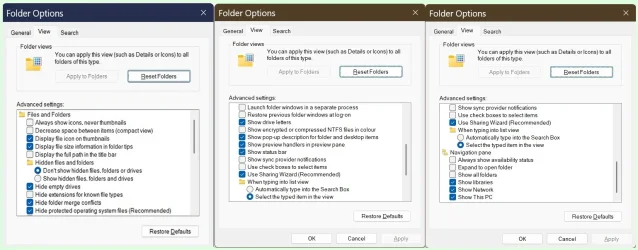
Is this what you are looking for?

o1.webp

o2.webp
 

My Computers

System One System Two

  • OS
    Windows 11 Pro 25H2 (26200.6901)
    Computer type
    Laptop
    Manufacturer/Model
    ASUS TUF Gaming A15 (2022)
    CPU
    AMD Ryzen 7 6800H with Radeon 680M GPU (486MB RAM)
    Memory
    Crucial DDR5-4800 (2400MHz) 32GB (2 x 16GB)
    Graphics Card(s)
    NVIDIA RTX 3060 Laptop (6GB RAM)
    Sound Card
    n/a
    Monitor(s) Displays
    15.6-inch
    Screen Resolution
    1920x1080 300Hz
    Hard Drives
    2 x Samsung 990 Evo Plus (2TB M.2 NVME SSD)
    PSU
    n/a
    Mouse
    Wireless Mouse M510
    Internet Speed
    2100Mbps/300Mbps
    Browser
    Firefox
    Antivirus
    Malwarebytes
  • Operating System
    Windows 11 Pro 25H2 (26200.8246)
    Computer type
    PC/Desktop
    Manufacturer/Model
    Custom build
    CPU
    AMD Ryzen 7 5700X3D
    Motherboard
    ASUS ROG Strix B550-F Gaming WiFi II
    Memory
    G.SKILL Flare X 32GB (2x16GB) DDR4
    Graphics card(s)
    ASUS ROG-STRIX-RTX3060TI-08G-V2-GAMING (RTX 3060-Ti, 8GB RAM)
    Monitor(s) Displays
    Samsung G50D IPS 27"
    Screen Resolution
    1440p/180Hz
    Hard Drives
    SAMSUNG 990 EVO Plus (2TB] M.2 NVME SSD
    SAMSUNG 990 EVO Plus (4TB) M.2 NVME SSD
    PSU
    Corsair RM750x (750 watts)
    Case
    Cooler Master MasterCase 5
    Cooling
    Scythe Mugen 6
    Keyboard
    Logitech K520 (MK540 keyboard/mouse combo)
    Mouse
    Logitech M310 (MK540 keyboard/mouse combo)
    Internet Speed
    2100 Mbps down / 300 Mbps up
    Browser
    Firefox, Edge, Chrome
    Antivirus
    Malwarebytes (Premium)
    Other Info
    ASUS Blu-ray Burner BW-16D1HT (SATA) || Western Digital Easystore 20TB USB 3.0 external hard drive used with Acronis True Image 2025 backup software || HP OfficeJet Pro 6975 Printer/Scanner
I've been wondering why some of the items are ticked and what they do.
 

Attachments

  • Options.webp
    Options.webp
    93.3 KB · Views: 1

My Computer

System One

  • OS
    Windows 11 Home 25H2 64-Bit
    Computer type
    Laptop
    Manufacturer/Model
    asus f515ja
    CPU
    Intel(R) Core(TM) i5-1035G1 CPU @ 1.00GHz 1.19 GHz
    Motherboard
    ASUSTeK COMPUTER INC. X515JA (U3E1)
    Memory
    8.00GB HDD
    Graphics Card(s)
    Standard Monitor on Intel UHD Graphics
    Sound Card
    Realtek HDA
    Screen Resolution
    1366 x 768 x 60
    Hard Drives
    1HDD 2 Partitions
    Mouse
    Logitech Cordless
    Internet Speed
    38mbps
    Browser
    Chrome+FF
    Antivirus
    Malwarebytes (Premium)
    Other Info
    When I find it.
I've been wondering why some of the items are ticked and what they do.
Paste the following into an AI Search Box and you'll get all the info you'll need:

From the View Tab of Windows Folder Options, can you provide a complete list of each checkbox, and explain, one by one, what each checkbox is for; also why some are check marked and some are not?
 

My Computers

System One System Two

  • OS
    Windows 11 Pro
    Computer type
    PC/Desktop
    Manufacturer/Model
    ASUS ROG Strix
  • Operating System
    Windows 11 Pro
    Computer type
    Laptop
    Manufacturer/Model
    ASUS VivoBook
Thanks Edwin and Shawn how's this?
 

Attachments

My Computer

System One

  • OS
    Windows 11 Home 25H2 64-Bit
    Computer type
    Laptop
    Manufacturer/Model
    asus f515ja
    CPU
    Intel(R) Core(TM) i5-1035G1 CPU @ 1.00GHz 1.19 GHz
    Motherboard
    ASUSTeK COMPUTER INC. X515JA (U3E1)
    Memory
    8.00GB HDD
    Graphics Card(s)
    Standard Monitor on Intel UHD Graphics
    Sound Card
    Realtek HDA
    Screen Resolution
    1366 x 768 x 60
    Hard Drives
    1HDD 2 Partitions
    Mouse
    Logitech Cordless
    Internet Speed
    38mbps
    Browser
    Chrome+FF
    Antivirus
    Malwarebytes (Premium)
    Other Info
    When I find it.
Seems fine.
 

My Computers

System One System Two

  • OS
    Windows 11 Pro for Workstations
    Computer type
    PC/Desktop
    Manufacturer/Model
    Custom self build
    CPU
    Intel i7-8700K 5 GHz
    Motherboard
    ASUS ROG Maximus XI Formula Z390
    Memory
    64 GB (4x16GB) G.SKILL TridentZ RGB DDR4 3600 MHz (F4-3600C18D-32GTZR)
    Graphics Card(s)
    ASUS ROG-STRIX-GTX1080TI-O11G-GAMING (11GB GDDR5X)
    Sound Card
    Integrated Digital Audio (S/PDIF)
    Monitor(s) Displays
    2 x Samsung Odyssey G75 27"
    Screen Resolution
    2560x1440
    Hard Drives
    1TB Samsung 990 PRO M.2,
    4TB Samsung 990 PRO M.2,
    TerraMaster F8 SSD Plus NAS
    PSU
    Seasonic Prime Titanium 850W
    Case
    Thermaltake Core P3 wall mounted
    Cooling
    Corsair Hydro H115i
    Keyboard
    Amazon Basics Wired Full Keyboard MD005
    Mouse
    Logitech MX Master 4
    Internet Speed
    2 Gbps Download and 100 Mbps Upload
    Browser
    Chrome and Edge
    Antivirus
    Microsoft Defender
    Other Info
    Logitech Z625 speaker system,
    Logitech BRIO 4K Pro webcam,
    HP Color LaserJet Pro MFP M477fdn,
    CyberPower CP1500PFCLCD
    Galaxy S23 Plus phone
  • Operating System
    Windows 11 Pro
    Computer type
    Laptop
    Manufacturer/Model
    Surface Laptop 7 Copilot+ PC
    CPU
    Snapdragon X Elite (12 core) 3.42 GHz
    Memory
    16 GB LPDDR5x-7467 MHz
    Monitor(s) Displays
    15" HDR
    Screen Resolution
    2496 x 1664
    Hard Drives
    1 TB SSD
    Internet Speed
    Wi-Fi 7 and Bluetooth 5.4
    Browser
    Chrome and Edge
    Antivirus
    Microsoft Defender
Back
Top Bottom