Solved Folders in My "C" drive


Stormforce

Well-known member
Member
Local time
7:29 AM
Posts
66
OS
Windows 11 25309
A number of folders have appeared in my C drive and i dont know where they came from.
On some of them i have tried usaing Take ownership and Unlocker but no access.
what are they for and and help on getting rid of them


Version -: 25136.rs prerelease 220606-1236
 

Attachments
  • Screenshot .jpg
    Screenshot .jpg
    21.2 KB · Views: 1

My Computer My Computer

At a glance

Windows 11 25309Ryzen 7 5800X16 GbMSI GTX 3060
OS
Windows 11 25309
Computer type
PC/Desktop
Manufacturer/Model
Home built
CPU
Ryzen 7 5800X
Motherboard
Asus ROG Strix B450-F
Memory
16 Gb
Graphics Card(s)
MSI GTX 3060
Sound Card
onboard
Monitor(s) Displays
1 x 27" Philips & 2 x 24" LG
Screen Resolution
1920 x 1080
Hard Drives
970 EVO 250 Gb NVMe
950 EVO 250 M.2
4 TB internal
4 Tb internal
2 TB external
2 TB External
500Mb External
PSU
Corsair RM750W
Case
Modified Corsair
Cooling
Standard boxed fan
Keyboard
Logitech K800
Mouse
Logitech MX Vertical
Internet Speed
390 Gb
Browser
Firefox, Brave
Antivirus
Win Defender
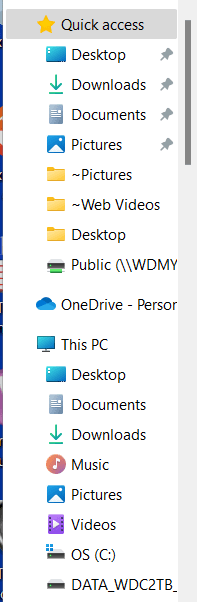
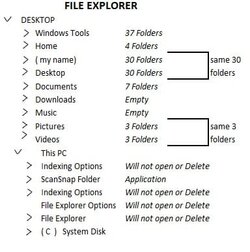
Sorry, I don't recognize what alternative file explorer produced that screenshot. It would be necessary for me to know what the folders in question actually are for me to give my opinion on the folders themselves. By the way, the file tree shows those folders on your desktop. You or some alternative app would have had to put them there. I think it's quite possible you are using 2 apps that conflict with each other.
You have to be careful what apps you install that alter the Windows 11 GUI.
 

My Computers My Computers

  • At a glance

    Windows 11 Pro 25H2 26200.8655i9-10900 10 core 20 threads32 gbnone-Intel UHD Graphics 630
    OS
    Windows 11 Pro 25H2 26200.8655
    Computer type
    PC/Desktop
    Manufacturer/Model
    Dell Optiplex 7080
    CPU
    i9-10900 10 core 20 threads
    Motherboard
    DELL 0J37VM
    Memory
    32 gb
    Graphics Card(s)
    none-Intel UHD Graphics 630
    Sound Card
    Integrated Realtek
    Monitor(s) Displays
    Benq 27
    Screen Resolution
    2560x1440
    Hard Drives
    2x1tb Solidigm m.2 nvme /External drives 512gb Samsung m.2 sata+2tb Kingston m2.nvme
    PSU
    500w
    Case
    MT
    Cooling
    Dell Premium
    Keyboard
    Logitech wired
    Mouse
    Logitech wireless
    Internet Speed
    so slow I'm too embarrassed to tell
    Browser
    #1 Edge #2 Firefox
    Antivirus
    Defender+MWB Premium
  • At a glance

    Windows 11 Pro 24H2 26200.8457AMD Ryzen 7 6800U32 gbintegrated
    Operating System
    Windows 11 Pro 24H2 26200.8457
    Computer type
    PC/Desktop
    Manufacturer/Model
    Beelink Mini PC SER5
    CPU
    AMD Ryzen 7 6800U
    Memory
    32 gb
    Graphics card(s)
    integrated
    Sound Card
    integrated
    Monitor(s) Displays
    Benq 27
    Screen Resolution
    2560x1440
    Hard Drives
    1TB Crucial nvme
    Keyboard
    Logitech wired
    Mouse
    Logitech wireless
    Internet Speed
    still too embarrassed to tell
    Browser
    Firefox
    Antivirus
    Defender
    Other Info
    System 3 is non compliant Dell 9020 i7-4770/24gb ram Win11 PRO 26200.8457
The image shows File Explorer at the top but it appears to me to be messed up as to folder listing. Mine:
 

Attachments

  • Screenshot 2022-06-15 085711.png
    Screenshot 2022-06-15 085711.png
    8.5 KB · Views: 2

My Computers My Computers

  • At a glance

    Win11 Pro RTM Version 24H2 Build 26100.4202Intel Core i5 11th Gen. 2.40GHz12GB
    OS
    Win11 Pro RTM Version 24H2 Build 26100.4202
    Computer type
    Laptop
    Manufacturer/Model
    Dell Vostro 3400
    CPU
    Intel Core i5 11th Gen. 2.40GHz
    Memory
    12GB
    Hard Drives
    256GB SSD NVMe M.2
  • At a glance

    Win11 Pro RTM Version 24H2 Build 26100.4202Intel Core i5 10th Gen. 2.90GHz16GBOnboard, no VGA, using a DisplayPort-to-VGA a...
    Operating System
    Win11 Pro RTM Version 24H2 Build 26100.4202
    Computer type
    PC/Desktop
    Manufacturer/Model
    Dell Vostro 5890
    CPU
    Intel Core i5 10th Gen. 2.90GHz
    Memory
    16GB
    Graphics card(s)
    Onboard, no VGA, using a DisplayPort-to-VGA adapter
    Monitor(s) Displays
    24" Dell
    Hard Drives
    512GB SSD NVMe, 4TB Seagate HDD
    Browser
    Firefox, Edge
    Antivirus
    Windows Defender/Microsoft Security
Thanks glasscutter
Although it does say Desktop none of the folders are actually on my Desktop.
I expect Documents Downloads Music Pictures Video to be there
I have not installed any sort of alternative File Explorer.
Other than the folders I have no access to the contents of all others are recognisable
Any guesses what apps could have messed up
 

My Computer My Computer

At a glance

Windows 11 25309Ryzen 7 5800X16 GbMSI GTX 3060
OS
Windows 11 25309
Computer type
PC/Desktop
Manufacturer/Model
Home built
CPU
Ryzen 7 5800X
Motherboard
Asus ROG Strix B450-F
Memory
16 Gb
Graphics Card(s)
MSI GTX 3060
Sound Card
onboard
Monitor(s) Displays
1 x 27" Philips & 2 x 24" LG
Screen Resolution
1920 x 1080
Hard Drives
970 EVO 250 Gb NVMe
950 EVO 250 M.2
4 TB internal
4 Tb internal
2 TB external
2 TB External
500Mb External
PSU
Corsair RM750W
Case
Modified Corsair
Cooling
Standard boxed fan
Keyboard
Logitech K800
Mouse
Logitech MX Vertical
Internet Speed
390 Gb
Browser
Firefox, Brave
Antivirus
Win Defender
From reading the release notes, it appears this new build has completely revamped file explorer. Announcing Windows 11 Insider Preview Build 25136

Since it did not affect @Berton negatively, it may be caused by the way you had your folders previous to the build. Since I don't do the insider thing myself as I consider it too risky, I'm only guessing. Another guess is it may have some relationship with your Onedrive folders since I do not see them in the tree. Sorry, I can't be of more help.
 

My Computers My Computers

  • At a glance

    Windows 11 Pro 25H2 26200.8655i9-10900 10 core 20 threads32 gbnone-Intel UHD Graphics 630
    OS
    Windows 11 Pro 25H2 26200.8655
    Computer type
    PC/Desktop
    Manufacturer/Model
    Dell Optiplex 7080
    CPU
    i9-10900 10 core 20 threads
    Motherboard
    DELL 0J37VM
    Memory
    32 gb
    Graphics Card(s)
    none-Intel UHD Graphics 630
    Sound Card
    Integrated Realtek
    Monitor(s) Displays
    Benq 27
    Screen Resolution
    2560x1440
    Hard Drives
    2x1tb Solidigm m.2 nvme /External drives 512gb Samsung m.2 sata+2tb Kingston m2.nvme
    PSU
    500w
    Case
    MT
    Cooling
    Dell Premium
    Keyboard
    Logitech wired
    Mouse
    Logitech wireless
    Internet Speed
    so slow I'm too embarrassed to tell
    Browser
    #1 Edge #2 Firefox
    Antivirus
    Defender+MWB Premium
  • At a glance

    Windows 11 Pro 24H2 26200.8457AMD Ryzen 7 6800U32 gbintegrated
    Operating System
    Windows 11 Pro 24H2 26200.8457
    Computer type
    PC/Desktop
    Manufacturer/Model
    Beelink Mini PC SER5
    CPU
    AMD Ryzen 7 6800U
    Memory
    32 gb
    Graphics card(s)
    integrated
    Sound Card
    integrated
    Monitor(s) Displays
    Benq 27
    Screen Resolution
    2560x1440
    Hard Drives
    1TB Crucial nvme
    Keyboard
    Logitech wired
    Mouse
    Logitech wireless
    Internet Speed
    still too embarrassed to tell
    Browser
    Firefox
    Antivirus
    Defender
    Other Info
    System 3 is non compliant Dell 9020 i7-4770/24gb ram Win11 PRO 26200.8457
From reading the release notes, it appears this new build has completely revamped file explorer. Announcing Windows 11 Insider Preview Build 25136

Since it did not affect @Berton negatively, it may be caused by the way you had your folders previous to the build. Since I don't do the insider thing myself as I consider it too risky, I'm only guessing. Another guess is it may have some relationship with your Onedrive folders since I do not see them in the tree. Sorry, I can't be of more help.
@glasskuter Your reply sheds new light on the issue, I'm not running on the Insider Preview Dev Build the last several months, have been on the RTM version of Win11, Notebook last Oct. and Desktop end of April. Now on Windows 11 Pro x64 Version 21H2 Build 19044.1766. Didn't see this in the Windows Insider section of the Forum.
 

My Computers My Computers

  • At a glance

    Win11 Pro RTM Version 24H2 Build 26100.4202Intel Core i5 11th Gen. 2.40GHz12GB
    OS
    Win11 Pro RTM Version 24H2 Build 26100.4202
    Computer type
    Laptop
    Manufacturer/Model
    Dell Vostro 3400
    CPU
    Intel Core i5 11th Gen. 2.40GHz
    Memory
    12GB
    Hard Drives
    256GB SSD NVMe M.2
  • At a glance

    Win11 Pro RTM Version 24H2 Build 26100.4202Intel Core i5 10th Gen. 2.90GHz16GBOnboard, no VGA, using a DisplayPort-to-VGA a...
    Operating System
    Win11 Pro RTM Version 24H2 Build 26100.4202
    Computer type
    PC/Desktop
    Manufacturer/Model
    Dell Vostro 5890
    CPU
    Intel Core i5 10th Gen. 2.90GHz
    Memory
    16GB
    Graphics card(s)
    Onboard, no VGA, using a DisplayPort-to-VGA adapter
    Monitor(s) Displays
    24" Dell
    Hard Drives
    512GB SSD NVMe, 4TB Seagate HDD
    Browser
    Firefox, Edge
    Antivirus
    Windows Defender/Microsoft Security
I just had another thought. You could temporarily enable the hidden administrator account and log into it to see if the folder tree is messed up in it. If proves to be specific ONLY to your account, that would prove it's not the build itself causing the problem.
Be sure to disable this account after you are done testing.
 
Last edited:

My Computers My Computers

  • At a glance

    Windows 11 Pro 25H2 26200.8655i9-10900 10 core 20 threads32 gbnone-Intel UHD Graphics 630
    OS
    Windows 11 Pro 25H2 26200.8655
    Computer type
    PC/Desktop
    Manufacturer/Model
    Dell Optiplex 7080
    CPU
    i9-10900 10 core 20 threads
    Motherboard
    DELL 0J37VM
    Memory
    32 gb
    Graphics Card(s)
    none-Intel UHD Graphics 630
    Sound Card
    Integrated Realtek
    Monitor(s) Displays
    Benq 27
    Screen Resolution
    2560x1440
    Hard Drives
    2x1tb Solidigm m.2 nvme /External drives 512gb Samsung m.2 sata+2tb Kingston m2.nvme
    PSU
    500w
    Case
    MT
    Cooling
    Dell Premium
    Keyboard
    Logitech wired
    Mouse
    Logitech wireless
    Internet Speed
    so slow I'm too embarrassed to tell
    Browser
    #1 Edge #2 Firefox
    Antivirus
    Defender+MWB Premium
  • At a glance

    Windows 11 Pro 24H2 26200.8457AMD Ryzen 7 6800U32 gbintegrated
    Operating System
    Windows 11 Pro 24H2 26200.8457
    Computer type
    PC/Desktop
    Manufacturer/Model
    Beelink Mini PC SER5
    CPU
    AMD Ryzen 7 6800U
    Memory
    32 gb
    Graphics card(s)
    integrated
    Sound Card
    integrated
    Monitor(s) Displays
    Benq 27
    Screen Resolution
    2560x1440
    Hard Drives
    1TB Crucial nvme
    Keyboard
    Logitech wired
    Mouse
    Logitech wireless
    Internet Speed
    still too embarrassed to tell
    Browser
    Firefox
    Antivirus
    Defender
    Other Info
    System 3 is non compliant Dell 9020 i7-4770/24gb ram Win11 PRO 26200.8457
Right click in the navigation pane (on empty space and deselect "Show all folders"

1655308560946.png
 

My Computers My Computers

  • At a glance

    Windows 10 Pro, Windows 11 DevIntel I3 1010016 GB DDR4 CrucialIntel on chip
    OS
    Windows 10 Pro, Windows 11 Dev
    Computer type
    PC/Desktop
    Manufacturer/Model
    Homebuilt
    CPU
    Intel I3 10100
    Motherboard
    ASUS B460M
    Memory
    16 GB DDR4 Crucial
    Graphics Card(s)
    Intel on chip
    Sound Card
    Realtek onboard
    Monitor(s) Displays
    ASUS 24, LG 24
    Screen Resolution
    Full HD x 2
    Hard Drives
    kingston A2000 NVMe PCIe 500 GB
    PSU
    LC Power 650W
    Case
    Noname
    Cooling
    Air 2x 120mm
    Keyboard
    Cherry G-81
    Mouse
    Logitech M500
    Internet Speed
    100/20
    Browser
    Firefox, Vivaldi
    Antivirus
    MS Defender
  • At a glance

    Windows 10 HomeRyzen 7 4700u8 GB DDR4AMD Vega
    Operating System
    Windows 10 Home
    Computer type
    Laptop
    Manufacturer/Model
    ASUS/Vivobook Flip 14
    CPU
    Ryzen 7 4700u
    Memory
    8 GB DDR4
    Graphics card(s)
    AMD Vega
    Sound Card
    Realtek onboard
    Monitor(s) Displays
    14"
    Screen Resolution
    FullHD
    Hard Drives
    512 Samsung NVMe PCIe
    PSU
    -
    Case
    Laptop
    Mouse
    Touchpad, Touchscreen
    Internet Speed
    100/20
    Browser
    Firefox, Vivaldi
    Antivirus
    MS Defender
no matter what i tried ( incl all of your suggestions ) nothing would work
Formated the SSD that contained the Operating system
Installed a clean version - after installing a number fo windows versions i am noy Back to 25140
Thanks for all your help i am considering this post closed
 

My Computer My Computer

At a glance

Windows 11 25309Ryzen 7 5800X16 GbMSI GTX 3060
OS
Windows 11 25309
Computer type
PC/Desktop
Manufacturer/Model
Home built
CPU
Ryzen 7 5800X
Motherboard
Asus ROG Strix B450-F
Memory
16 Gb
Graphics Card(s)
MSI GTX 3060
Sound Card
onboard
Monitor(s) Displays
1 x 27" Philips & 2 x 24" LG
Screen Resolution
1920 x 1080
Hard Drives
970 EVO 250 Gb NVMe
950 EVO 250 M.2
4 TB internal
4 Tb internal
2 TB external
2 TB External
500Mb External
PSU
Corsair RM750W
Case
Modified Corsair
Cooling
Standard boxed fan
Keyboard
Logitech K800
Mouse
Logitech MX Vertical
Internet Speed
390 Gb
Browser
Firefox, Brave
Antivirus
Win Defender
Back
Top Bottom