- Local time
- 12:26 PM
- Posts
- 777
- OS
- Windows 11 Pro build 26200.8524
I came across an Asus Website ( Windows Secure Boot Certificate Expiration and Update Guidelines | Official Support | ASUS Global ) that mentions about utilities to install motherboard MS CA 2023 certificates in several ways.
You will know those ways when you read the Asus web page.
I already installed the current certificates more than a year ago but wanted to give a run to one of the utilities that suited my motherboard (Asus H97-Pro Gamer from late 2014).
My motherboard is out of servicing cycle, meaning no BIOS updates are available for secure boot certificate enrollments. So I used the manual method just out of curiosity.
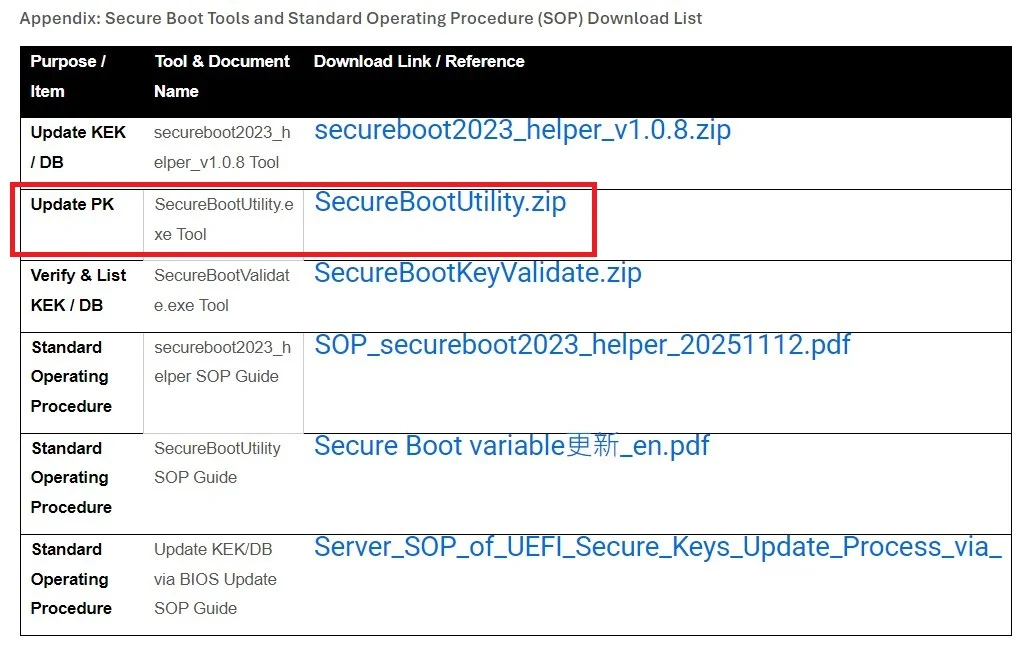
I downloaded SecureBootUtility.zip file and extracted SecureBootUtility.exe. I ran it in a CMD console opened with admin privileges.
I did not take any screenshots but the utility told me that my Asus PK certificate was wrong or something to that effect and asked me if I wanted to replace it. I said Yes (Y).
Then after rebooting, Windows started normally.
I had a Secure Boot status report by garlin's check script before I made the change and I made another report after the change.
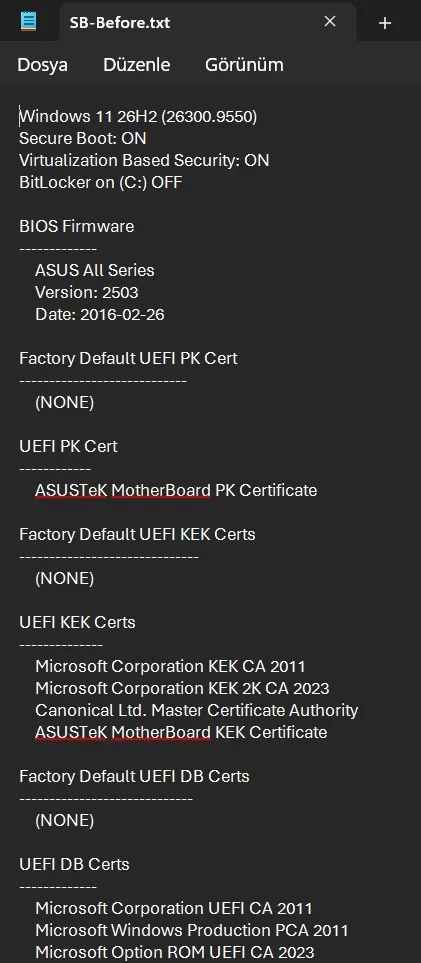
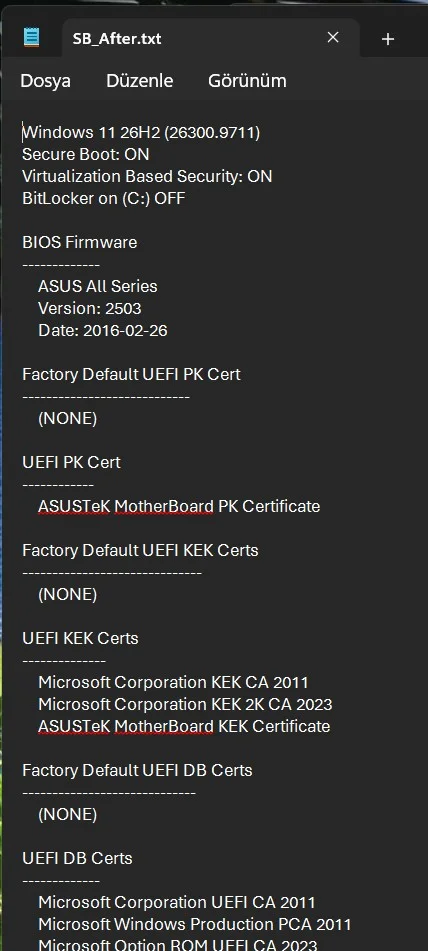
From the two reports I see that I had a Canonical Ltd. Master Certificate Authority cert under UEFI KEK certs section before but not after. I do not know what Canonical Ltd. Master Certificate Authority certificate was for but Asus utility got rid of it.
I thought some Asus PC owners, who do not know the presence of the above-mentioned Asus web page might be interested.
Happy computing.
You will know those ways when you read the Asus web page.
I already installed the current certificates more than a year ago but wanted to give a run to one of the utilities that suited my motherboard (Asus H97-Pro Gamer from late 2014).
My motherboard is out of servicing cycle, meaning no BIOS updates are available for secure boot certificate enrollments. So I used the manual method just out of curiosity.
I downloaded SecureBootUtility.zip file and extracted SecureBootUtility.exe. I ran it in a CMD console opened with admin privileges.
I did not take any screenshots but the utility told me that my Asus PK certificate was wrong or something to that effect and asked me if I wanted to replace it. I said Yes (Y).
Then after rebooting, Windows started normally.
I had a Secure Boot status report by garlin's check script before I made the change and I made another report after the change.
From the two reports I see that I had a Canonical Ltd. Master Certificate Authority cert under UEFI KEK certs section before but not after. I do not know what Canonical Ltd. Master Certificate Authority certificate was for but Asus utility got rid of it.
I thought some Asus PC owners, who do not know the presence of the above-mentioned Asus web page might be interested.
Happy computing.
My Computers
-
At a glance
Windows 11 Pro build 26200.8524Intel i7-4790Teams DDR3-1600 4x4 GBMSI Nvidia GeForce GTX 1050Ti- OS
- Windows 11 Pro build 26200.8524
- Computer type
- PC/Desktop
- Manufacturer/Model
- Home Built
- CPU
- Intel i7-4790
- Motherboard
- Asus H97 Pro Gamer with add-on TPM1.2 module
- Memory
- Teams DDR3-1600 4x4 GB
- Graphics Card(s)
- MSI Nvidia GeForce GTX 1050Ti
- Sound Card
- Realtek ALC1150
- Monitor(s) Displays
- Dell P2425D
- Screen Resolution
- 2560 by 1440 pixels
- Hard Drives
- Corsair NVMe M.2 Core XT 1000 GB (Windows 11 v.25H2); Samsung SATA Evo 870 500 GB (Windows 11 v.25H2);
- PSU
- Corsair HX850
- Case
- Gigabyte Solo 210
- Cooling
- Zalman CNPS7X Tower
- Keyboard
- Microsoft AIO Wireless (includes touchpad)
- Mouse
- HP S1000 Plus Wireless
- Internet Speed
- 500 Mb fiber optic
- Browser
- Chrome; MS Edge
- Antivirus
- Windows Defender
-
At a glance
MacOS 12 MontereyIntel Core i58 GBIntel integrated- Operating System
- MacOS 12 Monterey
- Computer type
- Laptop
- Manufacturer/Model
- Apple Macbook Air
- CPU
- Intel Core i5
- Memory
- 8 GB
- Graphics card(s)
- Intel integrated
- Screen Resolution
- 1440 by 900 pixels
- Hard Drives
- 128 GB
- Keyboard
- Built-in
- Mouse
- Microsoft Wireless
- Internet Speed
- 802.11 ac
- Browser
- Chrome; Safari
- Antivirus
- N/A