Freezes Then Shuts Down


TomCaz

Member
Local time
12:31 PM
Posts
2
OS
Windows 11 Pro
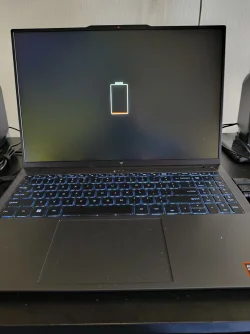
Hello. I recently purchased a laptop and after 1 week, the screen will freeze and the laptop immediately shuts down. When I turn it on, I get a black screen with a large battery graphic (see attached). Sometimes I have to unplug the power cord and plug in back in, but usually I have to wait a minute and turn it on again. Sometimes this works. Sometimes I have to do it several times.
Can someone please tell me what is going on and how can I fix it?
I tried a clean install of Windows.
I updated to the lates AMD GPU chipset and driver.
Is it a faulty battery, the GPU or a faulty motherboard power problem?
Thank you.
 
Windows Build/Version
Windows 11 Pro 25H2 OS Build: 26200.9168

Attachments
  • error.webp
    error.webp
    135.4 KB · Views: 1

My Computer My Computer

At a glance

Windows 11 ProRyzen 7 H25524GbRyzen 780M
OS
Windows 11 Pro
Computer type
Laptop
Manufacturer/Model
AceMagic S16
CPU
Ryzen 7 H255
Memory
24Gb
Graphics Card(s)
Ryzen 780M
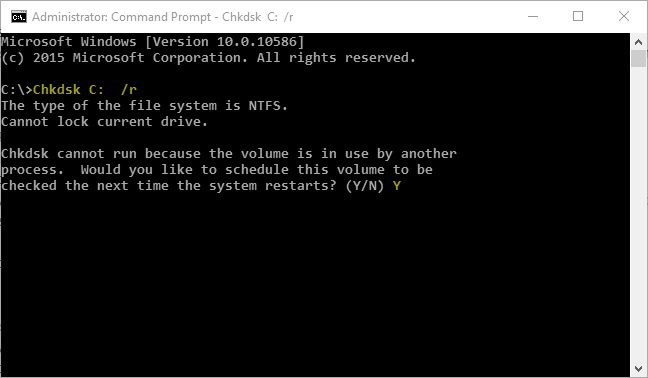
Check C: Partition for Errors

Check C: partition for file system and bad sector errors.

1. Start the Command Prompt as a administrator.

2. Within Command Prompt type Chkdsk C: /r command, press Enter key to schedule error checking C: partition at next time the system reboots.


YqAkQuW.png


Error checking with /r parameter can take long as 30 minutes or more.


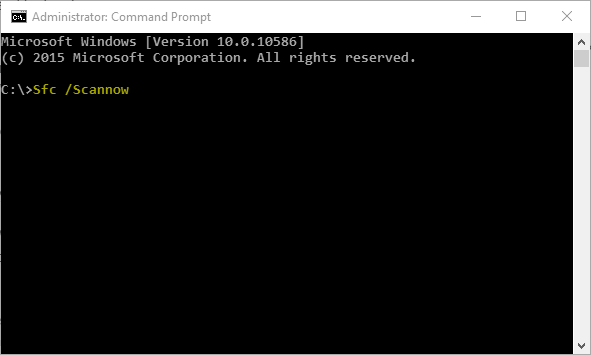
Repair any Corrupted Windows System Files


1. Start the Command Prompt as a administrator.

2. Within Command Prompt type Sfc /Scannow command, press Enter key.


tjNcOJL.png


3. Copy the C:\Windows\Logs\CBS\CBS.log file to the Desktop.

4. Attach the CBS.log file to your next post or upload the CBS.log file to PasteBin and let us have the download link.


Important Recommended Steps

• Update all installed applications
• Uninstall currently installed device drivers and then install latest version of the devices drivers.
• Install all of the Windows important updates.
• If you are overclocking (pushing the components beyond their design) you should revert to default at least until the crashing is solved. If you don't know what it is you probably are not overclocking.
• Use SpeedFan to monitor temperatures in computers, overheating can cause BSOD.
• Use Memtest86+ disc to check system memory's (RAM's) for errors.
• Use CrystalDiskInfo to check SMART health report of the hard disk drive (HDD).
• Use Prime95 to stress test your CPU
• Use 3DMark to stress test your GPU


Click the url links for the website to follow instructions on how to do hardware diagnostics:
- Loading...
- http://www.carrona.org/hwdiag.html
- http://www.carrona.org/strpdown.html
 

My Computer My Computer

At a glance

Windows 11AMD Ryzen 7 5700GMicron Technology DDR4-3200 16GBNVIDIA GeForce RTX 3060
OS
Windows 11
Computer type
PC/Desktop
Manufacturer/Model
HP Pavilion
CPU
AMD Ryzen 7 5700G
Motherboard
Erica6
Memory
Micron Technology DDR4-3200 16GB
Graphics Card(s)
NVIDIA GeForce RTX 3060
Sound Card
Realtek ALC671
Monitor(s) Displays
Samsung SyncMaster U28E590
Screen Resolution
3840 x 2160
Hard Drives
SAMSUNG MZVLQ1T0HALB-000H1
I recently purchased a laptop and after 1 week, the screen will freeze and the laptop immediately shuts down.
Welcome to the forum. If you purchased this laptop NEW, and it is still under warranty, I suggest you return it to the store for a refund or exchange. It should still be under most store's 30 day store warranty.
Otherwise, contact the warranty department of the manufacturer or manufacturer support. I say this because depending on how the warranty is worded a user's actions in trying to solve the problem can void the warranty.
 

My Computers My Computers

  • At a glance

    Windows 11 Pro 25H2 26200.9445i9-10900 10 core 20 threads32 gbnone-Intel UHD Graphics 630
    OS
    Windows 11 Pro 25H2 26200.9445
    Computer type
    PC/Desktop
    Manufacturer/Model
    Dell Optiplex 7080
    CPU
    i9-10900 10 core 20 threads
    Motherboard
    DELL 0J37VM
    Memory
    32 gb
    Graphics Card(s)
    none-Intel UHD Graphics 630
    Sound Card
    Integrated Realtek
    Monitor(s) Displays
    Benq 27
    Screen Resolution
    2560x1440
    Hard Drives
    2x1tb Solidigm m.2 nvme /External drives 512gb Samsung m.2 sata+2tb Kingston m2.nvme
    PSU
    500w
    Case
    MT
    Cooling
    Dell Premium
    Keyboard
    Logitech wired
    Mouse
    Logitech wireless
    Internet Speed
    so slow I'm too embarrassed to tell
    Browser
    #1 Edge #2 Firefox
    Antivirus
    Defender+MWB Premium
  • At a glance

    Windows 11 Pro 24H2 26200.9445AMD Ryzen 7 6800U32 gbintegrated
    Operating System
    Windows 11 Pro 24H2 26200.9445
    Computer type
    PC/Desktop
    Manufacturer/Model
    Beelink Mini PC SER5
    CPU
    AMD Ryzen 7 6800U
    Memory
    32 gb
    Graphics card(s)
    integrated
    Sound Card
    integrated
    Monitor(s) Displays
    Benq 27
    Screen Resolution
    2560x1440
    Hard Drives
    1TB Crucial nvme
    Keyboard
    Logitech wired
    Mouse
    Logitech wireless
    Internet Speed
    still too embarrassed to tell
    Browser
    Firefox
    Antivirus
    Defender
  • System 3 is non compliant Dell 9020 i7-4770/24gb ram Win11 PRO 26200.9445

Latest Support Threads

Back
Top Bottom