Here is the new OneDrive Link:

1drv.ms
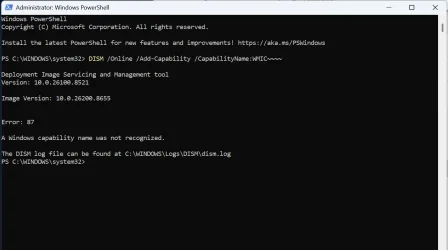
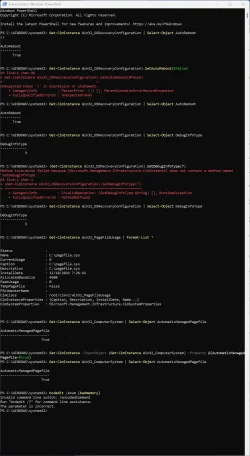
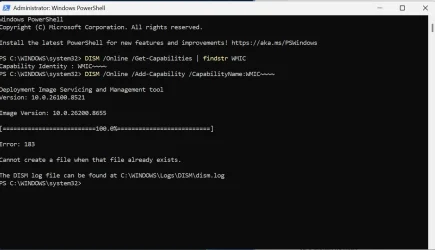
The WMIC is somewhat tricky:
 Here is the new TuneUp log:
Microsoft Windows 11 Pro Version 25H2 (OS Build 26200.8655)
==================================================================
Started on Mon 06/15/2026 at 19:54:09.40
[SFC /ScanNow]
Beginning system scan. This process will take some time.
Results:
Windows Resource Protection did not find any integrity violations.
==================================================================
Started on Mon 06/15/2026 at 19:55:27.11
[DISM /online /cleanup-image /ScanHealth]
Deployment Image Servicing and Management tool
Version: 10.0.26100.8521
Image Version: 10.0.26200.8655
No component store corruption detected.
The operation completed successfully.
==================================================================
Started on Mon 06/15/2026 at 19:56:24.50
[DISM /online /cleanup-image /RestoreHealth]
Deployment Image Servicing and Management tool
Version: 10.0.26100.8521
Image Version: 10.0.26200.8655
The restore operation completed successfully.
The operation completed successfully.
==================================================================
The second "SFC /ScanNow" was skipped, as the first output the following:
Windows Resource Protection did not find any integrity violations.
==================================================================
Started on Mon 06/15/2026 at 20:09:15.03
[ChkDsk /Scan]
The type of the file system is NTFS.
Volume label is Base.
Stage 1: Examining basic file system structure ...
1365248 file records processed.
File verification completed.
Phase duration (File record verification): 4.32 seconds.
22882 large file records processed.
Phase duration (Orphan file record recovery): 9.07 milliseconds.
0 bad file records processed.
Phase duration (Bad file record checking): 0.02 milliseconds.
Stage 2: Examining file name linkage ...
70536 reparse records processed.
1495198 index entries processed.
Index verification completed.
Phase duration (Index verification): 5.52 seconds.
0 unindexed files scanned.
Phase duration (Orphan reconnection): 698.40 milliseconds.
0 unindexed files recovered to lost and found.
Phase duration (Orphan recovery to lost and found): 0.06 milliseconds.
70536 reparse records processed.
Phase duration (Reparse point and Object ID verification): 111.17 milliseconds.
Stage 3: Examining security descriptors ...
Security descriptor verification completed.
Phase duration (Security descriptor verification): 10.62 milliseconds.
64976 data files processed.
Phase duration (Data attribute verification): 0.03 milliseconds.
CHKDSK is verifying Usn Journal...
49644488 USN bytes processed.
Usn Journal verification completed.
Phase duration (USN journal verification): 93.74 milliseconds.
Windows has scanned the file system and found no problems.
No further action is required.
965069823 KB total disk space.
144054892 KB in 262199 files.
203616 KB in 64977 indexes.
0 KB in bad sectors.
1523599 KB in use by the system.
65536 KB occupied by the log file.
819287716 KB available on disk.
4096 bytes in each allocation unit.
241267455 total allocation units on disk.
204821929 allocation units available on disk.
Total duration: 10.77 seconds (10771 ms).
==================================================================
Started on Mon 06/15/2026 at 20:09:33.28
==================================================================
[Set AutoReboot = False]
==================================================================
==================================================================
==================================================================
[Set DebugInfoType = 7]
==================================================================
==================================================================
[WMIC PageFile list]
==================================================================
==================================================================
[Set AutomaticManagedPagefile = True]
==================================================================
==================================================================
[BcdEdit /enum {badmemory}]
RAM Defects
-----------
identifier {badmemory}
==================================================================
Finished on Mon 06/15/2026 at 20:09:33.85
It took 15 minutes and 24 seconds to complete the operations.