Frequent BSODs - Unable to Determine the Cause


francis77

Member
Local time
11:13 PM
Posts
6
OS
Windows 11
Hi,

Over the last two weeks, I have been experiencing BSODs a few times a day and have been unable to determine the cause.

Here is what I have already tried:
1. Completely reset the computer using "Reset this PC"
2. Ran "Windows Memory Diagnostic"
3. Ran "Disk Check Utility (CHKDSK)"
4. Ran "DISM.exe /Online /Cleanup-image /Restorehealth"
5. Ran "sfc /scannow"

None of these steps have solved the problem, not even the complete system reset.

I have attached the diagnostic files required for analysis, but I am unable to interpret them myself. Since I am not an advanced user, I have completely run out of options.

Thank you very much for your time and help.
 
Windows Build/Version
Windows 11 Pro, 25H2, 26200.8655

My Computer

System One

  • OS
    Windows 11
    Computer type
    PC/Desktop
    Manufacturer/Model
    Beelink SER8
    CPU
    AMD Ryzen 7 8845HS
    Memory
    32 GB
    Graphics Card(s)
    AMD Radeon 780M
    Browser
    Edge
    Antivirus
    Windows 11 Antivirus
To post a BSOD issue, gather required files, put them all in one folder, zip the folder. Then upload zipped folder to any cloud provider and post a SHARED link to the folder here. @zbook can then analyze the issue.
 

My Computers

System One System Two

  • OS
    Windows 11 Pro 25H2 26200.8655
    Computer type
    PC/Desktop
    Manufacturer/Model
    Dell Optiplex 7080
    CPU
    i9-10900 10 core 20 threads
    Motherboard
    DELL 0J37VM
    Memory
    32 gb
    Graphics Card(s)
    none-Intel UHD Graphics 630
    Sound Card
    Integrated Realtek
    Monitor(s) Displays
    Benq 27
    Screen Resolution
    2560x1440
    Hard Drives
    2x1tb Solidigm m.2 nvme /External drives 512gb Samsung m.2 sata+2tb Kingston m2.nvme
    PSU
    500w
    Case
    MT
    Cooling
    Dell Premium
    Keyboard
    Logitech wired
    Mouse
    Logitech wireless
    Internet Speed
    so slow I'm too embarrassed to tell
    Browser
    #1 Edge #2 Firefox
    Antivirus
    Defender+MWB Premium
  • Operating System
    Windows 11 Pro 24H2 26200.8457
    Computer type
    PC/Desktop
    Manufacturer/Model
    Beelink Mini PC SER5
    CPU
    AMD Ryzen 7 6800U
    Memory
    32 gb
    Graphics card(s)
    integrated
    Sound Card
    integrated
    Monitor(s) Displays
    Benq 27
    Screen Resolution
    2560x1440
    Hard Drives
    1TB Crucial nvme
    Keyboard
    Logitech wired
    Mouse
    Logitech wireless
    Internet Speed
    still too embarrassed to tell
    Browser
    Firefox
    Antivirus
    Defender
    Other Info
    System 3 is non compliant Dell 9020 i7-4770/24gb ram Win11 PRO 26200.8457
Hi glasskuter,

Thank you for your advice.

Here is the OneDrive link:


My Computer

System One

  • OS
    Windows 11
    Computer type
    PC/Desktop
    Manufacturer/Model
    Beelink SER8
    CPU
    AMD Ryzen 7 8845HS
    Memory
    32 GB
    Graphics Card(s)
    AMD Radeon 780M
    Browser
    Edge
    Antivirus
    Windows 11 Antivirus
1) Please post a link for computer support (AZW SER8 V10) : drivers and BIOS


2) How come the new installation is using volume activation


3) Add WMIC:

Administrative command prompt:

Code:
DISM /Online /Add-Capability /CapabilityName:WMIC~~~~


3) Run Tuneup plus >post a share link


4) Open a support ticket / forum thread with Beelink to see if they have a new BIOS / Chipset drivers to fix problems with AMD chipset drivers (AMD GPIO Controller) and/or BIOS


Code:
BIOS Version/Date    American Megatrends International, LLC. SER8_P5C8V29, 8/14/2024

Code:
amdgpio2 AMD GPIO Client Driver AMD GPIO Client Driver Kernel Manual Running OK TRUE FALSE 4,096 28,672 0 3/23/2026 7:12:36 C:\WINDOWS\system32\DriverStore\FileRepository\a 4,096

Code:
AMD GPIO Controller oem16.inf 2.2.0.137 ACPI\AMDI0030\0 True 3/22/2026 1:00:00

Code:
amdgpio2.sys Mon Mar 23 01:12:36 2026 (69C0D9D4)
 
Last edited:

My Computer

System One

  • OS
    Windows 10
    Computer type
    Laptop
    Manufacturer/Model
    HP
    CPU
    Intel(R) Core(TM) i7-4800MQ CPU @ 2.70GHz
    Motherboard
    Product : 190A Version : KBC Version 94.56
    Memory
    16 GB Total: Manufacturer : Samsung MemoryType : DDR3 FormFactor : SODIMM Capacity : 8GB Speed : 1600
    Graphics Card(s)
    NVIDIA Quadro K3100M; Intel(R) HD Graphics 4600
    Sound Card
    IDT High Definition Audio CODEC; PNP Device ID HDAUDIO\FUNC_01&VEN_111D&DEV_76E0
    Hard Drives
    Model Hitachi HTS727575A9E364
    Antivirus
    Microsoft Defender
    Other Info
    Mobile Workstation
Hi zbook,

Thank you very much for your efforts.

Here is the TuneUp report:

Microsoft Windows 11 Pro Version 25H2 (OS Build 26200.8655)

==================================================================

Started on Mon 06/15/2026 at 15:56:03.80

[SFC /ScanNow]

Beginning system scan. This process will take some time.

Results:

Windows Resource Protection did not find any integrity violations.

==================================================================

Started on Mon 06/15/2026 at 15:57:21.54

[DISM /online /cleanup-image /ScanHealth]

Deployment Image Servicing and Management tool
Version: 10.0.26100.8521

Image Version: 10.0.26200.8655

No component store corruption detected.

The operation completed successfully.

==================================================================

Started on Mon 06/15/2026 at 15:58:18.87

[DISM /online /cleanup-image /RestoreHealth]

Deployment Image Servicing and Management tool
Version: 10.0.26100.8521

Image Version: 10.0.26200.8655

The restore operation completed successfully.

The operation completed successfully.

==================================================================

The second "SFC /ScanNow" was skipped, as the first output the following:

Windows Resource Protection did not find any integrity violations.

==================================================================

Started on Mon 06/15/2026 at 16:12:05.88

[ChkDsk /Scan]

The type of the file system is NTFS.
Volume label is Base.

Stage 1: Examining basic file system structure ...
1365248 file records processed.
File verification completed.
Phase duration (File record verification): 4.29 seconds.
22861 large file records processed.
Phase duration (Orphan file record recovery): 9.07 milliseconds.
0 bad file records processed.
Phase duration (Bad file record checking): 0.03 milliseconds.

Stage 2: Examining file name linkage ...
70489 reparse records processed.
1495110 index entries processed.
Index verification completed.
Phase duration (Index verification): 5.47 seconds.
0 unindexed files scanned.
Phase duration (Orphan reconnection): 692.81 milliseconds.
0 unindexed files recovered to lost and found.
Phase duration (Orphan recovery to lost and found): 0.06 milliseconds.
70489 reparse records processed.
Phase duration (Reparse point and Object ID verification): 107.05 milliseconds.

Stage 3: Examining security descriptors ...
Security descriptor verification completed.
Phase duration (Security descriptor verification): 11.72 milliseconds.
64932 data files processed.
Phase duration (Data attribute verification): 0.03 milliseconds.
CHKDSK is verifying Usn Journal...
38977680 USN bytes processed.
Usn Journal verification completed.
Phase duration (USN journal verification): 77.70 milliseconds.

Windows has scanned the file system and found no problems.

No further action is required.

965069823 KB total disk space.
143829608 KB in 262379 files.
203432 KB in 64933 indexes.
0 KB in bad sectors.
1513415 KB in use by the system.
65536 KB occupied by the log file.
819523368 KB available on disk.

4096 bytes in each allocation unit.
241267455 total allocation units on disk.
204880842 allocation units available on disk.
Total duration: 10.66 seconds (10667 ms).

==================================================================

Started on Mon 06/15/2026 at 16:12:23.48


==================================================================

[Set AutoReboot = False]

==================================================================


==================================================================


==================================================================

[Set DebugInfoType = 7]

==================================================================


==================================================================

[WMIC PageFile list]


==================================================================


==================================================================

[Set AutomaticManagedPagefile = True]

==================================================================


==================================================================

[BcdEdit /enum {badmemory}]

RAM Defects
-----------
identifier {badmemory}

==================================================================

Finished on Mon 06/15/2026 at 16:12:24.08
It took 16 minutes and 21 seconds to complete the operations.
 

My Computer

System One

  • OS
    Windows 11
    Computer type
    PC/Desktop
    Manufacturer/Model
    Beelink SER8
    CPU
    AMD Ryzen 7 8845HS
    Memory
    32 GB
    Graphics Card(s)
    AMD Radeon 780M
    Browser
    Edge
    Antivirus
    Windows 11 Antivirus
Hi zbook,

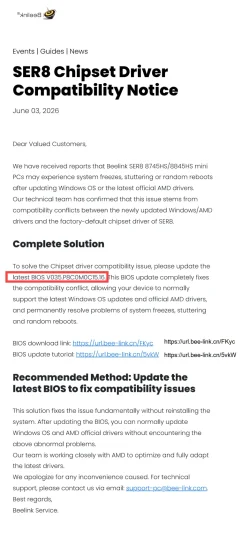
It seems that Beelink and AMD had a compatibility problem that seems to be solved.


---


---------

Please see my OneDrive shared folder for new files:


----------

I will make the BIOS update according to the Beelink instructions as explained in the pdf file:

SER8-V035_P8C0M0C15_16-Solve-Chipset-driver-compatibility-issue-Use-USB-to-flash-BIOS.pdf

BUT I have a problem understanding point 7 in the instructions.

It stated: "7. Type Flash, press tab, then press enter"

What is meant with "Type Flash"?
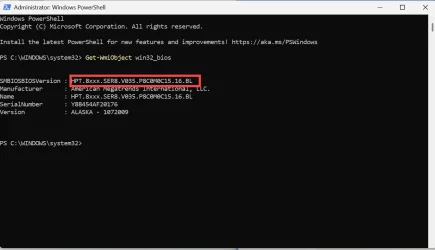
In the screenshot I can read "fec" in the red rectangle at the bottom of the screenshot.

Please give me some more detailed instructions about what to do with "Type Flash, press tab, then press enter"

Thank you
 

My Computer

System One

  • OS
    Windows 11
    Computer type
    PC/Desktop
    Manufacturer/Model
    Beelink SER8
    CPU
    AMD Ryzen 7 8845HS
    Memory
    32 GB
    Graphics Card(s)
    AMD Radeon 780M
    Browser
    Edge
    Antivirus
    Windows 11 Antivirus
1) Please add WMIC then rerun Tuneup plus > post a new share link

DISM /Online /Add-Capability /CapabilityName:WMIC~~~~


2) How come the new installation is using volume activation


3) Contact Beelink support for BIOS


Last edited:

My Computer

System One

  • OS
    Windows 10
    Computer type
    Laptop
    Manufacturer/Model
    HP
    CPU
    Intel(R) Core(TM) i7-4800MQ CPU @ 2.70GHz
    Motherboard
    Product : 190A Version : KBC Version 94.56
    Memory
    16 GB Total: Manufacturer : Samsung MemoryType : DDR3 FormFactor : SODIMM Capacity : 8GB Speed : 1600
    Graphics Card(s)
    NVIDIA Quadro K3100M; Intel(R) HD Graphics 4600
    Sound Card
    IDT High Definition Audio CODEC; PNP Device ID HDAUDIO\FUNC_01&VEN_111D&DEV_76E0
    Hard Drives
    Model Hitachi HTS727575A9E364
    Antivirus
    Microsoft Defender
    Other Info
    Mobile Workstation
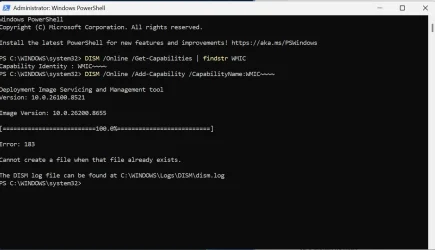
I was not able to install WMIC

2026-06-15_19-01-58.webp

I have added the log file on my OneDrive folder (see link above).


2) How come the new installation is using volume activation

I am not sure what you mean. I didn't get a serial number or something like that for the windows activation. The Windows 11 Pro activation seems to be stored on my Microsoft 365 account. When I reinstall Windows 11 using "Rest this PC" the activation of Windows is done automatically whiteout any actions I have to do.
 

My Computer

System One

  • OS
    Windows 11
    Computer type
    PC/Desktop
    Manufacturer/Model
    Beelink SER8
    CPU
    AMD Ryzen 7 8845HS
    Memory
    32 GB
    Graphics Card(s)
    AMD Radeon 780M
    Browser
    Edge
    Antivirus
    Windows 11 Antivirus
DISM /Online /Get-Capabilities | findstr WMIC

DISM /Online /Get-Capabilities | findstr /I WMIC

Post a share link.
 

My Computer

System One

  • OS
    Windows 10
    Computer type
    Laptop
    Manufacturer/Model
    HP
    CPU
    Intel(R) Core(TM) i7-4800MQ CPU @ 2.70GHz
    Motherboard
    Product : 190A Version : KBC Version 94.56
    Memory
    16 GB Total: Manufacturer : Samsung MemoryType : DDR3 FormFactor : SODIMM Capacity : 8GB Speed : 1600
    Graphics Card(s)
    NVIDIA Quadro K3100M; Intel(R) HD Graphics 4600
    Sound Card
    IDT High Definition Audio CODEC; PNP Device ID HDAUDIO\FUNC_01&VEN_111D&DEV_76E0
    Hard Drives
    Model Hitachi HTS727575A9E364
    Antivirus
    Microsoft Defender
    Other Info
    Mobile Workstation
Here is the new OneDrive Link:


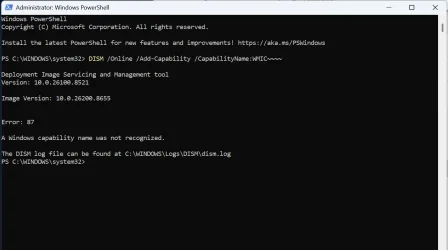
The WMIC is somewhat tricky:

WMIC Installtion NEW.webp


Here is the new TuneUp log:

Microsoft Windows 11 Pro Version 25H2 (OS Build 26200.8655)

==================================================================

Started on Mon 06/15/2026 at 19:54:09.40

[SFC /ScanNow]

Beginning system scan. This process will take some time.

Results:

Windows Resource Protection did not find any integrity violations.

==================================================================

Started on Mon 06/15/2026 at 19:55:27.11

[DISM /online /cleanup-image /ScanHealth]

Deployment Image Servicing and Management tool
Version: 10.0.26100.8521

Image Version: 10.0.26200.8655

No component store corruption detected.

The operation completed successfully.

==================================================================

Started on Mon 06/15/2026 at 19:56:24.50

[DISM /online /cleanup-image /RestoreHealth]

Deployment Image Servicing and Management tool
Version: 10.0.26100.8521

Image Version: 10.0.26200.8655

The restore operation completed successfully.

The operation completed successfully.

==================================================================

The second "SFC /ScanNow" was skipped, as the first output the following:

Windows Resource Protection did not find any integrity violations.

==================================================================

Started on Mon 06/15/2026 at 20:09:15.03

[ChkDsk /Scan]

The type of the file system is NTFS.
Volume label is Base.

Stage 1: Examining basic file system structure ...
1365248 file records processed.
File verification completed.
Phase duration (File record verification): 4.32 seconds.
22882 large file records processed.
Phase duration (Orphan file record recovery): 9.07 milliseconds.
0 bad file records processed.
Phase duration (Bad file record checking): 0.02 milliseconds.

Stage 2: Examining file name linkage ...
70536 reparse records processed.
1495198 index entries processed.
Index verification completed.
Phase duration (Index verification): 5.52 seconds.
0 unindexed files scanned.
Phase duration (Orphan reconnection): 698.40 milliseconds.
0 unindexed files recovered to lost and found.
Phase duration (Orphan recovery to lost and found): 0.06 milliseconds.
70536 reparse records processed.
Phase duration (Reparse point and Object ID verification): 111.17 milliseconds.

Stage 3: Examining security descriptors ...
Security descriptor verification completed.
Phase duration (Security descriptor verification): 10.62 milliseconds.
64976 data files processed.
Phase duration (Data attribute verification): 0.03 milliseconds.
CHKDSK is verifying Usn Journal...
49644488 USN bytes processed.
Usn Journal verification completed.
Phase duration (USN journal verification): 93.74 milliseconds.

Windows has scanned the file system and found no problems.

No further action is required.

965069823 KB total disk space.
144054892 KB in 262199 files.
203616 KB in 64977 indexes.
0 KB in bad sectors.
1523599 KB in use by the system.
65536 KB occupied by the log file.
819287716 KB available on disk.

4096 bytes in each allocation unit.
241267455 total allocation units on disk.
204821929 allocation units available on disk.
Total duration: 10.77 seconds (10771 ms).

==================================================================

Started on Mon 06/15/2026 at 20:09:33.28


==================================================================

[Set AutoReboot = False]

==================================================================


==================================================================


==================================================================

[Set DebugInfoType = 7]

==================================================================


==================================================================

[WMIC PageFile list]


==================================================================


==================================================================

[Set AutomaticManagedPagefile = True]

==================================================================


==================================================================

[BcdEdit /enum {badmemory}]

RAM Defects
-----------
identifier {badmemory}

==================================================================

Finished on Mon 06/15/2026 at 20:09:33.85
It took 15 minutes and 24 seconds to complete the operations.

 

My Computer

System One

  • OS
    Windows 11
    Computer type
    PC/Desktop
    Manufacturer/Model
    Beelink SER8
    CPU
    AMD Ryzen 7 8845HS
    Memory
    32 GB
    Graphics Card(s)
    AMD Radeon 780M
    Browser
    Edge
    Antivirus
    Windows 11 Antivirus
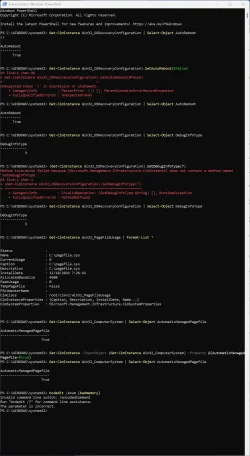
Please run Administrative PS > post results

Get-CimInstance Win32_OSRecoveryConfiguration | Select-Object AutoReboot

(Get-CimInstance Win32_OSRecoveryConfiguration).SetAutoReboot($false)

Get-CimInstance Win32_OSRecoveryConfiguration | Select-Object AutoReboot

Get-CimInstance Win32_OSRecoveryConfiguration | Select-Object DebugInfoType

(Get-CimInstance Win32_OSRecoveryConfiguration).SetDebugInfoType(7)

Get-CimInstance Win32_OSRecoveryConfiguration | Select-Object DebugInfoType

Get-CimInstance Win32_PageFileUsage | Format-List *

Get-CimInstance Win32_ComputerSystem | Select-Object AutomaticManagedPagefile

Set-CimInstance -InputObject (Get-CimInstance Win32_ComputerSystem) -Property @{AutomaticManagedPagefile=$true}

Get-CimInstance Win32_ComputerSystem | Select-Object AutomaticManagedPagefile

bcdedit /enum {badmemory}
 

My Computer

System One

  • OS
    Windows 10
    Computer type
    Laptop
    Manufacturer/Model
    HP
    CPU
    Intel(R) Core(TM) i7-4800MQ CPU @ 2.70GHz
    Motherboard
    Product : 190A Version : KBC Version 94.56
    Memory
    16 GB Total: Manufacturer : Samsung MemoryType : DDR3 FormFactor : SODIMM Capacity : 8GB Speed : 1600
    Graphics Card(s)
    NVIDIA Quadro K3100M; Intel(R) HD Graphics 4600
    Sound Card
    IDT High Definition Audio CODEC; PNP Device ID HDAUDIO\FUNC_01&VEN_111D&DEV_76E0
    Hard Drives
    Model Hitachi HTS727575A9E364
    Antivirus
    Microsoft Defender
    Other Info
    Mobile Workstation
Back
Top Bottom